Video marketing
Video Length by Platform in 2026: A One-Page Cheat Sheet
Compare official 2026 video maximums vs. practical small-business sweet spots across 11 networks, plus one 45-second 9:16 master workflow.
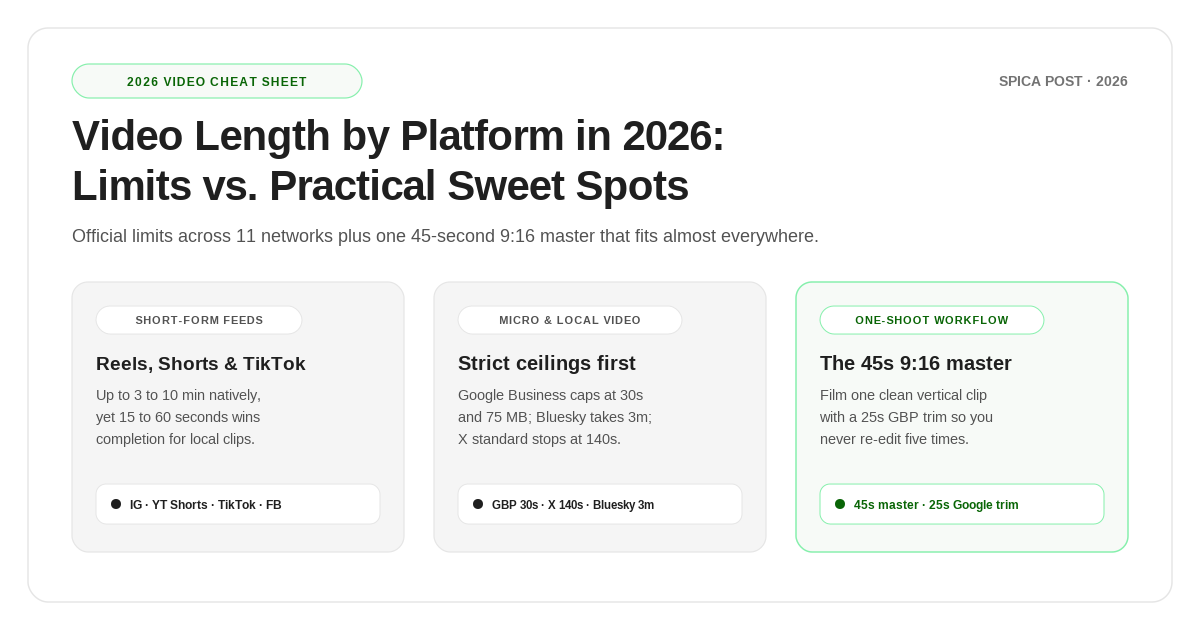
In 2026, social media video length by platform splits sharply between generous technical maximums (up to 3 minutes on Instagram Reels, YouTube Shorts, and Bluesky, 5 minutes on Threads, 10 minutes on TikTok, and 10 to 15 minutes on LinkedIn) and strict local or microblog ceilings (30 seconds and 75 MB on Google Business Profile, 140 seconds on standard X, and roughly 40 MB on typical Mastodon servers). For busy small businesses and creators, you do not need eleven separate edits: filming one clean 45-second vertical 9:16 MP4 master (plus a 25-second trim for Google Business Profile) fits the practical viewer sweet spot across almost every active feed.
Platform duration limits, file-size ceilings, and Spica Post integration availability snapshot verified November 2026 against YouTube Help, Google Business Profile Help, Meta Developer Docs, Bluesky Official Blog, and LinkedIn Help.
Technical limits tell you when an upload button will reject your file; practical sweet spots tell you when real customers actually finish watching. Almost every major network has stretched its maximum duration over the past two years to compete for long-form attention, yet local buyers scrolling on a phone still decide within three seconds whether a business clip earns thirty more seconds of their break. Bookmark this one-page reference so you stop guessing caps or re-exporting broken files at the end of a long shift.
The one-page 2026 video length table (11 platforms)
Keep both columns in view when planning a shoot: the official technical maximum stops upload failures, while the practical small-business sweet spot protects completion rate and saves hours of unnecessary editing.
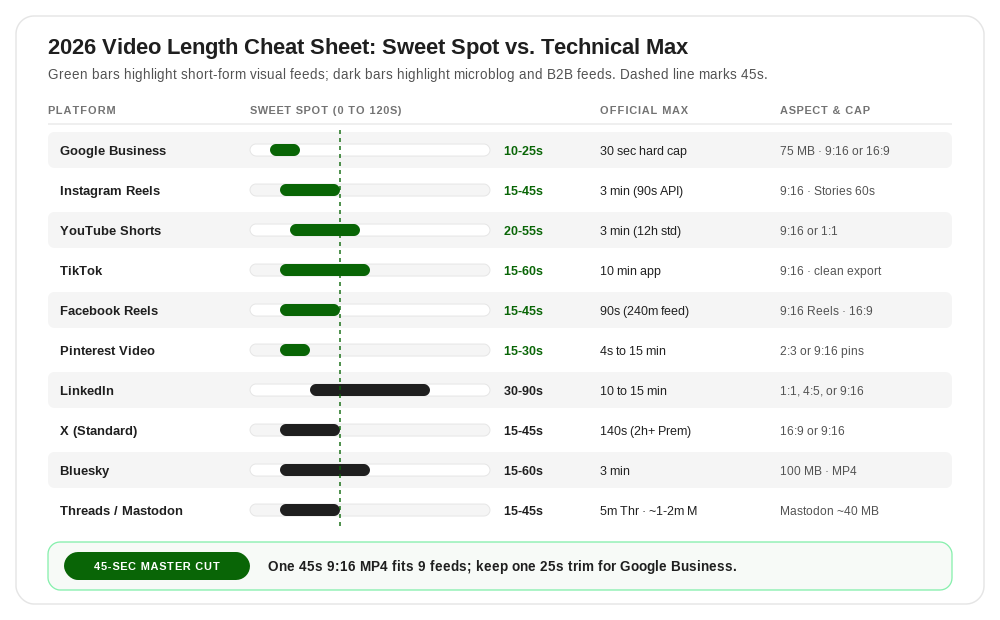
| Platform | Official technical maximum (Nov 2026) | Small-business sweet spot | Preferred aspect and file notes |
|---|---|---|---|
| Google Business Profile | 30 seconds (profile gallery; 75 MB cap) | 10 to 25 seconds | 9:16 or 16:9, minimum 720p; note Local Posts accept photos, not video. |
| Instagram Reels | 3 minutes native (90s API sweet spot) | 15 to 45 seconds | 9:16 vertical MP4; Instagram Stories cap at 60 seconds per card. |
| YouTube Shorts | 3 minutes (since Oct 2024 update) | 20 to 55 seconds | 9:16 vertical or 1:1 square; standard verified YouTube allows 12 hours. |
| TikTok | 10 minutes in-app (longer on web/eligible) | 15 to 60 seconds | 9:16 vertical MP4; export clean before posting to avoid TikTok watermarks. |
| Facebook Reels and Feed | 90 seconds Reels · 240 minutes feed | 15 to 45s Reels · 30 to 90s feed | 9:16 for Reels, 4:5 or 16:9 for feed updates with clickable URL captions. |
| Pinterest Video Pins | 4 seconds to 15 minutes | 15 to 30 seconds | 2:3 or 9:16 vertical MP4; strong opening visual frame replaces audio hooks. |
| 10 to 15 minutes native (up to 30 min API) | 30 to 90 seconds | 1:1, 4:5, or 9:16 MP4; burned-in captions essential for muted office scrolling. | |
| X (Twitter) | 140 seconds standard (2+ hrs Premium) | 15 to 45 seconds | 16:9 or 9:16 MP4; short direct clips outperform long monologues in fast feeds. |
| Bluesky | 3 minutes (since March 2025 update) | 15 to 60 seconds | MP4 up to 100 MB; preserves native aspect ratio cleanly in feed. |
| Threads | 5 minutes | 15 to 45 seconds | 9:16 or 4:5 MP4; quick voice-of-owner clips match Threads conversation pace. |
| Mastodon | Instance-dependent (~40 MB, ~1 to 2 min) | 15 to 45 seconds | Standard 1080p MP4 compressed under 40 MB with clear alt/description text. |
Platform notes: technical ceilings vs. what holds attention
Knowing why two networks with the same 3-minute ceiling behave differently in the real world helps you place longer walkthroughs where viewers actually welcome them and trim tight everywhere else.
Short-form discovery feeds: Instagram Reels, YouTube Shorts, TikTok, and Facebook Reels
These four vertical feeds share almost identical visual grammar, which is why one clean vertical cut travels easily among them:
- Instagram Reels and Stories: Instagram expanded native Reels up to 3 minutes, yet Meta’s Content Publishing API specifications and real viewer drop-off still favor clips under 90 seconds, with most local proof posts performing strongest between 15 and 45 seconds. Remember that Instagram Stories top out at 60 seconds per continuous segment without splitting. Need practical shoot prompts? Browse our Instagram Reels ideas for small businesses.
- YouTube Shorts vs. Standard YouTube: Following YouTube’s October 2024 expansion documented in YouTube Help’s Shorts guidelines, any vertical or square upload up to 3 minutes enters the Shorts shelf. Still, local tips and before-and-after demos retain far more viewers at 20 to 55 seconds. Save full 3 to 8 minute “how we diagnose X” or “full shop tour” explanations for standard horizontal YouTube, where verified channels can upload up to 12 hours and earn evergreen search views (see our YouTube Shorts guide for small businesses).
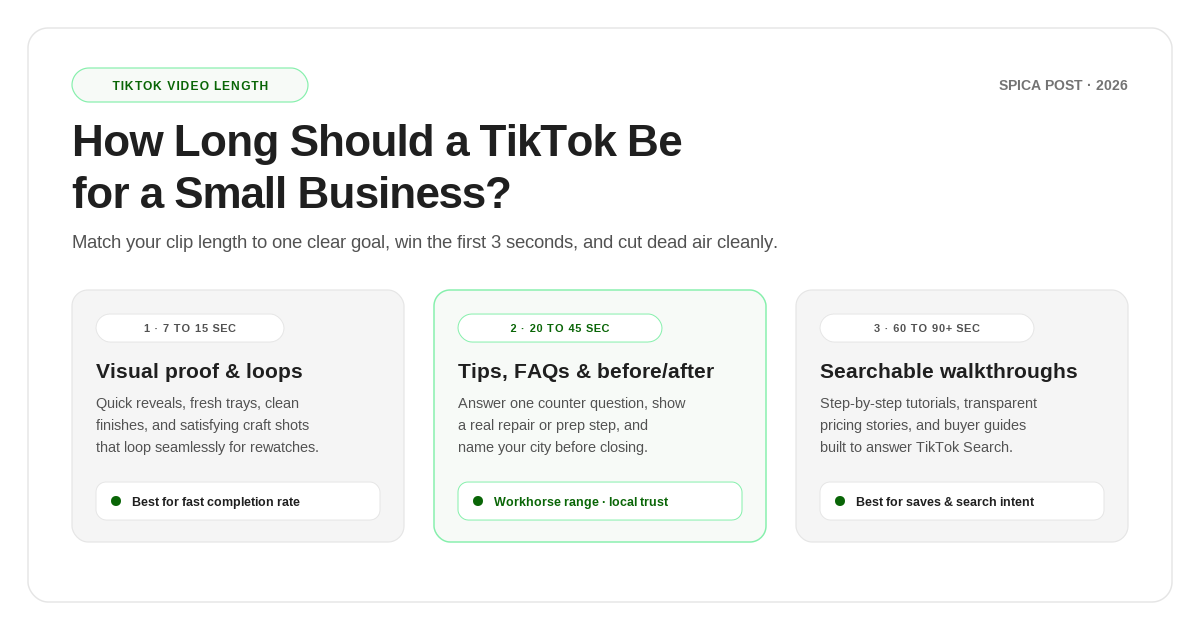
- TikTok: TikTok accepts up to 10 minutes recorded inside the app and even longer desktop uploads on eligible accounts, yet 15 to 60 seconds remains the steady workhorse for local businesses. Never film inside TikTok and download the watermarked copy to repost elsewhere; Instagram and YouTube visibly dampen watermarked re-uploads. For pacing by business goal, read our deep dive on how long a TikTok should be in 2026.
- Facebook Reels and feed video: Facebook Reels mirror Instagram’s 90-second sweet spot, while regular Facebook Page feed videos accept up to 240 minutes. For local owners, 30 to 90 second feed updates paired with a clickable booking or event URL beat long livestreams almost every week.
Local search and evergreen visual search: Google Business Profile and Pinterest
Two of the highest-intent local platforms carry specific video constraints that trip up owners who only know TikTok or Reels.
- Google Business Profile (strict 30-second ceiling): According to Google Business Profile photo and video guidelines, business profile videos must stay at 30 seconds or under, 75 MB or smaller, and at least 720p resolution. Keep one critical distinction straight: those short videos go into your Business Profile’s Photos and Videos gallery (ideal for a 15-second walk-through of your storefront, clean kitchen, waiting room, or service van), whereas Google Business Profile Local Posts (Updates, Offers, Events) take a single photo and do not accept video attachments. Pair crisp clips with our Google Business Profile photo tips.
- Pinterest Video Pins: Pinterest accepts video pins from 4 seconds up to 15 minutes, yet people scroll Pinterest like a visual catalog looking for project ideas, recipes, renovations, outfits, and seasonal gifts. Short 15 to 30 second vertical clips (2:3 or 9:16) that show the finished result in the very first frame earn far more saves and outbound website clicks than slow multi-minute intros. Learn how local shops organize boards in our Pinterest guide for small businesses.
Professional and microblog feeds: LinkedIn, X, Bluesky, Threads, and Mastodon
Text-led and professional feeds reward concise clarity and readable captions because a large share of viewers watch on mute between meetings or while commuting.
- LinkedIn: Per LinkedIn’s native video specifications, native uploads reach 10 to 15 minutes (depending on mobile vs. desktop interface, and longer via certain API endpoints), yet 30 to 90 seconds is the practical sweet spot for small-business owners sharing behind-the-scenes lessons, client FAQs, or local B2B case studies. Always include burned-in captions so office viewers can follow without headphones.
- X (Twitter): Standard X accounts remain capped at 140 seconds (2 minutes 20 seconds), while X Premium subscribers can upload videos running over two hours. Unless you are publishing a full podcast episode, 15 to 45 second clips with a plain two-sentence summary earn far more replies and link clicks.
- Bluesky: Following Bluesky’s March 2025 three-minute video release, users can post MP4 videos up to 3 minutes long and 100 MB. Keeping business clips between 15 and 60 seconds fits Bluesky’s conversational timeline cleanly.
- Threads and Mastodon: Threads permits videos up to 5 minutes, while Mastodon caps depend on each individual server instance (commonly 40 MB, which equals roughly 1 to 2 minutes of cleanly encoded 1080p MP4). Keeping clips under 45 seconds and compressed under 25 to 35 MB guarantees smooth uploads across almost every public Mastodon server without hitting size errors.
The “one 45-second clean 9:16 master” workflow
Most small businesses quit video after three weeks because they try to record a horizontal cut for YouTube, a 15-second clip for Reels, a 25-second clip for Google, and a separate talking-head cut for LinkedIn. That multiplies work fourfold for almost zero extra bookings.
Instead, build every routine weekly clip around one clean 45-second vertical 9:16 master structured so the first 24 seconds stand completely on their own.
Film cleanly inside the 45-second pacing blueprint
Structure your shoot into four simple beats so viewers stay to the end AND so you get a built-in Google Business Profile trim without re-filming:
- Seconds 0 to 3 (Immediate visual hook): Open directly on the finished dish, freshly repaired pipe, clean haircut reveal, or the exact customer question written cleanly on screen. Skip “Hey guys, welcome back to our channel!” completely.
- Seconds 4 to 24 (Core proof in two steps): Show the key moment of your craft or answer the main question clearly in plain words. Pause cleanly for half a beat at second 24. That 0-to-24 second block is your ready-to-upload Google Business Profile gallery clip (comfortably under Google’s 30-second ceiling) and your punchy Pinterest Video Pin.
- Seconds 25 to 40 (Practical nuance or local detail): Add the one helpful tip, pricing factor, seasonal timing, or neighborhood note that turns curious viewers into informed buyers.
- Seconds 41 to 45 (Calm next step): Name your city and give one simple action (book via link, ask a question in comments, or visit before Friday).
Copy-ready 45-second shooting script (with built-in 24s Google trim)
Keep this skeleton taped beside your counter or truck dash when filming any weekly proof clip:
[0:00 to 0:03 | Hook on finished visual or problem] “If your [common customer problem / seasonal craving] keeps happening in [City], check this one spot first.”
[0:04 to 0:24 | Core proof, clean pause at 0:24 for Google Business trim] “Here is what we see every week at [Business Name]: [show real step 1 and step 2 on camera in bright daylight]. Once [key fix or fresh batch] is done, [visible result right in front of the lens].”
[0:25 to 0:40 | Practical buyer detail] “Most [City] customers ask [timing, care tip, or what to expect]. Plan on [honest time window or clear takeaway] so there are zero surprises.”
[0:41 to 0:45 | Single clear next step] “Save this for later, or tap our Link Page to book a spot in [City] this week.”
Export specs that avoid re-editing across 10 feeds
Export your finished master once using these clean baseline settings before uploading anywhere:
- Container and codec: Standard H.264 MP4 with AAC audio, 1080 x 1920 resolution, 30 frames per second. Avoid 4K 60fps phone defaults unless filming cinema work; 4K files bloat quickly past 75 MB and trigger needless rejections on Google Business Profile, Mastodon, and compact crosspost queues.
- Target file size: Aim for under 25 MB for a 45-second master (roughly 4 to 5 Mbps bitrate). That looks razor sharp on every smartphone screen while passing Mastodon’s ~40 MB cap, Google’s 75 MB cap, Bluesky’s 100 MB cap, and crossposting pipelines effortlessly.
- Zero app watermarks: Edit in your phone’s native gallery or a clean editor that exports without a stamped logo. Upload that untouched MP4 separately to each channel.
- Center 4:5 safe zone for text and captions: Keep your face, product, and burned-in subtitles inside the middle 65 percent of the vertical frame so UI buttons on Reels/TikTok and feed previews on LinkedIn, X, and Facebook never slice off your captions.
For more on keeping multi-platform distribution calm and repeatable, see our creator cross-posting playbook and our guide on showing your face on business social media without overthinking camera presence.
Filming checklist, file size pitfalls, and customer permission
Before exporting and queuing your weekly clip, run through six quick checks that catch the mistakes responsible for nine out of ten failed uploads:
- Wipe your phone lens and check daylight. One shirt wipe removes grease haze, and standing near a bright window or open shade fixes grainy low-light footage immediately.
- Confirm file size under 25 MB (or 40 MB max). Check the file properties on your phone or computer before uploading so Mastodon, Google Business Profile, and Bluesky never time out.
- Verify the Google trim stays at 29 seconds or under. Even
0:30.4gets rejected by Google Business Profile’s strict 30-second check; trim cleanly to 24 to 27 seconds to leave safe margin. - Add readable captions and check mute playback. Watch your exported MP4 once with your phone muted to verify that the point still lands cleanly for office and commuter viewers.
- Tailor the surrounding text caption per network. Remove “link in bio” before posting to Facebook, LinkedIn, X, or Bluesky where clickable URLs work directly inside the post.
- Confirm explicit customer and staff permission. Always ask explicit verbal or written permission before filming or publishing identifiable customers, children, patients, team members, license plates, or private home addresses. Whenever someone prefers to stay off camera, frame tightly on hands at work, finished dishes, tools, clean exteriors, or your own voiceover.
Honest Spica Post trade-offs for video scheduling and crossposting
If you want one workspace to keep your clean MP4 masters organized and distribute them across networks without babysitting five apps, here is Spica Post’s exact November 2026 standing for small businesses and creators:
- What is live today: You can upload, schedule, and publish MP4 videos directly today on X, Bluesky (native MP4 video embeds live today), LinkedIn personal profiles (MP4), and Mastodon (MP4 up to 40 MB) from one composer or via assistant MCP tools. Spica Post’s Auto-crosspost also supports MP4 video mirroring (up to 25 MB) across connected accounts so a clean 45-second clip published on one readable source mirrors cleanly across your connected destinations without manual re-uploading, while deliberately skipping automatic TikTok posting to respect TikTok’s per-post owner-choice policy.
- What is built and completing platform review (Nov 2026): Spica Post’s video publishing adapters for Instagram Reels (including cover frame selection, Reels-only posting, and trial reels), Facebook Pages, Threads, TikTok (built with the required per-post owner-choice screen; app review submitted), YouTube (OAuth app verification approved November 23, 2026; completing the YouTube API Services compliance audit), and Pinterest (built with video pins and board selection; awaiting Standard access and not yet listed as a public platform page on our site) are built and finishing network approval. For Google Business Profile (API approved and enabled in production, awaiting first live service-area verification), keep in mind that Google’s Local Posts API accepts photos only, so your 25-second profile gallery video still uploads natively through Google Business Profile. Review live workspace video allowances and flat plans anytime on our pricing page, or inspect per-network details on our platforms overview and Auto-crosspost page.
Stop trying to memorize shifting maximums or produce five separate edits each week. Film one crisp 45-second 9:16 MP4 master in clean daylight with a natural pause at second 24, keep the file light, trim a quick 25-second cut for Google Business Profile, and let one afternoon shoot power your entire week.
Questions people ask
- What single video length works across almost every social platform in 2026?
- A clean 30 to 45 second vertical (9:16) MP4 without platform watermarks fits seamlessly into Instagram Reels, YouTube Shorts, TikTok, Facebook Reels, LinkedIn, X, Bluesky, Threads, Mastodon, and Pinterest. Keeping a natural pause near second 25 also gives you an instant trim that satisfies Google Business Profile's strict 30-second ceiling.
- How long can YouTube Shorts and Instagram Reels be in 2026?
- YouTube Shorts supports vertical or square videos up to 3 minutes long following YouTube's October 2024 expansion, while standard verified YouTube channels accept uploads up to 12 hours. Instagram Reels supports native uploads up to 3 minutes, though third-party API workflows often perform most reliably at 90 seconds or under, and Stories cap at 60 seconds.
- What is the video length limit for Google Business Profile?
- Videos uploaded directly to your Google Business Profile media section are strictly capped at 30 seconds and 75 MB (minimum 720p resolution). Note also that Google Business Profile Local Posts accept a photo rather than video, so save short 15 to 25 second storefront or proof clips for your profile's photo and video gallery.
- How long can videos be on Bluesky, X, Threads, and Mastodon?
- Bluesky accepts MP4 videos up to 3 minutes long (following its March 2025 update) and up to 100 MB. Standard X accounts cap videos at 140 seconds (with multi-hour uploads available on X Premium), Threads supports videos up to 5 minutes, and Mastodon limits vary by server instance, typically around 40 MB or roughly 1 to 2 minutes at standard 1080p.
- Why does filming in 4K 60fps often cause social media video upload errors?
- A 45-second clip recorded in 4K at 60 frames per second can easily exceed 150 MB to 300 MB, causing instant rejections on Mastodon (around 40 MB), Google Business Profile (75 MB), Bluesky (100 MB), and compact crossposting tools. Exporting crisp 1080p at 30fps in H.264 MP4 keeps visual quality sharp while keeping file sizes small and fast.
Sources
- YouTube Help: Upload YouTube Shorts (3-minute limit) and video length guidelines
- Google Business Profile Help: Manage photos and videos (30-second and 75 MB limits)
- Meta Instagram Platform Content Publishing API: Reels video specifications
- Bluesky Official Blog: Three-minute videos and updated media support (March 2025)
- LinkedIn Help: Video upload specifications and length limits