Instagram Reels
Instagram Reels for Small Businesses: 25 Phone-Ready Ideas
25 practical Instagram Reels ideas any owner can film on a phone in 5 minutes, organized by goal, with a 3-shot script and safe-zone tips.
You do not need trending dance audio, ring lights, or heavy editing software to bring local customers from Instagram Reels. One 15-to-25 second vertical phone clip per week showing real craft, answering one plain customer question, or giving a quick peek inside your neighborhood shop does more for calls and bookings than trying to mimic full-time creators.
Most business owners stall on Reels because they open the camera with no shot list, stare at a blank screen, and assume they have to perform a 60-second monologue. Flip that around: treat a Reel like three short four-second clips of work you are already doing today, capped with a clear line of on-screen text and your neighborhood name.
This guide gives you a repeatable 20-second shot structure with 9:16 safe-zone rules, 25 phone-ready Instagram Reels ideas grouped into five practical buckets, a quick format table matched to how comfortable you feel on camera, three copy-ready Reel captions, and a clean way to reuse every clip across channels.
The repeatable 20-second phone Reel blueprint
Before picking an idea from the list below, lock in one simple structure so every Reel takes under five minutes to film and assemble. Per Instagram’s official Reels creation help, vertical 9:16 video (1080 x 1920) fills the entire mobile screen cleanly without black bars.
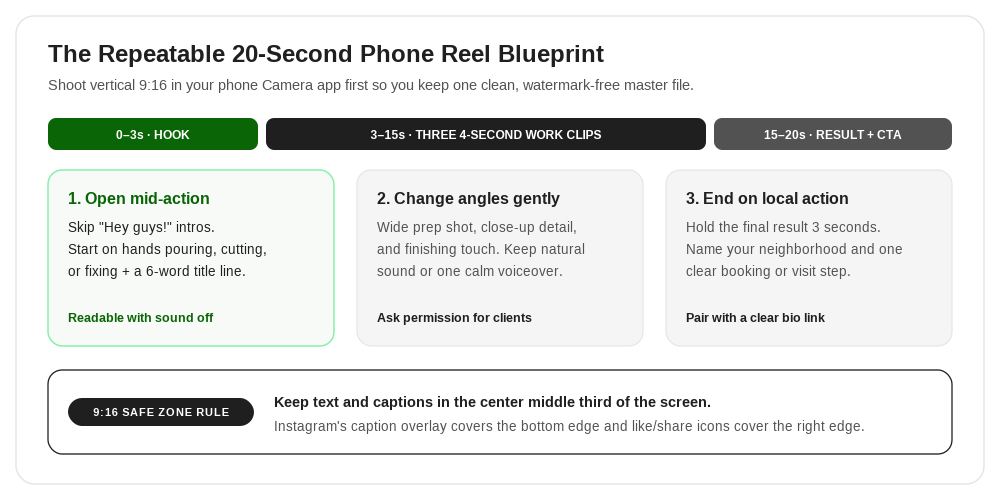
Three short clips beat one long monologue
A single 20-second static shot of someone talking feels long on a phone screen. Instead, capture three tiny angles of the same moment right in your phone’s native Camera app:
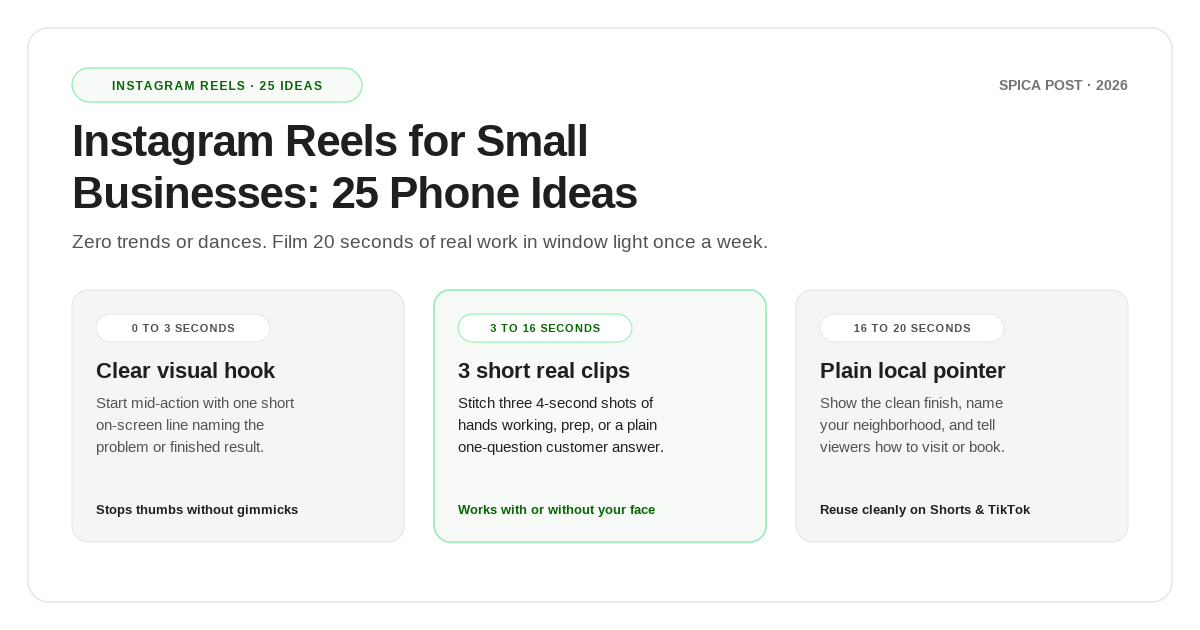
- Clip 1 (0 to 3 seconds · Hook): Start directly in motion (espresso pulling, wood being planed, dough being scored, paint rolling onto trim, a fresh box opening) paired with a short 5-to-7 word on-screen headline naming the result or neighborhood. Never waste the first three seconds saying “Hey guys, welcome back to my page.”
- Clip 2 (3 to 15 seconds · Proof): Show two or three quick four-second angle changes: a wider shot of your hands or workbench, a tight close-up of texture or precision, and the finishing detail.
- Clip 3 (15 to 20 seconds · Clear finish): Hold steady on the finished product, clean repair, plated dish, or smiling shop entrance for three full seconds so viewers have time to read your neighborhood and simple next step.
Sound, safe zones, and explicit permission
Three tiny guardrails prevent almost every amateur Reel mistake:
- Design for muted viewers first. Many neighbors scroll Instagram silently in waiting rooms or on the couch. Add clean, high-contrast captions inside the middle vertical third of the frame so neither the bottom Instagram caption bar nor the right-side like/share icons cover your words.
- Wipe your phone lens and face a window. Fingerprints blur vertical video instantly. Wipe the camera glass on your shirt and keep natural daylight facing your work rather than directly behind it.
- Ask explicit permission before filming people. Never include identifiable customers, children (without parent or guardian consent), homeowners’ private addresses, or camera-shy staff without asking warmly first. Hands-only and detail shots look crisp and respect everyone’s privacy effortlessly.
25 Instagram Reels ideas you can film on a phone
Pick one bucket per week and rotate through them. That single cycle gives you half a year of grounded local Reels without ever wondering what to shoot.
Bucket 1: Behind the craft and real work (Ideas 1 to 5)
People trust small businesses because real hands stand behind the work. You do not need to speak on camera for any of these five clips.
- The 15-second morning setup. Three 4-second clips of unlocking the door, flipping the Open sign, wiping the counter or starting equipment, and pouring the first coffee or checking the day’s schedule.
- Start-to-finish mini build. Film 3 seconds of raw ingredients or raw materials, 5 seconds of your hands mid-process, and 5 seconds of the clean finished item or completed service.
- Pack a real customer order (with personal details hidden). Show tissue wrapping, handwritten thank-you card, protective packaging, and sealing the box (always keep shipping labels and names out of frame).
- The satisfying tool or detail close-up. Crisp scissor line, foam art, pressure-washing stripe, paint cutting cleanly along trim, frosting smoothing on a cake, or leather stitching up close with real ambient sound.
- What “done right” looks like vs. rushed work. Place two samples side by side on your workbench (a cheap part vs. durable part, thin fabric vs. heavy canvas, uneven seam vs. clean finish) and point to the difference in 15 seconds.
Bucket 2: Fast local answers and myth-busters (Ideas 6 to 10)
Every question a customer asked you at the counter or on the phone this week is a Reel waiting to be filmed.
- One myth in your profession, debunked calmly. Open with text: “Myth about [your service] that costs [City] homeowners money.” Explain the truth in three plain sentences.
- “How long does this actually take?” Walk through realistic timing for your top service (hair color appointment, brake job, custom cake lead time, consultation to delivery) so new clients know what to expect.
- “How much should you prepare before calling us?” Three simple prep steps customers can do in two minutes before their appointment or service visit.
- Compare your two most popular options. Hold Option A and Option B side by side (two menu items, two haircut styles, two service packages, two fabric weights) and explain who each one fits best.
- The tiny maintenance check that saves money later. Show one 10-second care habit (how to wash linen, flush a filter, store baked goods, keep brass bright, or protect hair color in summer sun).
Bucket 3: Tours, new arrivals, and seasonal prep (Ideas 11 to 15)
First-time local visitors feel much more comfortable walking through your door when they already know what the parking lot and front counter look like.
- The “how to find us and park” 15-second walk. Film walking from the street corner or parking lot right up to your front door, naming the nearest landmark so nobody circles the block confused.
- Unbox a fresh delivery or seasonal shipment. Tear open the tape on new inventory, fresh flowers, roasted beans, or new supplies and hold up your top three favorites in daylight.
- Three seasonal favorites right now. Quick 4-second clips of three items, dishes, or services built for this exact month’s weather or upcoming holiday.
- A 20-second shop, studio, or van tour. Slow, steady pan from entrance to work area showing how clean, organized, and welcoming your space really is.
- “What is coming next week” sneak peek. Show a test dish, early prototype, upcoming class, or next week’s open booking slots so locals plan ahead.
Bucket 4: Real proof, reviews, and team moments (Ideas 16 to 20)
Real faces and real neighbor words close the gap between “neat video” and “I am booking with them.” Always get explicit consent before putting any customer or teammate on camera.
- Read one real Google review over b-roll of your work. Overlay a short 2-sentence Google review in clean readable text over 12 seconds of your hands doing the exact service the reviewer praised.
- Meet the person behind the counter (15-second intro). One staff member (who is happy to be filmed) shares their first name, what they love making or fixing, and their favorite neighborhood spot nearby.
- Before-and-after transformation (with written or verbal client consent). 3 seconds of the “before” state, 6 seconds of one middle step, and 6 seconds holding cleanly on the “after” result.
- A genuine mistake or snag and how you fixed it. Show a cracked test mug, an unexpected hidden issue on a repair, or a recipe tweak that took three tries. Honesty earns instant credibility.
- Milestone or community thank-you. Celebrating your shop’s anniversary, donating trays to a local school, or welcoming a neighborhood event, thanking the locals who keep you open.
Bucket 5: Clear booking, offer, and neighborhood pointers (Ideas 21 to 25)
Never forget to show people the exact door to walk through once they like what they see.
- This week’s open slots or quiet-day welcome. Film 10 seconds of your tidy room or workbench with overlay text listing two or three open Tuesday/Wednesday slots and pointing straight to your booking link.
- “What happens on your first visit.” Three quick clips walking a nervous first-time client through check-in, consultation, and checkout so there are zero surprises.
- Gift idea under a clear budget. Pick three easy local gifts (gift card, small care kit, coffee bag, candle, pastry box) and show them together in window light.
- Shout out a fellow local business on your street. Grab coffee or lunch next door, film a 10-second cheer for a neighboring owner (with their welcome), and tag them. Local owners routinely reshare these to their own customers.
- Your pinned “Start Here” 20-second trailer. Pin one clean Reel to the top of your Instagram grid introducing who you are, where you are located, your top three services or products, your hours, and how to book or visit.
Match the Reel format to your comfort on camera
You never have to force yourself into a style that feels unnatural. Pick the row that matches how you actually feel holding a phone:
| Your camera comfort | Best Reel format | Filming time | Ideas from above that fit best |
|---|---|---|---|
| Camera-shy (zero face on screen) | Hands-only 3-clip montage + crisp text overlay + natural shop sound | 3 to 5 minutes | Ideas 1, 2, 3, 4, 11, 12, 16, 21, 23 |
| Okay speaking, prefer staying behind lens | 3 short clips of your space or work + calm 15-second voiceover recorded afterward | 5 to 7 minutes | Ideas 5, 7, 9, 13, 14, 15, 18, 22 |
| Comfortable talking to camera | Phone propped by a front window answering one customer question plainly | 4 to 6 minutes | Ideas 6, 8, 10, 17, 19, 20, 25 |
Three copy-ready Instagram Reel captions
Keep captions short and specific: put the takeaway and your neighborhood in the first line so it shows before Instagram’s ... more cutoff.
1. Behind-the-craft reveal
How we prep [Signature Item / Service] every morning here in [Neighborhood] before doors open at [Time].
Most people only see the finished result, so here is the 15-second look at [the one small detail that makes it better].
Stop by [Street / Landmark] [Days and Hours], or tap the link in our bio to [order ahead / book a spot].
2. Plain customer question answered
The question we get asked almost every day in [City]: “[Exact Customer Question]?”
Short answer: [One plain 1-to-2 sentence answer].
Save this for your next visit, or drop your own question below and we will answer it in next week’s clip. Link in bio for hours, services, and direct booking.
3. First-time visitor welcome (great for your pinned Reel)
New to [Business Name] in [Neighborhood]? Here is everything you need to know in 20 seconds:
- Where we are: [Address / parking note]
- What we specialize in: [Top 3 services or items]
- Hours: [Clear days and times]
- How to get started: tap the link in our bio for menus, starting prices, and direct booking.
Reuse every clip cleanly (and honest Spica Post trade-offs)
Because you filmed your raw vertical clips in your phone’s Camera app first, that exact same clean 20-second video can go onto Instagram Reels, YouTube Shorts (see our YouTube Shorts reuse guide), and TikTok (see our local TikTok guide) without re-shooting anything or carrying an ugly watermark. Check your video thumbnail or companion carousel crops anytime with our free Image Size Checker.
Honest Spica Post status note for Instagram Reels
If you are looking at Spica Post to organize your weekly workflow alongside Instagram, here is the exact status as of November 2026:
- Live today: Spica Post gives you one clean Link Page (so your Instagram bio link sends Reel viewers straight to booking, hours, menus, or your shop), click-tracked
/l/short links, AI drafting help in your own brand voice, and live publishing plus Auto-crosspost across X, LinkedIn personal profiles, Bluesky, and Mastodon (where Bluesky also supports direct MP4 video up to 100 MB). - Built and completing network approval: Spica Post’s publishing connectors for Instagram (per Meta’s Instagram Content Publishing API), Facebook Pages, Threads, TikTok, Pinterest, YouTube, and Google Business Profile are built and completing official platform review or compliance audit. Until Meta direct publishing opens across all workspaces, you can plan your captions, keep your Link Page sharp in Spica Post, and upload your single weekly 20-second Reel natively inside Instagram in two minutes. See live availability and flat workspace plans on our pricing page.
Pick Idea #11 (the 15-second walk from parking to your front door) or Idea #1 (your morning setup) right now, film three four-second clips in window light, add one clear title line in the center of the screen, and post your cleanest Reel of the year today.
Questions people ask
- How long should an Instagram Reel be for a small business?
- Aim for 15 to 25 seconds for most small business Reels. That gives you enough time for a 3-second visual hook, three short clips showing real work or one clear answer, and a calm local next step without forcing viewers to sit through slow filler.
- Do I have to show my face or dance to make Instagram Reels work?
- No. Hands-only process clips, quick workspace tours, packing orders, plating food, or fixing real problems paired with readable on-screen text and optional calm voiceover regularly outperform awkward trend dances for local businesses.
- Should I film Reels inside the Instagram app or in my phone Camera app first?
- Record vertical 9:16 clips in your phone's native Camera app first. That keeps a crisp, watermark-free master file you can assemble cleanly and reuse on YouTube Shorts and TikTok without losing quality or carrying another app's logo.
- Where should I place text overlays on an Instagram Reel so nothing gets cut off?
- Keep all captions and titles inside the middle vertical third of the 9:16 screen. Instagram's caption bar covers the bottom edge, the Reels header sits at the top, and like, comment, and share buttons cover the right margin.
- Should I ask permission before filming customers or employees in an Instagram Reel?
- Yes, always ask explicit verbal or written permission before recording identifiable customers, clients, minors (via parent or guardian), or staff members. When someone prefers to stay off camera, frame strictly on your hands, tools, products, or tidy workspace.