Content strategy
Should You Show Your Face on Your Business Account?
An honest guide for camera-shy owners: when showing your face builds trust, when craft-first posts win, and a four-rung comfort ladder.
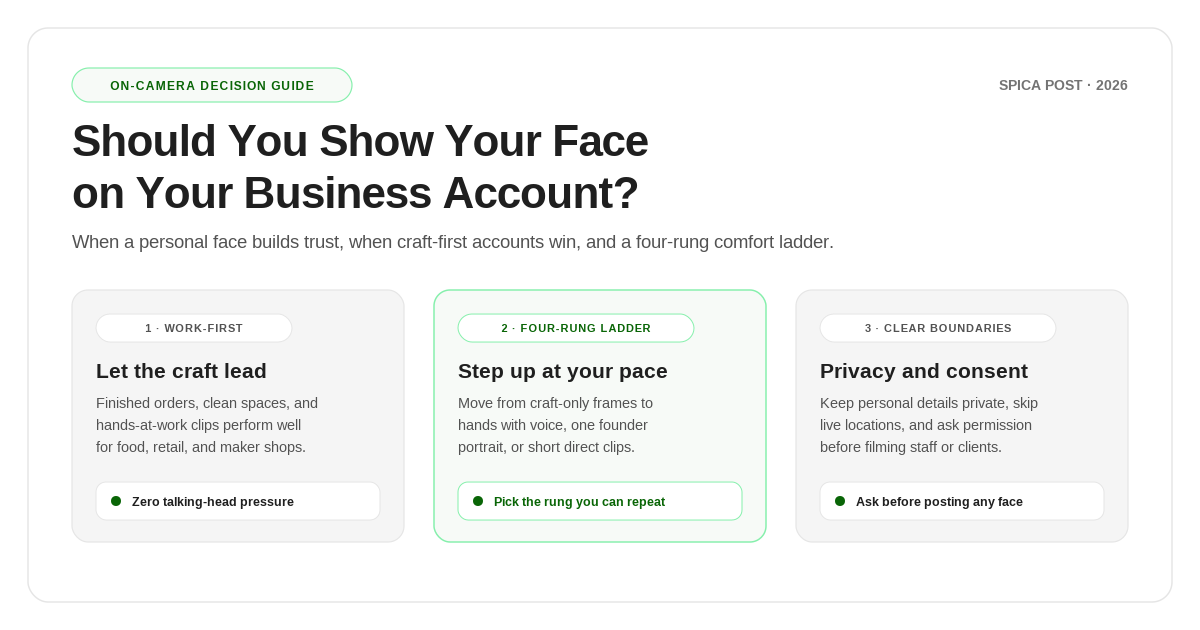
Showing your face on business social media is helpful, not mandatory: it speeds up trust in personal advisory, salon, and in-home service professions where buyers want to see who they are letting through the door, while craft-first and faceless accounts perform just as well for food, retail, handmade goods, and specialized repair work where the finished result is the star. The goal is never to turn a reluctant business owner into a full-time video performer, because an inconsistent feed from burnout loses far more customers than a steady feed built around your real work.
A lot of marketing advice makes camera-shy small businesses and creators feel as though staying off camera guarantees failure. That pressure leaves good owners staring at their phone lens for forty minutes on Sunday night, deleting six takes, and posting nothing for three weeks. A calmer decision starts with one question: what does your buyer actually need to see to feel safe spending money with you?
This guide lays out the honest split between professions where a face moves the needle and professions where the craft does the talking, walks through a four-rung visibility ladder you can climb at your own pace, shares copy-ready low-camera templates, sets practical privacy and permission boundaries for you and your staff, and outlines a 30-day test you can run without dread.
The honest split: when a face moves the needle and when the craft wins
Every local buyer runs a quiet risk check before calling, booking, or walking in. Sometimes the biggest question in their head is “Is this product or finished job actually good?” Other times the question is “Do I feel comfortable trusting this exact person in my living room, with my hair, or with my savings?”
Matching your camera level to the buyer’s real worry removes guilt from the decision.
| Business category | What the buyer worries about most | Recommended visibility rung | Highest-trust proof format |
|---|---|---|---|
| Real estate, coaching, consulting, solo advisors | Personal judgment, communication style, and whether they can work closely with you | Rung 3 or Rung 4 (portrait plus short talking-head answers) | 30-second answers to real client questions and local walkthroughs |
| In-home service professions (plumbing, cleaning, tutoring, pet care) | Who is walking into their house, cleanliness, reliability, and clear pricing | Rung 2 or Rung 3 (hands at work plus one clear pinned team portrait) | Before/after job proof, clean uniform/van photo, pinned founder intro |
| Salons, barbers, studios, wellness clinics | Skill on their hair/skin/body plus whether the vibe feels welcoming and calm | Rung 2 or Rung 3 (finished work plus friendly occasional face) | Crisp natural-light results, chair walkthroughs, warm intro post |
| Restaurants, bakeries, cafes, food trucks | Freshness, cleanliness, portion size, hours, and whether it looks appetizing today | Rung 1 or Rung 2 (craft and hands in motion) | Steam, plating, pastry pulls, open-sign check-ins, clear menu details |
| Retail shops, florists, craft makers, specialty goods | Craftsmanship, materials, sizing, giftability, and shipping or pickup reliability | Rung 1 or Rung 2 (product detail plus packing clips with voiceover) | Daylight product shots, packaging routines, scale-in-hand demos |
| Multi-staff repair shops, clinics, local institutions | Consistent standards regardless of which technician or clerk helps them | Rung 2 or Rung 3 (space, finished work, willing team highlights) | Clean bays/rooms, diagnostic explanations, optional staff spotlights |
When showing your face genuinely earns faster trust
In trust-heavy solo professions, hiding completely behind stock graphics or abstract quotes makes buyers hesitate. When someone hires a real estate agent, books a personal trainer, calls an independent insurance advisor, or schedules a home organizer, they are buying a relationship with a specific human being.
Even Google notes in its Google Business Profile photo guidance that team photos help prospective customers recognize the real people they will interact with when they visit or call. A single honest clip of you explaining how a first consultation works answers ten unspoken nerves in twenty seconds: your tone of voice, your pace, your patience, and whether you talk down to beginners. You do not need studio lighting or high-energy presenter tricks. Calm, steady eye contact in front of a bright window outperforms slick scripts because buyers are checking whether you feel grounded and trustworthy.
If you work in one of these personal-trust professions and still dread daily video, you do not have to film every day. One clear pinned introduction photo plus two brief talking-head explanations a month already places you ahead of competitors hiding behind faceless logos. See how high-trust local accounts pair personal authority with clear local info in our real estate social media guide and hair salon social media guide.
When faceless and craft-first accounts perform just as well
If someone craves sourdough bread on Saturday morning, wants a birthday bouquet delivered across town, or needs a dented fender repaired cleanly, they rarely care whether the owner dances on camera. They want sharp daylight proof of the crust, the ribbon finish, the paint match, the store hours, and an easy link to order or book.
Some of the highest-converting small business accounts on Instagram, Pinterest, TikTok, and local Facebook Pages almost never show a face on the grid. Instead, they show the craft so clearly that the viewer can practically smell the coffee, feel the linen texture, or hear the click of a neatly installed fixture. A clean close-up of hands icing a cake, trimming stems, or tightening a brass valve signals competence immediately.
This also holds true for solo creators who sell digital templates, stationery, ceramics, candles, or photography prints. When your catalog is visually self-evident, leading with the work attracts buyers who care about the product itself rather than parasocial commentary. Compare practical framing techniques in our phone product photography guide and job-site photo guide.
The hidden cost of forcing camera time you hate
Consistency compounds; dread breaks streaks. If you promise yourself three talking-head Reels a week while hating every minute of filming, you will avoid opening your content folder whenever work gets busy. Two weeks of silence turns into two months, and the account looks closed.
By contrast, an owner who settles comfortably on hands-at-work clips and sharp daylight photos can shoot four posts in fifteen minutes during normal prep work. Those four calm posts published every week all year will outsell a burst of seven anxious selfies followed by radio silence. Choose the visibility format that fits your real temperament first, then stretch upward only if you genuinely want to test it.
The 4-rung visibility ladder for camera-shy owners
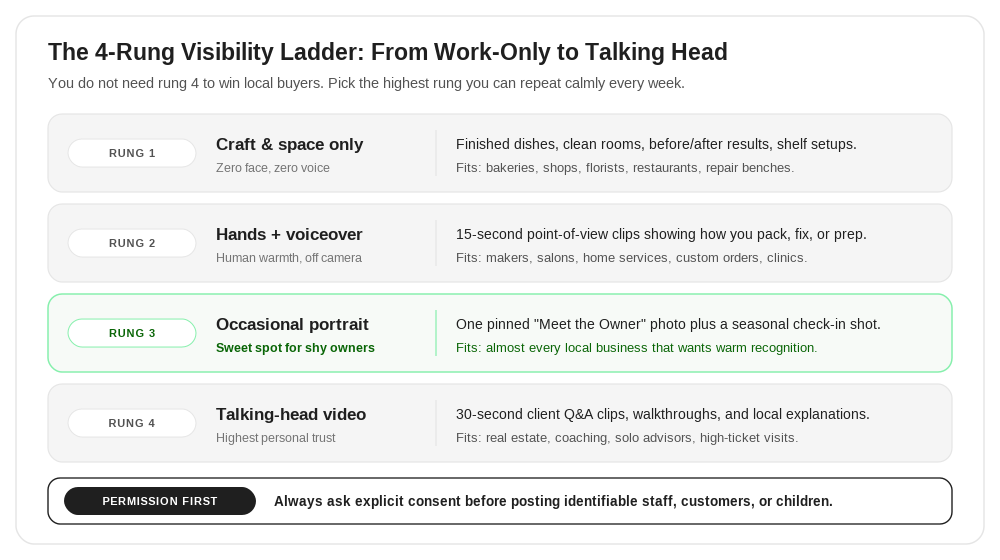
Instead of treating visibility as an all-or-nothing choice between hiding forever and filming daily vlogs, think of it as a four-rung ladder. You can stay on Rung 1 permanently, park on Rung 3 for years, or move up one rung for a single seasonal campaign.
Rung 1: Craft, tools, and space only
On Rung 1, neither your face nor your voice appears. The camera points strictly outward at what you make, fix, serve, or organize.
- What to shoot: Finished orders resting near a window, clean workspace setups before opening, neatly lined tools, fresh deliveries being unpacked, side-by-side before/after repairs, and written menu or seasonal hour boards.
- How to keep it warm: Avoid sterile catalog crops where everything floats on a void. Include real context like a wooden table corner, morning daylight hitting the counter, or an open notebook showing your schedule for the week. Pair every visual with plain, conversational captions written in the first person (“We just pulled twelve rosemary focaccia loaves out of the deck oven…”) so readers still feel a real person behind the account.
Rung 2: Hands at work plus calm voiceover
Rung 2 adds unmistakable human warmth without ever turning the front camera toward your face. Prop your phone on a cheap clamp tripod pointing down at your hands while you pour, sand, fold, stitch, trim, or assemble, then record a 15-second voiceover afterward in a quiet room.
Voice carries massive trust signals on its own. Hearing a calm, unhurried owner explain why they use a thicker stitching thread or how to tell when a water heater anode rod needs swapping builds the same familiarity as a face-to-face chat, with zero worry about hair, lighting, or blinking at a lens. You also do not need to speak while working: capture five silent 3-second clips during the day and read three plain sentences into your phone microphone after closing. Always add clear on-screen captions so silent scrollers catch every word.
Rung 3: One pinned founder portrait and seasonal check-ins
Rung 3 is the practical sweet spot for most camera-shy small businesses and creators. Almost your entire weekly feed stays craft, space, and hands-at-work content, while one single pinned photo at the top of your profile (and on your Google Business Profile and Link Page) puts a real human face to the business name.
Take one relaxed daylight portrait smiling near your workbench, storefront door, or service truck, wearing what you actually wear to work. Write a grounded three-paragraph introduction naming who you are, how long you have served your city, and what customers can expect when they reach out. Pin that post. After that, you only need one fresh face photo every quarter or two (for a holiday thank-you, an anniversary milestone, or a seasonal hours note) to keep the profile feeling unmistakably alive and human.
Rung 4: Short talking-head answers on camera
On Rung 4, you step directly in front of the camera for brief explanations, local updates, or walkthroughs. Even here, shorter and simpler beats polished monologues.
- Keep clips between 20 and 40 seconds. Answer exactly one real question a customer asked you this week.
- Skip the theatrical intro. Drop “Hey guys, welcome back to my page!” and start straight on the useful sentence: “Three homeowners asked me this week whether…”
- Hold an object or stand where you work. Holding a broken valve, a fabric swatch, a coffee bag, or a clipboard gives your hands something natural to do and anchors viewers visually in your profession.
- Accept minor stumbles. A slight pause or a natural laugh makes people lean in; staring rigidly at a teleprompter feels robotic.
How to build warm human trust without filming your face
Staying on Rung 1, Rung 2, or Rung 3 does not condemn your account to feeling cold or corporate. Corporate accounts feel cold because they speak in stiff third-person press releases, use generic stock photography, and ignore comments. Small businesses feel human because of specificity and responsiveness.
What buyers actually read as “human” on a local feed
Watch how local customers interact with neighborhood accounts they love, and five non-face signals show up repeatedly:
- Consistent hands and workspace details. A signature linen apron, the same scuffed wooden bench, the corner brick wall outside your shop, or your recognizable handwriting on order tags acts like a visual fingerprint. Regulars recognize your posts in half a second before reading the handle.
- Real first-person voice and first names. Signing replies and updates with “Thanks for stopping by, Maria” or “Quick note from Sam in the shop” turns an anonymous brand logo into a neighbor.
- Honest behind-the-scenes constraints. Explaining “We only bake 24 pecan tarts on Fridays because the pastry dough rests overnight” sounds unmistakably real and builds quiet respect for your standards.
- Prompt, non-scripted replies in comments and DMs. Answering a question about parking, turnaround time, or gluten-free options in plain language within a few hours builds more trust than ten dancing videos.
- Clear real-world anchors. Mentioning neighborhood cross streets, local weather, or seasonal community events reminds followers you live and work right down the road.
For more ideas when your camera roll feels empty, see our guide on what to post when you have nothing to say and our Instagram Reels ideas for small businesses.
Copy-ready templates for Rungs 1, 2, and 3
Save these three templates and adjust the bracketed details to match your business. None of them require recording a talking-head video.
1. Rung 1 craft-first caption (zero face, zero voice)
Just wrapped this [Project / Order Name] on the bench before Friday pickup in [City / Neighborhood].
Most people do not see [One Small Craft Detail, e.g., the double-stitched corner lining / the 18-hour cold ferment / the pressure check we run before sealing up], yet it is the step that keeps [Product / Repair] holding up months from now.
We have [Number] open slots left for [Next Week / Next Month]. Tap the link in our bio for pricing ranges, hours, and booking.
2. Rung 2 hands-at-work plus 15-second voiceover script
[Clip 1, 4 sec: hands holding raw material or worn part] “If your [Item / Issue] looks like this, you usually do not need a full replacement.”
[Clip 2, 6 sec: hands performing one clean step] “Here is the quick check we run first in our [City] shop before recommending any big fix: [One Plain Step].”
[Clip 3, 5 sec: finished clean result on workbench] “Takes about [Timeframe] when caught early. Send us a message with a photo if you want a straight answer on yours.”
3. Rung 3 pinned “Meet the Owner” portrait caption (one photo, pinned all year)
Hi [City / Neighborhood], I am [First Name], and I started [Business Name] back in [Year] to make [Core Service / Product] simpler and easier to trust.
I usually keep the camera pointed at [Your Work, e.g., the pastries / our repair jobs / the floral arrangements] rather than myself, so consider this the one post where you get to see who answers your messages and packs your orders.
When you reach out here, you talk directly to [Me / Our small team of X]. Our current hours, service area, and booking link are always kept up to date right in our bio. Glad you are here.
Privacy, personal safety, and explicit consent boundaries
Choosing whether to show faces online is not only a marketing decision. It is also a practical safety and workplace-respect decision that small businesses and creators should think through once, write down, and stick to.
Protecting your home, family, and daily routine
Public business accounts can be viewed by anyone, including strangers who are not customers. A few simple habits let you show warmth while keeping your private life closed:
- Never broadcast real-time solo presence. If you work alone in a studio, shop, or mobile van, post your “locking up for the night” or “working late on a custom order” clips the next morning rather than while you are alone on site.
- Scrub background clues. Check frames for house numbers on residential job sites, street signs near your own home, car license plates, visible security keypads, mail envelopes on counters, or children’s school shirts and neighborhood landmarks.
- Keep family separate by default. You do not owe social media access to your partner, children, or private life to appear “authentic.” Authentic on a business account means honest about your craft, your prices, and your standards, not over-sharing personal milestones.
- Use a dedicated business contact path. Point messages and calls to a business email, business phone line, or Link Page form rather than a personal cell number whenever possible.
Asking explicit permission from staff and customers
Putting your own face on camera is your personal choice. Putting an employee, a subcontractor, or a paying customer on camera requires explicit permission every single time.
- Ask before recording, not after. A quick “Mind if I take a quick photo of your finished [cut / arrangement / porch] for our Instagram? No worries at all if you prefer to keep it private” makes saying no completely comfortable. For customers, clarify whether their face will appear or only the finished work.
- Keep children off business feeds unless parents give clear written consent. Even at community markets or family-friendly venues, frame wide shots from behind or tight on hands and products so unconsented minors never appear.
- Never treat employment as automatic camera consent. Some of the best technicians, baristas, stylists, and cooks are private people who hate being filmed. Making video appearances strictly voluntary protects morale and avoids resentment. When team members do appear and speak about the business, remember that the FTC Endorsement Guides expect honest representation and transparent connection to the business rather than staged fake-customer testimonials.
- Agree on offboarding up front. If a willing employee becomes a regular face on your feed and later moves on to a new job, respect any request to stop running old clips in paid promos or pinned highlights.
Setting a simple one-page team camera guideline
Even a two-person shop benefits from writing four plain sentences in a shared handbook: participation on camera is always opt-in with zero penalty for declining; no one films coworkers candidly without warning; customer faces and identifiable property details require explicit verbal or written consent before posting; and everyone gets a quick preview before a clip featuring them goes live. That clarity eliminates awkward moments on busy shifts.
What happens if you plan to sell or grow beyond yourself
Think two to five years ahead before building every single post around your personal face. As LinkedIn’s Page best practices point out for growing organizations, personal voices spark early engagement, yet durable brand recognition also needs clear company-level proof so momentum carries beyond one individual.
Avoiding the founder-bottleneck trap
Solo owners sometimes discover an unintended side effect of going all-in on Rung 4 talking-head branding: every new caller insists on working only with the founder. If you are a solo consultant who plans to stay solo and raise rates, that bottleneck can actually be an asset. If you run a salon, cleaning company, plumbing crew, or bakery and hope to delegate appointments or eventually sell the business, attaching every bit of customer trust to one face makes hiring harder and lowers resale value.
Rotating spotlights across the work, space, and willing team
The clean balance is letting your craft, standards, and process carry roughly three out of four posts while human faces (yours, or willing teammates who opted in) appear in the remaining quarter. Show how the shop tests quality, how the team preps appointments, and what the finished result looks like. Customers still feel warm personal care, and they trust the business standard rather than demanding one overloaded calendar.
A 30-day low-pressure visibility test and honest Spica Post trade-offs
If you are still unsure which rung works best for your audience, run a calm four-week test rather than guessing in your head. Track real responses (DMs, quote requests, saved posts, and Link Page clicks) instead of obsessing over view counts.
- Week 1 (Rung 1 baseline): Publish three pure craft/workspace posts with crisp daylight photos and plain first-person captions naming your neighborhood and clear next step.
- Week 2 (Add Rung 2 hands + voice): Keep two Rung 1 posts and add one 15- to 25-second clip of your hands working with a calm voiceover answering a frequent customer question.
- Week 3 (Add Rung 3 pinned portrait): Publish one relaxed daylight photo of yourself at work using the pinned “Meet the Owner” template above, pin it to your profile, and upload the same clean photo to your Google Business Profile.
- Week 4 (Optional Rung 4 experiment, only if relevant): If you work in an advisory, real estate, salon, or home-visit profession, film one single 30-second talking-head FAQ clip. If you work in food, retail, or craft making, skip Rung 4 and test a second hands-and-voice clip instead.
- End-of-month review: Look at which posts brought real replies, saves, link clicks, or new bookings, AND ask yourself honestly which format felt easiest to repeat without dread. Lock that rung in as your weekly default.
Honest trade-offs if you use Spica Post
If you are checking how Spica Post works for staying consistent across whatever visibility rung you pick, here is the honest November 2026 picture for small businesses and creators:
- What works live today: Spica Post lets you keep your brand colors, fonts, photos, and tone notes in one workspace, browse craft-first and local post ideas, draft captions in your own voice (directly in the composer or through your connected AI assistant over MCP), check posts against each network’s character and media limits, run a fast branded Link Page with custom boxes and printable QR codes, and publish or schedule directly to X, LinkedIn personal profiles, Bluesky (with live Unified Inbox replies), and Mastodon.
- What is built and finishing platform review: If your primary audience lives on Instagram, Facebook Pages, Threads, Google Business Profile, TikTok, Pinterest, or YouTube, note clearly that Spica Post’s connectors for Meta (Instagram, Facebook Pages, Threads), TikTok, and Pinterest are built and completing platform review, Google Business Profile is approved and enabled in production awaiting first live service-area verification, and YouTube OAuth verification is approved while completing its API compliance audit. Until direct publishing opens on every channel, you can organize your photo library, draft your whole week cleanly in Spica Post, run your Link Page and X/LinkedIn/Bluesky cadence live, and copy finished captions straight into native Instagram or Facebook in two minutes. See current workspace plans on our pricing page.
Pick the rung on the ladder that respects both your buyers and your own energy. A steady, honest feed showing real work every week beats a reluctant face that disappears after ten days.
Questions people ask
- Do small businesses really need to show the owner's face to grow on social media?
- No. Plenty of profitable local shops, bakeries, restaurants, craft makers, and repair businesses grow steady bookings with photos and clips of their finished work, clean workspaces, and hands in motion. Showing your face speeds up trust in personal advisory or in-home service professions, but steady, helpful proof of your craft beats sporadic forced selfies every time.
- Which professions benefit most from putting a face on camera?
- Professions where the customer is buying your personal judgment, spending hours beside you, or inviting you into their home see the clearest lift from an on-camera presence. Real estate agents, coaches, consultants, therapists, hair stylists, private tutors, wedding planners, and solo home-visit technicians earn faster inquiries when prospects recognize the real person they will meet.
- How can a camera-shy business owner build warm human trust without talking-head video?
- Combine three low-pressure habits: film 15-second hands-at-work clips paired with a calm off-camera voiceover, pin one single clear photo of yourself or your team smiling in your workspace so visitors know a real person runs the shop, and sign helpful replies with your first name. Customers feel genuine warmth without you recording a monologue every week.
- Should I require employees or customers to appear on our business account?
- Never. Always ask explicit verbal or written permission before filming or posting identifiable faces of staff, customers, or families with children. Keep staff participation strictly opt-in with zero workplace pressure, and default to framing hands, finished work, or empty workspaces whenever anyone prefers to stay off camera.
- What privacy and safety boundaries should I set before showing my face online?
- Separate your public business presence from your private life. Never share your home street, children's school logos, car license plates, or real-time solo closing shifts. Film in your workspace or public areas, delay posting job-site clips until after you have left, and decide in advance which personal topics stay permanently off limits.