Photography
Job-Site Photos for Social Media: A Field Guide for Service Professions
Take clean job-site photos on your phone in 3 minutes: 5 repeatable shots, lighting habits, homeowner privacy checks, and copy-ready captions.
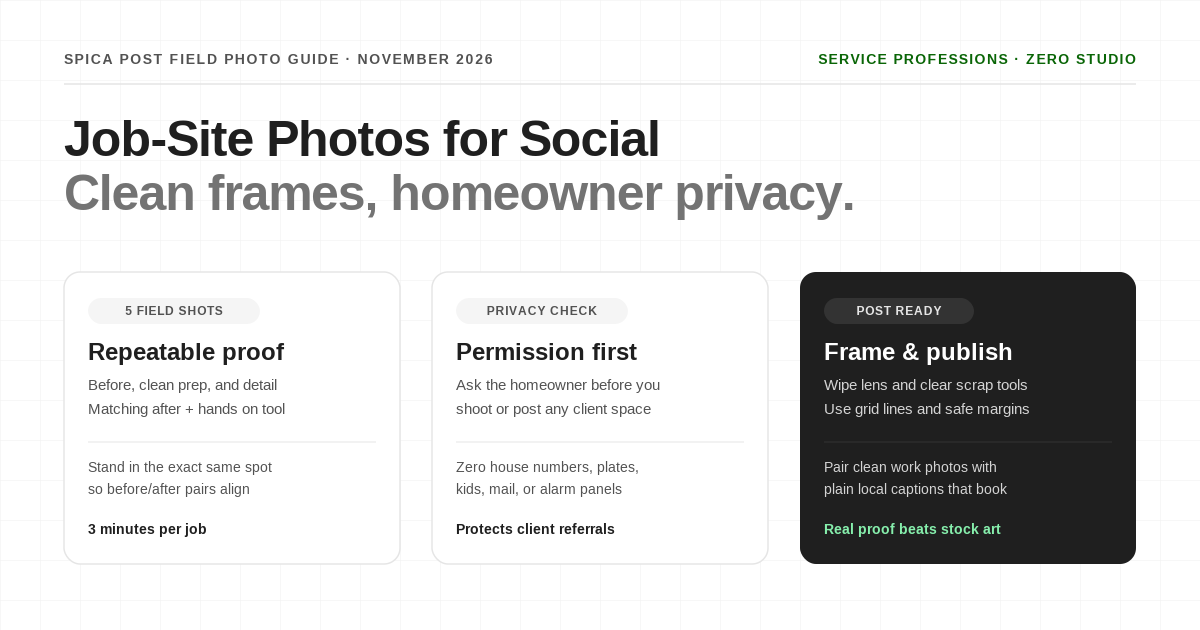
The best job-site photos for social media are taken on the phone already in your pocket in under three minutes: shoot five repeatable frames (before, clean prep, workmanship detail, matching after, and human scale), clear tools out of the finished corner, and run a strict homeowner privacy check before anything leaves your camera roll. Homeowners hiring an electrician, plumber, HVAC technician, landscaper, painter, roofer, cleaner, or handyman do not want glossy magazine shoots; they want quick visual proof that your crew protects their floors, finishes straight work, and respects their home.
Stock photos of smiling models holding spotless brand-new wrenches hurt local home services far more than owners realize. Neighbors spot stock photography instantly, making an honest local company look like an anonymous lead-broker site. Two sharp real-world photos from Tuesday’s panel upgrade, patio paver repair, or cabinet repaint answer the silent doubts standing between a homeowner and your phone number: Will they leave sawdust on my rug? Does their finish work look neat? Are they actually working here in town?
This guide gives small businesses and creators in service professions a 3-minute field routine: five repeatable shots, phone lighting habits built for dim basements and bright driveways, a homeowner permission and privacy checklist, before-and-after pairing rules, five copy-ready captions, and a calm weekly publishing system.
Why real job-site photos outperform stock images
Hiring a service crew carries a higher trust bar than buying a small retail item because the homeowner is letting strangers into their kitchen, crawlspace, or backyard. When a neighbor checks Google Maps or opens your Facebook, Instagram, LinkedIn, or Bluesky page before asking for an estimate, they scan recent photos for four quiet signals:
- Tidiness before and after the work: Flat canvas drop cloths, neat shoe covers, taped baseboards, swept concrete, and zero stray packaging prove care faster than claiming “we treat your home like our own.”
- Straight, clean workmanship: Even a homeowner who knows nothing about amperage or drainage pitch recognizes level conduit, tidy caulk joints, straight fence rails, and crisp paint cut lines immediately.
- Local housing stock: Showing the real brick, stucco, basement block, or roofing shingles common in your service area proves you already know homes like theirs.
- Recent activity: Per Google Business Profile photo guidelines, clear, well-lit, real images help prospective clients know what to expect before calling.
Shooting just two clean jobs a week yields ten usable photos every seven days, enough to keep Google Business Profile, Facebook, Instagram, LinkedIn, and Bluesky active all year.
The five repeatable job-site shots to take in three minutes
Guessing what to photograph while the client signs the invoice leads to blurry dark snapshots nobody wants to post. Teach yourself and every lead technician one simple five-shot sequence on approved jobs.
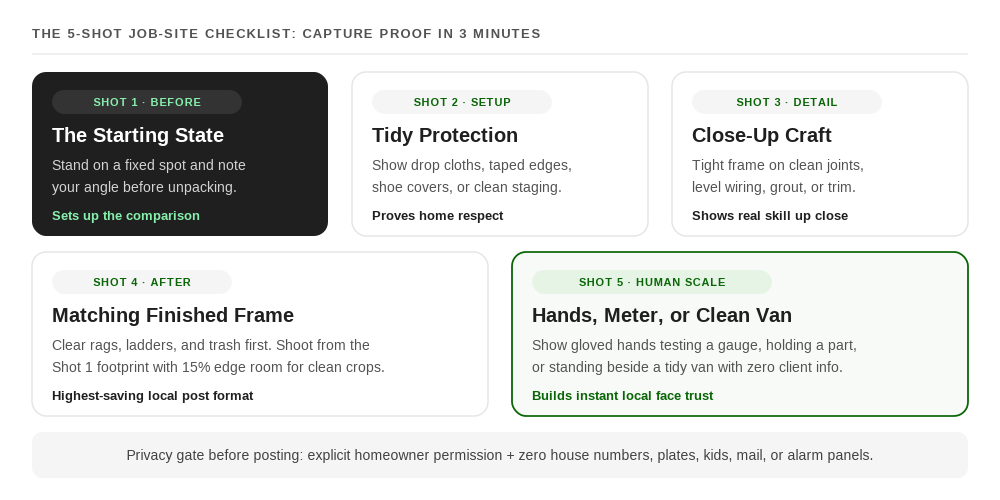
Shot 1: The starting state (the honest before)
Take this photo right after the homeowner grants permission and before a tool bag hits the floor. Stand in a spot you can remember (two steps back from the doorway threshold, or centered before the panel or patio). Hold your phone straight at chest height on the 1x lens so vertical lines stay vertical.
Shot 2: Clean prep and protection in progress
Most crews skip the middle of the job, yet clean prep wins referrals. Snap one quick frame showing taped floor protection over hardwood stairs, plastic dust barriers, staged replacement parts on a clean mat, or labeled circuits laid out neatly before reassembly.
Shot 3: The tight workmanship detail
Step physically closer (never pinch-zoom digitally) for one close-up of real craft: crisp copper joints, neat thermostat wiring, even tile grout, clean mulch edging, or smooth cabinet trim. Tight crops also protect homeowner privacy naturally by excluding the rest of the room.
Shot 4: The matching finished frame (the clean after)
Run a 30-second sweep first: move buckets, roll cords, pull stray painter’s tape, wipe smudges, and close adjacent closet doors. Stand on the exact Shot 1 footprint at the same chest height and 1x lens, then shoot. Matching angles let viewers grasp the fix in one glance.
Shot 5: Human scale (hands, meter, or clean service van)
Close with one human frame that shows your crew without exposing the client’s identity: gloved hands holding a meter reading, checking level with a torpedo level, holding a worn part beside its replacement, or standing beside a tidy van parked in a neutral spot with zero house numbers or plates visible.
Lighting and clean-frame habits for tough job sites
Field sites rarely resemble bright studios. Six fast phone habits solve dim utility rooms and harsh noon driveways cleanly (and for tabletop tool or product photography, see our guide to product photos with a phone).
Dark basements, attics, and utility closets
- Place your LED work light off to the side: Skip your phone’s built-in flash, which blasts shiny metal and tile with harsh glare while leaving corners black. Set a battery work light three to five feet left or right at a 45-degree angle for clean texture.
- Lock focus and lift exposure lightly: Tap the focal point, hold two seconds for AE/AF Lock, and nudge the sun icon slightly upward until dark piping or panels stay readable without blowing out light walls.
- Brace your elbows: Dim spaces slow shutter speed. Tuck your elbows to your ribs or lean your forearm against a doorframe for one steady second while tapping the shutter.
Bright midday exteriors (roofing, lawn care, painting, masonry)
- Avoid shooting directly into the sun: Shifting slightly to one side lets sunlight rake across siding, stone pavers, or lawn stripes instead of turning the house into a dark silhouette.
- Step out of your own shadow: On driveways, concrete coatings, and garden beds, angle slightly sideways so your shadow never falls across the finished work.
- Wipe dust off the rear lens every time: Drywall dust, sawdust, and pocket oil coat camera glass within minutes. Keep a clean microfiber cloth in the cab and wipe before every shot.
Leave your phone’s 3x3 camera grid turned on permanently so walls and posts stay vertical, and step back half a pace for 15 percent extra breathing room around the repair so horizontal Google cards and vertical Instagram 4:5 feeds never slice off the top of your work.
Homeowner privacy and permission checklist
One careless photo exposing a house number, child’s room, license plate, or alarm keypad can erase years of neighborhood referrals overnight. Treat homeowner consent and edge checks as a firm safety habit.
Verbal and written permission scripts
Always ask the customer for explicit permission before photographing or publishing any image or story from their property. Most homeowners gladly agree when you ask politely and explain nothing identifying will appear.
Use this calm verbal script during walk-through or sign-off:
“Your new panel (or patio / tile work) turned out really clean. Would you be comfortable if I took a couple of close-up photos of the work itself for our website and local social updates? I never include house numbers, names, or personal items, and I am happy to show you the exact frames before I leave.”
On digital estimates or work orders, include a plain optional opt-in line rather than fine print:
“Optional photo permission: Yes, [Business Name] may share close-up, non-identifying photos of the completed work (with zero address, names, license plates, or personal details) on their website, Google Business Profile, and social channels. [ ] Yes [ ] No”
If a homeowner says no or even hesitates, smile, say “No problem at all,” and keep your phone put away.
The 10-point frame privacy scan before uploading
Scan all four corners of every photo clockwise for five seconds before moving it to a post draft:
| Privacy risk to check | Why it hurts trust or safety | Fast fix in the field |
|---|---|---|
| House numbers & mailbox names | Reveals the exact client street address | Step two feet sideways or crop tight on the fixture |
| Street signs & unique landmarks | Pinpoints the house immediately on Maps | Angle downward or closer onto the repair zone |
| Vehicle license plates | Identifies owners, family, or neighbors | Reposition slightly or shoot before pulling in |
| Children & family portraits | Serious privacy risk on public profiles | Never shoot minors; step clear of photo walls |
| Security keypads & alarm signs | Exposes brand and entry points publicly | Keep wall panels and yard signs out of frame |
| Open mail, boards, prescriptions | Leaks names, schedules, and private info | Frame strictly on the counter, valve, or trim |
| Wi-Fi stickers on modems/routers | Frequently mounted beside basement panels | Angle away from ISP boxes or blur completely |
| Messy adjacent rooms or closets | Embarrasses clients even when work is neat | Close nearby interior doors before Shot 4 |
| Client full names on clipboards | Shows up accidentally beside staged tools | Keep invoices face down inside your bag |
| GPS camera location tags (EXIF) | Raw files can hold exact coordinates | Turn off camera location tags on work phones |
This same respect aligns with Google’s service-area business guidelines: crews without walk-in showrooms keep personal addresses private on their profile and give every client’s home the same protection.
Pairing before-and-after photos so viewers stop scrolling
Before-and-after sets earn the highest saves and shares in home services because viewers understand the result in one second.
- Swipeable carousel (Instagram, Facebook, LinkedIn, Bluesky multi-image): Put the clean After photo on Slide 1 and Before on Slide 2 (only lead with Before when the contrast is unmistakably visual, such as a stripped deck or overgrown walk). Leading with the finished room keeps your profile grid bright and inviting.
- Side-by-side split image (Google Business Profile updates, Pinterest, X): Use a clean 50/50 split with a thin white divider and small neutral
BEFORE/AFTERcorner labels. Skip giant neon arrows or stickers that hide workmanship. - Honest editing on both halves: Straighten lines and lift dim shadows gently so both shots reflect real eye perception. Never crank contrast on After while darkening Before artificially.
Five copy-ready job-site captions for service professions
Strong photos stall when paired with empty lines like “Another happy customer! Call today!” Include four concrete facts every time: the real problem, what you did cleanly, your town or service area (never the street), and one clear next step.
1. Clean before-and-after fix (Instagram, Facebook, LinkedIn)
Replaced a 19-year-old leaking basement shut-off and corroded section in [Town/Area] this morning with a quarter-turn brass ball valve and fresh copper manifold.
We laid runners from the front walk to the utility room, pressure-tested every joint for 20 minutes, and tagged the main shut-off clearly. Seeing damp rust near an older valve? Book a standard checkup via our bio link. (Shared with homeowner permission.)
2. Tidy prep and home protection (Facebook, Google Business Profile)
Half the finish quality of an interior cabinet repaint happens before the first coat opens. On this [Town] kitchen project, we masked every counter, sealed doorways to contain sanding dust, degreased every frame, and primed for daily wear.
Booking interior kitchen and trim slots for [Next Month] across [City 1], [City 2], and [City 3]. Tap our website link to view open estimate windows.
3. Close-up craftsmanship detail (Instagram carousel, Bluesky, X)
Close look at clean 200-amp panel labeling and straight breaker runs completed in [Town] today. Neat routing makes future troubleshooting safer, cooler, and faster ten years from now.
Planning an EV charger or workshop subpanel this season? Reach out before buying hardware. (Posted with homeowner permission.)
4. Seasonal maintenance prevention (Google Business Profile, Facebook)
Pulled a crushed foil dryer duct from behind a laundry wall in [Town/Area] this week and installed smooth rigid metal ducting with sealed seams so airflow recovers immediately.
Clothes taking two cycles to dry or laundry room feeling overly warm? Book an inspection across [Service Area] through our website link.
5. Human-scale parts comparison (LinkedIn, Instagram, Bluesky)
Left: the worn capacitor that shut down an AC unit on the first warm afternoon in [Town]. Right: the fresh heavy-duty replacement tested under load before closing the panel.
Small worn parts drive most midday breakdowns. Our spring tune-up checks every electrical reading before summer heat arrives. Booking link in profile.
When posting updates to your Google Business Profile, keep phone numbers out of the caption text because Google provides a built-in Call button and may reject descriptions containing raw numbers.
Format and file size checklist before uploading
Raw phone photos often exceed strict network limits (such as Bluesky’s 2 MB image cap) or crop awkwardly in Maps thumbnails. Verify any file in seconds with our free Image Size and Crop Checker:
| Network | Best orientation for field photos | Practical framing and limit note |
|---|---|---|
| Google Business Profile | 4:3 or 16:9 horizontal (1200 x 900 or 1200 x 675) |
Keep the repair centered so Maps thumbnails crop cleanly |
| Instagram feed & carousels | 4:5 vertical (1080 x 1350) or 1:1 square |
Vertical fills more phone screen; ideal for Before/After pairs |
| Facebook Pages | 4:5 vertical or 16:9 horizontal |
Crisp JPEG under 8 MB avoids muddy recompression |
| Bluesky | 16:9, 4:5, or 1:1 (up to 4 photos per post) |
Strictly <= 2 MB per image; write plain descriptive alt text |
| LinkedIn & X | 16:9 horizontal (1600 x 900) or 4:5 vertical |
Strong fit for commercial jobs, builders, and property managers |
Turn weekly job-site photos into scheduled posts
Keep one phone album named “Approved Job Photos”. Spend ten minutes every Friday moving four to six privacy-checked keepers into that album and writing two short local captions for next week.

Inside Spica Post Studio, you can store approved field photos in a shared Media Library with reusable alt text, adapt a single clean photo into horizontal cuts for Bluesky, LinkedIn, and X or clean branded frames, and let your AI assistant turn a two-line job note into local drafts waiting for your approval.
Real trade-offs to weigh before choosing a tool
As of November 2026, Spica Post publishes directly to X, LinkedIn personal profiles, Bluesky, and Mastodon, alongside a hosted Link Page, /l/ tracked short links, shared Media Library, and MCP assistant workflow. Integrations for Google Business Profile (API approved, completing profile verification), Instagram, Facebook Pages, Threads, TikTok, YouTube, Pinterest, and LinkedIn Company Pages are built and completing platform review and verification. If your crew relies primarily on Instagram and Google Business Profile today, you can centralize media, check sizes, and draft with your assistant while posting manually to channels finishing review; see current workspace options on our pricing page.
Start on your next approved job this week: ask permission clearly, wipe the lens, shoot five clean frames in three minutes, scan all four corners for privacy, and publish one honest before-and-after update naming your service area right in line one.
Questions people ask
- How many photos should a service business take on a typical job site for social media?
- Take five repeatable shots in under three minutes: the starting problem before you unpack, your tidy prep and floor protection, one tight detail shot of clean workmanship, the finished result from the exact same spot as the before photo, and a human-scale frame of your own gloved hands, test gauge, or clean service van.
- Do I need the homeowner's permission before posting job-site photos online?
- Yes, always ask for explicit permission from the homeowner or property manager before photographing or sharing any client property, interior, yard, or repair story. Ask calmly at arrival or walk-through, explain that no house numbers, names, or personal items will appear, and offer a simple written checkbox on your work order when possible.
- What private details must be kept out of job-site social media photos?
- Never include house numbers, street signs, vehicle license plates, children or family portraits, open mail or prescription bottles, Wi-Fi passwords on routers, security keypads, alarm yard signs, or unique floor plans that make a home easy to locate. Inspect the corners of every frame for five seconds before uploading.
- How can I make before-and-after photos look convincing instead of mismatched?
- Stand in the exact same spot at the exact same chest height with the same 1x phone lens for both photos. Clear ladders, buckets, rags, and cardboard boxes before taking the after shot, turn on matching room lighting, and keep vertical wall lines straight using your phone's 3x3 camera grid.
- What image aspect ratio works best for job-site photos across Google and social networks?
- Step back slightly so you leave about 15 percent breathing room around the repair or finished space. That one master file adapts cleanly to horizontal 4:3 or 16:9 cards on Google Business Profile, LinkedIn, Bluesky, and X, as well as vertical 4:5 posts and side-by-side carousels on Instagram and Facebook.