Hair salons
Social Media for Hair Salons and Barbers: Fill Open Chairs
Fill open midweek chairs without filming all day: chair-side lighting, client consent habits, fast booking links, and a 3-post weekly plan.
Most hair salons and barbershops do not struggle to fill Saturday morning; they struggle to fill Tuesday at 11:00 AM, Wednesday afternoon, and the two-hour hole left by a same-day cancellation. Yet the average salon account posts the exact opposite of what fills quiet chairs: five glossy hair-flip clips uploaded on Friday night when the weekend book is already full, paired with a bio that says “DM to book” while the stylist is standing behind a chair for nine hours straight.
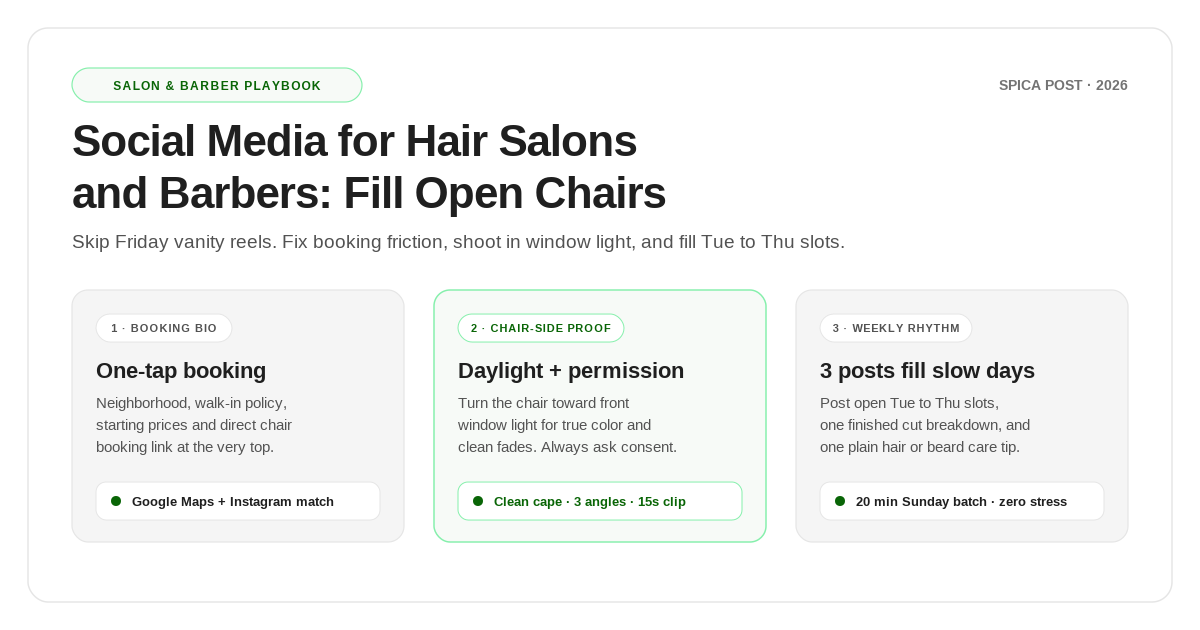
Social media fills salon and barbershop chairs when you focus on three plain habits instead of chasing viral transitions: remove every booking blocker from your bio and Google Business Profile, capture two daylight photos a week with clear client permission, and follow a calm three-post weekly rhythm built specifically around midweek openings, real specialties, and steady rebooking reminders.
This guide covers the four booking leaks to fix before your next post, where local clients actually decide who cuts their hair in 2026, a repeatable 3-post-a-week chair-filling schedule, chair-side phone lighting and consent habits, four copy-ready captions, a four-season salon calendar, and a 20-minute Sunday routine you can run without stepping away from your clients.
Fix four booking blockers before taking another chair photo
Before filming another slow-motion reveal, inspect your profiles the way a brand-new client inspects them at 10:30 PM on a Sunday night while trying to book a haircut for the week ahead. Four simple friction points quietly send ready-to-book neighbors to another shop:
- Missing neighborhood, parking, or walk-in clarity. State your exact neighborhood or cross streets in line one of every bio, note whether parking is behind the shop or on the street, and say plainly whether you accept walk-ins, appointments only, or both. A client who is unsure where you are located rarely keeps clicking.
- “DM to book” instead of a one-tap booking link. When you are rinsing color or lining up a beard, you cannot answer Instagram messages for three hours. By the time you reply, that person has already booked a chair down the road. Put your online booking tool (Square Appointments, Fresha, Vagaro, Booksy, GlossGenius, or a clean Link Page with one big booking button) at the top of your Instagram bio, Facebook page, and Google Business Profile.
- Vague services and mystery pricing. Nobody expects a final quote for a complex color correction on social media, but new clients want to know your starting range, your consultation policy, and your exact specialties (skin fades, scissor cuts, curly dry cuts, lived-in blonde, silk presses, locs, beard shaping). List real services on your Google Business Profile (following Google Business Profile service menu help) and pin one “New Client Guide” post explaining deposits, late policies, and what service option to pick.
- Stale photos and unanswered Google reviews. Someone searching “barber near me” or “curly hair salon” reads your five newest reviews and checks your latest photos before trusting you with their hair. Upload clean recent shop interior and chair photos (per Google Business Profile photo guidance) and reply warmly to every review, good or critical (see our Google review response guide).
Where local salon and barber clients actually look in 2026
You do not need to post on seven networks to stay booked solid. Two platforms handle almost all local discovery and verification, while a third and fourth help only if your clientele genuinely uses them.
| Channel | What the client does here | Best weekly job | Current Spica Post status (Nov 2026) |
|---|---|---|---|
| Google Business Profile | Searches nearby salons, checks hours, services, photos, and reviews | 1 weekly photo/update + fast review replies | Built and enabled in production; awaiting first live service-area profile verification |
| Checks your real portfolio (fades, blonding, curls, vibe) before tapping Book | 3 weekly feed posts + quick open-chair Stories | Built; completing Meta App Review | |
| Facebook Page | Neighborhood regulars, parents booking kids’ cuts, holiday gift cards | Mirror your 3 weekly Instagram posts cleanly | Built; completing Meta App Review |
| TikTok / YouTube Shorts | Local search for specific styles (“taper fade”, “butterfly cut”, “balayage”) | Optional: repost 1 short 15-second chair clip per week | Built; TikTok in app review, YouTube OAuth approved and completing compliance audit |
| Bluesky / X / LinkedIn / Mastodon | Local neighborhood chatter, salon suite networking, brand updates | Mirror tips, open-chair links, and salon news | Live direct publishing and Auto-crosspost today |
| Branded Link Page | One mobile page holding Book Now, Service Menu, Hours, and Directions | Always live in every social bio | Live today in Spica Post on your own link or domain |
For most independent salons, booth renters, and barbershops, Google Business Profile plus Instagram is the core pair, with Facebook mirrored automatically for family and neighborhood reach. Adding TikTok or YouTube Shorts only makes sense once those core habits take less than half an hour a week.
The calm 3-post-a-week chair-filling schedule
Consistency beats perfection in hair and barbering. Three intentional posts per week keep your shop top of mind for regulars due for a 4-to-8-week trim while giving first-time visitors proof that you actually specialize in their hair type.
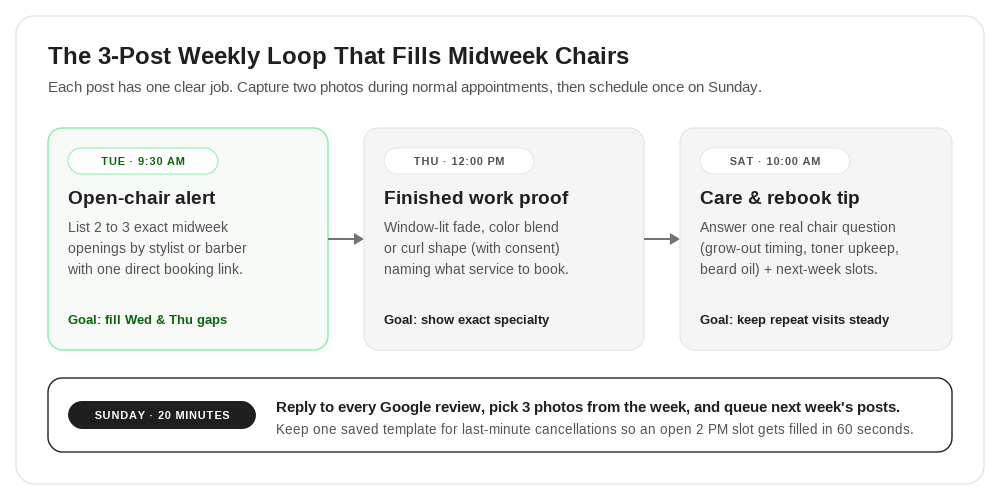
| Day and window | Post job | What to share (captured during normal work) |
|---|---|---|
| Tuesday · 9:30 AM | Midweek open-chair alert | Clean shop photo or stylist portrait listing 2 to 3 exact Wednesday/Thursday openings with stylist name and booking link |
| Thursday · 12:00 PM | Finished cut or color proof | Two window-lit photos (back + side angle, with client permission) naming the exact service to book and how long it takes |
| Saturday · 10:00 AM | Care, styling, or rebooking tip | One plain answer to a question clients ask in the chair (fade upkeep, purple shampoo timing, heat protection, curl refresh) + next week’s link |
Turning last-minute cancellations into same-day bookings
Cancellations happen in every salon. The mistake is posting a blurry screenshot of your booking app with zero context or writing “Anyone want a haircut today?” without telling people what fits in that gap.
Keep one saved fill-in-the-blank note on your phone so you can post a cancellation in under sixty seconds: name the exact time window, the stylist or barber, which services fit (for example, “45 minutes open: fits a haircut, skin fade, beard trim, or root touch-up, not a full highlight”), and your direct booking link. Specific time windows convert dramatically faster because readers immediately picture whether they can duck out on a lunch break.
Why you do not need to post every haircut
A grid packed with thirty nearly identical back-of-head photos tells a new visitor very little about who you are, how you communicate, or what it feels like to sit in your chair. Rotate your Thursday showcase intentionally across the services you actually want more of. If you want more curly cuts, dimensional brunettes, or razor fades on your calendar, show those exact services week after week, and stop posting services you dislike doing just because you happened to snap a picture.
Chair-side photography and client permission habits
You do not need a ring light mounted to every station or a five-minute photo shoot that makes clients awkward. Two tiny habits make ordinary phone photos look crisp and true to life.
Lighting and angles that show true color and clean fades
Overhead salon lighting is almost always mixed or warm yellow, which distorts ash blonde, copper, and silver tones and flattens subtle taper blends. Before your client stands up, follow this 45-second routine:
- Move toward natural daylight. Turn the chair toward your front window or step two paces into indirect daylight near the reception area. Never shoot with a bright window directly behind the client’s head, which turns their hair into a dark silhouette.
- Clean the frame in five seconds. Wipe your phone camera lens on your apron (hairspray and styling oil fog phone lenses constantly), brush stray clippings off the neck and cape, and check the mirror behind the chair for cluttered foil trays or open trash cans.
- Shoot three predictable angles. Take one clean straight-on back shot for length and color melt, one 45-degree side angle for fade transition, beard line, or face-framing layers, and one optional 10-second gentle comb-through or natural turn clip. Skip heavy skin-smoothing filters; clients want to see realistic texture so they trust what they will actually leave with. (See our full phone photography guide for exposure and framing tips.)
Always ask explicit client permission first
Never assume a client is comfortable appearing on your public business account, even if they are thrilled with their hair. Make permission warm, quick, and genuinely pressure-free:
- Ask before lifting the phone. Say something simple like: “Your blend came out super clean. Would you mind if I take a quick photo for our salon Instagram and Google page, or would you rather skip it today?”
- Offer a no-face option automatically. Many people love helping their barber or stylist but do not want their face online during a workday. Adding “We can keep it strictly from the back so your face is not in it” gets enthusiastic yeses while respecting privacy.
- Be extra careful with minors and bridal/surprise events. Always obtain clear parent or guardian consent before photographing children or teens, and double-check before posting a wedding trial or surprise makeover so you do not spoil a client’s event early.
Four copy-ready captions for hair salons and barbers
Use these straight from your notes app, swapping in your neighborhood, service names, and booking link.
1. Midweek open-chair update
Two midweek chairs opened up for this week in [Neighborhood]:
- Wednesday at 1:30 PM with [Name] (fits a haircut, skin fade, beard trim, or gloss)
- Thursday at 11:00 AM with [Name] (fits a full color, root touch-up, or cut and style)
Tap our booking link in bio to grab either spot directly, or call [Phone] if you are not sure which service length to choose. Street parking is open right outside on [Street].
2. Finished cut or color breakdown (with client permission)
Lived-in copper refresh and dry trim by [Stylist Name] (shared with our guest’s permission).
What we did: soft root smudge for a gentle grow-out plus a warm copper gloss that holds shine for 6 to 8 weeks without harsh lines.
How to book this look: select “Dimensional Color + Cut” on our booking page. First-time color guest? Start with a free 15-minute consultation or bring two photos of tones you love. Link in bio to see open chairs next week.
3. Plain chair-side care tip
Quick barber tip we answer ten times a week: if your mid fade looks fuzzy on day ten, you do not always need a full 45-minute appointment.
Booking a quick neck-and-edge cleanup between full cuts keeps your hairline crisp for an extra two weeks and takes 15 minutes on a lunch break. We keep Tuesday and Wednesday afternoon slots open for quick cleanups. Book yours at the link in bio.
4. New-client welcome post (great to pin at the top of your profile)
Thinking about booking your first visit at [Shop Name] in [Neighborhood]? Here is how we keep it simple:
- Where we are: [Address / landmark] with [free lot / easy street parking]
- Who we serve: [specialties, e.g., textured curls, precision fades, low-maintenance color, kids’ cuts]
- How to book: tap the link in our bio to see real-time openings, starting prices, and exact appointment lengths
- First visit tip: arrive with clean, dry hair as you normally wear it so we can see your natural fall before picking up the scissors.
Four-season content calendar for salons and barbers
Hair demand shifts cleanly with weather, school calendars, and holiday photography. Planning seasonal posts two to three weeks early fills your book before clients wait until the last minute.
| Season | What clients are searching for | High-booking post ideas |
|---|---|---|
| Winter (Jan to Mar) | Dry scalp relief, fresh New Year cuts, toning winter dullness, beard hydration | Scalp-care and deep-conditioning add-ons; quiet January weekday slots; Valentine’s date-night blowouts and crisp fades |
| Spring (Apr to Jun) | Lighter dimensional color, prom/graduation styles, wedding trials, spring chop | Early booking reminders for graduation weekends; spring refresh before-and-afters (with consent); humid-weather curl tips |
| Summer (Jul to Sep) | UV and chlorine protection, shorter low-heat cuts, vacation braids, back-to-school cuts | Back-to-school family booking blocks announced 3 weeks early; swim-proof color tips; sweat-friendly fade upkeep |
| Fall and Holidays (Oct to Dec) | Richer autumn glosses, family photo trims, Thanksgiving/December full-book warnings, gift cards | “Book your November and December chairs now” alerts; stocking-stuffer salon care kits; digital and physical gift cards |
Five common salon social media mistakes (and quick fixes)
- Hiding your city on your profile. A huge percentage of independent stylists write “Licensed Hair Artist · Color Specialist” with zero city or neighborhood. Someone scrolling Reels 800 miles away cannot sit in your chair. Put your city and neighborhood in your profile name and first bio line.
- Posting only when the week is already slow. Posting once a month only when you panic on a quiet Wednesday morning trains algorithms and locals to miss you. Three calm posts every single week keep next month’s Tuesday chairs filled before they ever sit empty.
- Zero call to action telling people what to book. Clients often love a photo of your work and still do not book because they do not know whether that look is a “Partial Foil”, a “Balayage”, or a “Toner Refresh”. Name the exact menu item right in the caption.
- Over-editing hair color and skin. Heavy saturation and contrast make copper look neon and brown hair look muddy, creating unrealistic expectations when a new client sits down. Shoot by a window and adjust brightness gently, nothing more.
- Forgetting your Google Business Profile. Instagram shows your craft, but Google Maps captures people actively typing “hair salon open now” or “barber near me” with their wallet already out. Copying one crisp photo and one weekly update to Google takes two extra minutes and pays off all year.
A 20-minute Sunday routine and honest Spica Post trade-offs
You should never spend your evenings fighting four social apps after standing on your feet all day. Follow one quick weekly batch:
- During the week (2 minutes total): After two finished cuts or color services where clients say yes to a photo, snap three daylight angles and drop them into a dedicated phone album called “Posts”.
- Sunday evening (15 minutes): Pick two photos from that album plus one shop/care visual, write your Tuesday open-chair update, Thursday work breakdown, and Saturday care tip using the templates above, and schedule them cleanly.
- Review and link check (3 minutes): Reply to every new Google review from the week and confirm your booking link opens cleanly on your own phone.
Honest trade-offs if you consider Spica Post
If you are evaluating Spica Post for salons and barbers, here is the exact picture as of November 2026 so you pick the right tool for your shop:
- What works live today: Spica Post gives your shop one clean Link Page (putting your booking link, service list, hours, and Google Maps directions on one fast mobile page for every bio), click-tracked short links so you can see which posts send people to your booking page, AI-assisted drafting in your shop’s voice, and live publishing plus Auto-crosspost across X, LinkedIn personal profiles, Bluesky, and Mastodon.
- What is built and completing network review: Because Instagram, Facebook Pages, Threads, TikTok, YouTube, and Google Business Profile matter most for local hair salons and barbershops, note plainly that Spica Post’s publishing connectors for Google Business Profile (approved and enabled, awaiting first live service-area profile verification), Instagram, Facebook Pages, Threads, TikTok, Pinterest, and YouTube are built and completing platform review/verification. Until Meta and Google direct publishing finish opening across all workspaces, you can draft your week and host your booking Link Page inside Spica Post while posting your 3 weekly photos natively to Instagram and Google in five minutes, or check current availability and flat workspace plans on our pricing page.
Start small this week: put your neighborhood and direct booking link at the top of your bio, snap two window-lit cuts with client permission, and announce three exact midweek openings on Tuesday morning. Your calendar will feel the difference within a month.
Questions people ask
- How often should a hair salon or barbershop post on social media to stay booked?
- Three focused posts per week are enough for most salons and barbershops: one midweek open-chair update, one finished cut or color showcase naming the exact service to book, and one short care or maintenance answer. Add quick Story updates whenever a same-day cancellation opens up.
- Which social platforms bring the most new bookings for salons and barbers in 2026?
- Google Business Profile and Instagram bring the highest share of local bookings. New clients search Google Maps for nearby salons, hours, service lists, and reviews, then tap Instagram to verify your real fades, color blends, curl work, or blowouts before booking. Facebook stays strong for neighborhood families and repeat regulars.
- Should salons and barbers ask permission before posting client hair photos?
- Yes, always ask explicit verbal or written permission before photographing, filming, or posting any client. If a client loves the cut but prefers to keep their face private, offer a clean back-of-head or angled profile shot that shows the blend, texture, or fade without identifying them.
- How do I take accurate hair color and fade photos with a phone?
- Avoid shooting directly under warm yellow overhead salon bulbs, which turn cool blondes brassy and hide crisp skin-fade gradients. Turn the chair toward a bright front window or soft daylight-balanced light, brush loose hair off the cape, wipe your camera lens, and capture three clean angles: back, side profile, and close-up blend.
- What is the fastest way to fill a last-minute cancellation on social media?
- Keep a saved open-chair caption template ready with the exact day, time, stylist or barber name, service length that fits that gap, and a direct booking link. Post it immediately to Stories and local channels instead of writing a vague message asking people to DM for availability.