Google Business Profile
How to Respond to Google Reviews & Social Comments Without Sounding Scripted
A practical 4-beat framework, 8 real reply templates, and a 10-minute daily inbox routine for answering 5-star reviews, 1-star complaints and social comments.
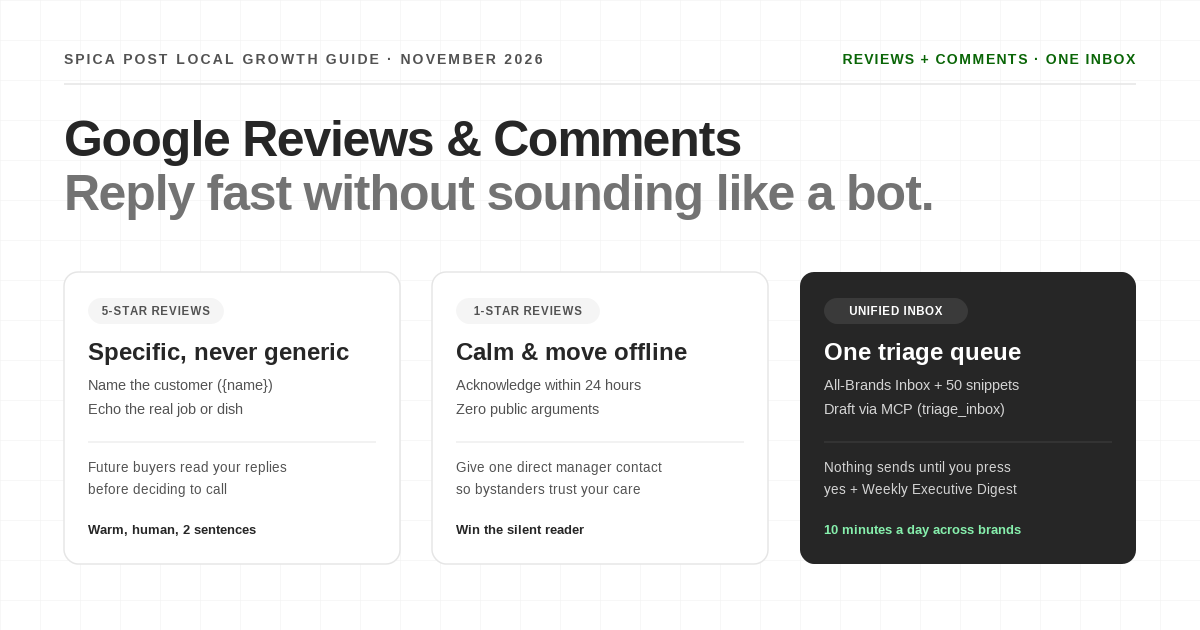
To respond to Google reviews and social comments without sounding scripted, follow a four-beat formula (Greet by name + Mirror one specific detail + Take clear action or add warmth + Close with a human sign-off), keep most replies between 35 and 90 words, answer negative feedback or buying questions within 24 hours, and remember who your real audience is: not only the person who wrote the comment, but the next fifty shoppers reading your Google Business Profile or social post before deciding whether to call you.
Most small business owners fall into one of two traps. Either they leave dozens of five-star reviews and social questions sitting unanswered for months because logging into four separate apps at the end of a long shift is exhausting, or they panic and paste the same stiff sentence (“Thank you for your valuable feedback! We strive for excellence every day!”) onto every single review until their profile reads like a broken answering machine.
Google’s own local ranking guidance explicitly points out that interacting with customers by responding to reviews shows shoppers you value their feedback and helps your profile perform better on Search and Maps. Even better, your reply is free, permanent sales copy sitting directly underneath the exact questions and objections future buyers care about most.
This guide gives you the exact four-beat framework, eight ready-to-adapt reply templates (covering 5-star praise, 4-star nudges, fair 1-star mistakes, unfair or wrong-business reviews, and social comments), the mistakes that quietly cost you bookings, and a calm 10-minute daily routine to stay on top of every conversation.
Snapshot verified November 2026. Guidance reflects Google Business Profile’s current review response policies and Spica Post’s live Unified Inbox capabilities as of November 2026.
Why your replies matter more to future shoppers than to the reviewer
When someone searches for a local dentist, plumber, bakery, salon, or independent studio on Google Maps, they almost never stop at the star average. They tap Reviews, sort by Newest or Lowest, and scan how the owner actually behaves under pressure.
Notice what happens inside a shopper’s head in ten seconds:
- Unanswered 5-star reviews signal a busy or absent owner. A quick, specific reply confirms the business is active this week.
- Copy-pasted robotic replies (“We appreciate your patronage and strive for 100% satisfaction!”) look outsourced and make even genuine five-star praise feel flat.
- Defensive arguments on 1-star reviews scare away far more customers than the original complaint ever could. A calm, specific, accountable owner response often neutralizes a harsh review and makes the business look more trustworthy than a suspiciously spotless 5.0 profile.
- Unanswered social comments (“Do you open on Sundays?” or “Does this work for curly hair?”) are literal warm leads walking away because nobody replied before they scrolled past.
Write every public reply for the next customer deciding whether to trust you, not just to win an argument with the person who left the comment. Calm beats clever every single time.
The 4-beat reply framework (never sound robotic again)
You do not need to stare at a blank box for ten minutes every time a notification lands. Every strong response, whether a glowing Google review, a tense 2-star complaint, or an Instagram question, uses the same four short beats.
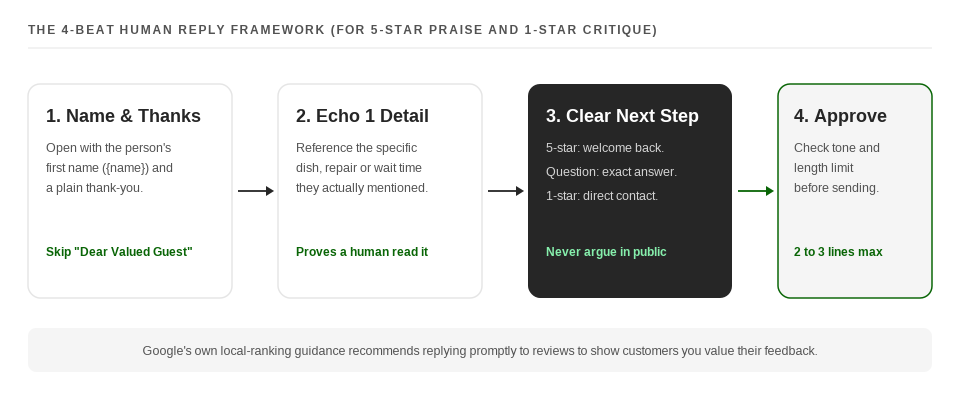
| Beat | What it does | Good example | Robotic version to avoid |
|---|---|---|---|
| 1. Greet by name | Proves a real person read the message | “Thanks so much, Sofia!” / “Hi Marcus,” | “Dear Valued Customer,” |
| 2. Mirror 1 concrete detail | Proves it is not copy-pasted spam | “…glad the Thursday morning water heater swap went smoothly.” | “…we appreciate your kind feedback regarding our services.” |
| 3. Warmth or clear next step | Reinforces trust or moves a problem offline cleanly | “Email me directly at ana@shop.com or call 555-0142 and ask for Ana.” | “Please contact customer support at your earliest convenience.” |
| 4. Human sign-off | Puts a real local name behind the business | “See you next season, David” | “Best regards, Management Team” |
Notice why Beat 2 does almost all the heavy lifting. Changing one phrase (the specific dish, repair, haircut, workshop, or delivery day they mentioned) takes six seconds and makes even a saved template feel unmistakably hand-written.
Respect customer privacy (especially in healthcare, legal, and personal services)
If you run a dental practice, medical clinic, therapy office, law firm, or accounting firm, never confirm that a reviewer is a patient or client, and never mention appointment details, diagnoses, or private case facts in a public reply. Keep Beat 2 focused strictly on your team’s general standards (“We take clear communication and on-time appointments seriously at our clinic…”) and invite them to call the front desk directly.
8 copy-ready templates (good reviews, bad reviews, and social comments)
Every template below uses {name} for first-name personalization (which Spica Post’s Saved Replies fill automatically from the reviewer or commenter’s profile) and a bracketed [specific detail] slot that takes five seconds to customize before sending.
1. Detailed 5-star Google review
Thanks so much, {name}! Hearing that [the Saturday patio seating and the sourdough breakfast sandwich] hit the spot made our whole kitchen’s morning. We appreciate you taking a minute to share that, and we look forward to seeing you back soon. · Elena
Why it works: Mirrors two real details naturally, stays under 50 words, and quietly reinforces what you are great at for anyone skimming your Maps listing.
2. Star-only 5-star review (no text written)
Thank you for the 5 stars, {name}! We are really glad you had a great experience with [our Oak Street team / our shop] and truly appreciate the support. Hope to welcome you back again soon. · Sam
Why it works: Short, warm, and never awkward about the reviewer leaving the text box blank. Vary your opening phrase across templates so three star-only reviews in a row never look identical.
3. Constructive 4-star review (praise plus one small friction point)
Thank you for stopping by and sharing honest feedback, {name}. I am glad you loved [the cold brew and the pastries], and you are right that [our Sunday morning line moved slower than it should have]. We just added a second register shift for weekend mornings to speed things up. Hope your next visit feels much smoother! · Elena
Why it works: Validates the compliment, owns the friction without making excuses, and shows future visitors that you actually improve things based on feedback.
4. Fair 1-star or 2-star review (your business genuinely dropped the ball)
Hi {name}, I am really sorry we fell short on [your Tuesday delivery window]. That is not the standard we promise our customers, and I understand why you were frustrated. I would like to make this right directly: please call me at [555-0194] or email [david@company.com] and ask for David so I can sort out a refund or replacement today. · David, Owner
Why it works: Zero excuses, zero blame-shifting, immediate ownership, and a direct offline path with a real person’s name. Future buyers see an owner who stands behind their work when something goes wrong.
5. Angry or exaggerated 1-star review (disputed facts)
Hi {name}, I am sorry you left unhappy after [your estimate visit on Thursday]. We always walk through pricing before starting any job and work hard to keep surprises off the invoice, so I want to review your notes personally and make sure nothing was miscommunicated. Please reach out to me at [ana@company.com] or [555-0148] whenever you have two minutes. · Ana
Why it works: Protects your reputation calmly without calling the customer a liar in public. Readers immediately sense the difference between an angry rant and a grounded, reasonable business owner.
6. Wrong-business or suspicious spam review
Hi {name}, thanks for letting us know, though it looks like this review may have been meant for another business: we do not [offer overnight dry cleaning / operate a downtown location] and have no record under your name. If there was any mix-up with our shop, please call us at [555-0130] so we can help; otherwise you may want to move this to the right listing. · Marco
Why it works: Polite, factual, and crystal clear for anyone scanning your reviews while you separately report the review to Google if it violates Google’s prohibited content policy (fake engagement, off-topic, or wrong business).
7. Buying-intent question on Instagram, Facebook, or Bluesky
Hi {name}! Yes, we do [same-week alterations and walk-in fittings Tuesday through Saturday, 10 AM to 6 PM]. If you want to lock in a spot or check pricing for a specific piece, feel free to call [555-0188] or tap the booking link in our bio. Happy to help!
Why it works: Answers the actual question publicly (so ten other silent readers get the answer too) instead of hiding behind “DM us for details!”, then gives one frictionless next step.
8. Compliment or casual community comment on social media
Appreciate that, {name}! [That walnut shelf finish] took three test coats to get right, so we are thrilled it caught your eye. Thanks for cheering us on!
Why it works: Keeps momentum alive in under 30 words. On social networks, early real-human back-and-forth under a fresh post also encourages other followers to chime in.
Five reply mistakes that quietly cost you calls
Even well-meaning owners lose bookings with a handful of avoidable habits:
- Keyword-stuffing Google replies. Writing “Thank you for choosing Best Austin Emergency Plumber LLC for your Austin Tankless Water Heater Repair in Austin TX!” reads like spam to humans and violates Google’s guidance against unnatural promotional stuffing. Mention the real service naturally once; never shoehorn awkward SEO phrases.
- Replying in anger at 11 PM. If a harsh review raises your blood pressure, draft your reply, step away for an hour (or until morning), cut half the adjectives, and remove every trace of sarcasm before hitting send.
- Never moving complaints offline. Going back and forth for six public comments under a 1-star review turns a minor mistake into a permanent spectacle. Give one clear direct phone number or email on your very first reply.
- Hiding answers behind “Check your DMs!” on social comments. Unless an answer requires private personal info (like an invoice number or address), answer standard questions about hours, availability, shipping, or service areas right in the public thread so every silent shopper sees it.
- Sharing a reviewer’s photo or quoting a private message without asking. Google reviews are public, but if you want to turn a customer’s review or job photo into a featured social graphic or testimonial post, always ask the customer’s permission first.
How to handle all replies in 10 minutes a day (the Unified Inbox workflow)
The hardest part of replying consistently is not writing three sentences; it is remembering to log into Google Business Profile, Instagram, Facebook, and Bluesky across one or ten brand accounts without missing a review for two weeks.
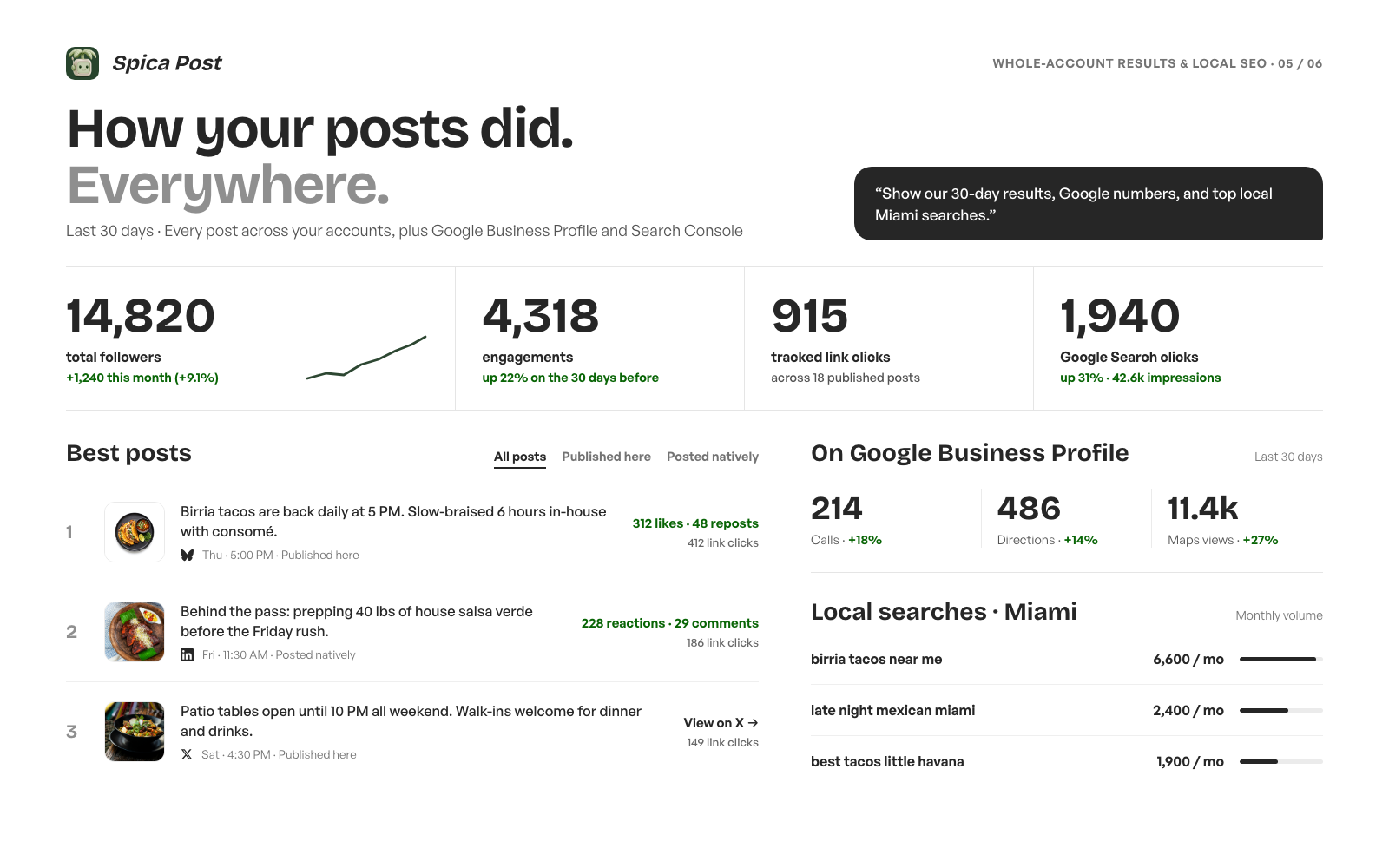
How Spica Post’s Unified Inbox works (and what is live today)
Spica Post built a dedicated Unified Inbox & Weekly Executive Digest designed for busy owners and multi-brand teams who want speed without handing the keys to unchecked auto-responders:
- One calm inbox across brands: Switch between This brand and All brands (
brands_inbox_list) so solo owners see one clean feed and agencies triage every client workspace without logging in and out of native apps. - Up to 50 saved replies with
{name}personalization: Store your own human-sounding templates (5-star thanks, star-only thanks, fair-complaint apology, hours/booking reply) and drop them in with one click, auto-filling{name}so you only tweak one specific detail before sending. - AI-assisted triage that never sends behind your back: Using Spica Post’s MCP
triage_inboxworkflow in Claude, ChatGPT, or Codex, your assistant can read open reviews and comments, draft tailored replies in your voice, and show every proposed reply for your explicit yes before callinginbox_reply. - Automatic background refresh + Weekly Executive Digest: Once armed, your inbox refreshes every 6 hours, emits
inbox.repliedwebhooks if your team tracks responses in Slack or a CRM, and can send an optional Weekly Executive Digest email summarizing 7-day engagement, follower growth, open inbox items waiting on a reply, and any accounts needing reconnect. - Platform-aware reply limits built in: Enforces each platform’s real reply ceiling automatically (up to 2,000 characters on Google Business Profile review replies; 300 graphemes on Bluesky replies) so replies never bounce mid-send.
Honest trade-offs and current channel status (verified November 2026)
We keep our promises transparent, so check the exact channel rollout before picking a plan on our pricing page:
- Bluesky comments and replies are live today across Studio, Pro and Agency plans (Starter focuses on publishing and does not include the Unified Inbox).
- Google Business Profile 1-to-5 star reviews, Instagram comments (including real-time comment webhook capture), and Facebook Page comments are built end-to-end in the Unified Inbox and unlock for every customer as Google Business Profile verification and Meta app review complete.
- X (Twitter) is intentionally excluded from the inbox: Because X charges pay-per-use fees for reading mentions and replies, Spica Post keeps X post-only by policy rather than passing unpredictable API read bills to customers.
- YouTube comments and Mastodon mentions are not inside the Unified Inbox yet; answer those natively in YouTube Studio and your Mastodon client for now.
A 10-minute daily routine any owner can actually stick to
You do not need to live inside notifications all day to build a reputation for fast, warm service. Run this five-step routine once a day (say right after opening or with your morning coffee):
- Minutes 0 to 2 (Urgent first): Scan for any 1-star to 3-star reviews and any buying questions on social posts (“Are you open today?”, “How do I book?”). Answer those first so warm leads and frustrated customers never wait.
- Minutes 2 to 6 (Batch 5-star reviews): Pick a saved template, let
{name}fill automatically, swap in one real detail from what the customer said, and send. Never send two identical replies back to back. - Minutes 6 to 8 (Social comments): Reply briefly to comments on your latest posts from the last 48 hours. Answer common questions publicly so future readers benefit.
- Minutes 8 to 9 (Flag & log real issues): If a review reveals a recurring operational snag (slow weekend pickup, unclear parking sign, missing menu item), drop a one-line note to your team so the fix happens in real life, not just in text.
- Minute 10 (Close the tab and get back to work): Turn off push notifications for non-urgent likes, and rely on your Weekly Executive Digest every Monday to verify nothing slipped through the cracks.
Set a single daily 10-minute calendar block for reviews and comments instead of replying piecemeal while stressed. You will answer faster, sound calmer, and protect the rest of your workday.
Questions people ask
- Does replying to Google reviews actually help local search visibility?
- Yes. Google's own Business Profile documentation explicitly states that interacting with customers by responding to reviews shows you value customer feedback and helps improve local business visibility and customer trust on Google Search and Maps.
- How fast should a small business respond to a Google review or social comment?
- Aim to reply to negative reviews and buying questions on social media within 24 hours (same business day whenever possible), and answer positive 4-star and 5-star reviews within 2 to 3 business days. Consistency matters far more than instant midnight replies.
- What is the character limit on Google Business Profile review replies?
- Google allows long owner responses (Spica Post supports up to 2,000 characters on Google Business Profile review replies), while social replies are tighter (for example 300 graphemes on Bluesky). In practice, the strongest review replies stay between 35 and 90 words so future shoppers actually read them.
- Should I copy and paste the same thank-you reply on every 5-star review?
- No. Prospective customers read five or ten reviews in a row before calling. Seeing the exact same corporate sentence repeated ten times looks automated and cold. Use saved reply templates as a starting skeleton, then swap in the customer's first name and one concrete detail from what they mentioned.
- How should I handle an angry 1-star review or a review left for the wrong business?
- Stay calm, acknowledge the frustration without arguing publicly, move resolution offline with a direct phone number or email, and write for the next hundred prospective customers reading the exchange. If the review violates Google's policies (spam, hate speech, or clearly the wrong business), reply politely clarifying the mix-up and flag it through Google Business Profile.
Sources
- Google Business Profile Help: Read and reply to reviews (official guidance)
- Google Business Profile Help: Tips to improve your local ranking on Google
- Google Maps User Contributed Content Policy: Prohibited & restricted content
- BrightLocal Local Consumer Review Survey: How consumers judge owner responses
- Spica Post Unified Inbox & Weekly Executive Digest
- Spica Post Free Google Business Profile Post Previewer