Character limits
Social Media Character Limits Cheat Sheet for 2026 (11 Networks)
Exact 2026 character limits, feed folds, URL weights, UTF-8 byte caps and media requirements across 11 social networks, plus how to adapt one post cleanly.
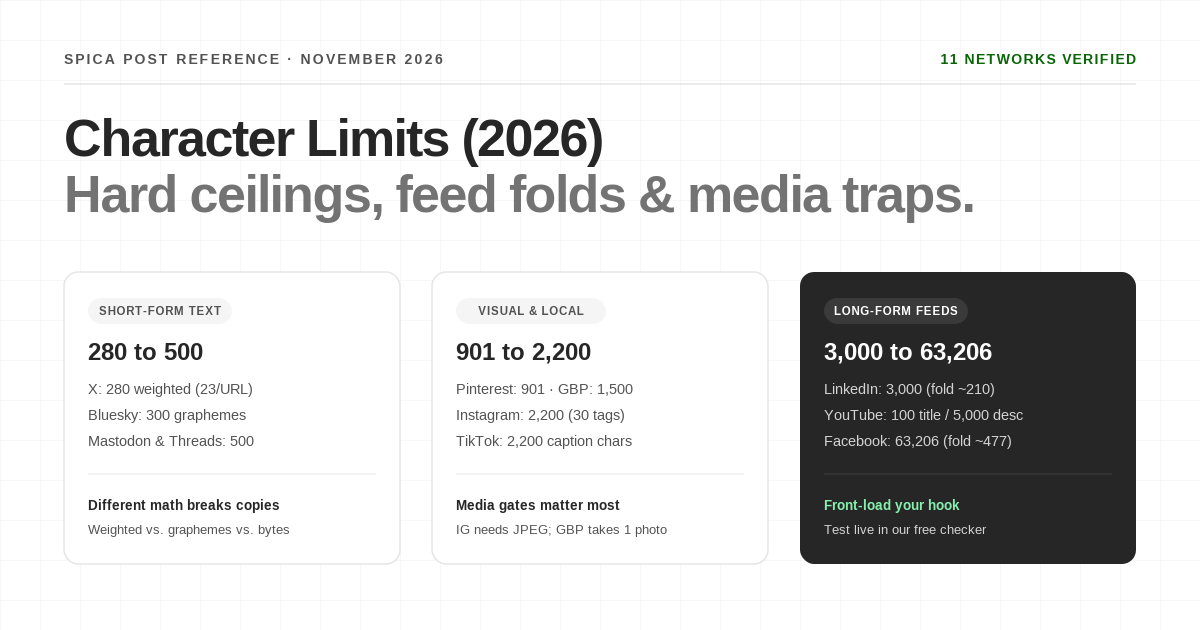
In 2026, social media character limits span from 280 weighted characters on X and 300 graphemes (3,000 UTF-8 bytes) on Bluesky to 500 on Mastodon and Threads, 901 on Pinterest, 1,500 on Google Business Profile, 2,200 on Instagram and TikTok, 3,000 on LinkedIn, 5,000 description characters (plus a 100-character title) on YouTube, and 63,206 on Facebook Pages. Just as important as the hard ceiling is the mobile feed fold: Google Business Profile (~120 chars), Instagram (~125 chars), LinkedIn (~210 chars) and Facebook (~477 chars) hide everything past your opening lines behind a “See more” tap, so putting your real point in the first 120 characters protects readability everywhere.
Most character-limit cheat sheets online are padded with outdated guesses that miss what actually rejects your post at publish time. A real publishing error rarely happens because someone typed 65,000 characters into Facebook. It happens because an expanded URL blew past Bluesky’s 300 graphemes, a PNG photo bounced off Instagram’s JPEG-only API, a video was attached to a Google Business Profile post, or an emoji pushed an X update from 279 to 281 weighted characters.
Every figure in this guide is matched directly against the live adapter validation limits enforced in Spica Post and in our free local Social Media Character & Post Checker.
Snapshot verified November 2026. Limits reflect published platform API rules and standard server defaults as of verification time.
Master cheat sheet: 2026 character limits, feed folds and media caps (11 networks)
Use this table as your quick reference before drafting or scheduling a multi-network campaign. Click any platform name to jump to its specific traps and tips.
| Network | Hard text limit | Visible before “See more” fold | Counting unit / special rule | Media & format requirements |
|---|---|---|---|---|
| X (Standard) | 280 (25,000 X Premium) | Full text (280) | Weighted: URL = 23, emoji/CJK = 2 | Up to 4 photos (PNG/JPEG/WebP) or 1 MP4 (no mixing) |
| Bluesky | 300 graphemes & 3,000 bytes | Full text (300) | Intl.Segmenter graphemes + UTF-8 bytes |
Up to 4 photos (PNG/JPEG/WebP) or 1 MP4 (no mixing) |
| Mastodon | 500 (standard server) | Full text (500) | Graphemes (custom servers may raise cap) | Up to 4 images (PNG/JPEG/WebP/GIF) or 1 MP4 |
| Threads | 500 | Full text (500) | Standard characters | Up to 20 photos/videos in carousel (PNG/JPEG/MP4) |
| 901 | Short card preview | Combined pin text limit | Media required: 1 to 5 items (PNG/JPEG/MP4) | |
| Google Business Profile | 1,500 | ~120 chars | Plain characters | Optional 1 JPEG or PNG photo (<= 5 MB); no video |
| 2,200 | ~125 chars | Characters; max 30 hashtags | Media required: 1 to 20 items (JPEG photos or MP4) | |
| TikTok | 2,200 (caption) | ~100–125 chars | Caption characters | Media required: 1 MP4 video (or photo post) |
| 3,000 | ~210 chars | Standard characters | Up to 20 media items (PNG/JPEG/MP4) | |
| YouTube | 100 title / 5,000 desc | Title + ~125 desc | Separate title (first line) & description | Video required: 1 MP4 video |
| Facebook Pages | 63,206 | ~477 chars | Standard characters | Up to 10 media items (PNG/JPEG/MP4) |
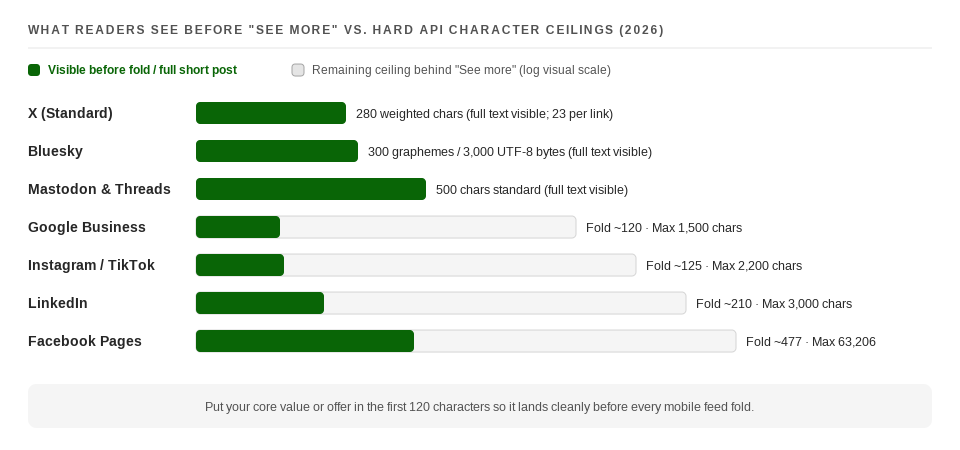
The three hidden counting traps that break multi-network posts
Simple character counters (like string.length in a spreadsheet) lie on three networks. Understanding these three edge cases eliminates almost all unexpected publish rejections.
Trap 1: X weighted characters (23 per URL, 2 per emoji or CJK glyph)
On X, length is not raw character count:
- Every valid
https://URL counts as 23 weighted characters, even if the link is a 12-character short domain or a 160-character UTM URL. - Most emoji and East Asian (CJK) characters count as weight 2 each.
- Standard Latin letters, numbers and spaces count as weight 1.
As a result, a 270-character draft with six festive emoji (6 × 2 = 12) actually measures 276 weighted characters (safe), while ten emoji pushes that same short sentence over 280 and gets rejected.
Trap 2: Bluesky graphemes vs. UTF-8 bytes (and expanded URLs)
Bluesky’s ATProto specification enforces two simultaneous ceilings:
- 300 grapheme clusters: A complex multi-codepoint emoji (like a family emoji or skin-tone modifier) counts as 1 grapheme, which is friendlier than X.
- 3,000 UTF-8 bytes: Heavily accented text, symbols or dense multi-byte scripts can approach byte limits if automated tools inject invisible characters or long markup.
- Full URL length counts: Unlike X’s 23-character flat rule, Bluesky counts the literal URL string you place in the post text. Moving a post with a long tracking URL from X to Bluesky is the #1 reason cross-posted updates overflow 300 graphemes (use tracked
/l/<code>short links or enable automatic native thread splitting).
Trap 3: Media-required and format-locked API rejections
Half of all “character limit” tickets turn out to be media limit rejections:
- Instagram refuses PNG, WebP and iPhone HEIC photos over the API. Converting images to JPEG before upload makes every single network accept the exact same file cleanly.
- Instagram, TikTok, YouTube and Pinterest reject text-only posts. Even a crisp 100-character caption fails if you forget to attach a photo or video.
- Google Business Profile accepts at most 1 photo (JPEG or PNG) and zero video on standard posts.
- X and Bluesky do not allow mixing photos and video inside a single post (pick up to 4 photos, OR 1 video).
Save every post graphic as a clean JPEG and write your opening hook inside the first 120 characters. Those two habits alone prevent 90 percent of cross-network rejections and awkward feed truncations.
Platform-by-platform breakdown (11 networks)
1. X (Twitter)
Standard X accounts cap at 280 weighted characters (X Premium raises the ceiling to 25,000 characters, though feeds still collapse long posts behind “Show more”). Keep everyday announcements under 240 weighted characters so readers have room to quote-post cleanly, attach up to 4 photos or 1 MP4 video (never both in one post), and split longer explanations into chained threads (up to 25 parts on Spica Post).
2. Bluesky
Bluesky caps every post at 300 graphemes and 3,000 UTF-8 bytes, with up to 4 photos or 1 MP4 video. Because Bluesky displays the full 300 graphemes without hiding anything behind a fold, short punchy paragraphs with clean line breaks and alt text on every photo read cleanly. If your copy passes 300 graphemes, split it into a native chained Bluesky thread (up to 25 parts).
3. Mastodon
Standard Mastodon instances (such as mastodon.social) enforce 500 graphemes and up to 4 images (PNG, JPEG, WebP or GIF, up to 16 MB each) or 1 MP4 video (40 MB). Individual self-hosted or niche instances can configure higher custom limits, and Mastodon natively supports optional content warnings (spoilerText), post visibility (public, unlisted, private) and chained threads up to 25 parts.
4. Threads
Threads caps posts at 500 characters and supports generous carousels of up to 20 photos or videos (PNG, JPEG, MP4). Five hundred characters is roughly two short paragraphs, making Threads ideal for conversational opinions, mini-checklists and multi-photo before-and-after recaps without needing a long thread.
5. Pinterest
Pinterest pins require 1 to 5 visual items (PNG, JPEG or MP4 video pin) paired with a target board and concise, search-friendly copy (up to 901 characters combined in Spica Post’s validator). Front-load your main keyword and benefit in the first 60 to 100 characters because grid cards display only the opening line alongside the vertical image.
6. Google Business Profile
Google Business Profile posts allow up to 1,500 characters, yet Maps and Search cards typically truncate around 120 characters. Put your core offer, service area, date or booking prompt in sentence one, attach 1 crisp JPEG or PNG photo (never a video, and keep files <= 5 MB), and test how your card crops before publishing with our free Google Business Profile Post Previewer.
7. Instagram
Instagram captions cap at 2,200 characters and 30 hashtags maximum, requiring 1 to 20 photos or videos (JPEG for photos; MP4 for Reels and video slides). Mobile feeds cut captions after roughly 125 characters, so put your hook before line two, keep paragraphs airy, and stick to 3 to 5 specific local or niche hashtags rather than a wall of 30 generic tags.
8. TikTok
TikTok captions hold up to 2,200 characters and require a video (MP4) or photo post. Because captions overlay the bottom of the video player and fold after roughly 100 to 125 characters, use the opening line to reinforce the on-screen hook and pack clear descriptive keywords into the rest so TikTok search indexes your clip.
9. LinkedIn
LinkedIn posts allow 3,000 characters and up to 20 media attachments, collapsing feed posts after roughly 210 characters (about two or three short lines on mobile). Treat those first 210 characters as a standalone headline and subheadline: if a reader does not care after line two, they never click “more” to read the remaining 2,790 characters.
10. YouTube
YouTube requires 1 MP4 video with a hard 100-character title (truncating in many mobile lists around 60 to 70 characters) and a 5,000-character description. Put your primary search phrase cleanly inside the first 60 characters of the title and put your website link and main takeaway in the first 125 characters of the description before the fold.
11. Facebook Pages
Facebook Pages allow an enormous 63,206 characters and up to 10 media attachments, folding feed posts after roughly 477 characters. Very few small-business updates ever benefit from essay-length Facebook posts: concise 150-to-400-character posts with one strong authentic photo (and customer permission if featuring a customer) stay completely visible without requiring a tap.
How to adapt one core post across all 11 networks in 60 seconds
Instead of writing eleven separate drafts from scratch, follow the Three-Tier Ladder:
- Write the 120-character core hook first. State what happened, what is on offer, or the single useful tip in under 120 characters. That opening line clears every mobile feed fold (Google Business Profile, Instagram, TikTok, LinkedIn and Facebook).
- Build the 260-character short-form shell. Add one supporting sentence and a short link so the full update fits simultaneously on X (280 weighted), Bluesky (300 graphemes), Mastodon (500) and Threads (500) without awkward cuts.
- Expand only where longer context helps. Add a brief bulleted takeaway or booking detail for LinkedIn (3,000), Instagram (2,200), Google Business Profile (1,500) and Facebook Pages, and pair it with a JPEG photo (plus an MP4 cut for TikTok/YouTube if filming video).
If you connect Claude, ChatGPT or Cursor to Spica Post over MCP, your assistant generates network-specific variants automatically and runs drafts_validate against these exact adapter rules before showing you a single draft for approval. (For transparency on Spica Post’s live channels today: X, Bluesky, Mastodon and LinkedIn personal profiles require no central platform review, while Instagram, Facebook Pages, Threads, Google Business Profile, YouTube, TikTok and Pinterest unlock as official reviews clear; see pricing for live plans.)
Write to the fold, not to the ceiling. A 200-character post with a sharp opening line and a clean JPEG beats a 2,100-character wall of text on almost every social feed in 2026.
5-step pre-publish check before scheduling any multi-network batch
Run this quick checklist on every campaign batch before clicking approve:
- Test your draft in the free Character & Post Checker. Toggle your photo and video counts so you catch X weighted-link overflows, Bluesky UTF-8 byte limits and media-required rejections in one screen.
- Verify your first 120 characters stand alone. Read only the first sentence and ask whether someone scrolling on a phone immediately knows what you are offering or teaching.
- Convert every image to JPEG and check alt text. One clean JPEG satisfies Instagram, Google Business Profile, X, Bluesky, Mastodon, LinkedIn, Threads, Pinterest and Facebook without format bounces.
- Preview local search cards separately. If you are posting an offer or event to Google Business Profile, run it through the free Google Business Profile Post Previewer to check button labels and date spans.
- Shorten long tracking URLs before cross-posting. Replace 110-character UTM strings with clean short links so Bluesky’s 300-grapheme counter stays comfortable and clicks stay tracked cleanly across networks.
Questions people ask
- Why does the same post fit on X (280) yet fail on Bluesky (300)?
- X uses weighted characters where every URL counts as 23 characters regardless of how long the link actually is. Bluesky counts the full expanded URL against 300 user-perceived graphemes and 3,000 UTF-8 bytes, so one 95-character tracking link can push a 240-character X post over Bluesky's limit.
- What is the difference between a character limit and a feed fold?
- The character limit is the hard ceiling where a platform refuses to publish your post (for example 2,200 characters on Instagram or 3,000 on LinkedIn). The feed fold is where the app collapses your caption behind a See more button (roughly 120 characters on Google Business Profile, 125 on Instagram, 210 on LinkedIn and 477 on Facebook).
- Which social networks reject text-only posts or non-JPEG images?
- Instagram, TikTok, YouTube and Pinterest reject text-only posts and require attached media. Instagram's publishing API specifically requires JPEG photos (refusing PNG, WebP and iPhone HEIC), and Google Business Profile accepts only 1 JPEG or PNG photo and no video.
- How many hashtags are allowed on Instagram in 2026?
- Instagram enforces a hard maximum of 30 hashtags per caption and rejects posts over that limit. For readability and signal quality, most small businesses and creators perform better using 3 to 5 specific, relevant tags rather than filling all 30 slots.
- How can I check character limits across multiple networks before posting?
- Paste your draft into Spica Post's free browser-based Character & Post Checker (/tools/character-counter/), which runs locally with zero login and checks exact X weighted lengths, Bluesky graphemes and UTF-8 bytes, feed folds and media rules across ten platforms simultaneously.
Sources
- Spica Post Free Social Media Character & Post Checker (live adapter rules)
- X Developer Docs: Counting characters and weighted URL lengths
- Bluesky ATProto Docs: Rich text 300-grapheme and 3,000 UTF-8 byte limits
- Mastodon API Documentation: Posting statuses and media attachments
- Meta Instagram Platform Content Publishing API documentation
- Google Business Profile API: Local post length and media specifications
- Spica Post Auto-crosspost length adaptation and thread splitting