Dentists
Social Media for Dentists: What You Can Post and What to Avoid
Ease dental anxiety and book new-patient exams with calm clinic tours, team intros, and plain guidance while respecting strict HIPAA privacy red lines.
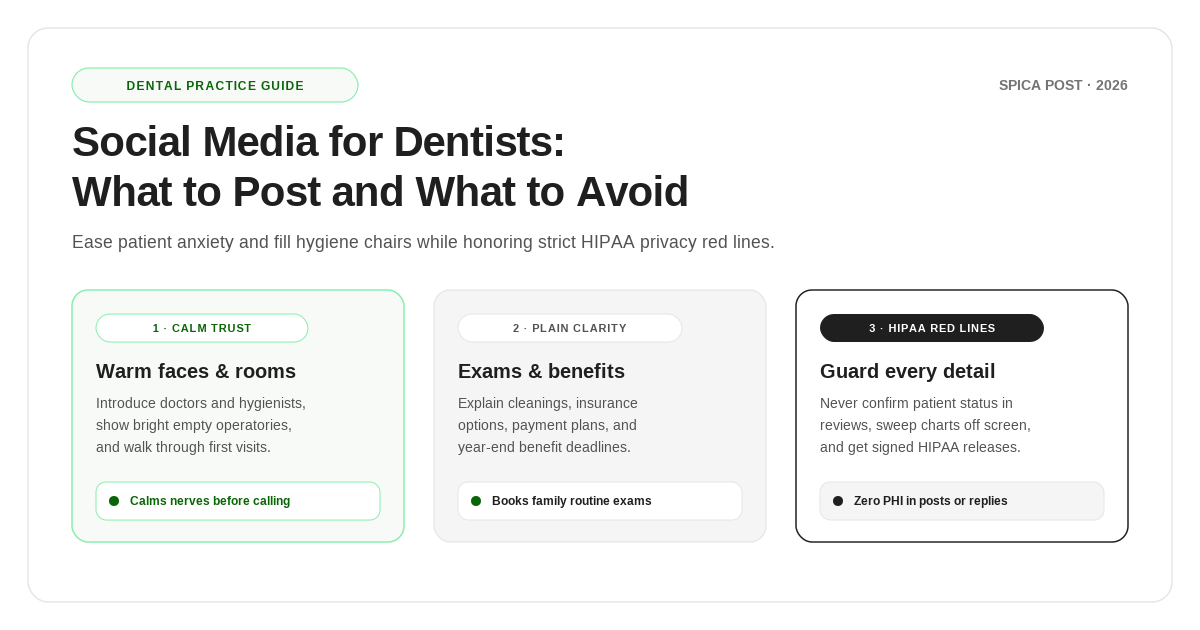
Social media for dentists succeeds when every post accomplishes two quiet jobs at once: lowering the anxiety that keeps neighborhood families putting off a checkup, and protecting patient privacy without exception so your practice never crosses a HIPAA red line in a photo background, caption, or public review reply.
Editorial note and snapshot verified November 2026: this article provides practical marketing and editorial guidance for dental teams, not legal advice. Always review your specific authorization forms, review-response scripts, and advertising claims with qualified healthcare compliance counsel, official U.S. HHS HIPAA Privacy Rule documentation, American Dental Association HIPAA resources, and your state dental board’s advertising guidelines.
When a prospective patient searches for a new family dentist, they are rarely shopping for viral dance clips or flashy cosmetic promises. They are asking much more human questions: “Does this doctor look patient and kind? Is the office spotless and welcoming? Will they judge me because I skipped cleanings for three years? Do they take my insurance or offer clear self-pay options? Can I book online without sitting on hold?” Answering those five questions clearly across your Google Business Profile, social feeds, and booking Link Page fills hygiene chairs far more reliably than trend chasing ever will.
This guide covers four profile blockers to fix before posting, where prospective dental patients actually look in 2026, four safe content pillars that book exams, strict HIPAA and patient-trust red lines to avoid, five copy-ready compliant templates, a four-season recall calendar, and a 20-minute weekly review-and-approval workflow for busy dental offices.
Fix four trust and booking blockers on your clinic profiles
Before drafting a single new post, inspect your Google Business Profile, Instagram bio, Facebook Page, and booking links on a phone as if you just moved to town with a sore molar or two children needing fall checkups. Four small gaps push ready callers to the next clinic on the map.
1. Clinical jargon and missing neighborhood facts in your bio
Bios reading “Comprehensive Prosthodontics & Restorative Excellence” sound impressive to peers and confusing to neighborhood parents. Replace clinical shorthand with plain facts in line one: your city and neighborhood, who you care for (general family care, pediatric visits, gentle exams, emergency visits), languages spoken at the front desk, and an easy parking note.
2. Cold stock photos instead of your real front desk and rooms
Anxious patients want to picture the exact room they will walk into. Generic stock models flashing bright white teeth create instant skepticism. Replacing stock banners with five sunlit, real photos of your exterior sign, reception desk, bright waiting area, spotless empty operatory, and smiling doctors builds immediate familiarity (review framing tips in our Google Business Profile photos guide).
3. Scattered links instead of one clear mobile Link Page
Someone checking your Instagram profile on their break does not want to hunt through six dropdown menus to find your new-patient form. Put four patient-friendly buttons on one fast mobile Link Page linked from every bio and printed as a QR code on appointment reminder cards:
- Request a New-Patient Exam or Cleaning (straight to your HIPAA-compliant online booking portal or office phone line).
- Insurance, Membership Plan & Payment Options (one plain-English overview page).
- Office Hours, Parking & Accessibility (clear directions and suite number).
- Emergency Toothache Guidance (your direct office phone number and same-day availability note).
4. An incomplete Google Business Profile
Most new dental patients find their clinic through Google Search and Maps first, then click over to Instagram or Facebook to see whether the team feels approachable. Verify your primary category, list plain-English services (routine cleanings, digital X-rays, crowns, pediatric exams, emergency care), keep holiday closures current, and read every review promptly (see our Google Business Profile setup guide and local SEO beginner guide).
Where prospective dental patients actually look in 2026
A dental office manager already balances insurance verifications, hygiene recalls, and front-desk calls. Skip platforms that drain hours without reaching local households, and focus on the few channels that match how people choose a doctor.
| Channel | What the prospective patient does here | Best weekly job for a dental practice | Current Spica Post status (Nov 2026) |
|---|---|---|---|
| Google Business Profile | Searches “dentist near me”, checks reviews, hours, parking, and clinic photos | 1 fresh empty-clinic or team photo weekly, updated holiday hours, safe review replies | Built and enabled in production; awaiting first live service-area profile verification |
| Branded Link Page | Taps from social bio to book exams, check insurance info, or get directions | Always live in every bio and printed as a QR code at checkout or on recall cards | Live today in Spica Post with custom announcement boxes and printable SVG QR codes |
| Checks whether the doctors, hygienists, and office look warm and calm | 2 to 3 weekly posts: team intros, calm clinic tours, plain-English care Q&As | Built; completing Meta App Review | |
| Facebook Page | Local parents, retirees, and multi-generational households verifying community presence | Mirror your 2 to 3 weekly trust posts, seasonal reminders, and office hour alerts | Built; completing Meta App Review |
| LinkedIn (personal profile) | Referring specialists, local employers, and dental hygienist or assistant job candidates | 1 to 2 monthly posts highlighting team culture, continuing education, and hiring | Live direct publishing today |
| YouTube / Shorts | Anxious adults researching “what happens at a first dental visit” before calling | Optional: 1 short 45-second calm doctor explainer per month linked from your website | Built; YouTube OAuth approved and completing compliance audit |
| X / Bluesky / Mastodon | Optional community updates, weather closure alerts, or local health tips | Quick clinic weather or holiday-hour alerts pointing to your Link Page | Live direct publishing and Auto-crosspost today (Bluesky Unified Inbox live) |
For almost every neighborhood dental practice, Google Business Profile, Instagram, Facebook, and a clear Link Page drive new patient exams, while LinkedIn quietly helps you attract skilled hygienists and specialist referrals.
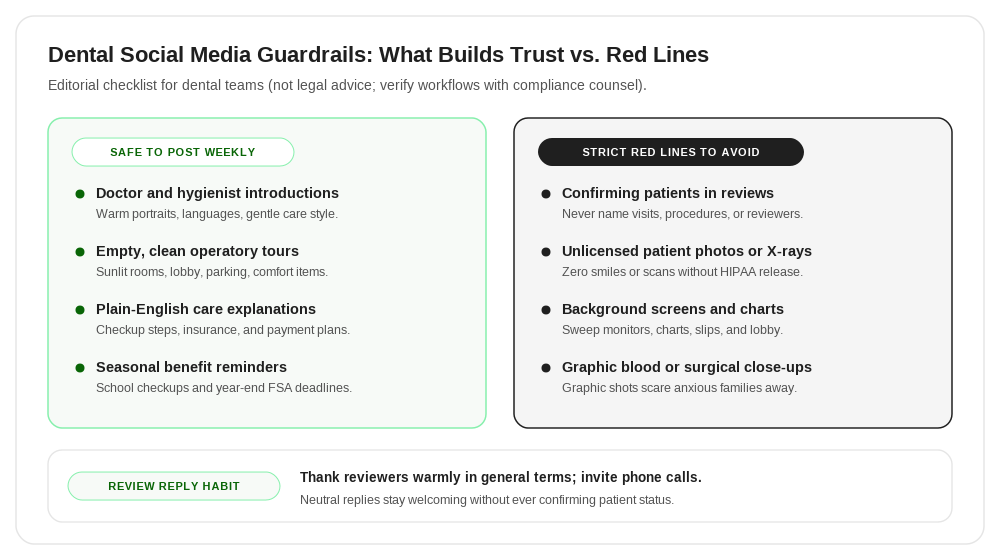
What you can post safely: four pillars that ease anxiety and book exams
Dental social media does not need patient stories or clinical before-and-after galleries to work remarkably well. In fact, practices that center their calendar around team warmth, clinic familiarity, and plain-English answers run nearly zero privacy risk while converting anxious locals into loyal routine patients.
Pillar 1: Warm introductions to your dentists, hygienists, and front desk
Walking into an exam room feels far less intimidating when a new patient already recognizes the hygienist’s smile and knows the doctor’s gentle communication style. Once every two weeks, share a bright portrait of one team member (with that staff member’s willing participation) answering two friendly non-clinical questions: what they love about working in your neighborhood, what languages they speak, and one small comfort detail they offer nervous patients. Showing real, calm human faces builds instant local trust (learn more in our guide to showing your face on business social media).
Pillar 2: Calm tours of clean, empty operatories and arrival steps
Fear thrives in the unknown. Record a slow 20-second horizontal or vertical walkthrough when the clinic is completely empty before opening or after closing: start at the parking lot and front door, walk past the bright check-in counter, step into one spotless empty hygiene room, and show comfort options such as warm blankets, sunglasses for the overhead lamp, or quiet headphones. Explain plainly what the first 45 minutes of a new-patient visit look like so nobody feels caught off guard.
Pillar 3: Plain-English explanations of checkups, insurance, and payment options
Patients delay care for two main reasons: fear of discomfort and fear of surprise bills. Create calm, judgment-free educational posts answering the exact questions your front desk hears every Monday:
- Judgment-free return visits: Reassure adults who have not seen a dentist in three, five, or ten years that your team focuses only on moving forward comfortably with zero lecturing.
- Routine checkup breakdowns: Explain in four bullet points what happens during a routine cleaning, periodontal check, and digital X-ray, and how long it takes.
- Insurance and self-pay clarity: Clarify plainly whether you accept major PPO plans, file claims on patients’ behalf, offer an in-house preventive membership plan for uninsured families, or provide phased treatment options.
- Children’s first visits: Reassure parents about gentle “happy visits” where young children meet the chair, count their teeth, and pick a toothbrush without pressure.
Pillar 4: Timely seasonal reminders before benefits or school breaks arrive
Families appreciate helpful calendar prompts when they arrive early enough to get an after-school or pre-holiday slot. Publish gentle reminders four to six weeks ahead of back-to-school checkups, spring break cleanings, and the annual year-end deadline for dental insurance maximums and Flexible Spending Account (FSA) dollars.
Strict red lines to avoid: HIPAA privacy and patient trust
One careless comment reply or an unnoticed computer monitor in the background of a celebratory team photo can create severe regulatory and reputational harm. Treat the five boundaries below as absolute office policy for every doctor, hygienist, assistant, and coordinator.
Red line 1: NEVER confirm or imply someone is a patient in public review replies
This is the single most common HIPAA violation among dental practices on Google Maps, Yelp, and Facebook. The U.S. HHS Office for Civil Rights (OCR) enforcement agreements include multiple real penalties against dental offices that responded to online reviews by revealing patient names, visit dates, billing disputes, or treatment details.
Even if a patient leaves a glowing five-star review writing “Dr. Patel fixed my cracked molar yesterday and barely hurt at all!”, you still cannot confirm they are a patient. Writing “Thank you Maria, we are so glad your molar crown feels great and cannot wait to see you in six months!” publicly verifies a provider-patient relationship and clinical care without written HIPAA authorization.
Instead, every public reply (whether five-star praise or a one-star complaint) must stay completely general and non-confirming: thank the reviewer for sharing feedback, affirm your practice’s commitment to comfortable care and clear communication, and invite anyone who wishes to discuss a specific experience to call your office directly. Never argue, never mention appointments, never verify billing, and never use clinical details publicly.
Red line 2: NEVER post patient photos, smiles, or X-rays without signed written HIPAA authorization
Verbal “Sure, go ahead!” approval while a patient sits in the chair does not satisfy HIPAA marketing authorization requirements. Before posting any patient portrait, smile makeover, testimonial quote, child “cavity-free club” snapshot, or radiograph (even if you think the mouth alone is anonymous), obtain a separate, valid written HIPAA marketing authorization signed by the patient (or legal guardian for minors) that specifies exactly what may be disclosed, which platforms may display it, an expiration date or event, and the clear right to revoke permission in writing at any time. Store the signed authorization cleanly in your compliance records, and immediately remove a post if a patient ever revokes consent. Ask your healthcare attorney or compliance officer to review your practice’s exact authorization form.
Red line 3: Sweep every photo and video background for Protected Health Information (PHI)
Modern phone cameras capture razor-sharp text ten feet away. Before taking any clinic photo or team selfie, pause for a ten-second background sweep across six common leak points:
- Operatory and front-desk monitors showing schedules, patient names, birth dates, or radiographs.
- Clipboards, routing slips, and physical charts resting on counters or hanging on room doors.
- Lab boxes, impression bags, and Invisalign or crown cases printed with patient names.
- Morning huddle whiteboards or sticky notes tucked beside monitors.
- Glass reflections or mirrors showing patients seated in adjacent bays or hallways.
- Waiting-room visitors sitting in the background during business hours.
The simplest safeguard is an office habit: photograph rooms and team portraits only before doors open, during a closed lunch hour, or after the last patient leaves, with every screen locked or turned off.
Red line 4: Skip graphic blood, extractions, or fear-triggering visuals
Close-up videos of bloody gums, extracted teeth, needles, or heavy drilling belong in gated dental-school study groups, never on a neighborhood clinic’s Instagram or Google Business Profile. Roughly one in three adults already feels anxious about dental visits; one jarring clinical close-up in their feed undoes months of warm trust building. Stick to smiling team faces, tidy modern tools resting calmly on sealed trays, dental models, or clean educational diagrams.
Red line 5: Avoid unverified outcome guarantees or misleading fee claims
In addition to federal HIPAA requirements, state dental boards enforce strict advertising standards covering specialty titles, “painless” guarantees, before-and-after disclaimers, and advertised fee disclosures. Keep claims honest, plain, and grounded in what your office genuinely delivers (for example, “gentle, unhurried exams with topical numbing options” rather than “100 percent pain-free dentistry guaranteed”).
Five copy-ready HIPAA-conscious templates for dental offices
Share these five templates with your front-desk and marketing coordinator as safe starting points, and have your compliance advisor approve your office’s final versions before daily use.
1. Safe, warm 5-star Google review reply (never confirms patient status)
Thank you for taking a moment to share such kind feedback! Our entire team at [Practice Name] works hard to keep every visit calm, clear, and comfortable for our neighbors in [City]. We truly appreciate your support and are always here if you ever have a question at [Office Phone].
2. Safe, calm 1-star or dissatisfied review reply (zero PHI, moves offline)
Thank you for sharing your feedback. At [Practice Name], we take patient comfort, clear communication, and billing transparency very seriously, and we are sorry to hear about a frustrating experience. Because we respect every individual’s privacy, we cannot discuss specific visits or account details online. Please call our office manager directly at [Direct Phone] or email [Office Email] so we can listen carefully and help address your concerns.
3. Judgment-free welcome post for anxious or overdue new patients (pin this post)
Has it been two, five, or ten years since your last dental checkup? You are welcome here with zero judgment and zero lectures.
At [Practice Name] in [Neighborhood / City], your first visit starts with a relaxed conversation before anyone looks at a single tooth. You set the pace, we explain every step in plain language before we begin, and we review clear costs upfront so there are never surprises.
Have questions before booking? Tap the link in our bio to see our team, office hours, and easy online appointment request, or call [Office Phone].
4. Empty-operatory calm tour and first-visit guide
Curious what a routine new-patient visit at [Practice Name] actually looks like? Here is a quiet peek inside our [Neighborhood] office before morning hours begin:
- Easy free parking right off [Street Name] with ground-floor access
- Calm check-in with digital forms you can complete from home before arriving
- Unhurried 60-minute exam, gentle cleaning, and digital X-rays reviewed side by side with Dr. [Last Name]
Ready to get your next checkup on the calendar? Tap our Link Page in bio to view open weekday and [early morning / Saturday] times.
5. Year-end insurance and FSA benefits reminder (post October to November)
Friendly fall reminder for our [City] neighbors: most dental insurance annual maximums and Flexible Spending Account (FSA) funds reset on December 31 and do not roll over into the new year.
If you have been meaning to schedule your second routine cleaning of the year or complete recommended preventive care, November and December chairs fill quickly. Call our front desk at [Office Phone] or tap our bio link to check remaining weekday openings, and our coordinators will gladly help verify your general plan details.
Four-season dental recall calendar and five mistakes to skip
Hygiene openings follow family school schedules and insurance calendars cleanly across the year. Matching your two weekly posts to each season keeps chairs full without desperate last-minute promos.
| Season | What local families and adults think about | Safe, high-booking weekly post themes |
|---|---|---|
| Winter (Jan to Mar) | Fresh insurance benefit resets, New Year health routines, dry-mouth winter tips, cold sensitivity | “Fresh annual benefits just reset” calm checkup reminders; sensitivity Q&A; warm doctor and hygienist introductions |
| Spring (Apr to Jun) | Spring break family cleanings, graduation and wedding smile prep, spring sports safety | Spring break sibling appointment blocks; custom athletic mouthguard reminders; plain-English whitening safety FAQ |
| Summer (Jul to Sep) | Back-to-school dental checkups (required by many districts), college send-off visits, summer schedule flexibility | “Book back-to-school cleanings before August fills” posted in late June; pediatric “happy visit” walkthroughs; parking and office tour |
| Fall and Holidays (Oct to Dec) | Year-end insurance and FSA deadlines (“Use It or Lose It”), holiday travel toothache prep, festive treats | October and November benefit deadline reminders; holiday office hours posted 2 weeks early; gentle winter care tips |
Eliminate these five habits right away to safeguard compliance and patient confidence:
- Replying to Google reviews with personal names or procedure notes. Even kind replies like “Glad your cleaning went well, John!” risk exposing Protected Health Information. Stick strictly to warm, general non-confirming responses.
- Snapping casual “team fun” selfies during busy clinic hours. Open charts, monitors, and hallway guests slip into backgrounds unnoticed. Shoot clinic photos only in empty rooms with screens locked.
- Treating verbal chair consent as legal marketing permission. Never publish patient faces, smiles, or radiographs without a compliant, signed written HIPAA marketing authorization stored on file.
- Posting complex clinical diagrams or lecturing patients about flossing. Shame pushes nervous adults away; calm curiosity, comfort options, and clear next steps bring them in.
- Letting a third-party agency auto-post generic stock teeth without doctor review. Generic stock posts look cold and risk inaccurate medical claims. Review every drafted post internally before it goes live.
A 20-minute weekly approval workflow and honest Spica Post trade-offs
Dental practices stay both consistent and compliant when drafting and approval are cleanly separated:
- Wednesday afternoon (10 minutes): Your office coordinator snaps one empty-clinic or willing-staff daylight photo (after verifying screens are off and charts are cleared) and drafts two calm posts for the following week using plain-English care themes.
- Thursday morning (5 minutes): The lead dentist or compliance lead reviews both drafts against a quick five-point check (zero PHI in text or background, zero patient photos without signed HIPAA authorization, honest non-guaranteed claims, clear local CTA, current office hours) and clicks Approve.
- Friday check (5 minutes): Answer new Google reviews using approved neutral, non-confirming templates and confirm your booking Link Page opens smoothly on mobile.
Honest trade-offs if you consider Spica Post
If you are evaluating Spica Post for dentists, here is the exact November 2026 platform picture for small businesses and creators, including compliance considerations:
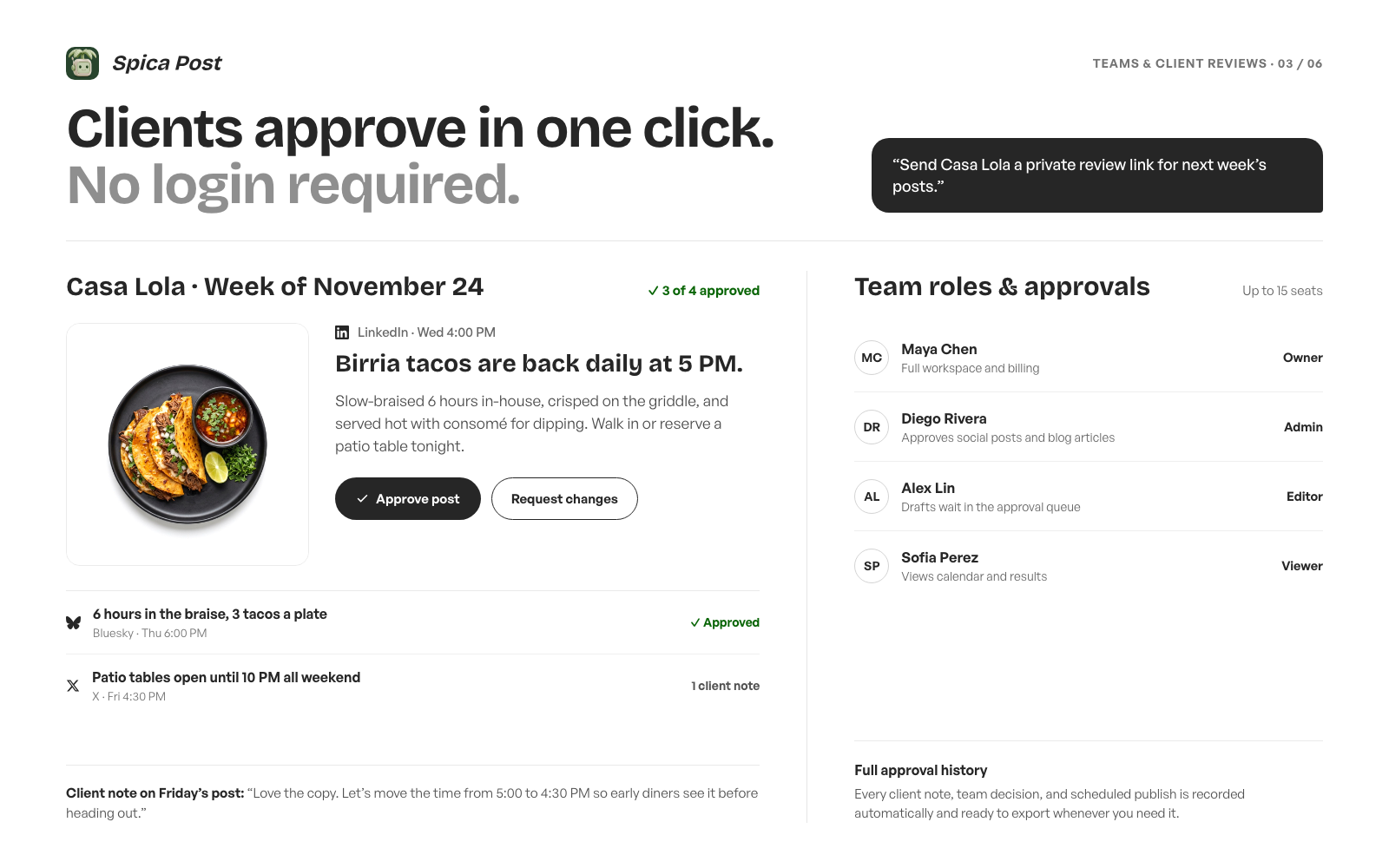
- Live today: Spica Post includes a fast branded Link Page (putting your online booking portal, insurance summary, office hours, parking notes, and printable SVG QR code on one page), team roles and an internal approval queue on Studio, Pro and Agency so a coordinator can draft while the lead dentist approves every post before publishing (with a searchable workspace audit log),
/l/click-tracked short links, drafting in your clinic’s calm voice, and live publishing across X, LinkedIn personal profiles (useful for recruiting hygienists and building specialist awareness), Bluesky (with live Unified Inbox replies), and Mastodon. Never upload patient PHI, clinical charts, or unapproved patient images into any general social media scheduling platform; keep social content strictly educational, clinic-focused, or covered by valid signed marketing authorizations. - Built and completing network review: Because Google Business Profile, Instagram, and Facebook Pages matter most for neighborhood dental clinics, note plainly that Spica Post’s connectors for Google Business Profile (approved and enabled in production, awaiting first live service-area profile verification), Instagram, Facebook Pages, Threads, TikTok, Pinterest, and YouTube (OAuth approved, completing compliance audit) are built and finishing platform review and verification. Until Google and Meta direct publishing open across all workspaces, use Spica Post for your clinic Link Page, internal draft-and-approve review workflow, and LinkedIn updates while pasting your two approved weekly posts natively to Google Business Profile, Instagram, and Facebook in five minutes. Review flat workspace plans anytime on our pricing page.
Start with one calm improvement this week: update every public review reply script to stay warmly non-confirming, shoot five sunlit photos of your spotless empty clinic and smiling doctors, and pin one judgment-free new-patient welcome post pointing straight to your booking Link Page. Anxious neighbors will feel the difference before they ever dial your number.
Questions people ask
- Can a dentist reply to a Google review by thanking a patient by name or mentioning their visit?
- No. Confirming or implying in a public reply that someone is a patient of your practice can disclose Protected Health Information under HIPAA, even when the reviewer wrote a glowing five-star comment naming their own procedure. Keep every public review reply warm, general, and strictly non-confirming, and invite anyone with specific questions to call your office directly.
- Can dental practices post before-and-after smile photos or X-rays on Instagram?
- Only after obtaining a valid, HIPAA-compliant written authorization signed by the patient that spells out exactly what images will be shared, where they may appear, and the patient's right to revoke permission. Never rely on casual verbal consent in the chair, and never assume cropping a photo to just teeth removes all privacy obligations.
- What types of social media posts actually bring new patients to a dental office?
- Posts that lower fear and remove practical friction convert best: friendly introductions to your dentists and hygienists, sunlit tours of empty operatories, plain-English explanations of what happens during a routine exam or cleaning, clear insurance and membership-plan summaries, and timely reminders before annual dental benefits expire.
- Should dentists post graphic clinical videos or surgical close-ups on local social feeds?
- Avoid graphic blood, extractions, or close-up surgical drills on patient-facing local accounts. While clinical peers may appreciate technical footage on professional forums, families and anxious adults browsing Instagram or Google Maps often feel startled and scroll straight to a calmer practice.
- How many times per week should an independent dental clinic post on social media?
- Two to three calm, well-checked posts per week paired with weekly Google Business Profile photo updates and safe review replies is plenty. Consistency and a clear, trustworthy clinic profile outperform daily trendy videos for booking routine checkups and hygiene recalls.
Sources
- U.S. HHS Office for Civil Rights: Summary of the HIPAA Privacy Rule
- U.S. HHS OCR: HIPAA Enforcement Resolution Agreements (online review and social media disclosures)
- American Dental Association (ADA): HIPAA Privacy and Security guidance
- Google Business Profile Help: Read and reply to reviews on Google
- Spica Post for Dentists: weekly posting examples and setup