Google Business Profile
Google Business Profile Offers and Events: When They Beat a Regular Update
Compare Google Business Profile Updates, Offers, and Events: exact fields, date ranges, rejection triggers, UTM tracking, and copy-ready templates.
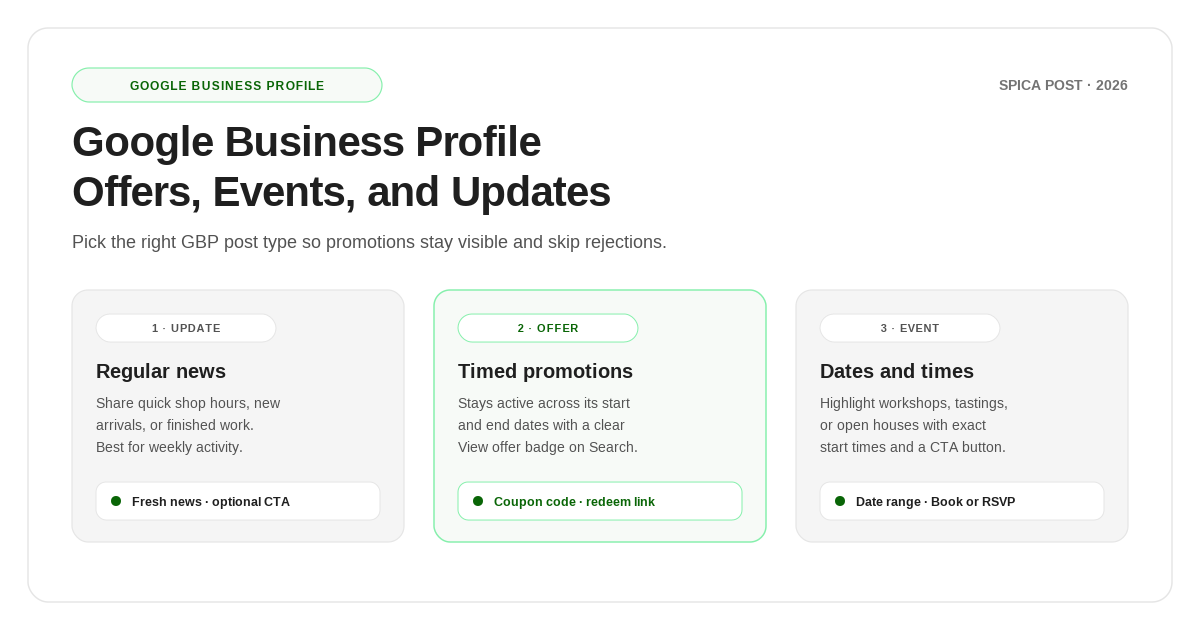
A Google Business Profile offer post or event post beats a regular update whenever your news has a real calendar window, a concrete incentive, or a scheduled date customers can act on. While a regular Update is built for quick weekly proof of life and gradually scrolls down your listing, an Offer unlocks a bold 58-character headline, an automatic View offer badge in Google Search and Maps, structured coupon code and terms fields, and a dedicated redeem link, while an Event displays exact start and end dates and times alongside a direct action button such as Book, Sign up, or Learn more.
Most small businesses and creators treat Google Business Profile’s post composer as a single generic box, dumping holiday specials, seasonal discounts, and weekend workshops into plain Updates week after week. When you do that, you leave behind the very visual cues that make a hurried local searcher stop comparing three nearby listings and tap yours first. Even worse, one small mistake inside an offer caption, such as typing a phone number in the body text or uploading a cluttered flyer graphic, can trigger an instant automated Not approved status without explaining what broke.
This guide breaks down the exact field-by-field differences among Updates, Offers, and Events, shows when each format outperforms the others, maps out every technical limit and automated rejection trigger documented in Google Business Profile Help, walks through UTM tracking so you can prove real bookings, and gives you five copy-ready templates you can test right away.
Snapshot verified November 2026. All field limits, media specifications, automated policy restrictions, and scheduling options reflect Google Business Profile Help documentation (support.google.com/business/answer/7342169, answer/7213077, answer/7662907) and Google’s Business Profile local posts API verified in November 2026.
How Google Business Profile’s three post types actually differ
Every post you publish on Google Business Profile lives under one of three structured types, and Google renders each type differently on mobile Search and Google Maps cards. Picking the right type takes five seconds and determines which fields appear above the fold before a shopper ever taps to expand your caption.
| Specification | Regular Update (STANDARD) |
Offer Post (OFFER) |
Event Post (EVENT) |
|---|---|---|---|
| Best job | Weekly proof of activity, new stock, finished work, hours changes | Timed discounts, seasonal tune-ups, first-visit perks, bundles | Workshops, tastings, open houses, classes, pop-up dates |
| Dedicated title | None (caption body only) | Required, up to 58 characters | Required, up to 58 characters |
| Caption body limit | Up to 1,500 characters (first ~80 to 100 chars visible before fold) | Up to 1,500 characters (summary sits under title and dates) | Up to 1,500 characters (summary sits under title and times) |
| Date and time range | None (archives after 6 months per Google Help) | Required start and end dates (optional matching start/end times) | Required start and end dates plus start and end times |
| Action button / badge | Optional single CTA: Book, Order online, Buy/Shop, Learn more, Sign up, or Call now | Automatic View offer badge; no separate CTA button (uses Redeem URL instead) | Optional single CTA: Book, Order online, Buy/Shop, Learn more, Sign up, or Call now |
| Coupon code & terms | Not available | Optional code (58 chars max), Redeem online HTTPS URL, Terms (5,000 chars max) | Not available |
| Photo format & size | 1 JPEG or PNG photo up to 5 MB via API (clean daylight shots) | 1 JPEG or PNG photo up to 5 MB (no dense promo flyer text) | 1 JPEG or PNG photo up to 5 MB (real venue, product, or host) |
| Category restriction | Open to verified profiles (regulated goods still restricted) | Hotels cannot publish Offers or mention deals per Google Posts policy | Open to verified profiles (including hotels for non-promo events) |
Look closely at two details that trip up even experienced local marketers. First, an Offer cannot carry a standard Book or Call now button alongside its offer fields; Google replaces the button slot with the automatic View offer badge and puts your clickable destination inside the Link to redeem offer field. Second, although Google gives every post up to 1,500 characters, mobile Search cards cut the caption off cleanly after roughly 80 to 100 characters (slightly more on desktop). That means a plain Update has to earn the tap with its opening sentence alone, whereas an Offer or Event gets a bold 58-character title and visible date line right at the top of the card.
If you are still setting up your core listing, categories, or service areas before worrying about promotions, start with our complete Google Business Profile setup guide first so your foundation is verified and accurate.
When an Offer or Event clearly beats a regular Update
Posting an Offer or Event is not about adding bells and whistles for their own sake. It is about matching the post format to how a local buyer scans Google Maps while deciding where to spend money today or this weekend.
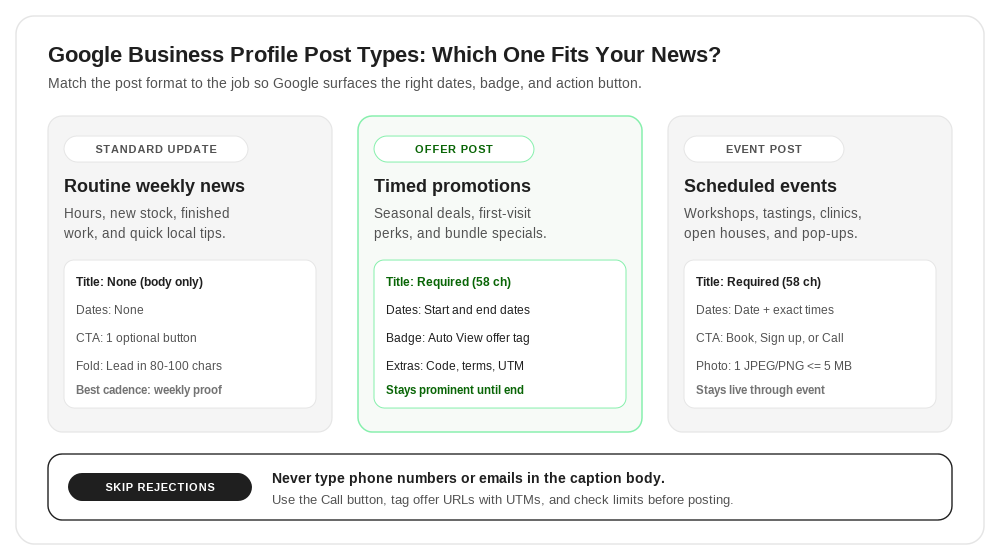
Why date-bound Offers stay prominently active across their window
When you publish a regular Update about a November boiler inspection discount, it starts competing immediately against whatever general update you post next week, and searchers skimming your profile see a wall of plain text with no visual indicator that a deal is currently running. By contrast, an Offer post carries a distinct tag icon and View offer label directly inside your profile’s Updates and Offers surfaces on Search and Maps, and Google keeps the offer surfaced as active throughout the start and end dates you enter.
That persistence is especially valuable for professions with predictable shoulder seasons or repeat bookings:
- Home services (HVAC, plumbing, landscaping, roofing): A 30-day seasonal maintenance offer (“$79 Fall Furnace Safety Check” from October 1 to October 31) stays visibly pinned to its valid window without needing you to repost the same text every Monday.
- Salons, barbershops, spas, and clinics: Weekday mid-day incentives (“15% Off Tue and Wed Morning Cuts”) clearly show exact dates and plain terms (“Valid for appointments starting between 9 AM and 1 PM”) so front-desk staff never argue over expired screenshots.
- Restaurants, bakeries, and local retail: Multi-week seasonal bundles (“Holiday Pastry Box Pre-Order: Free Coffee on Pickup”) let hungry searchers tap View offer, copy the code, and click straight to your online order page.
When Events win for workshops, tastings, open houses, and seasonal clinics
An Event post shines whenever time and place matter as much as the offer itself. Because Events display the 58-character event title, start date and start time, end date and end time, and a dedicated action button (Book, Sign up, Learn more, or Call now), a shopper immediately knows whether the happening fits their calendar.
Small businesses across dozens of professions can run Events even if they never think of themselves as event venues:
- Bakeries, coffee shops, and breweries: Saturday tasting flights, latte art classes, seasonal menu launches, or live acoustic evenings.
- Boutiques, florists, and gift shops: Trunk shows, wreath-making workshops, Mother’s Day bouquet bars, or sidewalk sale weekends.
- Dentists, optometrists, vets, and gyms: Back-to-school checkup weekends, free community mobility clinics, or neighborhood pet adoption mornings.
- Real estate agents and showrooms: Sunday open houses, first-time buyer Q&A evenings, or kitchen remodel showroom walk-throughs.
- Food trucks and pop-ups: Special weekend festival stops or multi-day neighborhood market appearances where exact hours matter.
When a regular Update is still the smarter tool
Do not force every piece of news into an Offer or Event just to get a headline. Google expects Offers to represent genuine promotions and Events to represent real scheduled happenings. Publishing a fake 90-day “sale” on normal everyday pricing erodes buyer trust and risks policy flags.
Stick to a clean regular Update whenever you are sharing:
- Completed work and craft proof: A sharp daylight photo of a finished copper pipe repipe, a fresh wedding bouquet, or a restored patio with two concise sentences explaining the job and neighborhood.
- Operational announcements: Updated winter opening hours, holiday closures, new payment options, or a newly added service line.
- Counter FAQs: Answering one question customers call about every week, paired with a Learn more link to your website or Call now button.
Remember what Google explicitly states in its local search guidance: Google has never confirmed that Business Profile posts are a direct ranking factor, so nobody should promise that posting moves you from position five to position one overnight. You can read more in our plain breakdown of whether Google Business Profile posts help local SEO. What posts reliably do is convert the searchers who already see your profile into calls, direction taps, and bookings.
Exact field blueprint for high-converting Offers and Events
Filling out an Offer or Event properly takes under four minutes once you know which characters customers see immediately and which fields stay tucked inside the expanded view. Before publishing any live post, test every limit and preview the mobile cut-off inside our free Google Business Profile Post Previewer.
Offer post fields line by line
Every strong Offer post handles five structured fields with zero wasted words:
- Offer title (required, 58 characters max): Put the concrete value and exact service first, never vague hype like “Big Fall Savings Are Here!”. Aim for 35 to 52 characters so the full line renders cleanly on narrow phones without clipping. Good examples:
"$25 Off Drain Cleaning · New Clients"(36 chars) or"Free Pastry With Morning Latte · Tue-Thu"(40 chars). - Start and end dates (required): Set honest dates that match your internal calendar and checkout system. Avoid setting a 12-month expiration date on a generic offer; tight 2-to-6-week windows create natural urgency and keep your profile looking actively managed. If you specify a start time, Google expects a matching end time as well, and the end timestamp must never precede the start.
- Offer details / body (optional in UI, strongly recommended, 1,500 chars max): Put the most useful context in the first 80 to 100 characters: who qualifies, what is included, and how to redeem it at the counter or online. Keep total body length crisp around 150 to 350 characters rather than writing a sprawling essay.
- Coupon code (optional, 58 chars max): Short, human-readable codes work best because people remember them when calling or checking out in person (
FALLTUNEUP,MORNING15,FIRSTVISIT). Using a GBP-specific code also doubles as free offline attribution when a customer mentions it at the register. - Link to redeem offer (optional, HTTPS URL) and Terms (optional, up to 5,000 chars): Link directly to the exact booking page, menu item, or Link Page card where the customer claims the deal (never dump them on a cluttered generic homepage), and state clear plain-English terms (“One per household. Cannot be combined with other discounts. Must book by November 30.”).
Event post fields line by line
An Event post shifts the structure slightly because attendees need time, logistics, and one unmistakable button:
- Event title (required, 58 characters max): Name what is happening and who it is for in plain language (
"Saturday Sourdough Class · Beginners Welcome", 44 chars). - Start date, start time, end date, end time (required): Always enter exact local start and end times rather than leaving times blank so Google does not fall back to generic all-day defaults that confuse visitors showing up at 9 AM for a 6 PM tasting.
- Event description (up to 1,500 chars, front-load first 80 to 100 chars): Answer four instant questions right away: what guests will do or get, exact cost (or “Free entry”), whether spots are limited, and parking or arrival instructions.
- Call-to-action button (optional, strongly recommended): Match the button label literally to the next tap:
- Book or Sign up -> direct seat registration or calendar link.
- Order online -> ticket purchase or pre-order box page.
- Learn more -> event details page or Link Page section.
- Call now -> automatically rings the verified phone number on your Google Business Profile (takes no URL).
Visual quality and customer permission for Offer and Event photos
Google recommends clean, well-lit JPEG or PNG photos up to 5 MB (see our full Google Business Profile photo tips guide for dimensions and daylight framing). One photo of the actual plated special, freshly serviced equipment, or workshop table outperforms a busy graphic packed with starburst badges and tiny print every time. In fact, heavy overlaid text and promotional borders are a prime trigger for automated rejections.
Whenever you photograph a workshop, tasting, salon appointment, or finished residential project to illustrate an Event or Update, always ask the customer’s explicit permission first before posting identifiable faces, children, license plates, or private home interiors. Shooting tight on hands preparing food, tools neatly arranged on a workbench, or guests who explicitly said yes keeps your profile warm and trustworthy.
Seven automated rejection triggers in Google Business Profile posts (and how to fix them)
Few things frustrate small business owners more than carefully writing a seasonal Offer only to see Google stamp it Not approved thirty seconds later. Per Google Business Profile’s Posts Content Policy, every post passes through automated filters checking text, links, and media before going live. Avoiding these seven triggers keeps your approval rate close to 100 percent:
- Typing a phone number, email address, or social handle inside the caption body. Google’s anti-fraud filters frequently reject posts containing raw phone numbers or email addresses in the text to curb impersonation spam. Delete the phone number from the text and select the native Call now button on Updates and Events, or link directly to your verified website or Link Page on Offers.
- Uploading cluttered promotional flyers, stock art, or heavy watermarks. Google’s media review looks for authentic photos representing your real business. Graphics covered in dense promotional text, giant percentage stickers, or recycled stock photos are routinely rejected. Use a crisp daylight photograph with zero text overlay, and put the discount percentage in the Offer Title field where Google expects it.
- Mentioning regulated goods or services inside promotional text. Under Google’s prohibited and restricted content guidelines, businesses touching regulated categories (such as alcohol, tobacco, gambling, financial products, firearms, or certain medical/pharmaceutical services) may publish non-promotional general Updates about hours or community news, but cannot advertise deals or discounts on regulated products. A craft brewery, for instance, should promote “Friday Live Music & Wood-Fired Pizza Night” rather than “Half-Price IPA Pitchers”.
- Publishing Offer posts from a Hotel primary category. Google explicitly restricts lodging businesses in the Hotel category from creating Offer posts or promoting room rate deals inside local posts. Hotels can still publish helpful Updates and non-promotional Events (such as seasonal lobby music, neighborhood guides, or restaurant hours).
- Using excessive ALL CAPS, repeated exclamation marks, or deceptive pricing claims. Writing
"HUGE BLOWOUT SALE!!! 80% OFF EVERYTHING TODAY!!!"trips spam heuristics fast. Write like a calm neighbor explaining a fair deal: sentence case, specific numbers, and honest terms. - Linking to broken, unencrypted, or mismatched URLs. Every button URL and Offer redeem URL must start with
https://, resolve cleanly without malware warnings or sketchy redirects, and match the business or booking provider customers expect. - Spam-reposting the exact rejected draft over and over. If a post comes back Not approved, hover over the status indicator to inspect the flagged policy, edit the specific element (usually removing a phone number, swapping a text-heavy graphic for a clean photo, or softening restricted words), and publish once cleanly. Rapidly retrying identical rejected text can trigger temporary posting locks on the profile.
Tracking real revenue from Offers and Events with UTM tags
Google Business Profile’s native Performance dashboard counts total Website clicks, Calls, and Direction requests across your entire profile (Google Business Profile Performance help), which is helpful at the monthly level, yet it does not automatically break out which specific Offer or Event drove which booking in your website analytics.
Fixing that blind spot takes fifteen seconds with UTM campaign tags appended to your Offer’s Link to redeem offer or your Event’s Book / Sign up button URL.
A clean UTM naming scheme you can reuse every month
Keep your parameter names lowercase, consistent, and short so your analytics reports stay tidy across the year:
utm_source=googleutm_medium=organicutm_campaign=gbp-offer-2026-11-furnace(orgbp-event-2026-12-sourdough-class)utm_content=offer-redeem-link(orevent-book-button)
Put together, a clean destination link looks like this:
https://yourbusiness.com/fall-tuneup?utm_source=google&utm_medium=organic&utm_campaign=gbp-offer-2026-11-furnace&utm_content=offer-redeem-link
Build error-free tagged URLs in seconds using our free UTM Campaign Link Builder, then paste the finished https:// URL straight into your Offer redeem field or Event button.
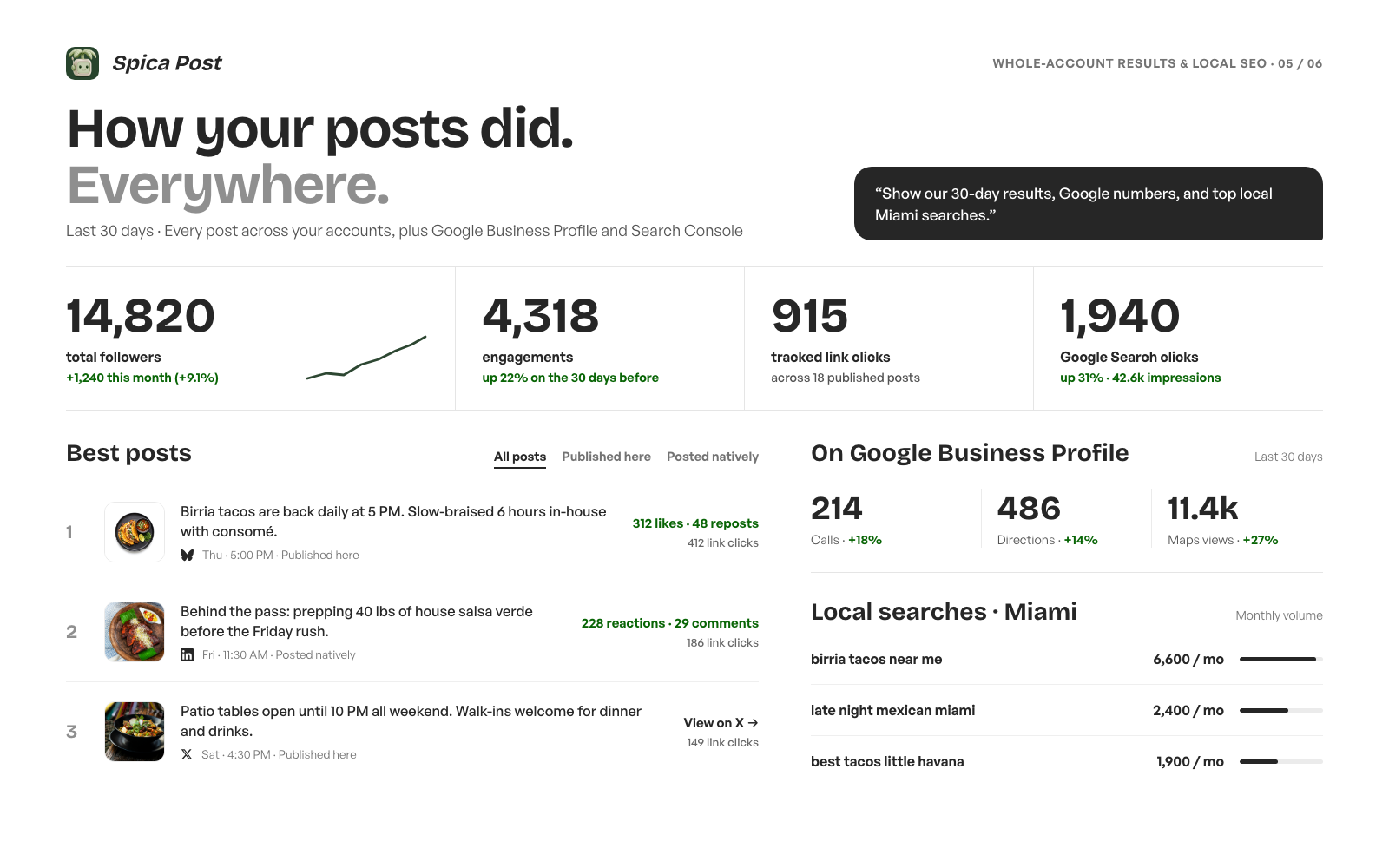
Pairing UTM clicks with offline proof
Not every local buyer taps a link; plenty read your Offer card on Google Maps, close the app, and walk through your front door or tap your profile’s main Call button. Combine three simple signals at the end of every month:
- UTM-tagged landing page visits and completed bookings from your Offer redeem links and Event buttons.
- Coupon code redemptions at your register, booking form, or phone intake (“I saw the FALLTUNEUP offer on Google”).
- Monthly Calls, Direction requests, and Website clicks inside Google Business Profile Performance, compared against months when you posted plain Updates only.
For a deeper look at connecting online clicks to real register receipts, see our guide on how to know if social media is actually bringing customers.
Five copy-ready Google Business Profile Offer and Event templates
Save these five templates and adapt the bracketed fields to your business. Each one keeps the title well under 58 characters, puts the core benefit in the first 80 to 100 characters, omits phone numbers from the body text, and pairs cleanly with a daylight photo.
1. Home service seasonal maintenance Offer (HVAC, plumbing, electrical, landscaping)
Post type: Offer Offer title: $79 Fall Furnace Safety Check · [City] Dates: [Start Date] to [End Date] Body: Book our 18-point furnace safety and efficiency check before cold weather arrives across [City and Neighboring Areas]. Includes filter inspection, thermostat calibration, carbon monoxide safety check, and an upfront written report with zero surprise fees. Coupon code: WARMHOME79 Terms: Valid for residential single-system inspections booked before [End Date]. Cannot be combined with other discounts. Redeem URL: https://[yourdomain.com]/furnace-check?utm_source=google&utm_medium=organic&utm_campaign=gbp-offer-furnace
2. Restaurant, bakery, or coffee shop weekday Offer
Post type: Offer Offer title: Free Drip Coffee With Any Pastry · Tue to Thu Dates: [Start Date] to [End Date] Body: Stop by [Neighborhood] between 7:30 AM and 10:30 AM Tuesday through Thursday and enjoy a complimentary 12 oz house roast with any freshly baked croissant, scone, or muffin. Baked from scratch every morning while trays last. Coupon code: MORNINGBREW Terms: Valid Tuesday through Thursday, 7:30 AM to 10:30 AM, dine-in or walk-up counter orders. Mention this Google offer at checkout. Redeem URL: https://[yourdomain.com]/menu?utm_source=google&utm_medium=organic&utm_campaign=gbp-offer-morning-brew
3. Hair salon, barber, or wellness clinic first-visit Offer
Post type: Offer Offer title: $20 Off First Cut and Blowout · [Neighborhood] Dates: [Start Date] to [End Date] Body: New to [Business Name]? Enjoy $20 off your first signature haircut, wash, and blowout with any stylist on our [Neighborhood] team. Includes a 10-minute consultation so your cut grows out cleanly between visits. Coupon code: WELCOME20 Terms: Valid for first-time clients on appointments booked before [End Date]. Enter code online or mention at check-in. Redeem URL: https://[yourdomain.com]/book?utm_source=google&utm_medium=organic&utm_campaign=gbp-offer-welcome20
4. Local workshop, class, or open-house Event
Post type: Event Event title: Beginner Sourdough Workshop · Take Home a Loaf Dates and times: [Saturday Date], 2:00 PM to 4:30 PM Body: Learn mixing, folding, and shaping in a small 12-person hands-on afternoon session at our [Street/Neighborhood] bakery. Every guest leaves with live starter, printed recipe notes, and a shaped loaf ready to bake Sunday morning. All ingredients and aprons included; free street parking along [Cross Street]. Action button: Sign up -> https://[yourdomain.com]/workshops?utm_source=google&utm_medium=organic&utm_campaign=gbp-event-sourdough
5. Community tasting, pop-up, or showroom Event
Post type: Event Event title: Saturday Spring Patio Showroom Open House Dates and times: [Saturday Date], 10:00 AM to 3:00 PM Body: Walk through our newly installed outdoor lighting, paver borders, and drought-tolerant garden layouts at [Address / Landmark]. Bring phone photos of your yard for a free 15-minute layout chat with our design lead. Light refreshments provided; family-friendly and zero sales pressure. Action button: Learn more -> https://[yourdomain.com]/open-house?utm_source=google&utm_medium=organic&utm_campaign=gbp-event-open-house
A repeatable 20-minute monthly GBP calendar and honest Spica Post trade-offs
You do not need to publish daily on Google Business Profile to outperform quiet competitors. One clean 4-post monthly rhythm takes twenty minutes to draft at the start of the month and mixes all three formats intentionally:
- Week 1 (Offer post): Launch one honest, date-bound monthly or seasonal promotion (running 21 to 30 days) with a crisp 58-character title, clear terms, and a UTM-tagged redeem link.
- Week 2 (Regular Update): Share one authentic daylight photo of finished work, a new product arrival, or a customer-approved result paired with a Call now or Book button.
- Week 3 (Event post or second Update): Publish an upcoming workshop, tasting, extended-hours shopping night, or seasonal clinic with exact start/end times and a Sign up or Book CTA. If no event is scheduled that month, answer one top customer FAQ in a plain Update.
- Week 4 (Regular Update + monthly review check): Share upcoming holiday hours, staffing availability, or a seasonal prep tip, then spend five minutes replying warmly to every new Google review (see our Google review response guide) and checking your monthly Calls and Website clicks.
Google Business Profile itself lets you schedule and repeat single posts directly inside its dashboard (covered step by step in how to schedule Google Business Profile posts), which works well if Google is the only channel you touch. Once you also share the same promotion across social accounts, repeating the formatting, photo resizing, and link tagging by hand across every app adds up quickly.
Honest trade-offs if you consider Spica Post for Google Business Profile
If you are evaluating Spica Post for Google Business Profile, here is the exact November 2026 picture for small businesses and creators:
- What you can use live right now with zero login: Our browser-based Google Business Profile Post Previewer mirrors every Update, Offer, and Event field limit (58-character titles, 1,500-character body and mobile fold check, date-order checks, 58-character coupon codes, HTTPS URL validation, and JPEG/PNG 5 MB photo verification), and our free UTM Campaign Link Builder tags your offer and event URLs in seconds.
- What is live inside Spica Post workspaces today: Direct scheduling and Auto-crosspost across X, LinkedIn personal profiles, Bluesky (with live Unified Inbox replies and whole-account analytics sync), and Mastodon, alongside branded Link Pages (great as a fast mobile landing page for GBP offers and events) and click-tracked
/l/short links. - Google Business Profile rollout status (verified November 2026): Google approved Spica Post’s Business Profile API access (
mybusiness.googleapis.comv4) and enabled it in production; our native GBP adapter (supporting Updates, Offers, Events, 58-char titles, coupon codes, terms, buttons, “On Google” Performance metrics in/results, and 1-to-5 star review replies in the Unified Inbox) is built in code and completing its first live service-area profile verification, while Instagram, Facebook Pages, Threads, TikTok, and YouTube finish platform review/audit steps. Check current workspace plans anytime on our pricing page.
Open the Google Business Profile Post Previewer today, draft one honest 30-day Offer or upcoming Event with a crisp 58-character title and a UTM-tagged redeem link, and watch how much more clearly your listing stands out beside plain neighboring profiles.
Questions people ask
- When should I use a Google Business Profile offer post instead of a regular update?
- Use an Offer post whenever you have a real promotion with a clear start and end date, such as a seasonal tune-up discount, a weekday lunch special, or a first-visit perk. Unlike a regular Update, an Offer carries a dedicated 58-character headline, an automatic View offer badge on Google Search and Maps, optional coupon code and terms fields, and stays active across its entire date range.
- Why did Google reject my Google Business Profile offer or event post?
- The most common automated triggers are phone numbers, email addresses, or social handles typed inside the caption body, heavy text overlays or watermarks on the photo, regulated products such as alcohol or financial promotions, hotel discount posts, or vague clickbait claims. Remove contact details from the caption, use a clean daylight JPEG or PNG photo, and attach the built-in Call or redeem link instead.
- Can I add a custom Book or Call button to a Google Business Profile Offer post?
- No. Offer posts automatically display Google's built-in View offer prompt and hold your destination inside the dedicated Redeem online URL field instead of a separate call-to-action button. If you want a direct Book, Order online, Sign up, Shop, Learn more, or Call now button right on the card, publish an Event or a standard Update.
- How long do Google Business Profile Offers and Events stay visible on my listing?
- An Offer or Event stays prominently active throughout the start and end dates you configure, and automatically drops off active prominence once the end date passes. Standard Updates have no date window and typically move down your feed as newer updates arrive, archiving automatically after six months.
- How do I track whether a Google Business Profile offer actually brought customers?
- Add UTM parameters such as utm_source=google, utm_medium=organic, and utm_campaign=gbp-offer-winter to your offer's redeem link or event's booking button, or use a unique 58-character coupon code customers mention at checkout. Pair those clicks and redemptions with monthly Calls, Directions, and Website clicks in Google Business Profile Performance.
Sources
- Google Business Profile Help: Create posts for your Business Profile
- Google Business Profile Help: Posts content policy
- Google Business Profile Help: Add updates, offers, and events
- Google Business Profile Help: Understand Business Profile performance
- Spica Post Free Google Business Profile Post Previewer