Copywriting
Emojis in Business Posts: When They Help and When They Hurt
When 1 to 2 clean emojis make local posts easier to scan, when stacks read like AI spam, and how to keep captions clear for screen readers.
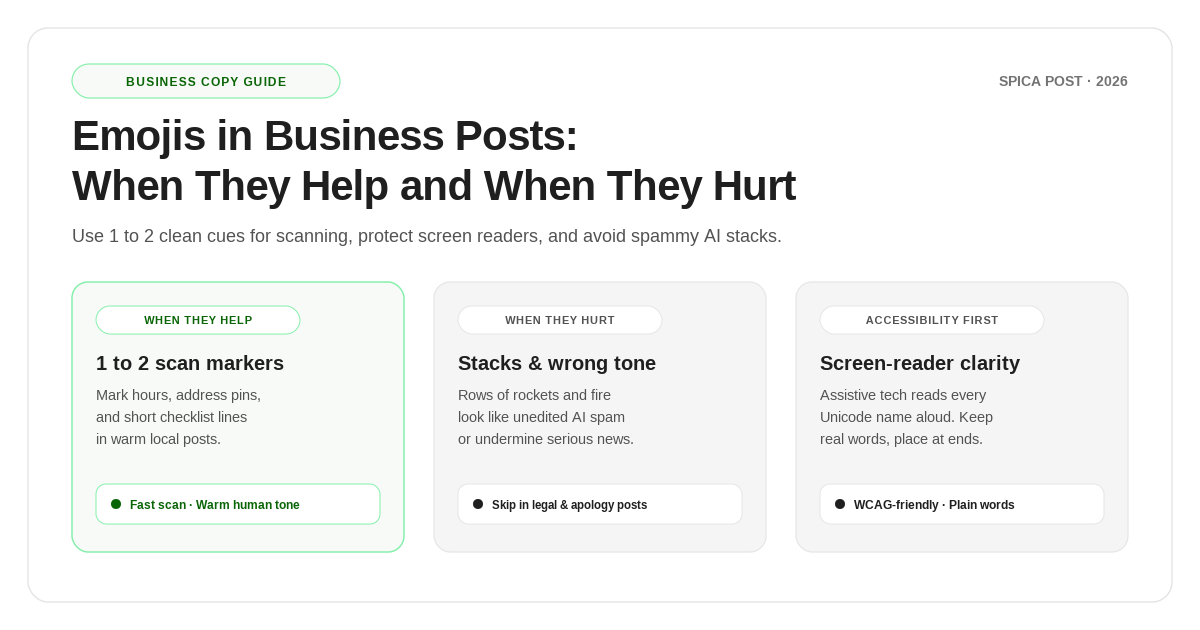
Using emojis in business social media posts helps when one or two restrained icons clarify logistics (such as an address, opening hours, or a warm greeting for a neighborhood cafe or salon) and hurts the moment stacks of rockets, fire, or sparkles crowd out plain meaning, read like unedited AI copy, or break comprehension for screen-reader users. Strong business writing stands completely clear if you delete every emoji from the draft; icons should act only as quiet seasoning, never as structural crutches.
Platform counting limits, accessibility guidance, and Spica Post tool details snapshot verified November 2026 against W3C WCAG 2.2, Unicode CLDR specifications, X Developer Docs, and Bluesky ATProto documentation.
Small businesses and creators often swing between two unhelpful extremes. Some treat emojis as forbidden in every context, making a Saturday bakery announcement read like a municipal parking citation. Others drop twelve icons into a six-line caption because an AI generator handed them back that way, accidentally making an established local company look like a pop-up scam. Finding the calm middle ground takes two minutes of editing and immediately separates real business voices from noisy feed filler.
When 1 to 2 clean emojis actually help a business post
Emojis earn their spot in a caption only when they perform one of two real jobs: speeding up visual scanning on a small phone screen or matching the genuine human warmth of a consumer-facing profession.
Visual scanning for logistics: hours, addresses, and event times
Mobile readers skim social feeds quickly while standing in line or riding the bus. A single clean visual anchor beside your practical details can draw the eye straight to what a customer needs without forcing a dense paragraph.
- Location and pickup pins: One simple pin icon beside a street address or weekend pop-up stop separates the “where” from the story above it.
- Hours and date cues: A single clock or calendar icon next to holiday hours or workshop dates helps busy locals confirm timing in two seconds.
- Short two-item checklists: In a warm consumer caption (such as a seasonal menu drop or weekend market listing), one restrained checkmark next to two concise items gives structure without needing HTML formatting that social feeds do not support.
Even in these logistics blocks, the words themselves must carry 100 percent of the information. Write “Address: 412 Cedar Ave” or “Open Saturday 8 AM to 3 PM” cleanly so that if an icon fails to render on an older phone or gets stripped by an aggregator, zero meaning disappears.
Adding warmth to hospitality and personal professions
Certain professions naturally sound warmer when spoken face to face, and a restrained touch on social media reflects that hospitality. Neighborhood bakeries, coffee shops, restaurants, florists, hair and nail salons, pet groomers, yoga studios, and independent bookstores can comfortably use one or two well-chosen icons when announcing seasonal specials, community markets, or a happy team milestone.
In contrast, if a plumber, family dentist, CPA, or roofing company uses a single calm icon at all, it should stay strictly practical (for example, marking a seasonal checklist item on Facebook) rather than playful. Readers judge professionalism by whether your writing matches how you actually speak at the counter or on the phone. For deeper voice calibration, see our guide on building a brand voice for a small business.
Keeping mobile captions clean above the fold
Every major social network collapses captions behind a “See more” tap after roughly 120 to 210 characters (see exact cutoffs in our 2026 character limits cheat sheet). Leading line one with three sirens, two sparkling stars, and an ALL-CAPS announcement eats valuable preview space before the reader even learns what you sell. Put your real headline in plain words first, then decide whether a single quiet icon at the end of the line adds warmth or simply clutters the frame.
When emojis quietly hurt trust and scream unedited AI spam
Knowing when to delete emojis matters far more than knowing which ones to add. Four common habits quietly erode credibility with local customers.
The “three rockets and sparkles” AI tell
Over the past two years, millions of business owners began pasting raw drafts straight from generic AI chat tools onto LinkedIn, Facebook, and Instagram. Default model outputs almost always rely on the exact same handful of decorative icons: rockets, sparkles, fire flames, light bulbs, pointing fingers, and target bullseyes stacked at the front of every bullet point.
Customers have developed instant pattern recognition for that style. Even when your underlying offer is completely honest, opening a post with “Exciting news!!” flanked by rockets and sparkles signals that nobody took thirty seconds to read what went out under the company name. Stripping default decorative icons is the fastest edit in our playbook on making AI social media posts sound human.
Replacing actual words or hiding important facts
Replacing nouns or verbs with tiny pictures forces readers to solve a rebus puzzle just to understand your store hours or discount. Writing “New [coffee icon] + [croissant icon] ready at [clock icon] 7!” saves zero meaningful space, slows comprehension on every screen, and breaks completely for screen-reader users and search indexing.
Social platforms also index plain caption keywords for local search. Writing “fresh sourdough loaves and espresso” helps nearby customers searching Instagram or TikTok find your bakery; substituting icons hides your actual products from search engines inside those apps.
High-stakes topics where zero emojis is the only right choice
Some business updates require plain, calm, unmistakable language. Remove every single emoji without exception when publishing any of the following:
- Customer apologies and service recovery: Explaining a billing error, delayed order, or kitchen mistake with a sweating face or folded-hands icon feels dismissive instead of accountable.
- Medical, dental, mental health, and clinical updates: Patients evaluating a clinic want calm accuracy, not playful cartoons next to appointment policies or health advice.
- Legal, tax, accounting, and insurance guidance: Homeowners comparing policies or filing deadlines associate excessive icons with untrustworthy solicitations.
- Emergency closures, outages, and safety alerts: Storm closures, power outages, road detours, or recall notices need fast, unambiguous plain text.
- Price increases, policy changes, and condolences: Respectful honesty needs no decoration.
Cross-platform rendering surprises and dark-mode invisibility
Emojis are not uniform images; each operating system (Apple iOS, Google Android, Samsung One UI, Microsoft Windows) draws its own artwork for the same Unicode code point. A subtle smile on one phone can look sarcastic or strained on another. Black line-art symbols (such as dark hearts, musical notes, or monochrome arrows) can also vanish almost completely against dark-mode phone screens, which many social users keep enabled all day. Checking plain-word clarity protects your message regardless of device theme.
Screen-reader accessibility: what assistive technology actually reads aloud
Accessibility is not an abstract compliance chore; millions of potential local customers use screen readers such as VoiceOver on iOS, TalkBack on Android, NVDA, or JAWS because of low vision, blindness, or reading fatigue. Under W3C Web Content Accessibility Guidelines (WCAG) 2.2 (specifically Success Criterion 1.1.1 Non-text Content and Success Criterion 1.3.1 Info and Relationships), non-text elements must never obscure or distort meaningful reading order.
Every emoji carries an official text description maintained in the Unicode Consortium Full Emoji List (CLDR short names). When a screen reader encounters an emoji inside your caption, it reads that entire name out loud at full speed.
Consider what happens when a shop posts a hyped announcement using five decorative icons in a row (three fire icons, one rocket, and one sparkles icon) followed by claps between words. A screen-reader user does not “skim past” the icons. They hear:
“Fire. Fire. Fire. Rocket. Sparkles. Huge. Clapping hands. Weekend. Clapping hands. Sale. Clapping hands. Starts. Now. Backhand index pointing down. Backhand index pointing down.”
By the time the audio finishes naming hands and flames, the listener has already swiped past your post in frustration.
Follow five simple habits so every customer experiences your caption clearly:
- Place emojis at the end of a sentence or paragraph, never mid-sentence. Putting one icon after a completed thought lets every reader absorb the message first without interruption.
- Never repeat the same emoji back to back. One check or smile conveys the cue cleanly; three in a row triples audio noise for zero extra clarity.
- Never use emojis as bullet points for long lists. Use clean hyphens or numbered steps (
1.,2.,3.) instead of placing pointing fingers or checkmarks at the start of six lines, where the screen reader repeats “check mark button” six times before every fact. - Never rely on an emoji alone to carry meaning. Always write the real word beside it (“Saturday hours”, “Address”, “Call us”) so meaning stays intact with or without the graphic.
- Skip decorative skin-tone modifiers on generic object cues unless representing a specific person. Complex multi-codepoint emoji sequences append lengthy modifier descriptions (“medium-dark skin tone” or directional qualifiers) to the spoken output, lengthening audio playback unexpectedly when used as casual decoration.
Platform-by-platform emoji restraint and technical limits
Even when a caption is accessible, each social platform has its own reader expectations and technical character-counting limits. What feels warm on a neighborhood restaurant’s Instagram feels out of place on a Google Business Profile update or a B2B LinkedIn post.
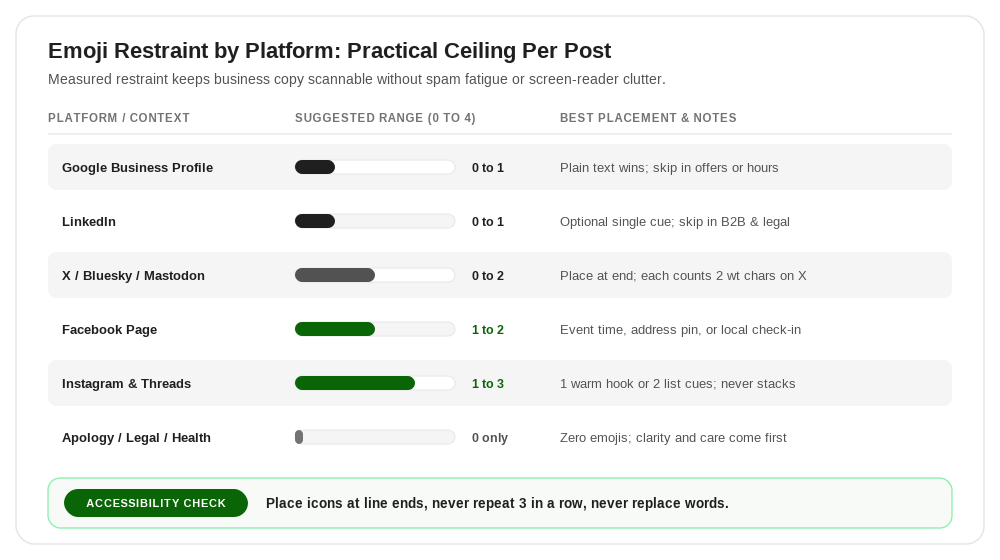
| Platform or context | Practical ceiling per post | Best use for a local business | Technical counting and display note |
|---|---|---|---|
| Google Business Profile | 0 to 1 | Plain text almost always wins; at most 1 clean cue on seasonal events | First ~120 chars show in Search/Maps preview; emojis waste precious local keywords. |
| 0 to 1 | Optional single quiet cue in personal updates; zero in legal, tax, or B2B bids | Emoji bullet walls are heavily associated with automated spam feeds on LinkedIn. | |
| X (Twitter) | 0 to 2 | One closing cue only when tone is conversational | Per X Developer Docs, every emoji counts as 2 weighted characters toward the 280 limit. |
| Bluesky | 0 to 2 | Light conversational tone at sentence ends; zero inside serious threads | Per Bluesky ATProto docs, limits check 300 graphemes AND 3,000 UTF-8 bytes; complex ZWJ emojis use 12 to 28+ bytes each. |
| Mastodon | 0 to 2 | Clean closing accent or custom instance emoji where relevant | Mastodon communities strongly value screen-reader accessibility and alt text; skip icon clutter. |
| Facebook Page | 1 to 2 | Marking event time, street location, or warm neighborhood reminder | Mobile folds around ~477 chars; plain words plus clickable URL convert best. |
| Instagram and Threads | 1 to 3 | One warm hook cue or two tidy details in hospitality, beauty, and retail | Feed folds near ~125 chars on Instagram; never put icon stacks before your main point. |
| Apology, medical, legal, crisis | 0 only | Plain, respectful, direct sentences with clear contact details | Zero exceptions; tone misfires hurt customer trust far faster than plain prose. |
Notice the hidden technical traps on short-form text networks. On X, adding six decorative icons burns 12 weighted characters immediately. On Bluesky, combined emojis joined by zero-width joiners (ZWJ sequences) count as one grapheme visually yet expand rapidly in UTF-8 bytes, occasionally surprising authors near long rich-text threads. Pasting drafts into our free Character and Post Checker shows exact weighted counts and byte totals across ten networks before you schedule.
Before-and-after business caption rewrites across four professions
Seeing the difference side by side makes restraint effortless. Below are four realistic small-business drafts showing how stripping emoji clutter immediately sharpens voice, trust, and accessibility.
1. Neighborhood bakery weekend menu (Instagram or Facebook)
Before (cluttered, hard to scan, noisy on screen readers):
🔥🔥🔥 HUGE WEEKEND DROP!! 🚀✨ Fresh 🥐 + ☕️ + 🍓 tarts are HERE!! 👏 Don’t 👏 miss 👏 out!! 👉👉 Stop by 📍 214 Maple St ⏰ 8-2!! 🎉🥳💯
After (warm, clear, accessible, 1 optional closing cue):
Fresh strawberry almond tarts and warm croissants just hit the case at 214 Maple Street.
Open Saturday and Sunday from 8:00 AM to 2:00 PM (or until the last tray sells out). Tap our bio link to reserve a box of six ahead of the morning line. ☕
2. Local HVAC seasonal tune-up reminder (Facebook Page)
Before (unedited AI bullet wall):
❄️ Winter is coming!! 🥶 Is your furnace ready?! 🚨🚨 ✅ Fast service! 🚀 ✅ Certified techs! 🔧✨ ✅ Affordable prices! 💰🔥 👉👉 Book NOW before spots vanish!! 📞👇
After (calm, trustworthy, zero emojis needed):
Cold nights arrive in two weeks, and a clogged furnace filter or worn igniter is the most common reason heat shuts off on the first freezing morning.
We have five weekday tune-up openings left for Oakridge and Westside homeowners. Every visit covers a plain 14-point safety check with upfront pricing before any repair. Schedule your slot here: https://example-hvac.com/tuneup
3. Family dental clinic holiday hours and billing notice (Google Business Profile or Facebook)
Before (mismatched cheerful icons on practical care news):
🦷✨ Friendly reminder fam!! 😁🎉 Our clinic is CLOSED 🚪❌ Thursday & Friday for Thanksgiving 🦃🍂! Please remember copays are due at check-in 💳😉!! Call us if it hurts 🚑😅!
After (respectful, unmistakable, zero emojis):
Holiday hours notice: Oak Street Family Dental will be closed Thursday, November 26 and Friday, November 27, and will reopen Monday at 8:00 AM.
Established patients with an urgent dental issue during the holiday can call our main number to reach the on-call dentist. Reminder: routine copays are collected at check-in.
4. Independent hair salon opening announcement (Instagram)
Before (icons replacing real words mid-sentence):
Last-minute ✂️ + 🎨 opening tomorrow at ⏰ 2 PM!! 💇♀️✨ DM us 💌 ASAP to grab your 🪑 before it’s gone!! 🔥💖
After (human, searchable, accessible, 1 clean cue at the end):
One last-minute cut-and-color chair just opened for tomorrow (Thursday) at 2:00 PM with Elena at our Downtown studio.
Send us a direct message or tap Book Now in our Link Page to claim it. New and returning guests welcome. ✨
Check tone and customer permission before publishing
Whenever a lighthearted post includes a photo, testimonial quote, or short video clip of a customer, patient, or team member, check two things together before hitting publish: first, that you have their explicit verbal or written permission to share their face or words, and second, that any emoji beside their quote matches how they would want to be represented publicly. A thoughtful customer testimonial reads far more genuinely in clean plain text than surrounded by celebratory fireworks.
A 30-second emoji edit checklist before hitting publish
Run this quick five-step pass on every caption before scheduling or posting. It takes less than half a minute and keeps every channel consistent:
- Run the delete test. Temporarily imagine removing every emoji in the draft. If any sentence loses a word, an address label, or its basic meaning, rewrite the plain words first.
- Count total icons against the platform ceiling. Hold Google Business Profile and LinkedIn to 0 to 1, X, Bluesky, Mastodon, and Facebook to 0 to 2, and Instagram to 1 to 3 maximum.
- Check for AI-spam clusters and repeated icons. Delete any rockets, sparkles, pointing-finger pairs, or repeated triplets (
fire fire fire) unless you genuinely sell rockets or fireworks. - Verify screen-reader placement. Move any remaining icon to the end of a sentence or closing line, keep real bullet numbers or hyphens on lists, and check that nothing interrupts mid-sentence flow.
- Confirm character and byte limits. Check your final text in a multi-network validator so weighted emoji characters on X or UTF-8 bytes on Bluesky never clip your closing link.
For complete caption framing beyond emojis, read our core guide on how to write social media captions for a small business and sharpen your closing lines with social media call-to-action examples.
Honest Spica Post trade-offs for drafting and validation
If you want one calm workspace to draft clean captions in your own business voice and verify technical limits before publishing, here is Spica Post’s exact November 2026 standing for small businesses and creators:
- Live today: Spica Post’s free, zero-login Character and Post Checker checks exact X weighted emoji lengths, Bluesky grapheme and UTF-8 byte counts, and mobile feed folds locally in your browser across ten networks. Inside a Spica Post workspace, your saved brand voice keeps drafts plain and grounded (avoiding robotic emoji clutter), while direct scheduling and Auto-crosspost run live today on X, Bluesky, LinkedIn personal profiles, and Mastodon alongside branded Link Pages and
/l/click-tracked short links. - Completing platform approvals: Direct publishing adapters for Instagram, Facebook Pages, Threads, Google Business Profile (approved and enabled in production, awaiting first live service-area verification), TikTok, and YouTube (OAuth verified, finishing API compliance audit) are built and finishing network review. Until Meta and Google direct posting open across all workspaces, you can still validate every caption in the free checker, draft clean voice-matched copy in Spica Post, and paste straight into Instagram, Facebook, or Google in seconds. Current flat workspace plans are listed on our pricing page.
Good business writing does not need shouting icons to earn attention. Lead with real facts, respect every customer’s screen and screen reader, keep emojis sparse and deliberate, and let honest clarity carry the post.
Questions people ask
- How many emojis should a small business use in a social media post?
- Most business posts read clearest with zero to two emojis total, and rarely more than three even on visual networks like Instagram. One clean icon to soften a warm opening or separate an address line helps scanning, whereas five or more emojis quickly blur together and make ordinary updates look like spam.
- Why do emojis break screen readers for blind or low-vision readers?
- Assistive software reads every emoji's full Unicode CLDR text description aloud. Placing icons between words interrupts a sentence mid-thought, and repeating three fire or sparkle icons forces a listener to hear 'fire fire fire' before reaching your actual hours, price, or offer.
- Which business posts should never contain emojis?
- Keep emojis completely out of legal notices, medical or dental care guidance, insurance claim updates, billing or price-increase announcements, severe weather closures, service outages, and customer apologies. In high-stakes moments, plain words show respect and calm competence.
- Do emojis count as extra characters on X and Bluesky?
- Yes. On X, every standard emoji counts as 2 weighted characters against the 280-character ceiling. On Bluesky, one complex emoji sequence such as a family or skin-tone icon counts as 1 user-perceived grapheme but can consume 12 to 28 UTF-8 bytes against the 3,000-byte limit.
- Why do emoji-heavy captions make a business sound like unedited AI copy?
- Default AI prompts routinely decorate every bullet point with rockets, sparkles, light bulbs, and pointing fingers. Readers now recognize that pattern within two seconds and subconsciously treat the post as low-effort filler rather than a real note from a local owner.
Sources
- W3C Web Accessibility Initiative: Web Content Accessibility Guidelines (WCAG) 2.2
- Unicode Consortium: Full Emoji List and CLDR Short Names
- X Developer Documentation: Counting weighted characters and emojis
- Bluesky ATProto Documentation: Rich text grapheme and UTF-8 byte limits
- Spica Post Free Social Media Character and Post Checker