Image sizes
Image Sizes for Every Social Network in 2026
Exact 2026 social media image sizes across 11 networks, safe zones, file limits, and the 3-crop workflow that covers 95% of feeds cleanly.
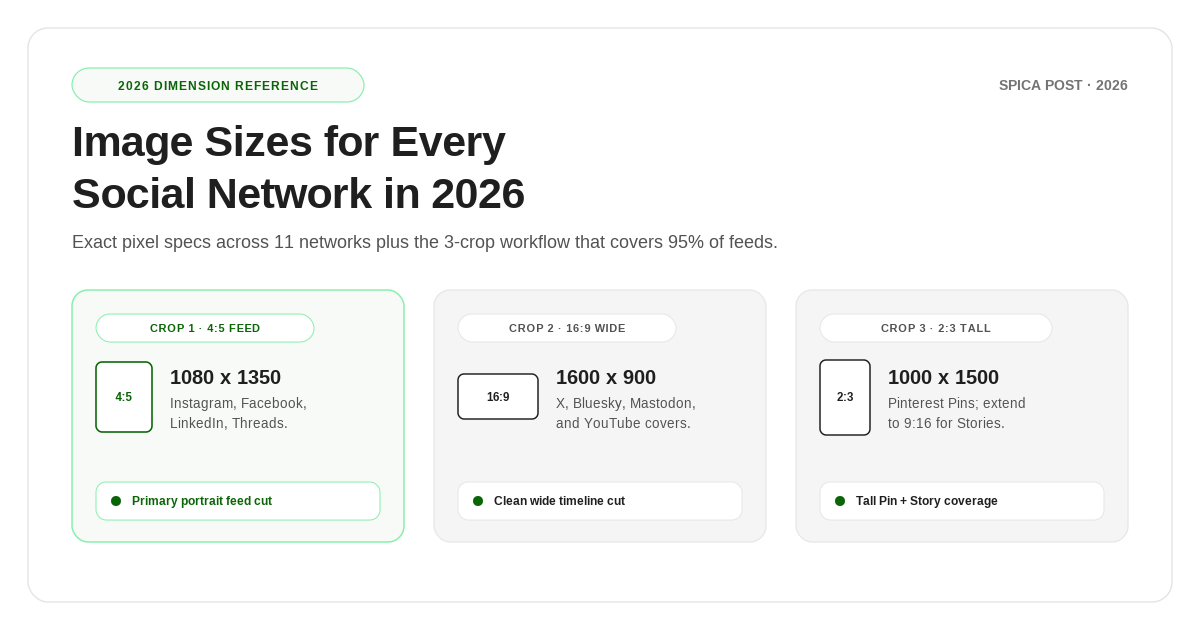
To look sharp across every major social network in 2026 without exporting eleven separate files per post, follow the 3-crop rule: export one 1080 x 1350 (4:5 portrait) image for Instagram, Facebook, LinkedIn, and Threads; one 1600 x 900 (16:9 landscape) image for X, Bluesky, Mastodon, and YouTube; and one 1000 x 1500 (2:3 vertical) image for Pinterest (extending to 1080 x 1920 for full-screen Stories, Reels, and TikTok carousels). Those three base dimensions cover roughly 95% of everyday social publishing cleanly while keeping text and faces safe from automated feed crops.
Snapshot verified November 2026. Every pixel dimension, aspect ratio, and file-size limit below reflects current official developer and help documentation across all 11 networks.
Small businesses and creators rarely have an extra hour each afternoon to resize one product photo into fourteen custom templates. Yet uploading the wrong aspect ratio costs real attention: a tall screenshot on X slices off your headline, a wide landscape banner on Instagram shrinks to a tiny strip in mobile feeds, and an oversized PNG on Bluesky gets compressed into muddy artifacts.
Use this page as your single 2026 bookmark: the complete 11-network dimension table, the 3-crop workflow diagram, safe-zone margins for profile circles and overlays, JPEG versus PNG versus WebP guidance, and fast ways to verify or automate cuts before anything goes live.
Master 2026 image size reference across all 11 networks
Scan the table below for exact primary post dimensions, aspect ratios, and technical limits across every major social channel. Where a platform supports both portrait and landscape posts, the strongest mobile-first feed option is listed first.
| Network | Placement | Recommended size (px) | Aspect ratio | File formats and key limits |
|---|---|---|---|---|
| Feed photo & carousel | 1080 x 1350 |
4:5 |
JPEG recommended (API requires JPEG, max 8 MB; feed ratios 4:5 to 1.91:1) |
|
| Profile grid preview | 1080 x 1440 |
3:4 |
Keep core text/faces inside center safe zone so 4:5 posts sit cleanly in 3:4 grid tiles | |
| Stories & Reels covers | 1080 x 1920 |
9:16 |
Leave 250 px top and 340 px bottom clear of text overlays |
|
| Feed portrait / link card | 1080 x 1350 / 1200 x 630 |
4:5 / 1.91:1 |
JPEG or PNG; 4:5 dominates mobile scroll, 1200 x 630 fits shared link previews |
|
| Google Business Profile | Update, Offer, Event post | 1200 x 900 |
4:3 |
JPEG or PNG, 10 KB to 5 MB; center subject cleanly (Google crops edges on mobile cards) |
| Google Business Profile | Cover photo / Logo | 1024 x 576 / 720 x 720 |
16:9 / 1:1 |
Min 250 x 250 px for logos; clear daylight exterior or storefront shot for cover |
| Mobile portrait / Landscape | 1080 x 1350 / 1200 x 627 |
4:5 / 1.91:1 |
JPEG or PNG (up to 20 images per multi-image post via API; avoid WebP) | |
| X | Single landscape / Square | 1600 x 900 / 1080 x 1080 |
16:9 / 1:1 |
JPEG, PNG, or WebP, max 5 MB per image, up to 4 images per post |
| Bluesky | Timeline image (1 to 4) | 1600 x 900 (or 1080 x 1350) |
16:9 (or 4:5) |
JPEG, PNG, or WebP; strict 1 MB limit (export clean JPEG below 950 KB to avoid heavy re-compression) |
| Mastodon | Timeline image (1 to 4) | 1600 x 900 (or 1080 x 1350) |
16:9 (or 4:5) |
PNG, JPEG, WebP, or GIF; 8 MB to 16 MB depending on your server instance limit; always add alt text |
| Threads | Feed photo & carousel | 1080 x 1350 / 1080 x 1440 |
4:5 / 3:4 |
JPEG or PNG, up to 8 MB; carousels hold up to 20 items cleanly |
| Standard Pin | 1000 x 1500 |
2:3 |
JPEG or PNG, max 20 MB; tall ratios beyond 1:2.1 get truncated in feeds |
|
| TikTok | Photo carousel (Photo Mode) | 1080 x 1920 |
9:16 |
JPEG or WebP; full-screen vertical slides, keep text out of right icon rail and bottom caption area |
| YouTube | Video thumbnail | 1280 x 720 |
16:9 |
JPEG or PNG, max 2 MB, min width 640 px; keep bottom-right corner clear of duration badge |
Need text lengths to match these visual limits? Keep our 2026 social media character limits guide and 2026 video length reference bookmarked beside this table.
The 3-crop rule that covers 95% of social feeds
Instead of maintaining a messy folder of ten aspect ratios for every campaign, standardize your camera framing and design templates around three core crops. Shooting photos with a modest margin of breathing room around your subject lets you export all three cleanly in under two minutes.
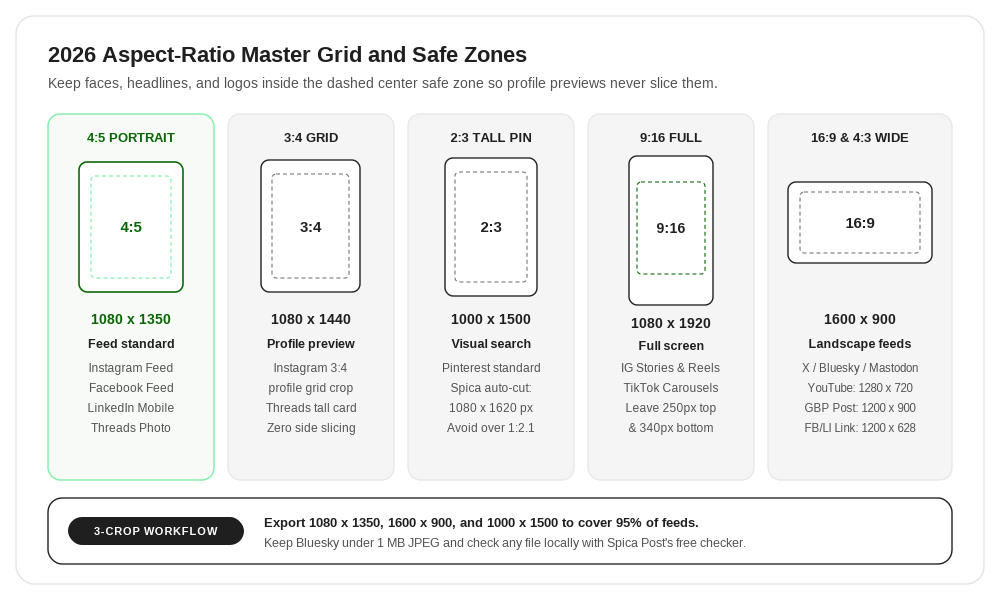
Crop 1: 1080 x 1350 (4:5 portrait) for vertical feed platforms
A 4:5 vertical frame occupies significantly more vertical real estate on a smartphone screen than a 1:1 square or 16:9 wide photo, which naturally pauses scrolling thumbs without feeling cramped. This single export handles Instagram feed posts and carousels, Facebook mobile feed photos, LinkedIn portrait posts, and Threads photo posts at crisp native sharpness.
If you shoot directly on your phone camera, remember that default phone cameras shoot at 3:4 (4:3 turned vertically). Trimming just a sliver off the top or bottom converts a native phone photo cleanly into 4:5 (1080 x 1350) with zero distortion.
Crop 2: 1600 x 900 (16:9 landscape) for timeline and thumbnail platforms
Timeline networks built around concise text and link conversation display wide frames cleanly on both desktop and mobile without vertical cropping. Exporting one 1600 x 900 JPEG covers X, Bluesky, Mastodon, and YouTube thumbnails (YouTube accepts 1600 x 900 cleanly as exact 16:9, or you can export 1280 x 720 directly under its 2 MB cap). When you also need a Google Business Profile update (1200 x 900, 4:3) or a Facebook/LinkedIn link preview (1200 x 628), keeping your key subject centered in your 16:9 master lets you trim cleanly without losing heads, logos, or prices.
Crop 3: 1000 x 1500 (2:3 vertical) for Pinterest, plus 9:16 when full-screen matters
Pinterest rewards tall vertical imagery that stands out inside its two-column visual search grid; per Pinterest’s official Pin specs, 2:3 (1000 x 1500, or higher-resolution 1080 x 1620) is the gold standard because taller infographics past 1:2.1 get clipped at the bottom. Only create a fourth 9:16 (1080 x 1920) export when you are deliberately publishing Instagram Stories, Reels covers, or TikTok photo carousels, where full-screen edge-to-edge height matters.
Network-by-network crop quirks and profile safe zones
Knowing the nominal pixel size is only half the battle; knowing where each app places buttons, usernames, circular masks, and duration badges keeps your finished graphics readable on every device.
Instagram 4:5 feed vs. 3:4 profile grid preview
Instagram transitioned profile grids away from strict 1:1 squares toward a taller 3:4 vertical rectangle (1080 x 1440 ratio). Meanwhile, the Instagram publishing API enforces feed image aspect ratios between 4:5 (0.8) and 1.91:1 (Meta Instagram Media reference).
In practice, designing your primary post at 1080 x 1350 (4:5) while keeping headlines and logos away from the outermost 70 px left and right margins gives you the best of both worlds: your post passes every API and feed check smoothly, and when Instagram zooms slightly to fill a 3:4 grid tile on your profile page, zero letters get trimmed off the sides.
Facebook, Threads, and LinkedIn desktop vs. mobile framing
- Facebook Pages: Portrait
1080 x 1350(4:5) photos look strong on mobile feeds. If you share an external website URL directly, Facebook pulls the page’s Open Graph card at1200 x 630(1.91:1). Avoid uploading tiny600 pxscreenshots, which appear soft on retina phone displays. - LinkedIn: Multi-image posts and single photos perform cleanly at
1080 x 1350(4:5) for mobile readers, while horizontal case-study charts and link thumbnails remain best at1200 x 627(1.91:1). Per Microsoft’s LinkedIn Images API docs, stick strictly to JPEG or PNG rather than WebP. - Threads: Handles both
4:5(1080 x 1350) and3:4(1080 x 1440) vertical frames cleanly without harsh cropping, making it an effortless match for your Instagram portrait export.
Google Business Profile 4:3 posts, 16:9 covers, and square logos
Google Business Profile displays your photos across Search panels, Google Maps cards, and mobile update carousels, each applying slightly different edge trims. According to Google Business Profile photo guidelines, keep update, offer, and event posts at 1200 x 900 (4:3), upload a bright 1024 x 576 (16:9) cover photo showing your real storefront or team, and set a 720 x 720 (1:1) square logo centered with padding so circular avatars never clip letters. For specific photography ideas that convert Maps searchers, see our Google Business Profile photos guide.
X, Bluesky 1 MB compression, and Mastodon instance limits
- X: Supports up to 4 images per post in JPEG, PNG, or WebP up to
5 MBeach (X media best practices). Single1600 x 900(16:9) images display full-bleed cleanly; two-image posts render side by side (7:8per half), so avoid wide panoramas inside multi-photo tweets. - Bluesky: Enforces a strict
1 MB(1,000,000bytes) cap on standard image uploads. Uploading a raw4 MBphone photo or uncompressed PNG triggers automatic resizing and heavy compression that softens thin text. Exporting a1600 x 900JPEG at 82% quality usually lands between180 KBand450 KB, sailing straight through with razor-sharp detail. - Mastodon: Instance limits vary by server (commonly
8 MBto16 MBper image, up to 4 images per post), and timeline previews default to a16:9focus crop unless you set a focal point. Adding descriptive alt text on Mastodon and Bluesky is both an accessibility norm and strongly appreciated across both communities.
Pinterest 2:3 Pins, TikTok 9:16 photo carousels, and YouTube 16:9 thumbnails
- Pinterest: Stick to
1000 x 1500(2:3) or1080 x 1620(2:3). Place clear, high-contrast title text in the upper half of the Pin so Pinterest’s bottom corner icons and domain labels never collide with your headline. - TikTok Photo Mode: Use
1080 x 1920(9:16) vertical slides. Keep crucial text out of the bottom340 px(where captions and audio titles sit) and the rightmost140 px(where the profile, like, comment, and bookmark buttons stack). - YouTube thumbnails: Export
1280 x 720(16:9) under2 MB. Always leave the bottom-right corner clear because YouTube stamps the video length badge directly over that corner.
Profile avatars, banners, and overlay safe-zone cheat sheet
Bookmark these persistent brand-asset safe zones so your profiles look sharp on day one:
| Asset type | Recommended export size | Safe-zone precaution to follow |
|---|---|---|
| Universal circular profile avatar (IG, FB, X, Bluesky, LinkedIn, TikTok, YouTube) | 800 x 800 (1:1 square) |
Keep your logo mark or face inside an inner circle occupying ~75% of the square so circular crops never slice letters |
| LinkedIn personal banner | 1584 x 396 (4:1 wide) |
Keep text on the right half; the circular profile photo overlaps the bottom-left corner on desktop and centers on mobile |
| X / Bluesky / Mastodon header | 1500 x 500 (3:1 wide) |
Leave the bottom-left corner and top/bottom 60 px margins free of words so mobile avatars and status bars never block copy |
| Facebook Page cover | 851 x 315 (or 1640 x 624 2x) |
Center headline and contact text inside the middle 640 x 312 safe window so mobile side-cropping keeps every word visible |
| Stories / Reels / TikTok 9:16 overlays | 1080 x 1920 (9:16) |
Keep all captions, prices, and calls to action between 250 px from top and 340 px from bottom, plus 140 px off the right edge |
JPEG vs. PNG vs. WebP, file sizes, and avoiding muddy re-compression
Picking the right file format prevents the two most common upload headaches: rejected files and blurry re-compressed text.
When JPEG beats PNG (and when PNG wins)
Every social platform re-encodes uploaded images to save bandwidth. If you upload an enormous 9 MB PNG photograph, the network’s automated compressor shrinks it aggressively, often leaving halo artifacts around text and muddy skin tones. Exporting cleanly sized files upfront puts you in control of quality:
| Content type | Best format | Target export settings | Networks where it shines |
|---|---|---|---|
| Real photographs (food, job sites, portraits, products) | JPEG | sRGB color profile, 80% to 85% quality, under 900 KB when sharing to Bluesky |
Universal across all 11 networks; required for Instagram Graph API publishing |
| Clean text cards, charts, flat logos | PNG | Exact target pixel width (1080, 1200, or 1600 px), compressed via lossless optimizer |
Facebook, LinkedIn, X, Bluesky (if < 1 MB), Mastodon, Pinterest, YouTube thumbnails |
| Modern lightweight web assets | WebP | 82% quality | Supported on X, Bluesky, Mastodon, TikTok, and websites; avoid for Instagram API and LinkedIn |
Managing Bluesky’s 1 MB threshold and Instagram’s JPEG limit
Two specific technical limits trip up multi-network workflows more than any others:
- Instagram API expects JPEG: If your workflow prepares images for Instagram publishing tools alongside LinkedIn or X, saving photography as clean sRGB JPEG avoids upload rejections completely.
- Bluesky caps standard images at 1 MB: Checking file weight before upload (or keeping a preset that exports
1600 x 900JPEGs around300 KBto700 KB) ensures Bluesky displays crisp graphics without downscaling them unexpectedly.
Color profile (sRGB), DPI myths, and naming files cleanly
Ignore the persistent myth that social images need 300 DPI to look sharp. DPI (dots per inch) applies strictly to ink on physical paper; screens only care about total pixel dimensions (1080 x 1350 at 72 DPI and 1080 x 1350 at 300 DPI contain the exact same pixels).
What does change how colors look across phones is the color profile. Always export in sRGB rather than Display P3 or Adobe RGB. Wide-gamut files frequently turn dull and washed out when a social app strips color metadata during compression. Finally, name your exported files descriptively (for example, austin-bakery-sourdough-4x5.jpg instead of IMG_8492.JPG) so your team can find and reuse seasonal shots cleanly next year.
Check photos locally and automate channel cuts
Measuring pixel ratios manually before every batch gets tedious fast, especially when you juggle client photos, phone shots, and promotional slides in one sitting.
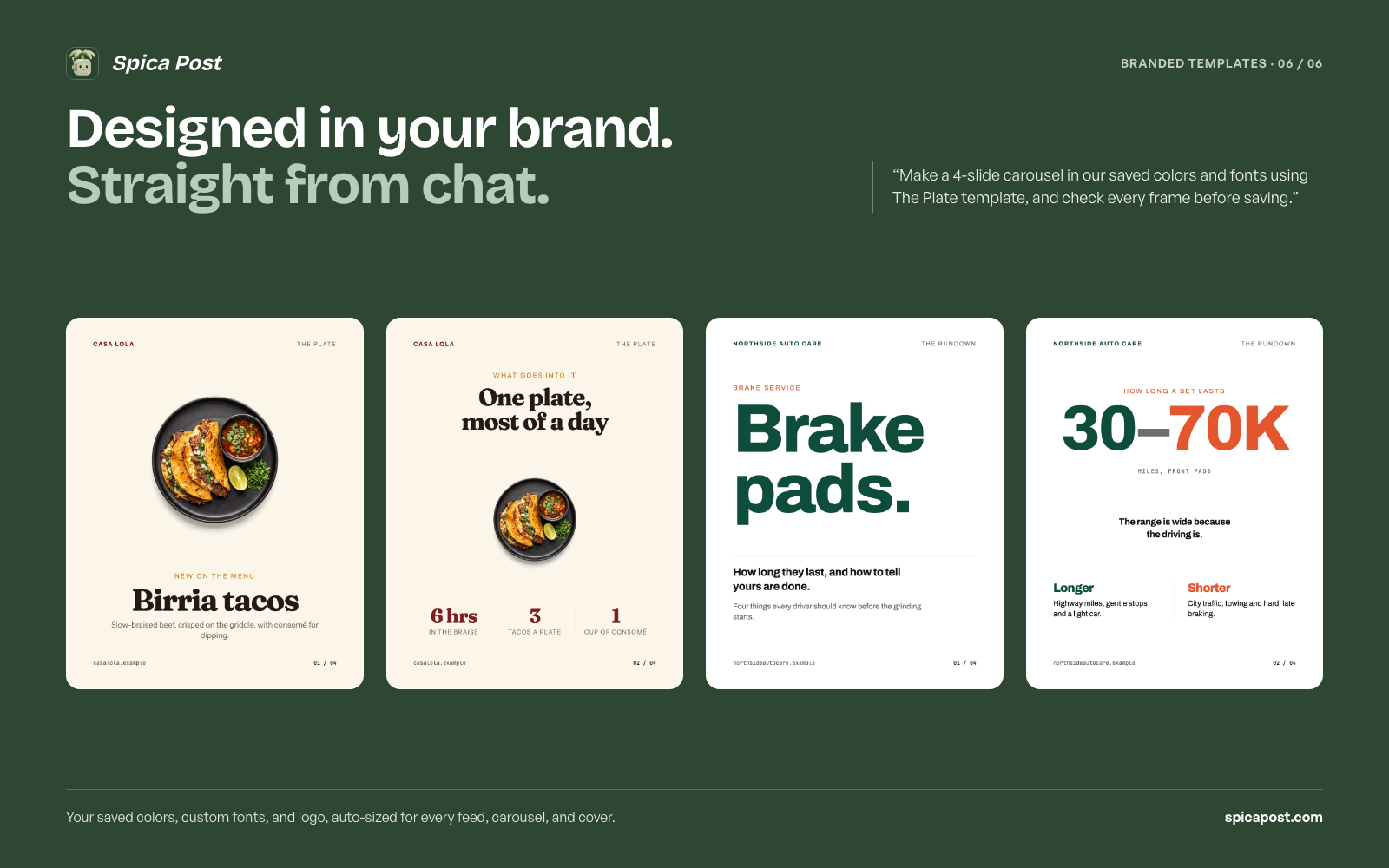
Pre-flighting images in Spica Post’s free browser checker
Before you upload a batch of photos, open Spica Post’s free no-login Social Media Image Size Checker. Drop any local image file from your computer or phone (or type pixel dimensions directly) and the tool immediately reports the detected aspect ratio and flags exact ratio fit, low resolution, or likely cropping across Instagram 4:5, Stories/Reels 9:16, X and YouTube 16:9, Pinterest 2:3, Google Business Profile 4:3, LinkedIn/Facebook 1.91:1, and 1:1 square. Everything runs locally inside your browser; your image never leaves your device.
How Spica Post’s automatic channel cuts work (and honest November 2026 trade-offs)
When you create designed posts inside Spica Post using your saved brand kit (colors, fonts, logo, and photos), each portrait template automatically generates matching channel cuts, including a 1600 x 900 landscape cut for X and Bluesky and a 1080 x 1620 vertical cut for Pinterest, so you stop redrawing the same announcement three times.
Here is the transparent November 2026 picture of how Spica Post serves small businesses and creators today:
- Live today: Free local browser tools (including the image size checker, character counter, and Google Business Profile post previewer), the
/mediaAsset Library with alt-text editing, Branded Templates with automatic1600 x 900X/Bluesky and1080 x 1620Pinterest channel cuts, Branded Link Pages with QR codes, and direct publishing plus Auto-crosspost to X, LinkedIn personal profiles, Bluesky (including photo and MP4 video posts), and Mastodon. - Built and completing network review: Spica Post’s publishing connectors for Instagram, Facebook Pages, Threads, Google Business Profile (approved and enabled in production; awaiting first live service-area profile verification), LinkedIn Company Pages, TikTok, YouTube (OAuth verification approved November 2026; completing API compliance audit), and Pinterest (built; awaiting Standard access) are completing review or verification. Until direct publishing opens across Meta, Google, and Pinterest workspaces, you can still verify every crop locally, generate brand-consistent multi-channel cuts in Spica Post, publish directly to X, LinkedIn, Bluesky, and Mastodon, and download crisp cuts for native posting in seconds. Compare flat workspace plans anytime on our pricing page.
6-step export checklist before you schedule a week
Run this rapid checklist once during your weekly batching session:
- Check pixel dimensions in the image size checker before writing captions.
- Export the 3 core crops (
1080 x 1350,1600 x 900, and1000 x 1500if using Pinterest) rather than forcing one file everywhere. - Inspect safe zones so circular profile avatars, Instagram
3:4grid crops, Story buttons, and YouTube duration badges never clip text. - Export photographs as sRGB JPEG (keeping Bluesky files under
950 KB) and flat graphics as crisp PNG where supported. - Write one plain sentence of alt text for every photo to serve screen-reader users cleanly.
- Confirm explicit customer permission before publishing any photo showing a customer, client home, vehicle, or identifiable private project.
Bookmark the 11-network table above, standardize your weekly exports on 1080 x 1350, 1600 x 900, and 1000 x 1500, and verify questionable shots locally in two seconds. Crisp framing makes your everyday business photos look twice as trustworthy without spending a dime on new gear.
Questions people ask
- What is the best single image size if I only want to export one crop?
- Export 1080 x 1350 pixels (4:5 portrait) if you post primarily to Instagram, Facebook, LinkedIn, and Threads. If you crosspost widely to X, Bluesky, Mastodon, and YouTube, add a second 1600 x 900 (16:9) crop and a 1000 x 1500 (2:3) vertical crop for Pinterest so nothing gets sliced awkwardly.
- Why does my 4:5 Instagram photo crop slightly differently on my profile grid in 2026?
- Instagram displays feed posts up to 4:5 (1080 x 1350) while previewing profile grid tiles at a taller 3:4 proportion (1080 x 1440). Keeping key headlines, logos, and faces centered inside the middle safe zone ensures both the scrolling feed and your profile grid look clean.
- What image size should I use for Google Business Profile posts and covers?
- Use 1200 x 900 pixels (4:3 landscape) for Google Business Profile update, offer, and event posts, 1024 x 576 (16:9) for your profile cover photo, and 720 x 720 (1:1) for your square logo. Keep file sizes between 10 KB and 5 MB in JPEG or PNG.
- Why do my images look blurry or fail to upload on Bluesky?
- Bluesky enforces a strict 1 MB per-image upload ceiling on standard posts and aggressively compresses files that push past that threshold. Exporting clean 1600 x 900 JPEGs saved around 80 to 85 percent quality keeps file sizes well under 1 MB while preserving crisp edges.
- Should I upload JPEG, PNG, or WebP files to social networks in 2026?
- Use JPEG (sRGB color space) for all photographs because it keeps file sizes compact and works universally, including on Instagram's API which accepts JPEG images rather than PNG or WebP. Use PNG mainly for flat graphics, text slides, and logos on networks that accept PNG, such as LinkedIn, X, Facebook, Bluesky, and Pinterest.
Sources
- Meta for Developers: Instagram Content Publishing image aspect ratio and file limits
- Google Business Profile Help: Manage photos and videos for your Business Profile
- Microsoft Learn: LinkedIn Images API specifications
- X Developer Docs: Media upload best practices and image limits
- Pinterest Business Help: Standard Pin creative dimensions and ratios