Engagement
Why Your Posts Get No Likes (and What to Change First)
Separate silent local buyers from real reach leaks, then fix the five causes hurting your posts with a 14-day reset and caption upgrades.
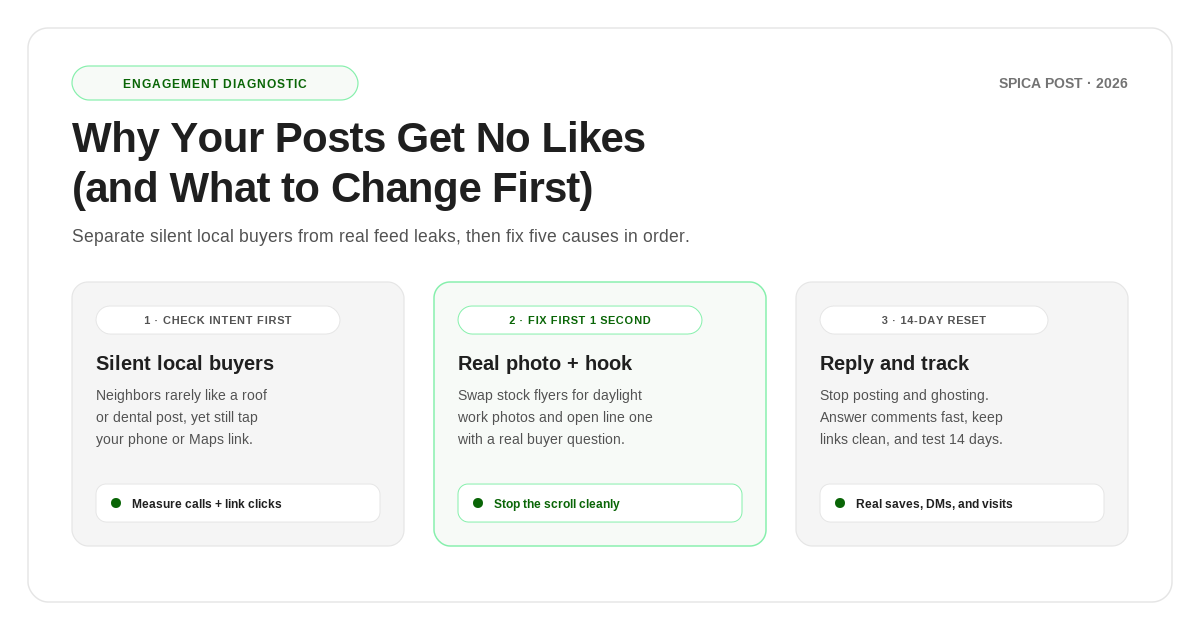
When your social media posts get no likes, check silent local buyer actions (profile visits, website clicks, phone taps, and Maps directions) before changing a word, because many local customers buy without ever tapping a heart icon. If clicks, saves, replies, and DMs are flat too, the cause is almost always one of five fixable leaks: weak first-second visuals and hooks, announcements nobody asked for, posting without replying, broken cadence or raw link placement, or a mismatch between your format and the platform.
Snapshot verified November 2026. Staring at two likes after spending forty minutes picking a photo and writing a caption (one from your cousin, one from your own personal account) feels discouraging enough to make any small business owner close the app for a month. Worse, most advice online pushes shallow tricks like chasing dance trends, stuffing thirty hashtags into comments, or posting three times a day until you burn out. None of those fix the underlying reasons real people scroll past a business post.
This diagnostic guide walks through the problem in strict priority order: first separating silent local intent from genuine distribution failures, then repairing the five root causes one by one, upgrading four real captions before and after, and running a calm 14-day engagement reset you can actually measure.
Step 0: Separate silent local buyers from a real reach problem
Before rewriting your entire content plan, verify whether you have an attention problem or simply a low-like profession. People behave very differently on social media when browsing a bakery versus browsing a dentist, an immigration attorney, a pest-control tech, or an emergency plumber.
Someone scrolling Instagram at 9:00 PM happily double-taps a warm tray of cinnamon rolls or a clean fade haircut. That exact same person almost never taps like on a post about root canal anxiety, drain backups, tax audit deadlines, or transmission leaks, because liking a medical or home-repair post feels odd in a social feed. Instead, they read quietly, tap your profile to see whether you look trustworthy and active, check your reviews, and click your booking link or phone number two weeks later when the problem hits.
| Profession type | Typical public likes per post | Real signals that prove posts work | How to verify this week |
|---|---|---|---|
| Visual impulse (bakeries, cafes, florists, salons, boutiques) | Moderate to high on bright real photos | Saves, DM shares to friends, menu/shop clicks, walk-in mentions | Check Instagram Insights sends/saves + Link Page clicks |
| Considered local services (dentists, HVAC, plumbers, mechanics, clinics) | Often 2 to 10 likes even on healthy accounts | Profile visits, call button taps, Google Maps directions, booking clicks | Check Google Business Profile performance + tracked /l/ clicks |
| Professional & B2B (accountants, coaches, consultants, insurance) | Low likes, higher quiet profile views | Link clicks, newsletter sign-ups, private DMs, referral replies | Track short-link clicks and ask new leads “Where did you see us?” |
| Creators and online sellers | Varies heavily by format and watch time | Saves, shares, reply threads, direct product link clicks | Compare saves + clicks per 1,000 views rather than raw likes |
Open three quick screens right now before diagnosing any creative flaws:
- Your Google Business Profile performance tab. Per Google Business Profile performance help, watch calls, direction requests, and website clicks over the past 30 days. Many local owners discover their Instagram posts got four likes while their Google listing drove forty phone calls from customers who checked Instagram first to confirm they were real.
- Your Link Page or website clicks. If you use tracked short links or a Link Page, check whether people tapped your booking button or menu quietly without liking the post.
- Saves, DM shares, and private replies. As Meta explains in Instagram Ranking Explained and Instagram Insights documentation, modern feeds weigh watch time, saves, and DM sends heavily alongside likes. A post with 3 likes and 14 saves or 8 sends to friends is quietly outperforming a post with 25 polite likes and zero actions.
If those silent-intent metrics are moving upward and new customers mention seeing you online (see our deeper guide on how to tell if social media is bringing customers), stop stressing over public heart counts. If reach, clicks, saves, replies, and likes are all near zero, move straight into the five-cause diagnostic tree below.
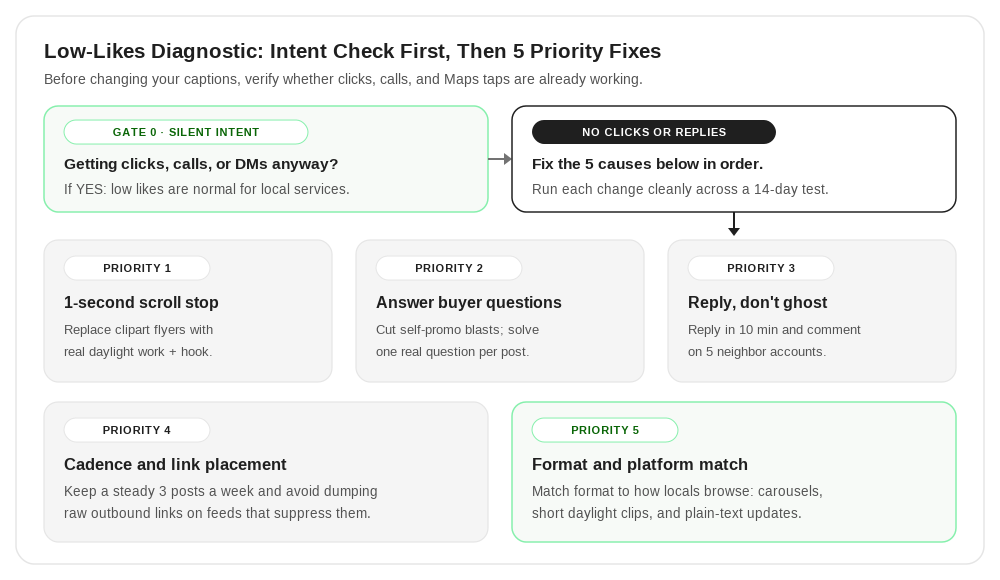
The 5 fixable causes (in strict priority order)
Fix these from top to bottom. Tweaking posting times or hashtags (Cause 4 or 5) cannot rescue a blurry flyer with a boring headline (Cause 1).
Cause 1: Your visual and first line fail the 1-second scroll stop
On mobile phones, people decide in roughly one second whether to pause or thumb straight past your post. Two habits kill small business posts before anyone reads sentence two:
- Canva clipart flyers and stock photography. Heavy text graphics with stock photos of smiling handshakes scream “advertisement,” and human thumbs are trained to flick past ads on reflex. Real daylight photos of your actual workbench, fresh plate, finished repair, clean studio chair, or hands packing an order outperform generic graphic flyers consistently because they look native to the feed. If you shoot on a phone, wipe the lens, step beside a bright window or open shade, and clear counter clutter (see our phone product photo guide).
- Wasting line one on greetings or slogans. Every network truncates long captions after the first one to two lines (“See more”). Opening with “Happy Tuesday everyone! At Apex Dental we pride ourselves on excellence…” puts your actual point below the fold where nobody clicks. Put the concrete hook, number, or real buyer question in the first 80 characters.
One essential note whenever you switch from stock flyers to authentic work photography: always ask explicit customer, client, or staff permission before photographing or posting identifiable faces, homes, children, or vehicles. Tight daylight shots of finished dishes, neatly wired panels, clean tools, or willing customers who gave clear consent look authentic while respecting everyone’s privacy.
Cause 2: Posting announcements nobody asked for instead of solving one buyer question
Scroll through your last ten posts and sort each one into two piles: “About us” (“We have appointments open!”, “Check out our website!”, “Happy National Coffee Day!”) versus “Useful to a customer” (“Three signs your AC drain line is clogging before July humidity hits”, “How much fabric to bring for a custom chair reupholster”, “What happens during a first 45-minute chiropractic visit”).
Most stalled accounts run 80% “About us” broadcasts. Even loyal past customers rarely react to a flyer that says “Call us for all your roofing needs.” Flip the ratio so at least three out of every four posts answer one real customer question, show one specific finished job with real details, or remove one common buying fear (price range, turnaround time, parking, what to expect). When you then post an offer once a week, warm readers actually pause to read it.
Cause 3: Posting and ghosting (zero local replies or conversations)
Every social platform uses interaction history to decide whose posts appear near the top of a reader’s feed. Instagram explicitly lists your history of interacting with an author as a core Feed and Stories ranking signal, and LinkedIn, Facebook, and Bluesky behave similarly (LinkedIn analytics definitions).
When a business schedules a post, closes the app for four days, ignores the one neighbor who asked “How much is this?” in the comments, and never comments on a single nearby business or neighborhood account, the feed interprets the page as a dead bulletin board.
Fix this with a simple 5-and-5 habit after publishing:
- Reply to every genuine comment within the same day with a real sentence (not just a thumbs-up emoji), and ask a light follow-up question when natural.
- Leave five thoughtful, human comments per week on real accounts in your area: neighboring shops, local farmers markets, chamber pages, host venues, or complementary professions (for example, a wedding florist commenting warmly on a local bakery’s cake post). Never drop spammy “Check out my page!” promos; leave genuine neighborly remarks that make locals curious enough to tap your name.
Cause 4: Broken cadence and buried outbound links
Two mechanical habits quietly throttle distribution even when your photos look great:
- Feast-or-famine bursts. Posting six times during a slow weekend and then disappearing for twenty-five days resets audience recognition every month. A calm, steady rhythm of two to three solid posts per week beats sporadic bursts every time because returning readers start recognizing your face, truck, or studio style in the feed.
- Dumping raw external links onto feeds that demote them. On Facebook Pages, X, LinkedIn, and Threads, pasting a bare URL straight into every caption often pulls down reach because networks prefer keeping people scrolling inside their app. Save raw links for moments when the click itself is the whole point, use a clean mobile Link Page anchored in your bio, and on platforms where a first reply or clean link card fits naturally, test keeping the main post punchy so readers engage before clicking.
Cause 5: Format and platform mismatch
Copy-pasting the exact same square flyer and 25 hashtags across five networks guarantees weak performance on at least three of them. Match the format to how people actually consume each feed:
- Instagram: Bright 4:5 vertical photos, swipeable 4-to-6-slide educational carousels (which earn saves and second impressions when people scroll back), and short 15-to-30-second daylight clips with clear on-screen captions. Keep captions readable and skip bloated hashtag blocks.
- Facebook Pages and neighborhood groups: Plain conversational questions, local community stories, clear photos of real people or finished work (with permission), and concise schedule/event updates.
- LinkedIn personal profiles: Short story-driven lessons from real client work (anonymized unless approved), practical checklists, or clean document carousels without stiff corporate jargon.
- Bluesky and X: Crisp one-to-three-sentence observations, real-time availability notes, or focused 3-part threads that fit cleanly inside each network’s character limits without awkward truncation.
- Google Business Profile: Direct Offer, Event, and Update posts paired with one bright horizontal photo and a single clear action button (Call now, Book, Order online).
Four real before-and-after caption upgrades
Notice what changes in every rewrite below: no gimmicky clickbait, no shouting in all caps, just a real first line, concrete specifics, and one clear low-friction next step.
1. Local plumbing and home service
- Before (gets 1 like): “Need a plumber? Call Smith Plumbing today! We offer fast, reliable, affordable service for all your residential plumbing needs. Licensed and insured! #plumber #plumbing #localbusiness #calltoday”
- After (built for saves, shares, and calls):
Hearing a quiet hissing sound behind your toilet ten minutes after it flushes usually costs under $25 in parts to fix, yet left alone it can quietly add $80 a month to your water bill.
Pop the tank lid and check if the flapper seal looks warped or slimy around the edges. Swapping that rubber flapper takes five minutes and stops most phantom running toilets immediately.
If the tank still refills on its own after a fresh flapper, the fill valve needs adjusting or replacing. Tap the link in our bio to see this week’s open service windows across [Neighborhood / City].
2. Neighborhood bakery
- Before (gets 3 likes): “Fresh pastries available today! Come visit us on Main Street! Open 7 AM to 3 PM! We love our customers!”
- After (stops the scroll and triggers pre-orders):
First pan of brown-butter cardamom knots just hit the cooling rack at 7:15 AM, and the glaze is still warm.
We baked 36 for today’s counter case plus a second small tray of gluten-friendly almond financiers coming out at 9:30 AM. Once the morning rack clears, we do not bake a second batch until Friday.
Want two set aside before your commute? Tap our Link Page in bio to reserve a box for quick counter pickup on Main Street.
3. Family dental clinic
- Before (gets 2 likes): “Did you know brushing twice a day is important for oral health? Schedule your 6-month cleaning with Bright Valley Dental today!”
- After (removes real buyer hesitation):
Putting off a dental cleaning because it has been three years and you dread getting lectured? That is the number-one message new patients send us, and we have a strict zero-lecture rule in every chair.
Here is how a returning visit actually works here: 10 minutes talking through anything bothering you first, gentle digital X-rays only if needed, and a calm cleaning at your pace with numbing gel available anytime you ask.
Evening slots on Tuesdays and Thursdays fill fastest. Tap our bio link to see open times this month or message us any question privately.
4. Independent hair salon or barber
- Before (gets 4 likes): “Before and after transformation! Book your next appointment via link in bio! #haircut #salon #balayage #hairgoals”
- After (real craft details, with explicit client permission):
Three months of grow-out without a harsh root line: we blended soft lowlights through the mid-lengths so [Client First Name] only needs a gloss refresh every 10 weeks instead of sitting in a foil chair every month. (Shared with [Client First Name]’s permission.)
If your color looks brassy by week four or your schedule cannot handle six-week touch-ups, ask for a lived-in root melt at your next consult.
Save this photo to bring to your stylist, or tap our bio link for our next three open color windows in [Month].
Your 14-day engagement reset plan
Do not try to overhaul five networks overnight. Pick one primary platform (plus your Google Business Profile if you serve a local area), freeze all generic flyer templates for two weeks, and run six clean posts on this exact schedule.
| Days | Focus | Exact action to execute | Metric to log |
|---|---|---|---|
| Days 1 to 2 | Baseline and profile cleanup | Log your current 30-day profile visits, Link Page clicks, saves, and Google Business Profile calls. Fix your bio line one (what you do, exact city, clear next step). | Starting baseline numbers |
| Days 3 to 5 | Posts 1 and 2: Real daylight work + FAQ | Publish one crisp daylight work photo answering a top customer question, plus one 4-slide plain-text or photo carousel explaining a common mistake or price factor. | Saves + profile visits |
| Days 6 to 7 | Active local replies | Answer every comment within a few hours and leave five genuine, non-salesy remarks on local partner or neighborhood posts. | Replies + local profile taps |
| Days 8 to 10 | Posts 3 and 4: Behind the process + real proof | Share a 20-second steady daylight clip of your craft (hands, tools, prep) with captions on screen, plus one permission-approved customer result or real story. | Watch time + DM sends |
| Days 11 to 13 | Posts 5 and 6: Direct offer with friction removed | Publish one clear booking/order invitation naming exact availability, turnaround, or parking details, paired with a clean tracked link on your Link Page. | Tracked clicks + DMs/calls |
| Day 14 | Honest review and repeat | Compare saves, sends, clicks, and inquiries against Days 1 to 2. Keep the two formats that earned real actions and cut whatever stayed flat. | 14-day before/after delta |
Notice that raw “like count” is never the primary judge on Day 14. Look first at saves, DM shares, replies, tracked link clicks, and phone or booking inquiries. Those are the signals both customers and ranking systems reward.
Measuring what actually moves (and honest Spica Post trade-offs)
Tracking quiet buyer actions is much easier when your links, replies, and post numbers live in one view instead of five disconnected mobile apps.
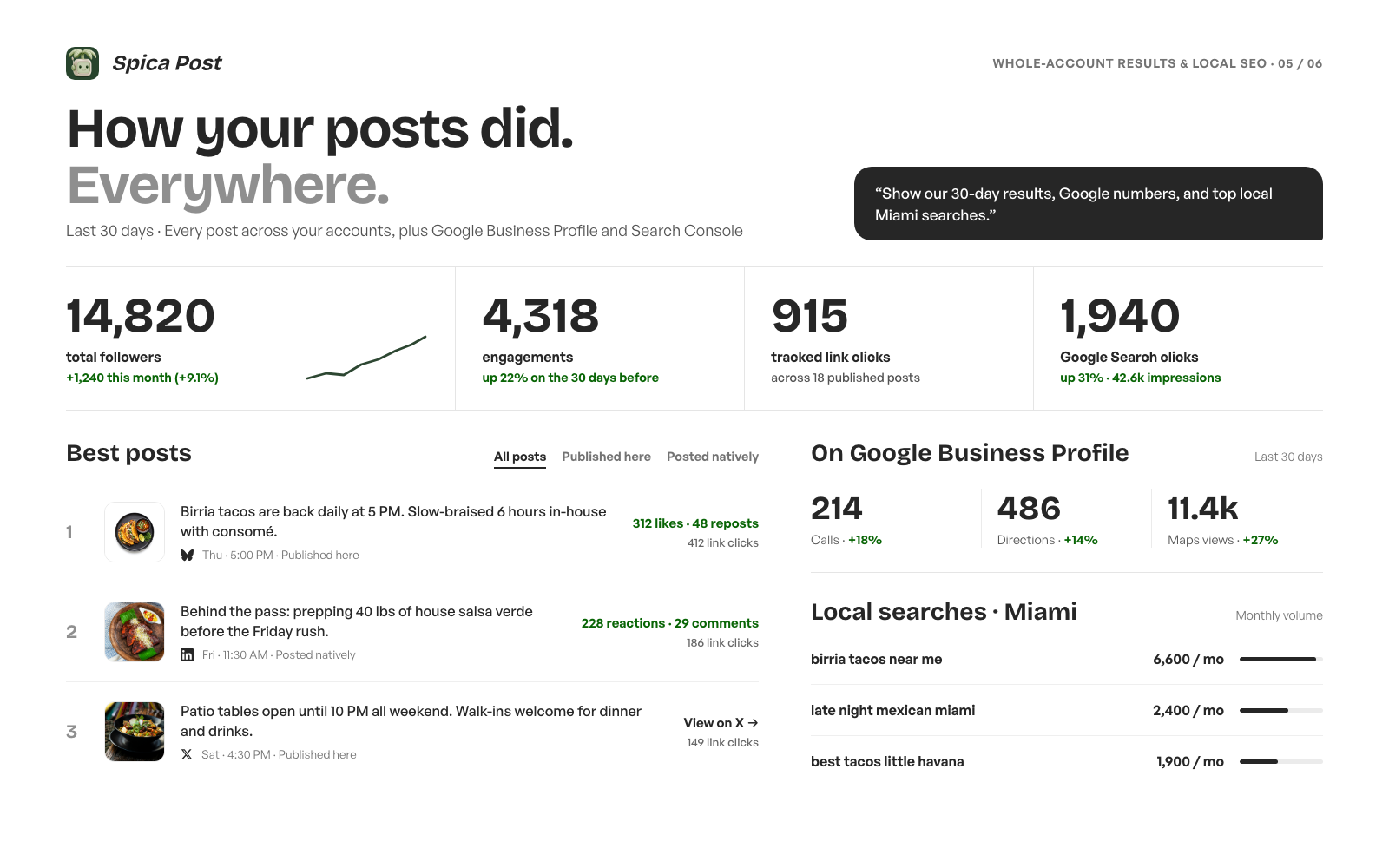
If you are considering Spica Post to run your 14-day reset and track whether low-like posts are actually driving clicks and local calls, here is the honest November 2026 picture for small businesses and creators:
- What works live today: Spica Post includes a fast Branded Link Page with visit and button click counts,
/l/tracked short links that count real human browser clicks per post even on silent networks (filtering bots and link-preview crawlers without storing personal visitor data), direct scheduling and Auto-crosspost across X, LinkedIn personal profiles, Bluesky, and Mastodon, plus live whole-account analytics sync and Unified Inbox comment replies on Bluesky today. You can also browse profession-specific hooks anytime on our free post ideas library. - What is built and completing network approvals: Whole-account analytics sync, Unified Inbox replies, and direct publishing connectors for Instagram, Facebook Pages, Threads, TikTok, LinkedIn Company Pages, and Pinterest are built in the app and completing third-party platform review/access. Google Business Profile posting, reviews, and Performance API metrics (calls, direction requests, website clicks) are approved and enabled in production, awaiting first live service-area profile verification, and YouTube OAuth is verified while completing its API Services compliance audit. Also note plainly that X post analytics are never pulled inside Spica Post by design (to avoid per-read X API charges; Spica Post links straight to your latest X post on X while still tracking your
/l/short-link clicks on X automatically). - Clear workspace pricing: Review current plans and included analytics tools anytime on our pricing page without guessing about per-channel add-ons.
Before you write off your social accounts over a quiet like count, open your clicks, saves, and Google Business Profile numbers today. If real neighbors are already tapping through, keep showing up calmly. If everything is flat, drop the clipart flyers, put a real customer question in line one, reply like a neighbor, and run the 14-day reset cleanly.
Questions people ask
- Does getting only two or three likes mean my social media posts are failing?
- Not automatically. For local service professions such as dentists, plumbers, accountants, or auto mechanics, neighbors rarely tap like in public, yet they still check your profile to confirm you are open, tap your phone number, click your booking link, or open Google Maps directions. Check clicks, calls, saves, and DMs before declaring a post a failure.
- What is the fastest single change to improve low engagement on business posts?
- Upgrade the first one second of your post: replace template clipart or stock graphics with a bright daylight photo of your real work, and rewrite line one so it names a real customer question or local problem instead of a generic greeting or company announcement.
- Why do my posts with website links get far fewer likes and views?
- Many social feeds prioritize keeping users inside the app, so posts containing raw external URLs in the main body often receive narrower distribution. Keep the main post focused on clear value, and place your booking or offer destination in your bio Link Page, a first reply where appropriate, or a clean tracked short link when sharing direct resources.
- How long should I test changes before deciding if my new approach works?
- Give any structured reset at least 14 days and six to eight consistent posts. Judging a strategy after two posts reacts to random weekday timing noise rather than showing whether better visuals, buyer-focused hooks, and active comment replies move saves, clicks, and DMs.
- Should I buy likes or join engagement pods to jump-start a quiet business account?
- No. Fake likes and artificial engagement groups confuse feed ranking systems by training them to show your posts to unrelated bots or out-of-state accounts instead of local customers. Real saves, local DM shares, and steady neighborhood replies build durable reach without risking account limits.
Sources
- About Instagram: Instagram Ranking Explained
- Instagram Help Center: Understand Insights metrics across posts, Reels, and Stories
- Google Business Profile Help: Understand your Business Profile performance
- LinkedIn Help: Post and Page analytics definitions
- Spica Post: Post ideas for small businesses and creators