Multi-location
Social Media for Multi-Location Businesses: One Brand, Many Branches (2026)
Run 2 to 20 locations without duplicate chaos: one brand hub, separate Google Business Profiles, 70/30 local posts, and role approvals.
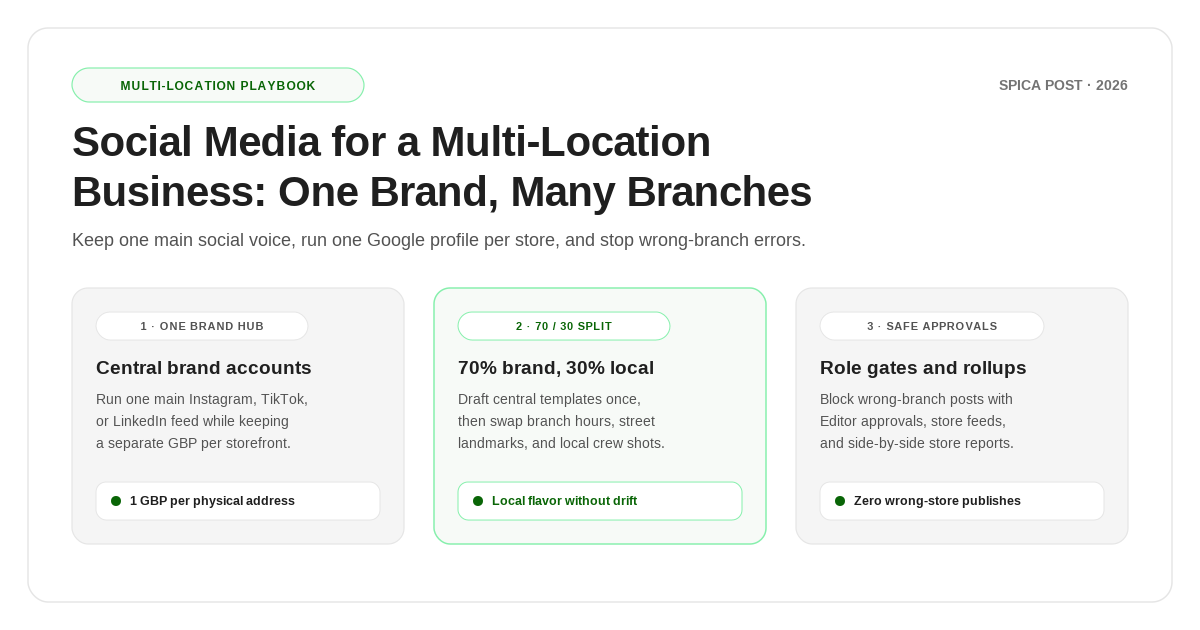
Social media for a multi-location business works smoothly when you separate where customers discover your brand from where they look up directions to a specific door: keep one central Instagram, TikTok, LinkedIn, or X account for brand storytelling across 2 to 20 branches, maintain one dedicated Google Business Profile per physical storefront, run a 70/30 brand-to-local post template, and enforce role-based approvals so nobody ever blasts the wrong branch’s hours or promo.
Opening your second or third storefront changes how social media breaks. With one shop, you snap a quick photo by the front counter, type a caption, and hit publish. With four clinics, eight cafés, or fifteen retail locations, two opposite failures show up fast. Either every store manager creates an unauthorized local handle that goes silent after six weeks (leaving abandoned pages littered across Instagram and Facebook), or headquarters blasts identical corporate copy everywhere without local street landmarks, parking notes, or store-specific hours, causing frustrated drivers to show up at a closed Westside door during a Downtown-only promotion.
Snapshot verified November 2026 against Google Business Profile representation guidelines for chains, Google location group documentation, and Google Business Profile Performance metrics. This playbook gives owners, operations leads, and marketing coordinators a clear architecture for 2 to 20 locations: which networks stay centralized vs. localized, how to run a repeatable 70/30 content workflow, how role gates and location-scoped calendars eliminate wrong-branch mistakes, four copy-ready templates, and how to compare every storefront side by side without spreadsheet busywork.
One brand account or one per storefront: the decision matrix
Deciding whether to centralize or split accounts is not an all-or-nothing choice. Every platform serves a different local intent, and mixing discovery networks with map directories creates unnecessary work for store managers who already have shifts to staff.
| Network or asset | Recommended setup (2 to 20 locations) | Why this structure wins | When to make an exception |
|---|---|---|---|
| Google Business Profile | Always 1 separate profile per physical address | Local Maps searches, driving directions, click-to-call, branch hours, and store-specific reviews require exact street coordinates | Never combine two staffed storefronts into one profile; organize all branches inside one Google location group |
| Instagram & TikTok | 1 central brand account (tag location pins per post) | Concentrates followers, watch time, and video production quality instead of starving 6 empty branch feeds | Split only when branches sit in different states or metros with distinct menus, local culture, and dedicated on-site creators |
| Facebook Pages | 1 main Page for 2 to 5 nearby stores; Facebook Locations or branch Pages past 6+ distinct cities | Neighbors check Facebook for local community events, snow-day closures, and store-level holiday schedules | Keep 1 unified Page unless each branch actively answers its own DMs and posts weekly local updates |
| 1 central Company Page plus leadership personal profiles | Recruiting, B2B partnerships, commercial accounts, and vendor trust grow stronger under one unified company footprint | Only split if a regional division operates under a completely separate legal brand name | |
| X, Bluesky & Mastodon | 1 central brand handle naming branch neighborhoods clearly | Fast service alerts, weather pivots, and brand news travel better from one verified handle with clear neighborhood tags | Rarely needed per store unless a flagship venue hosts daily live events |
| Branded Link Page | 1 hub Link Page linking to store booking/hours, OR 1 Link Page per branch on print QR codes | Countertop QR codes at Store #3 should open Store #3’s menu, review link, and directions immediately with zero extra taps | Give every physical counter its own branch QR code while keeping the main bio link as a clean multi-store hub |
Why every physical address requires its own Google Business Profile
Per Google Business Profile guidelines for chains and brands, every staffed storefront with permanent exterior signage and distinct local hours should maintain its own verified listing. Consistent naming matters: use your exact real-world business name across every door (for example, “Cedar Bakehouse” across all profiles rather than stuffing neighborhood keywords like “Cedar Bakehouse Best Sourdough Westside Austin” into the title, which risks profile suspension).
Store each branch inside a single location group under one primary owner account owned by the business itself, never under a former store manager’s personal Gmail address. Assign each profile its own local phone number (or tracked local line with the direct store number listed as secondary), its own location landing page URL (such as /locations/westside/ rather than sending every store to a generic homepage), and its own verified holiday hours. For full setup basics, walk through our Google Business Profile setup checklist.
When a branch actually earns its own Instagram or Facebook handle
Before letting a newly opened branch spin up @YourBrandNorthside, run a three-question test:
- Will the two audiences overlap by less than 30 percent? Two coffee shops four miles apart share commuters and regulars; splitting Instagram splits your own fans in half. Two clinics in different metropolitan areas serve completely separate patient bases.
- Do inventory, pricing, events, or local services differ weekly? A multi-location fitness studio running different class instructors and community runs in three cities benefits from localized Facebook or Instagram touchpoints far more than a dry cleaner with uniform services.
- Is there a named person accountable for two clean posts a week for the next 12 months? An empty branch page whose last post wishes customers “Happy Memorial Day 2024” hurts walk-in trust more than having no separate page at all.
If a branch fails any of those three checks, keep Instagram, TikTok, LinkedIn, and X unified at the brand level and express every store’s local personality through location geotags, pinned Story highlights per city, dedicated branch Link Pages, and active store-level Google Business Profiles.
The 70/30 hub-and-branch content architecture
Pure corporate posting feels cold to neighborhood regulars. Pure branch improvisation destroys visual consistency and creates policy headaches. The most reliable middle ground for small businesses and creators scaling from 2 to 20 doors is the 70/30 hub-and-branch split.
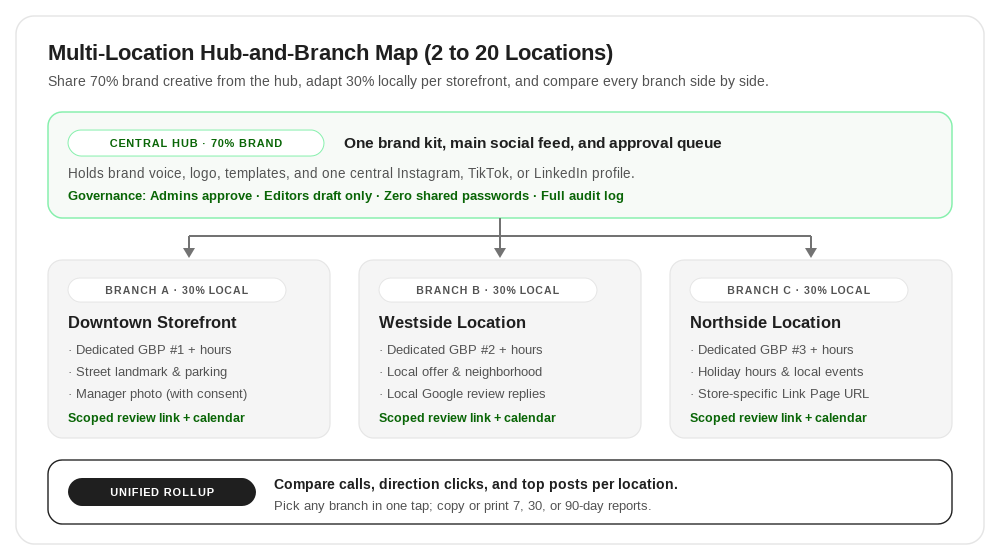
Under this workflow, headquarters (the owner, marketing lead, or partner agency) creates 70 percent of the message once: the brand voice, clean photography or branded template layout, core seasonal offer, product or service explanation, and clear call to action. Each storefront then swaps in the 30 percent local layer that makes a neighbor stop scrolling and realize this business sits five minutes from their driveway.
| Content layer | Who owns it | Exact elements included | Update cadence |
|---|---|---|---|
| 70% Central Brand Core | Owner, marketing lead, or agency | Brand colors, typography, logo, core offer copy, seasonal launch dates, company-wide service explanations, compliance phrasing | Batched once every 2 to 4 weeks |
| 30% Local Branch Layer | Branch manager (drafting as Editor) or coordinator using branch notes | Exact street landmark and parking instructions, store-specific hours, neighborhood name, local manager or staff spotlight, branch-only stock or promo, direct store booking/menu URL | Swapped in 10 minutes per week before approval |
What belongs in the 30 percent local layer
Strong local edits do not require rewriting an entire caption from scratch. Four concrete details turn a generic announcement into a neighborhood magnet:
- Visual street landmarks and parking notes: Instead of “Visit our South location,” write “Right beside the corner of Oak and 4th across from Memorial Park, with free 2-hour garage parking behind the building.”
- Branch-specific hours and capacity: One store might stay open until 8:00 PM on Thursdays while another closes at 6:00 PM or holds weekend walk-in slots. Never assume every storefront shares identical hours, especially around federal holidays.
- Local manager and crew spotlights: People walk into neighborhood doors because they recognize friendly faces. Share one quick behind-the-counter introduction per branch each month so regulars know who runs the morning desk or service bay.
- Neighborhood events and community tie-ins: Mention the Saturday farmers market two blocks away, local school spirit nights, nearby street paving detours that affect turn-ins, or charity drives hosted in that specific lobby.
Explicit permission rules for staff and customer photos across branches
When ten store managers snap quick phone photos for social media, privacy habits must be standardized across every location, never left to guesswork. Establish one written rule for every storefront: always ask explicit permission from every identifiable employee or customer before photographing or posting their face, name, or personal vehicle.
If a staff member prefers staying off camera, respect that without pressure and frame shots around clean counter displays, freshly stocked shelves, finished craftsmanship, exterior signage in morning light, or hands preparing an order. Keep customer receipts, loyalty tablets, appointment monitors, prescription bags, and license plates completely outside every photo frame across all locations.
Preventing wrong-branch mistakes with structural guardrails
Asking busy managers to “double-check the dropdown before clicking post” works until Friday at 4:45 PM when a holiday schedule changes and someone is juggling two browser tabs. Multi-location mistakes are operational failures, and they require structural software guardrails rather than sharper reminders.
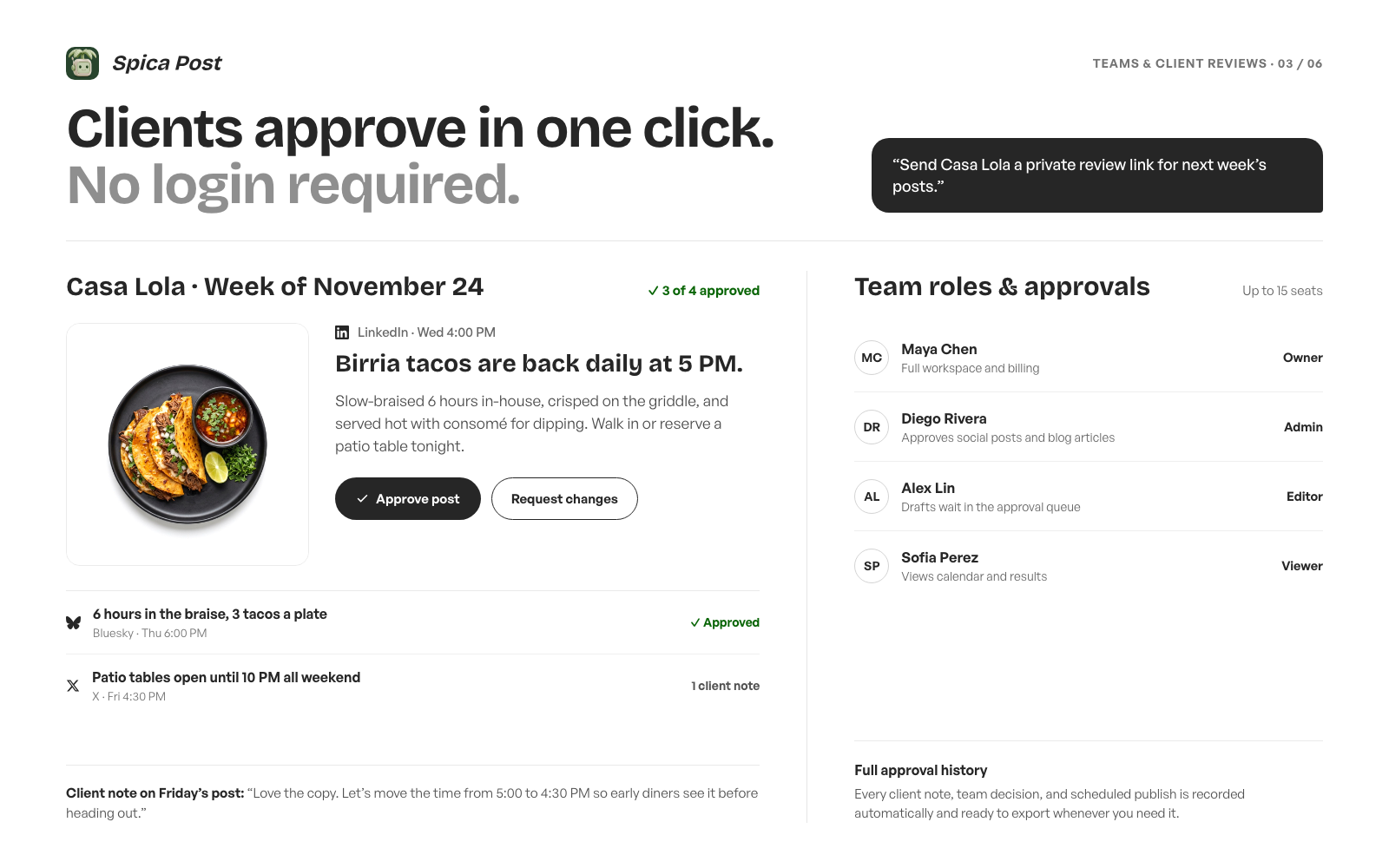
Role-based approval gates (Owner, Admin, Editor, Viewer)
Never share one master Instagram, Facebook, or Google password across store managers in a group chat. When a branch manager leaves or changes locations, shared credentials create immediate security gaps and zero accountability.
Instead, connect each social profile and Google Business Profile once via OAuth inside a workspace that enforces distinct team roles:
- Owner and Admin: Connect or disconnect accounts, manage billing and invitations, approve queued posts, and publish directly.
- Editor (ideal for store managers or local coordinators): Upload local branch photos, adapt the 30 percent local caption details, and submit drafts for review, while blocked at the server (
403 approval_required) from publishing directly across web, API, or AI assistant tools. - Viewer (ideal for regional directors, franchise partners, or silent owners): Inspect upcoming calendars and performance reports without any risk of accidentally editing or cancelling live posts.
Turning on a workspace-wide requireApproval setting ensures every single post passes a quick second pair of eyes before going out, and a searchable audit log records exactly who drafted, edited, approved, or cancelled each branch update. For deeper governance architecture across agencies and large brand portfolios, read our guide to managing multiple social media accounts safely.
Brand isolation, stale-tab refusal, and location grouping
Multi-location teams generally fall into one of two structures:
- One unified brand with multiple storefronts (e.g., 6 neighborhood bakeries under one name): Keep all connected profiles inside one workspace and group accounts into named Locations (Downtown, Westside, Northside). In the composer, picking a location is one clean tap under “Going to” instead of ticking individual checkboxes one by one, preventing accidental cross-branch selection.
- Distinct regional brands or separate franchise entities (e.g., 4 differently named sister concepts under one owner): Place each distinct brand in its own server-isolated workspace under one login. Every browser tab displays
<Brand> · <Page>, refuses writes from stale tabs left open on an earlier brand until reloaded, and requires explicitbrandIdparameters whenever an AI assistant drafts posts over MCP (and locks every REST API key to one brand).
Location-scoped calendars and zero-login branch manager review links
Most store managers do not want another software dashboard password just to verify whether Tuesday’s snow-day hours or next week’s patio special look accurate. Two tools remove that friction completely:
- Location-scoped calendar feeds: Export an
.icssubscription link or live Google Sheets.csvfeed filtered by?location=so Store #2’s manager sees Store #2’s scheduled posts directly inside Google Calendar, Outlook, or Apple Calendar alongside staff shifts and local deliveries. - Zero-login review links (
/review/<token>): Send each branch manager or franchise partner a scoped, optional-expiry review link showing only their location’s upcoming posts with full images and copy. They tap Approve or Request changes with a quick note (“Update Saturday close to 5:00 PM for street fair”) without creating a user account, and their feedback lands straight back on your calendar and notifications.
Four copy-ready 70/30 multi-location post templates
Keep these four templates in your central brand folder. Headquarters fills in the core message once; each branch swaps only the bracketed local 30 percent details before approval.
1. Brand-wide seasonal offer adapted per storefront (Google Business Profile Update or Offer)
[70% Brand Core: Spring tune-up / seasonal menu / 2-line product launch headline] is officially live at our [Branch Neighborhood] location through [End Date].
[30% Local Detail: Find us on [Street Name] right across from [Local Landmark], with easy parking in [Lot / Street]. Open [Days & Exact Branch Hours].]
Tap the link below to view [Branch Name] availability and book directly with our local team.
2. Local branch manager or crew spotlight (ask explicit staff permission first)
Say hello to [First Name], who leads the counter at our [Branch Neighborhood] storefront every [Days of Week].
[30% Local Detail: One genuine sentence about their favorite local menu item, helpful service tip, or neighborhood tie-in, approved directly by the team member.]
Stop by [Street / Cross Streets] this week to say hi, or tap our [Branch Name] Link Page in bio for directions and current hours.
3. Branch-specific holiday hours, detour, or weather update
Quick heads-up for our [Branch Neighborhood] neighbors: on [Day, Date], our [Branch Name] location will run adjusted hours from [Start Time] to [End Time] (while our [Other Branch Name] location stays on normal hours until [Time]).
[30% Local Detail: Helpful parking or detour note, e.g., enter from [Side Street] while utility crews finish repaving on [Main Ave].]
Check live hours and direct links for every storefront on our Link Page in bio before heading over.
4. Neighborhood event or community tie-in (central brand feed with branch geotag)
Heading to [Local Farmers Market / School Game / Street Fair] in [Neighborhood] this [Day]? Our [Branch Name] doors are just [Walking/Driving Distance] away on [Street Name].
[70% Brand Core: One calm sentence describing the featured service, grab-and-go item, or seasonal special waiting inside.]
Mention this post or tap our [Branch Name] pin for walking directions and live hours.
Measuring every branch side by side without spreadsheet chaos
Running five storefronts without branch-level visibility hides obvious wins and leaks. Maybe your Eastside store receives half the Google direction clicks of your Westside store simply because Eastside has not added fresh interior photos in eight months, or because Eastside takes three weeks to answer Google reviews.
Per-location Google Business Profile Performance rollups
Google reports storefront-level actions through its Business Profile Performance metrics (Google Business Profile performance help). Track four core metrics per branch on a calm 30-day rhythm rather than obsessing over daily impressions:
| Metric per branch | What it actually tells operations | Action to take when one branch lags |
|---|---|---|
| Google calls & direction requests | High-intent neighbors ready to visit or book today | Audit that branch’s hours, primary category, fresh exterior/interior photos, and weekly Google Updates |
| Website & Link Page clicks | How many local viewers moved from profile to booking, menu, or estimate form | Give the lagging store its own clean /l/ short link or dedicated countertop QR Link Page so clicks never blur together |
| Google review volume & response time | Whether walk-in trust matches store service quality | Put a branch-specific review QR card at checkout and answer every review within 48 hours (see our Google review reply guide) |
| Top-performing local posts | Which local crew photos, landmarks, or offers earn genuine engagement | Share winning branch formats with slower stores during your monthly 15-minute manager huddle |
Comparing 7, 30, and 90-day windows across storefronts
Avoid pasting screenshots from six different Google dashboards into slide decks every month. Grouping connected accounts into named Locations lets you view every storefront side by side across 7, 30, or 90 days (posts published, engagement, top posts, and Google Business Profile Performance rollups where connected) and copy a plain-text summary or print a clean PDF for regional partners and store managers.
A 30-minute weekly multi-location routine and honest trade-offs
Consistency across 2 to 20 branches comes from one short calendar rhythm that never burns out store managers:
- Monday morning (10 minutes, HQ): Draft two 70 percent brand templates for the week, attach approved photography, and drop clear bracketed placeholders for local branch details.
- Tuesday midday (5 minutes per branch manager, as Editor): Each store lead drops in one fresh daylight photo (with explicit staff or customer permission), fills in local hours, landmark, or neighborhood details, and submits to the approval queue.
- Wednesday morning (10 minutes, Owner or Admin): Review all submitted branch drafts in one queue, verify every location tag matches the right storefront, share zero-login review links if a franchise partner needs final sign-off, and approve to schedule.
- Friday afternoon (5 minutes, HQ or Branch Lead): Reply warmly to new Google reviews and social comments per location without mixing up branch names or details.
Skip five common traps that trip up multi-location teams:
- Letting store managers own Google Business Profiles on personal emails. Always keep primary ownership under a company-controlled Google location group.
- Copy-pasting identical text with zero local details across ten Google profiles. Even one fresh sentence naming cross streets, parking, or a local team highlight signals real neighborhood presence.
- Putting phone numbers inside Google Business Profile post captions. Google provides a built-in Call button and may reject post copy containing phone digits per Google Business Profile post guidelines.
- Ignoring closed or relocated branch listings. Mark permanently closed or moved storefronts cleanly in Google Business Profile immediately so drivers never pull into an empty lot.
- Paying per-channel or per-seat penalties that force teams to share logins. Shared passwords always end in wrong-branch errors; choose flat workspace structures where every teammate has their own role.
Honest trade-offs if you evaluate Spica Post in November 2026
If you are comparing platforms for a multi-location business on how Spica Post works, here is the exact November 2026 breakdown matching our public capabilities for small businesses and creators:
- Live today in Spica Post: Multi-location grouping (one-tap location targeting in the composer plus side-by-side 7, 30, and 90-day Locations reports you can copy or print as PDF), isolated multi-brand workspaces under one login with stale-tab write refusal, role-based team seats (Owner, Admin, Editor, Viewer) with server-enforced Editor approvals (
403 approval_required) and searchable CSV-exportable audit logs, All-Brands Calendar with?location=-filtered.icsand Google Sheets feeds, zero-login location-scoped client and manager review links (/review/<token>), Branded Link Pages with printable SVG QR codes and tracked/l/short links, and direct publishing plus Auto-crosspost across X, LinkedIn personal profiles, Bluesky (including live Unified Inbox replies), and Mastodon. - Built and completing network approvals or not yet built: Because multi-location storefronts rely heavily on Google Business Profile, Instagram, Facebook Pages, and LinkedIn Company Pages, be aware plainly that Spica Post’s connectors for Google Business Profile (API approved and enabled in production; awaiting first live profile verification before opening across all workspaces), Instagram, Facebook Pages, Threads, TikTok, LinkedIn Company Pages, and YouTube (OAuth approved; completing compliance audit) are built and finishing network review or verification. Also note that automatically emailing scheduled multi-location PDF reports on a timer is not built yet (you view, copy, print to PDF, or pull reports on demand via the Locations page, REST
/v1, or MCP). Until direct Google and Meta publishing finishes rollout, you can run your central brand templates, approval queue, location calendars, manager review links, Link Pages, QR codes, and live networks inside Spica Post while copying approved local updates into Google Business Profile and Meta natively. Review flat workspace tiers anytime on our pricing page.
Start with a quick audit this afternoon: verify that every physical storefront sits inside one company-owned Google location group, retire duplicate dead branch handles, and write your first 70/30 weekly template with clear approval roles. Every door will stay local without ever losing your brand.
Questions people ask
- Should a multi-location business create separate Instagram and TikTok accounts for every branch?
- Most businesses with 2 to 20 locations in the same metro area or region perform better with one central Instagram and TikTok account so followers, views, and video production effort stay concentrated. Create a separate branch handle only when a storefront sits in a distinct metro market, carries a different local menu or service catalog, and has a dedicated person filming fresh weekly content.
- Does every physical storefront need its own Google Business Profile?
- Yes. Every physical address that serves walk-in customers with its own signage and staffed hours should have its own verified Google Business Profile organized inside a shared location group. Separate profiles ensure local Maps searchers see exact driving directions, accurate branch hours, local reviews, and store-specific updates.
- How does the 70/30 content split work for businesses with multiple locations?
- Your central marketing lead creates 70 percent of the post structure once: core brand message, seasonal offer, product photography, and visual layout. Each branch swaps in the final 30 percent locally: exact street landmarks, parking notes, store-specific holiday hours, neighborhood mentions, and manager or staff photos taken with explicit permission.
- How do multi-location teams stop branch managers from accidentally posting to the wrong store?
- Replace shared social passwords with role-based workspace permissions and location grouping. Assign branch leads as Editors who draft local updates and submit them to an internal approval queue while Owners or Admins approve and schedule, and use location-scoped zero-login review links so each store manager verifies only their own branch calendar.
- Can store managers post photos of customers or employees working inside a branch?
- Only after obtaining explicit permission from every identifiable customer or employee before taking and publishing the photo. Clear written or verbal consent protects staff comfort and customer privacy across all locations, and keeping receipts, payment screens, and background guests out of frame keeps branch feeds clean.
Sources
- Google Business Profile Help: Guidelines for representing your business (chains and storefronts)
- Google Business Profile Help: Create and manage location groups
- Google Business Profile Help: Check and understand your Business Profile performance
- Google Business Profile Help: Create posts on your Business Profile
- Spica Post Studio: multi-brand isolation, team approvals, and multi-location reports