Grand opening
Social Media for a Grand Opening: The 4-Week Plan
Open your doors to a full room with a calm 4-week social media plan: early Google setup, neighbor tags, soft-opening RSVPs, countdowns, and first reviews.
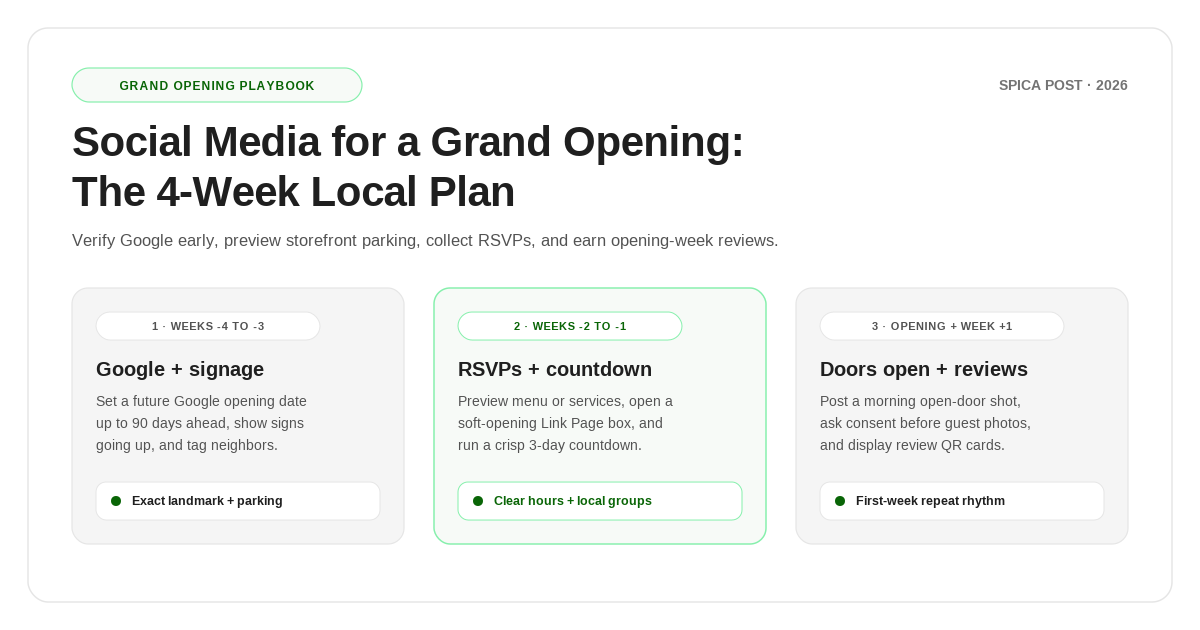
A reliable grand opening social media plan starts four weeks before your doors unlock, beginning with verifying your Google Business Profile with a future opening date (Google lets you verify early and begins showing your profile publicly up to 90 days before opening), followed by a calm week-by-week rhythm: Week -3 signage and neighbor tags, Week -2 service previews and a soft-opening RSVP Link Page box, Week -1 exact parking guides and a 3-day countdown, and Opening Weekend plus Week +1 proof paired with checkout review QR cards.
Most new storefronts, cafes, salons, clinics, and gyms make the exact same mistake during build-out. The owner spends three intense months wrestling with contractors, permits, equipment deliveries, and staffing, says almost nothing online because the room still has drop cloths on the floor, and finally publishes a single “We’re open today!” post at 9:15 AM on Saturday morning. By the time neighbors see that post on Sunday night, opening weekend is already over and the quiet Monday slump sets in.
Neighbors do not need a glossy interior tour to care about a new local business. They want to know what is moving into the empty corner unit they drive past every morning, who is behind it, where to park, what opening weekend feels like, and whether they can reserve a spot or walk right in. Four steady weeks of plain, honest updates build more real foot traffic than a stack of last-minute flyers ever will.
Snapshot verified November 2026. Google Business Profile future opening-date visibility, pre-opening post capabilities, review policy limits, and Spica Post Link Page features reflect live November 2026 documentation. Review current Spica Post workspace options anytime on our pricing page.
Set up your Google Business Profile up to 90 days ahead
Claiming and verifying your Google Business Profile before build-out finishes is the highest-leverage task in your entire grand opening timeline, because Google Maps visibility takes days to settle and cannot be rushed on Friday night.
According to Google Business Profile Help and Google’s business representation guidelines, a brick-and-mortar storefront does not have to wait until opening morning to verify. When you create your profile and set a future opening date (month and year required, up to one year ahead), Google begins displaying your verified profile publicly 90 days before your opening date.
What unlocks during the 90-day pre-opening window
Once your verified profile carries a future opening date inside that 90-day window, you can prepare the ground for local searchers before your first customer walks through the door:
- Upload honest progress photos: Post clear daylight shots of your permanent exterior signage, front door, painted interior, and equipment arriving so locals recognize your storefront immediately when driving past.
- Write a plain-language business description: State exactly what you sell, which neighborhood you serve, and when you open without stuffing lists of zip codes.
- Publish pre-opening Google updates and offers: Use Google Business Profile posts to announce your exact grand opening date, opening-weekend hours, or a ribbon-cutting event.
- Keep reviews clean until opening day: Google automatically blocks public customer reviews and public photo uploads until your official opening date arrives, protecting new owners from early confusion. Once your opening date passes, Google displays a “Recently opened” badge on your listing for 90 days.
How to pass verification while construction is still wrapping up
If Google triggers video verification, wait until your permanent exterior signage is mounted (temporary paper banners often fail review), your street number is visible, and you hold keys that unlock the entrance and back-of-house area. Film one continuous, uncut clip walking from the street sign to your storefront sign, unlocking the door, and showing interior equipment or point-of-sale hardware. Follow our full Google Business Profile setup guide before submitting so you never trigger an avoidable reset by editing your business name mid-review.
The complete 4-week grand opening timeline
Four weeks gives you enough runway to repeat your address, hours, and offer across several formats without boring neighbors or burying yourself in content work during final inspections.
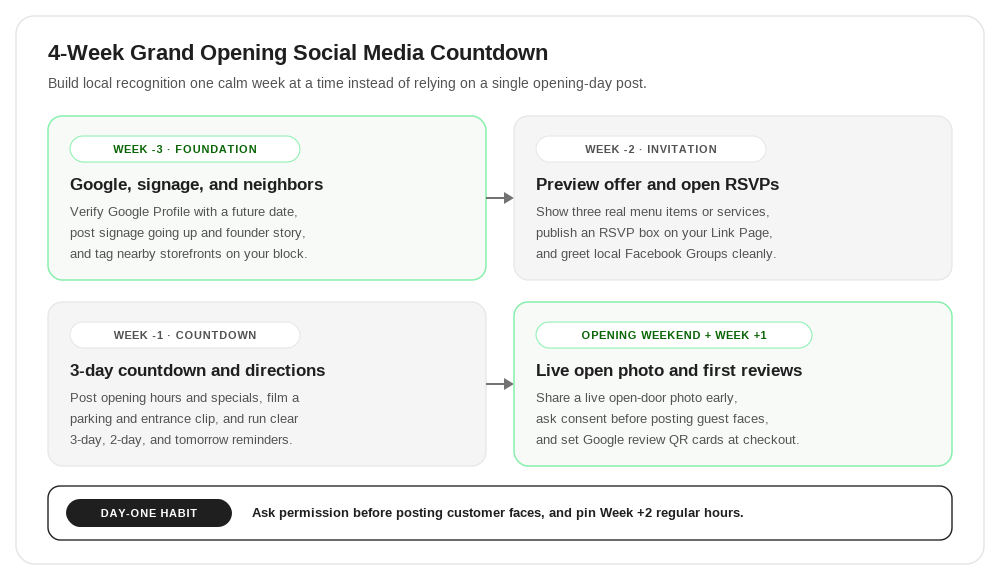
| Phase | Core job | What to publish (2 to 4 posts per week) | Channels to prioritize |
|---|---|---|---|
| Weeks -4 to -3 | Claim territory and meet the block | Permanent sign going up, founder story, exact cross street and parking preview, shout-outs tagging neighboring businesses | Google Business Profile, Instagram, Facebook Page, Link Page |
| Week -2 | Show the offer and capture RSVPs | 3 core menu items or service previews, soft-opening RSVP or opening-day reminder box on your Link Page, polite local Facebook Group introduction | Instagram, Facebook Page and Groups, Link Page, X or Bluesky |
| Week -1 | Remove arrival friction and count down | Full opening-weekend hours and specials, 20-second walking and parking video clip, daily 3-day, 2-day, and tomorrow countdown posts | Instagram Feed and Stories, Facebook, Google Business Profile Event/Offer |
| Opening Weekend | Prove you are open right now | Crisp door-open photo 30 minutes before opening bell, real-time stock or wait-time Stories, warm thank-you recap (with consent for faces) | Instagram Stories and Feed, Facebook, X or Bluesky, Google Business Profile |
| Week +1 | Lock in regulars and first reviews | Checkout Google review QR card live on Day 1, “We are open all week” regular-hours pin, answers to top 3 opening-weekend questions | Google Business Profile, Instagram pinned grid, Link Page |
Week -3: signage, founder story, and neighbor tags
Week -3 turns a mystery construction site into a real business owned by real people who care about the neighborhood. Aim for three focused posts across the week rather than noisy daily updates.
Show the sign going up with your exact street and landmark
Few local posts outperform a crisp daylight photo of the new sign going onto the building facade. People who walk their dog past that storefront every morning immediately tap and share it into neighborhood text threads. Pair the photo with plain-English directions: name the exact street number, nearest cross street, visible neighbor landmark (“right between Cedar Coffee and the post office on Maple Avenue”), and where cars actually park.
Share a short founder story without corporate jargon
Neighbors support small businesses and creators when they know who stands behind the counter. Take one natural portrait of yourself or your founding team standing by the front window in daylight. In four short paragraphs, explain why you chose this profession, why you picked this specific neighborhood, what you want a first visit to feel like, and the exact date you open. Skip dramatic buzzwords and write the way you would answer a curious neighbor peeking through the glass.
Tag neighboring storefronts on your block
Local algorithms and real neighborhood word-of-mouth reward genuine local relationships. Walk down your block during Week -3, buy a coffee next door, introduce yourself to the salon owner, bookstore, or florist two doors down, and ask if you can tag them when sharing your new block. When you post a photo holding a cup from next door or pointing out the shared parking lot behind your strip center and tag two neighboring businesses cleanly, those owners frequently reshare your post to hundreds of locals who already visit that exact block every week.
Week -2: offer previews, soft-opening RSVPs, and local groups
Once locals recognize your address and face, Week -2 answers their next practical question: “What can I actually buy, eat, book, or try there, and how much does it cost?”
Preview three signature items or core services
Pick three things you want to be known for from day one. A cafe shows its signature pastry, espresso pour, and lunch sandwich; a dental clinic shows a bright treatment room, transparent new-patient exam steps, and kid-friendly waiting corner; a gym shows its small-group class floor, beginner onboarding session, and locker area. Shoot crisp daylight photos on your phone with zero clutter in the frame (see our phone product photography guide) and state realistic price ranges or introductory offers clearly so visitors arrive without sticker shock.
Build one fast Link Page with an RSVP or soft-opening box
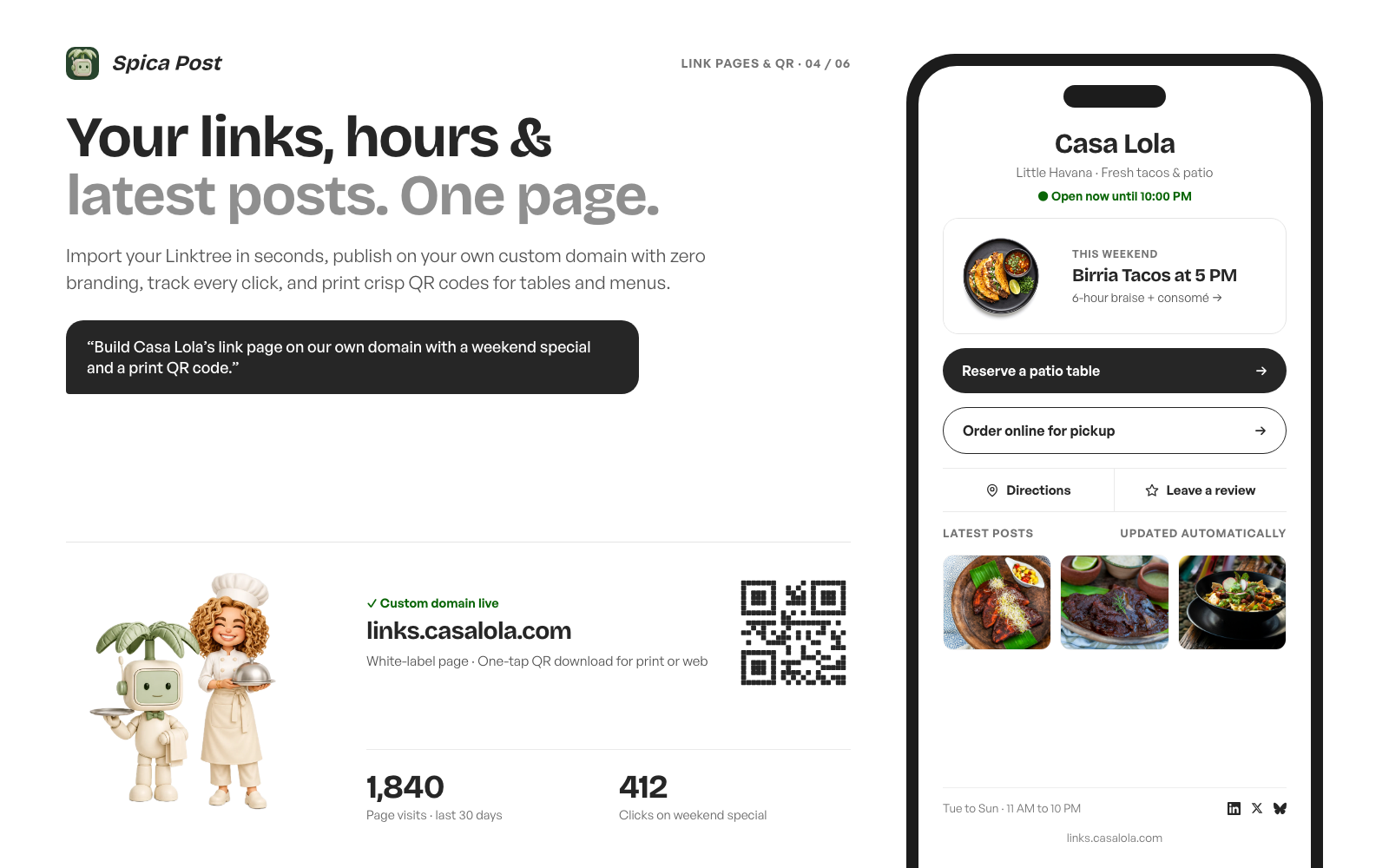
Never scatter opening details across three separate websites, a slow PDF menu, and expired Stories. Put one fast Link Page in every social bio and on a printed QR poster taped inside your front window facing the sidewalk so curious passersby can scan while walking past.
Structure your opening Link Page with four clean blocks from top to bottom:
- Scheduled top announcement box: During Week -2, highlight your Soft-Opening RSVP or Opening-Day Reminder link. Schedule that box to swap automatically on opening morning into “Doors Open Today: Hours, Specials & Directions” using exact
startsAtandendsAttimestamps so nobody reads an expired invite. - Core menu, service list, or booking button: Let visitors browse services or book their first appointment in one tap.
- One-tap Google Maps directions and parking note: Tell drivers exactly where the lot entrance sits.
- Printable window QR code: Generate a crisp SVG QR code for your front glass and checkout counter so offline foot traffic feeds directly into your online bookings.
Introduce yourself in local Facebook Groups the right way
Neighborhood Facebook Groups (local parent groups, town community boards, foodie groups, and homeowner associations) still drive huge opening-week foot traffic when approached respectfully. Read each group’s pinned posting guidelines before writing a single word. Many groups reserve business introductions for a designated day like “Small Business Friday” or require admin approval. Post once from your personal profile as a neighbor introducing your new shop, include one bright daylight photo of your sign or signature item, state exact hours and address, and answer every comment warmly. For full etiquette, read our local Facebook Groups marketing guide.
Week -1: daily 3-day countdown, hours, and exact parking guide
Week -1 shifts from awareness to logistics. Assume a busy parent or commuter wants to stop by Saturday morning and will abandon the trip if parking feels confusing or hours look unclear.
Film a 20-second walking and parking guide
Stand at the nearest main intersection or parking lot entrance, press record on your phone in vertical format, and walk straight to your front door in one calm take. Speak plainly: “Turn right off Pine Street just past the brick bank, park free anywhere in the back lot behind our building, and walk through the green awning door.” Post that clip as an Instagram Reel, Facebook video, and pinned Story Highlight labeled Parking. Few local businesses ever make this clip, yet visitors save and share it constantly because it kills first-visit anxiety.
Publish opening-weekend hours, specials, and walk-in clarity
Three days before opening, publish one clean graphic and plain-text caption stating:
- Exact opening-weekend hours for Friday, Saturday, and Sunday (plus regular weekly hours starting Monday or Tuesday).
- Opening-weekend specials or first-visitor perks with clear limits (for example, “First 50 guests receive a house tote bag” or “Free 15-minute posture screen all Saturday, walk-ins welcome”).
- Walk-in versus appointment clarity: State clearly whether visitors need a reservation, how long a typical service or wait takes, and whether you accept card, tap-to-pay, or cash.
Run a calm 3-day countdown (Days -3, -2, and -1)
A 14-day countdown exhausts everyone; a crisp 3-day countdown lands right inside how families actually plan their weekend.
- 3 days out (Wednesday): Full opening-weekend schedule, specials, and RSVP or booking link.
- 2 days out (Thursday): The 20-second parking and entrance clip paired with a quick team intro.
- 1 day out (Friday afternoon): One clean shot of the stocked shelves, set chairs, or prepped counter with “Tomorrow at [Time]. Here is everything you need to know before you swing by.”
Opening weekend and Week +1: live proof, consent, and first reviews
Opening morning moves fast, so prep your morning caption the night before and set one simple rule for the team: do not disappear on Monday.
Post your live door-open photo before the rush hits
Thirty minutes before unlocking the doors, snap one sharp photo of the open entrance, fresh counter, or team standing proudly beside the sign. Post it with a warm two-sentence note confirming you are open right now, stating closing time, and tagging your city location. If a popular item runs low or appointment slots fill up by noon, share a quick two-line Story update so nobody drives across town expecting something that already sold out.
Ask explicit customer permission before posting faces
A bustling grand opening room feels wonderful, and owners naturally want to show off the crowd. Before lifting a camera toward guests, remember one clear privacy boundary: always ask explicit verbal or written permission before photographing or posting identifiable customer faces, and always ask a parent or guardian directly before capturing any child. Many neighbors love supporting a new shop while preferring not to appear online.
When the room is too busy to ask individuals one by one, capture warm energy cleanly without unconsented faces: frame tight on hands holding a fresh pastry box, a haircut finish shot taken from behind (with client approval), full studio equipment before class starts, or smiling staff members who enthusiastically opted in.
Put Google review QR cards at checkout on Day 1
Once your official opening date passes and Google lifts the pre-opening review lock, your first ten genuine Google reviews rapidly establish trust for everyone searching your profession nearby. Print small counter cards with a direct QR code to your Google review link (see Google’s official tips to get more reviews) and invite every happy visitor naturally at checkout: “Thank you for coming to opening weekend. If you have thirty seconds later, a quick honest review on Google helps neighbors find us.” Never offer discounts, free items, or gift cards in exchange for reviews, as Google’s Maps User Generated Content Policy explicitly prohibits incentivized reviews and can strip reviews from a fresh profile.
Transition cleanly into Week +1 regular hours
A common post-opening dip happens when the ribbon comes down and the feed goes silent for ten days. On Monday morning, publish a grateful opening-weekend recap, update your Link Page top box from “Grand Opening” to your steady weekly hours and booking button, and pin a clean “New here? Here is what we do, our regular hours, and where to park” post at the top of your Instagram and Facebook pages.
How the 4-week plan adapts across five local professions
While the four-week rhythm stays identical, each profession emphasizes slightly different proof before opening day.
| Profession | Best Week -2 preview | Smartest soft opening | Key opening-weekend detail |
|---|---|---|---|
| Retail shop or boutique | 3 distinct product tables with honest price ranges | Invite-only Thursday evening preview for email/RSVP list | Parking lot entrance, stroller accessibility, return policy clarity |
| Cafe or bakery | Oven pulls, espresso calibration, pastry case lineup | Ticketed or limited-menu morning practice shift | Early sell-out alerts on Stories plus seating and Wi-Fi notes |
| Hair or nail salon | Clean stations, color wall, sterilization setup, stylist bios | Friends-and-family booked slots to test timing | Direct booking link, walk-in policy, exact service duration |
| Clinic, dentist, or wellness | Calm reception room, doctor/clinician intro, insurance info | Open-house walk-through with free Q&A and light snacks | Insurance/self-pay clarity, parking/elevator access, intake link |
| Gym or fitness studio | Equipment floor, coaching demo, beginner-friendly framing | Free founding-member trial classes capped per slot | What to bring (water, shoes, towel), shower/locker access |
Five copy-ready grand opening templates
Copy these five templates into your notes, swap in your real street names, hours, and Link Page address, and keep your tone natural.
1. Week -3 signage and neighbor introduction
Our sign just went up at [Street Address] in [Neighborhood], right next to [@NeighborBusiness].
We are [Business Name], and on [Opening Day, Date] at [Time] we are opening our doors to bring [specific service or product] to [City]. Building out this corner over the last [Number] months has been a labor of love, and we cannot wait to meet our block.
Free parking sits right [exact lot or street detail]. Follow along over the next three weeks as we finish stocking shelves, share our menu/services, and open early soft-opening spots.
2. Week -2 soft-opening RSVP and Facebook Group introduction
Hi [Neighborhood] neighbors! My name is [Your Name], and my team and I are opening [Business Name] at [Street Address] (across from [Landmark]) on [Opening Date].
We focus on [2 concrete things you offer, e.g., sourdough loaves and neighborhood coffee / gentle family dentistry with Saturday appointments / small-group strength classes for beginners]. Before our full grand opening weekend, we are hosting a small soft opening on [Date] from [Start] to [End] so neighbors can peek inside first.
You can check our menu/services and grab one of the soft-opening RSVP spots on our Link Page here: [Link Page URL]. Feel free to drop any questions below, and thank you for the warm welcome!
3. Week -1 three-day countdown set (Days -3, -2, and -1)
3 days out: Three days until we unlock the doors at [Street Address]! Join us [Opening Day] from [Start] to [End] for [opening special or welcome perk]. Walk-ins are welcome (or book ahead via the link in bio).
2 days out: Two days to go! Here is the fastest way to reach us: turn onto [Cross Street], pull into [Parking Lot Detail], and head straight for the [Door/Awning Color] entrance. See our full hours and map pin in bio.
1 day out: Tomorrow is opening day! Shelves are stocked, equipment is tested, and our doors open at [Opening Time] sharp at [Street Address]. Tap our bio link for exact hours, menu/rates, and one-tap directions.
4. Opening-morning live door-open post
Doors are officially open at [Business Name] ([Street Address], [Neighborhood])!
We are here today from [Start Time] to [End Time] with [featured opening item, service, or welcome treat while supplies last]. Parking is open along [Lot / Street], and our team is ready to welcome you in. Swing by, say hello, and tell us what you think of the new space.
5. Post-opening thank-you recap and Week +1 regular hours
Thank you, [Neighborhood], for an unforgettable opening weekend at [Business Name]! Meeting so many neighbors in person made every late night of prep worth it.
Starting this week, here are our steady regular hours:
Missed the weekend rush? Swing by anytime this week or book through our Link Page in bio. If you visited us over the weekend and have thirty seconds, a quick honest Google review helps other locals discover our new spot.
Five mistakes that drain opening-week foot traffic
Even great local openings lose easy momentum to five avoidable habits:
- Waiting until opening week to claim Google Business Profile. Verification holds and video reviews can take several business days, leaving opening-day searchers staring at an empty map pin.
- Posting teaser photos with no address or city. A moody coffee cup photo with the caption “Soon…” gives locals zero reason to follow or save the post. Name your street and neighborhood in every pre-opening update.
- Burying opening hours in an image alone. Always type exact dates, hours, and your street address as plain text inside the caption so phone visitors and search engines can read and copy them instantly.
- Skipping parking and entrance directions. If your door sits around the back of a strip center or parking requires a side-street turn, telling visitors ahead of time prevents circling cars from giving up.
- Going completely quiet on Week +1. Opening weekend brings curious neighbors; Weeks +1 through +4 turn curious visitors into loyal weekly regulars through steady posts, review replies, and visible regular hours.
Pre-opening checklist and honest Spica Post trade-offs
Run through this quick audit before Week -3 begins:
- Claimed and verified Google Business Profile with your future opening date, exact signage name, sharp primary category, and real daylight exterior photos.
- Published one fast Link Page containing your RSVP or opening-day announcement box, services or menu, map directions, and a printed SVG QR code taped inside your front window.
- Drafted your 3-day countdown, parking clip script, and opening-morning caption ahead of time so you are not writing posts while greeting guests.
- Printed a clean Google review QR card for the checkout counter and briefed your staff to ask explicit permission before photographing any guest’s face.
- Checked how your product or service launch differs from a physical storefront opening if you also ship online (compare timelines in our 4-week product launch social media plan).
Honest trade-offs if you consider Spica Post for your opening
If you are checking how Spica Post works to organize your grand opening, here is the exact November 2026 picture for small businesses and creators:
- Live today: Spica Post gives you a fast branded Link Page with scheduled announcement boxes (
startsAtandendsAtso your RSVP box flips cleanly into Opening Hours on launch morning), printable SVG QR codes for your front window and checkout counter, click-tracked/l/short links, drafting in your own voice, and direct scheduling plus Auto-crosspost across X, LinkedIn personal profiles, Bluesky (with live Unified Inbox replies), and Mastodon. - Built and finishing network review: Because Instagram, Facebook Pages, and Google Business Profile carry major local weight during a grand opening, be aware that Spica Post’s Google Business Profile connector is approved and enabled in production while awaiting its first live profile verification check, and Instagram, Facebook Pages, Threads, TikTok, and YouTube connectors are built and completing each network’s public app review or compliance audit. Until direct publishing opens across all workspaces for Meta and Google, run your opening Link Page, window QR codes, drafting workspace, and live channels in Spica Post, then copy your polished captions cleanly into Instagram, Facebook, and Google Business Profile in two minutes. See current flat workspace plans anytime on our pricing page.
Start four weeks out, verify Google first, introduce yourself to your block, and make parking effortless. By the time you turn the key on opening morning, the neighborhood will already know your name.
Questions people ask
- How early can I set up my Google Business Profile before my grand opening?
- You can create and verify your Google Business Profile with a future opening date up to one year in advance, and Google begins displaying your verified profile publicly 90 days before opening day. That 90-day pre-opening window lets you publish progress photos, updates, and your description before the doors unlock, while holding public reviews until you officially open.
- How many weeks before opening day should a local business start posting on social media?
- Four full weeks before opening weekend is the ideal rhythm for shops, cafes, salons, gyms, and clinics. Starting at Week -4 gives you time to clear Google verification, introduce yourself to neighboring storefronts, fill a quiet soft-opening list, and guide local visitors through parking and hours without burning out.
- Should I host a soft opening before advertising my official grand opening?
- Yes. Running a controlled soft opening during Week -1 or the week before lets your team test point-of-sale flow, pacing, and kitchen or booking timing with friendly neighbors and RSVP guests. It also produces genuine daylight photos of your finished space ready for your final 3-day countdown.
- Can I post grand opening photos that show customers waiting in line or browsing inside?
- Only after asking explicit verbal or written permission from anyone whose face is clearly identifiable, and always ask parents before photographing children. When the room gets busy, focus quick shots on open doorways, fresh displays, team members who opted in, or detail shots that avoid unconsented faces.
- How do I collect my first Google reviews during opening week without breaking Google policy?
- Place a small printed QR card linking straight to your Google review screen beside your register or front desk, and invite every visitor equally once they have experienced your space. Never offer freebies, discounts, or raffle entries in exchange for reviews, because Google's user-contributed content policy strictly forbids incentivized reviews.
Sources
- Google Business Profile Help: Add or claim your Business Profile
- Google Business Profile Help: Guidelines for representing your business on Google
- Google Business Profile Help: Create posts, offers, and updates
- Google Business Profile Help: Tips to get more reviews
- Maps User Generated Content Policy: Prohibited and restricted content