Product launch
How to Plan a Product Launch on Social Media (4-Week Arc)
Launch a new product or service with a calm 4-week social arc: waitlist boxes, pricing FAQs, 3 demo angles, clean UTM links, and week-after proof.
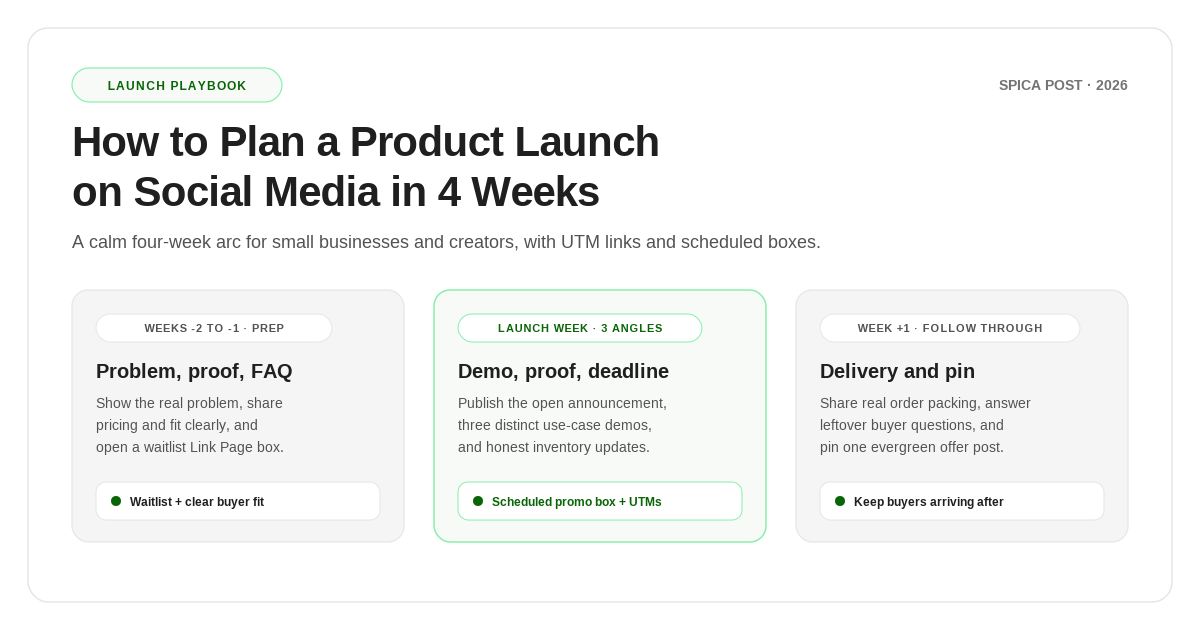
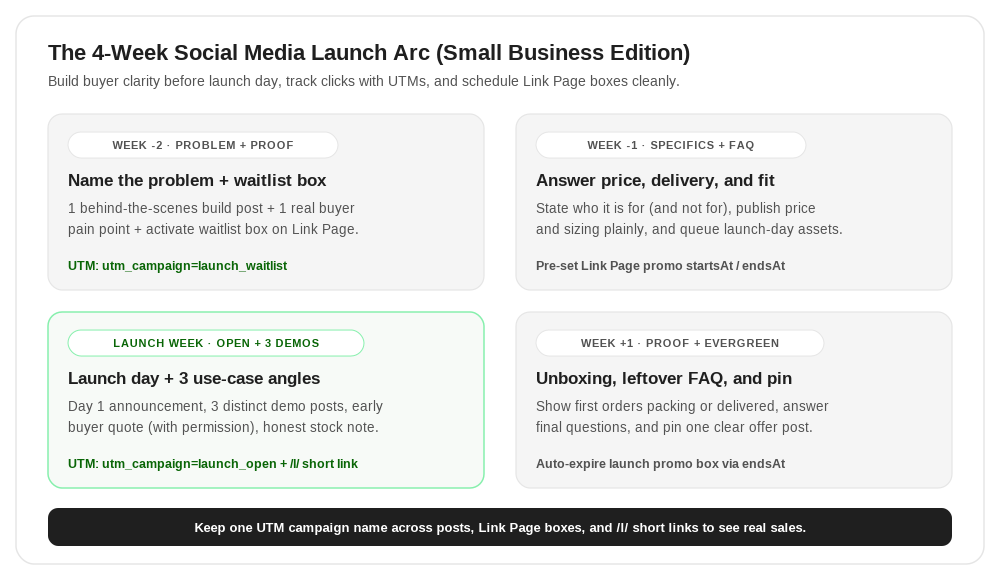
A practical product launch social media plan for small businesses and creators runs across a calm four-week arc (Week -2, Week -1, Launch Week, and Week +1) built around buyer clarity instead of fake suspense. You spend Week -2 framing the problem and opening a waitlist Link Page box, Week -1 answering pricing and fit honestly, Launch Week publishing the announcement alongside three distinct use-case demos and real buyer feedback, and Week +1 proving real delivery before pinning an evergreen offer.
Most small launches fizzle for one of two opposite reasons. Either the owner says nothing for two months and drops one surprise “It’s live!” post on Tuesday afternoon that almost nobody sees, or they copy a bloated corporate PR calendar full of mysterious teaser silhouettes and countdown graphics that exhaust both the owner and their audience before anyone knows what the product actually costs.
Small businesses and creators win launches by answering real buying questions early, showing the product working in concrete contexts, tracking every link cleanly, and following through after day one. Below is the week-by-week four-week launch arc, copy-ready caption templates, exact UTM and tracked short-link discipline, how to schedule time-bound Link Page promo boxes with startsAt and endsAt, a launch readiness checklist, and an honest November 2026 look at Spica Post’s capabilities.
Snapshot verified November 2026. Google Analytics 4 UTM parameter documentation, Google Business Profile offer guidance, and Spica Post’s Link Page scheduling (startsAt/endsAt) and /l/ short-link features reflect documentation verified in November 2026. Review current plan options anytime on Spica Post’s pricing page.
Why small-business launches fail when they imitate big-brand PR
Big brands spend tens of thousands of dollars buying ads to remind strangers that a teaser exists. When an independent maker, local shop, consultant, or software creator posts vague black-and-white silhouettes saying “Something big is coming soon…”, busy followers simply keep scrolling.
Three quiet leaks usually drain launch sales:
- Hidden specifics until launch morning: Waiting until launch day to reveal price, shipping timelines, sizing, or turnaround forces interested buyers to stop and think instead of ordering right away.
- One single angle repeated five times: Posting “We just launched! Link in bio!” four days in a row trains your audience to tune out. Buyers need to see how the product fits their specific use case.
- Unmeasured links and stale bio banners: Dropping raw un-tagged URLs into captions leaves you guessing which channel worked, while forgetting to remove a “Launch Week Offer” banner three weeks later creates awkward refund messages.
A four-week arc solves all three problems cleanly while fitting inside a normal operating week.
The 4-week product or new-service launch arc
Whether you are releasing a seasonal coffee roast, a new maintenance package, a ceramic mug collection, a coaching workshop, or a digital template, this four-week structure adapts without extra headcount.
| Launch phase | Posts to publish | Core job of this week | Link Page and tracking setup |
|---|---|---|---|
| Week -2 (Warm up) | 2 to 3 posts | Show the real problem, share honest behind-the-scenes proof, and invite early interest | Turn on a Waitlist / Early Access Link Page box (utm_campaign=launch_waitlist) |
| Week -1 (Clarity and FAQ) | 3 posts | Publish exact pricing, specs, delivery dates, FAQ, and who it is (and is not) for | Pre-schedule the Launch Live box (startsAt / endsAt) and shorten UTM URLs to /l/ |
| Launch Week (Open) | 4 to 5 posts | Launch announcement, 3 different use-case demos, early buyer feedback (with permission), and stock/window check | Activate Launch Live box at top of Link Page; pin announcement on primary profile |
| Week +1 (Proof and pin) | 2 to 3 posts | Packing/delivery proof, leftover DM questions, and pinning one calm evergreen offer | Launch promo box auto-expires at endsAt; keep standard product button live |
Week -2: Frame the problem, show real work, and open your waitlist
Do not start with hype. Start with the exact frustration or desire that made you build this product or service in the first place.
- Post 1 (The problem in plain words): Describe the specific friction your customers kept mentioning over the past six months, and explain briefly what you are making to fix it.
- Post 2 (Behind-the-scenes proof): Share a clean daylight photo of a prototype, ingredient test, sample batch, syllabus outline, or workbench setup. Showing real craft earns curiosity far faster than mystery graphics.
- Link Page move: Add a clean custom announcement box at the top of your Link Page inviting readers to join your waitlist or save the launch date. Even twenty warm email addresses or SMS reminders give launch morning real momentum.
Week -1: Publish specifics, pricing, FAQ, and honest boundaries
Week -1 removes every reason a warm buyer might hesitate on launch morning. Give away the facts upfront so people decide before orders even open.
- Post 1 (Full specifics and pricing): Share the exact launch date and time (with time zone), price, what is included, and shipping or booking turnaround. Clear pricing filters in serious buyers and cuts repetitive “How much?” DMs in half.
- Post 2 (Who it is for, and who it is not for): One of the highest-trust posts any small business or creator can publish is an honest boundary post. Name two concrete scenarios where your new offer shines, and one scenario where a customer should skip it or choose a different option instead. Honesty lowers refunds and raises conversion among the right buyers.
- Post 3 (Pre-launch FAQ): Answer the four real questions people already asked in comments or DMs during Week -2 (sizing, compatibility, local pickup vs. shipping, payment options, or booking reschedule terms).
- Behind-the-scenes prep: Batch-draft every Launch Week post now, double-check each network’s character and image limits, verify every checkout button on a phone, and pre-schedule your launch promotional box on your Link Page.
Launch Week: Announcement, three distinct demos, proof, and honest urgency
Spread four to five crisp posts across Launch Week so buyers scrolling on Monday, Wednesday, or Friday each see a fresh reason to click:
- Day 1 (Launch-day announcement): Lead with what is now open, one crisp hero photo or 20-second demo clip, the core benefit, exact price or starting rate, and one direct tracked link. Pin this post to the top of your main profile and publish a matching update or offer on your Google Business Profile if local (Google Business Profile offer guidance).
- Day 2 (Use-case demo 1: the everyday workflow): Show the product solving its main job step by step in real daylight or a real screen capture, focused on time saved or ease of use.
- Day 3 or 4 (Use-case demo 2: comparison or detail close-up): Zoom in on one tangible detail (stitching, ingredients, setup speed, packaging, or what separates this version from an older alternative).
- Day 5 (Use-case demo 3 + early buyer feedback): Show a third distinct context (for example, gifting, small-space use, or team rollout) paired with one genuine early buyer reaction. Customer permission check: Always ask explicit verbal or written permission before screenshotting a buyer’s DM, quoting a review with their name, or showing a customer holding your product.
- Day 6 or 7 (Honest inventory or window check): If you produced a small batch of 40 units, opened 8 service slots, or offered a real first-week bonus, share the honest remaining count and exact cutoff hour. Never invent fake scarcity when inventory is unlimited; if the item stays available permanently, frame Day 7 simply as a weekend reminder for anyone who missed launch day.
Week +1: Unboxing, leftover questions, and an evergreen pin
Many small businesses earn a large share of their first-month sales during Week +1 from cautious buyers who wanted to see the offer ship first.
- Delivery and packing proof: Share a short clip or crisp photo of the first batch boxed up on the counter, ready for courier pickup, or the first client kickoff underway (keeping customer addresses, shipping labels, and private data strictly out of frame!).
- Leftover FAQ post: Gather the top two or three questions buyers asked during Launch Week and answer them plainly in one calm post.
- Evergreen pin: Unpin any expired launch-bonus notice and pin one timeless post summarizing what the product does, how it works, and where to buy or book year-round. Explore how creators turn these calm post-launch posts into ongoing revenue in our creator social media to sales guide.
UTM parameters and tracked short-link discipline
Without consistent link tracking, you finish a four-week launch knowing you made sales, yet having zero clue whether your LinkedIn pricing breakdown, your Bluesky demo thread, or your Link Page top box drove the buyers.
Google Analytics 4 reads standard UTM query parameters (utm_source, utm_medium, utm_campaign, and optional utm_content) to attribute clicks cleanly (GA4 custom URL documentation). Follow one strict naming convention across your whole launch:
| UTM parameter | Consistent launch format | Concrete example | Common mistake to avoid |
|---|---|---|---|
utm_source |
Lowercase platform or placement name | instagram, linkedin, bluesky, linkpage, gbp |
Mixing IG, Instagram, and ig_bio (splits reports into 3 rows) |
utm_medium |
Channel type | social (posts), bio (Link Page), email (waitlist) |
Leaving spaces or capital letters |
utm_campaign |
One shared launch slug for all 4 weeks | autumn_mug_drop_2026 or bookkeeping_pkg_nov26 |
Changing campaign spelling halfway through Launch Week |
utm_content |
Specific post angle or week | w1_faq, launch_demo1, launch_box_top, wplus1_pack |
Leaving blank when testing 3 different demo angles |
Build each tagged destination URL in seconds using Spica Post’s free UTM Builder, then wrap each tagged URL in a clean tracked /l/ short link (available on Studio, Pro and Agency workspaces in Spica Post Studio). That gives you two simultaneous benefits: your captions stay short and readable instead of displaying a 160-character query string, and you see human browser click counts per post right alongside your GA4 purchase attribution (with social preview crawlers filtered out automatically so link-card bots do not inflate your numbers). Learn more about verifying real buyer impact in our guide on how to tell if social media is bringing customers.
Scheduling Link Page promotional boxes with startsAt and endsAt
One of the easiest launch errors is leaving a “Pre-Order Opens Tuesday” or “Launch Bonus Ends Sunday at Midnight” banner sitting live on your profile link three days after the deadline passed. Nothing erodes credibility faster than a dead promotion sitting at the top of your page.
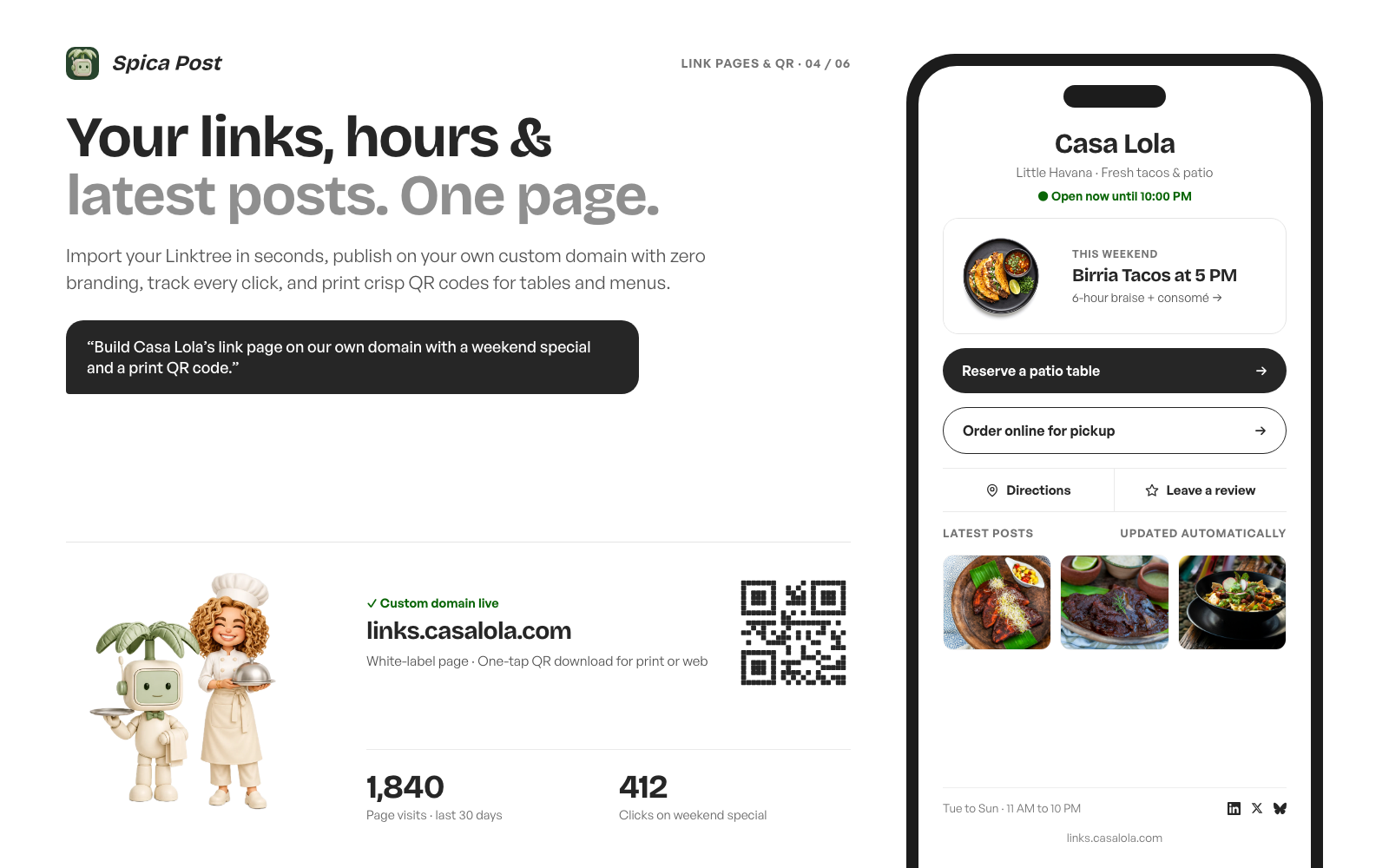
In Spica Post’s Link Page editor (or directly through your connected MCP assistant via links_save), custom promotional boxes (kind: "box") accept optional startsAt and endsAt schedule timestamps. Set up two boxes during Week -1 and let them hand off automatically:
- Box A (Waitlist / Countdown box): Set
endsAtto the exact minute orders open (for example,2026-12-01T09:00:00-05:00). Choose a compact or full-width card with a product photo and one waitlist button. - Box B (Launch Live promo box): Set
startsAtto the exact minute Box A ends (2026-12-01T09:00:00-05:00) and setendsAtto the exact cutoff of any launch-week bonus or limited drop (for example,2026-12-07T23:59:00-05:00), pointing to your UTM-tagged checkout page. - Permanent Product Button underneath: Keep your regular evergreen product link below the promotional box so visitors arriving in Week +2 still find the offer cleanly even after the temporary launch promo box disappears on its own.
If you sell in person at a storefront, pop-up market, or studio, download the SVG QR code for that exact Link Page and set it at the register so walk-in shoppers scan straight to the live launch page.
Five copy-ready product launch caption templates
Adapt these five templates for physical products, local services, or digital offers, and check our social media call-to-action examples if you want extra closing lines.
1. Week -2 behind-the-scenes and waitlist caption
Over the past [Timeframe], [Number] of you asked for a simpler way to [Solve Specific Problem] without [Main Annoyance].
We have been testing [Product / Service Name] in the workshop this month, and it opens on [Launch Date] at [Launch Time + Time Zone]. Here is a quick look at [One Tangible Detail Shown in Photo].
Want first notice the moment doors open? Tap our Link Page in bio to join the waitlist (zero spam, just one launch-day note).
2. Week -1 honest “who it is for and who it is not for” caption
Before [Product / Service Name] opens on [Day] at [Price], here is the plain breakdown so you know if it fits you:
Built for you if:
- [Specific Situation 1]
- [Specific Situation 2]
Skip it for now if:
- [Honest Boundary or Alternative]
Full specs, turnaround times, and FAQ are live on our Link Page now. Drop any last question below and I will answer it straight.
3. Launch-day opening announcement
[Product / Service Name] is officially live.
Designed to help [Target Customer] get [Concrete Outcome] in [Realistic Timeframe], it includes [Top 2 Tangible Features] for [Exact Price]. [Optional: First batch is limited to X units / X spots for Month.]
Order or book directly at [Tracked /l/ Short Link or Link Page]. Huge thank-you to everyone who shared feedback while we built this.
4. Launch Week use-case demonstration caption
One question we heard all week: “How does [Product / Service Name] actually hold up when [Real-World Scenario]?”
Here it is in action (three quick facts from this test):
See full details or grab yours while [Batch / Launch Window] is open at [Tracked /l/ Short Link].
5. Week +1 packing proof and leftover FAQ caption
First [Number] orders of [Product / Service Name] are packed and heading out today (with zero customer details shown). Thank you to everyone who jumped in during launch week.
Two quick answers for anyone still deciding:
- [Top Question 1]: [Clear 1-Sentence Answer]
- [Top Question 2]: [Clear 1-Sentence Answer]
[Product / Service Name] stays available anytime at our Link Page in bio, and we are pinning our full overview post to the top of this profile.
Pre-launch readiness checklist (run 48 hours before Day 1)
Walk through these eight quick checks two days before launch morning so nothing breaks when clicks arrive:
- Test checkout on a mobile phone over cellular data, not just desktop Wi-Fi, including Apple Pay, card entry, shipping calculations, and confirmation emails.
- Verify every UTM link and
/l/short link by clicking each one once and confirming it lands on the exact right page with zero typos. - Confirm Link Page box timestamps (
startsAtandendsAt) match your local time zone, including daylight saving offsets. - Check every photo and video against network limits (aspect ratio, JPEG/MP4 format, clean alt text, and no cropped text near edges).
- Prepare three saved replies for common launch questions (shipping time, sizing or scope, and local pickup or refund terms) so you answer DMs in thirty seconds.
- Confirm customer permission in writing for every early tester quote, testimonial, or photo showing a real person.
- Clear shipping labels and personal names out of any Week +1 packing or behind-the-scenes photos before saving them to your media folder.
- Schedule your core launch posts ahead while leaving room to add one real-time inventory or thank-you post once orders start rolling in.
Honest trade-offs if you consider Spica Post for your launch
If you are comparing tools to run your four-week launch, here is what Spica Post handles live in November 2026 alongside its honest current limits:
- Live today for small-business and creator launches: Spica Post gives you a branded Link Page with scheduled promotional boxes (
startsAt/endsAt), flexible card layouts (stack,compact,half), printable SVG QR codes, click-tracked/l/short links with automatic per-post click attribution, a free no-login UTM Builder, MCP assistant drafting in your saved brand voice, and live direct scheduling plus Auto-crosspost across X, LinkedIn personal profiles, Bluesky (with whole-account analytics sync and live Unified Inbox replies), and Mastodon. - Built and finishing platform review (Nov 2026): Connectors for Instagram, Facebook Pages, Threads, Google Business Profile (approved and enabled in production, awaiting first live service-area profile verification), TikTok, YouTube (OAuth approved, completing API Services compliance audit), LinkedIn Company Pages, and Pinterest are built and finishing network approval or verification. If your launch leans heavily on Instagram or Facebook today, run your Link Page boxes,
/l/tracked short links, UTM naming, X/LinkedIn/Bluesky scheduled announcements, and AI drafting in Spica Post while pasting finalized launch posts natively into Instagram and Facebook on launch morning. - What Spica Post is not: Spica Post is not a storefront checkout, email autoresponder, or paid ad manager. Pair it cleanly with Shopify, Stripe Payment Links, Gumroad, Square, or your booking calendar so your Link Page and tracked short links measure clicks straight into checkout. Check flat workspace plans anytime on our pricing page.
Pick a realistic launch date at least fourteen days out, set up your waitlist Link Page box tonight, and tag every link cleanly before day one. A calm four-week arc beats launch-day panic every single time.
Questions people ask
- How early should a small business start posting before a product or service launch?
- Start two full weeks before launch day (Week -2). That gives warm followers enough context to understand the problem you solved, see honest pricing and fit details in Week -1, and join a waitlist or bookmark launch day without feeling battered by a three-month corporate hype cycle.
- How many times should I post during Launch Week without annoying my audience?
- Aim for four to five purposeful posts spread across Launch Week, each from a different angle: the clear launch-day announcement, three distinct use-case or demonstration posts, one early buyer note (shared with explicit permission), and one honest inventory or launch-window reminder. People rarely mind seeing an offer four times when every post answers a different real question.
- Why should I use UTM parameters and tracked short links for a small product launch?
- Without clean UTM tags and short-link click counts, every social referral blurs together inside analytics as vague direct traffic. Tagging each channel with consistent lowercase utm_source, utm_medium, and utm_campaign values lets you see plainly whether Instagram bio clicks, LinkedIn demos, or Bluesky threads actually produced orders.
- What is the smartest way to update my Link Page during a product launch?
- Schedule your promotional Link Page announcement boxes ahead of time with exact startsAt and endsAt timestamps. Run a waitlist box during Weeks -2 and -1, switch automatically to an active launch offer box the minute orders open, and let the launch promo box expire cleanly when early pricing or stock closes so nobody clicks a stale deal.
- What should I post during the week after launch day?
- Do not go silent on Day 8. During Week +1, share photos of real orders being packed or delivered, answer the top two questions buyers asked in DMs during launch week, and pin one clear evergreen post explaining what the product is, who it helps, and how to order anytime.