Creators
Social Media for Creators Who Sell: From Posts to Orders
Turn views into real orders without sounding pushy: tighten your bio-to-checkout path, balance story and offer posts, and track real clicks.
Plenty of independent creators know the sting of a post that climbs past ten thousand views, collects dozens of warm comments, and produces zero orders. Usually it happens for one of two opposite reasons: either the creator shares entertaining clips while feeling too awkward to mention what they actually sell, or they drop raw “Buy now!” checkout links with zero story, context, or reason to care.
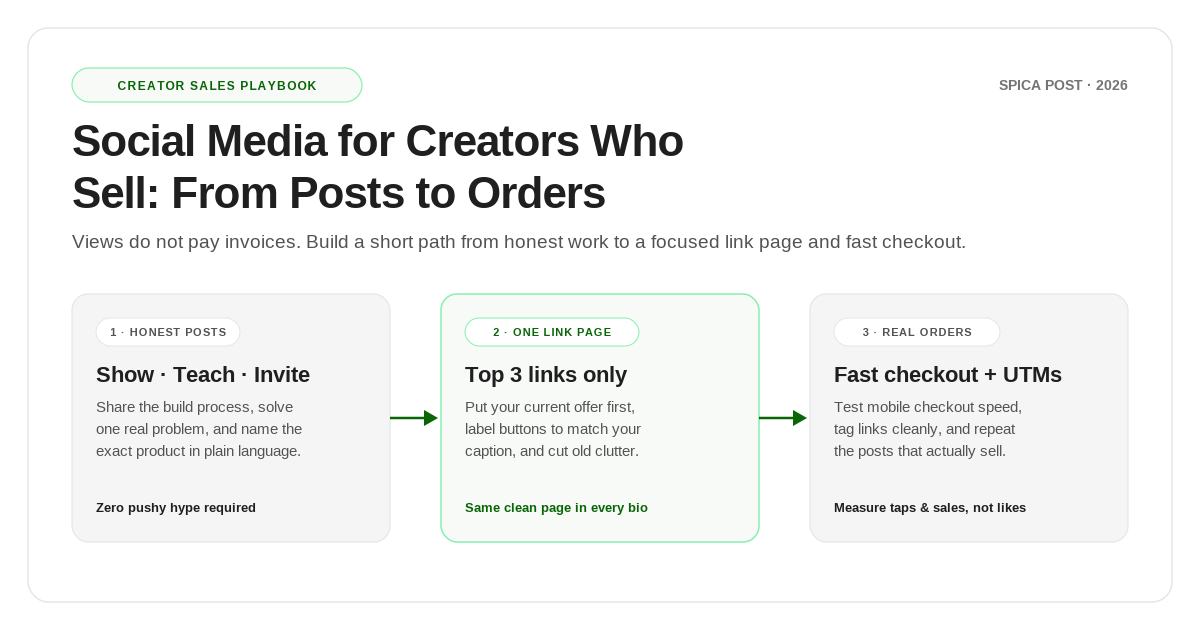
Turning social media posts into steady orders requires fixing the short path between curiosity and checkout: make your bio say plainly what you sell, trim your link page down to three focused destinations with your current offer at button number one, follow a repeatable show-teach-invite weekly rhythm, and measure real clicks and completed orders instead of chasing empty views.
This guide shows you where creator sales quietly leak between a post and checkout, how to structure a 3-post-a-week selling rhythm without feeling pushy, which platforms fit physical goods versus digital products and services, four copy-ready captions, simple UTM click tracking, and a calm multi-platform workflow.
Fix three checkout leaks before creating another post
Before spending five hours editing another short video, walk through your own buyer path on your phone over cellular data, starting from a random post you published last week. Almost every flat creator storefront has one of these three leaks:
- A clever bio that hides what you sell. A bio that reads “Coffee, chaos, and good energy” tells a brand-new viewer nothing. Line one should state plainly what you make or offer and how buyers receive it (for example, “Wheel-thrown stoneware mugs · Small Friday drops, ships US-wide” or “Notion & spreadsheet templates for solo bookkeepers · Instant download”).
- A bloated link page with fifteen competing buttons. When someone finally taps your bio link, showing them an old podcast episode from last winter, six social icons, an Amazon wish list, and three expired promo codes drains their buying intent immediately. Cut your link page down to three top destinations: your current featured product or shop right at the top, one free sample or newsletter signup second, and one contact/custom-order option third. (See our creator link page guide for clean layout rules.)
- Mobile checkout surprises. Tap your own Buy button inside the Instagram or TikTok in-app browser. If the page takes six seconds to load, forces a password signup before showing shipping cost, or hides whether a digital template works in Excel or Google Sheets, warm buyers close the tab right at the finish line. Show clear totals, realistic ship or download times, and fast wallet checkout (Apple Pay, Google Pay, or one-screen card entry).
How a viewer actually moves from a post to an order
Buyers rarely see one post from a stranger and buy five seconds later. Most orders happen across a short four-step chain, and fixing the single weakest link raises orders faster than doubling your posting volume.
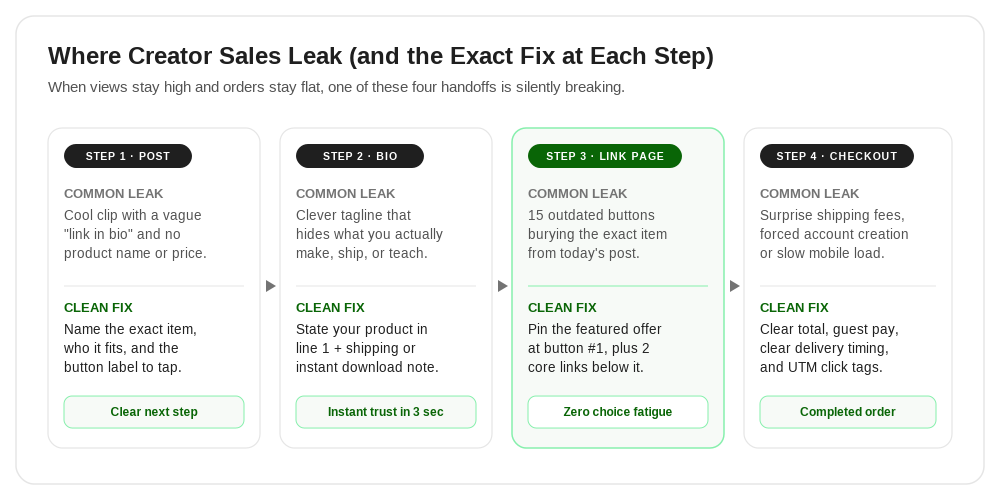
Name the exact product and button instead of saying “link in bio”
Generic “link in bio!” endings force a curious viewer to guess which link to hunt for once they tap your profile. Replace vague prompts with exact matching labels: “Tap ‘Autumn Linen Apron (Restocked)’ at the top of my link page to see colors and measurements” or “Grab the ‘Invoice Tracker Template’ button at button #1 on my link page”. When the button text matches the caption word for word, hesitation disappears.
Show the product in real hands and real scale
Whether you sell handmade ceramics, sewn bags, digital PDFs, presets, or consulting calls, buyers worry about one quiet question: “Will this actually look and work like I expect once I pay?” Show real scale in your hand, scroll through a real screen recording of the digital template in action, or share a realistic two-minute walk of what happens during a paid coaching session. Plain proof beats polished advertising graphics every time (and takes two minutes with our phone product photo tips).
The show-teach-invite rhythm that sells without burnout
You do not need hard-sell countdown timers every single day, nor do you need to hide your store out of politeness. Rotating three natural post types every week builds trust while giving ready buyers an easy opening to order.
| Weekly beat | Post job | Example for physical makers | Example for digital or service creators |
|---|---|---|---|
| Post 1 · Show | Behind the work (process & craft) | Packing orders, glazing a new clay batch, testing fabric weight, or fixing a prototype flaw | Recording a 20-second screen tour while refining a new template tab or client workbook |
| Post 2 · Teach | Solve one problem your product solves | How to season a wooden board, care for raw denim, or style a small shelf without clutter | A 4-step checklist showing how to organize quarterly receipts or price a freelance retainer |
| Post 3 · Invite | Direct offer, restock, or open slots | Clear restock post: exact batch count, price, dimensions, shipping date, and button name | Clear launch or booking post: exact deliverables, who it fits, who should skip it, and checkout link |
Match your platform mix to what you actually sell
Trying to run eight networks alone leads straight to creator burnout. Pick two primary channels that fit your product format and crosspost calmly to secondary channels where your buyers also hang out.
| Channel | Strongest creator sales fit | Best format | Current Spica Post status (Nov 2026) |
|---|---|---|---|
| Bluesky / X / Mastodon | Indie makers, writers, software/template builders, niche communities | Build-in-public threads, product demos with direct clickable links, launch updates | Live direct publishing, chained threads (up to 24 follow-ups), and Auto-crosspost today |
| LinkedIn (personal profile) | Consultants, designers, B2B templates, courses, workshops, services | Plain case studies, mini-guides, client takeaways, open cohort announcements | Live direct publishing today |
| Physical goods, apparel, art, ceramics, jewelry, visual makers | Window-lit carousels, packing clips, restock Stories pointing to Link Page | Built; completing Meta App Review | |
| TikTok / YouTube Shorts | Demonstration-friendly gadgets, crafts, tutorials, digital walkthroughs | 20-to-40 second “problem -> demo -> result” clips with exact product name | Built; TikTok in review, YouTube OAuth approved and finishing audit |
| Evergreen physical gifts, printables, home decor, patterns, recipes | Clean vertical pins linking straight to individual product pages | Built; completing platform approval | |
| Branded Link Page + Blog | Every creator turning bio clicks into orders and searchable essays | Top 3 offers + custom domain + click-tracked links | Live today inside Spica Post |
Notice one huge practical difference across platforms: Bluesky, LinkedIn, X, and Mastodon allow direct clickable links right inside posts and reply threads, whereas Instagram and TikTok push almost all clicks through your profile bio link. Publishing your core story once and linking cleanly where links are allowed multiplies how many warm readers reach checkout without extra filming.
Four copy-ready captions for creators who sell
Swap in your product details, exact dimensions or deliverables, and the matching top button name on your link page.
1. Behind-the-making process post (soft bridge to your shop)
Pulled 18 of these stoneware pour-over cones out of the kiln this morning after tweaking the inner rib spacing twice last month.
The tiny ridge change makes water drain evenly instead of stalling halfway through a brew. Fourteen passed inspection cleanly (the four slightly speckled seconds will go in a discounted basket on Friday).
Everything goes live Friday at 11:00 AM ET. Tap “Friday Kiln Drop + Reminder” at the top of my link page if you want a quick email ten minutes before the shop opens.
2. Problem-to-solution demo (digital template, course, or tool)
Every April I used to lose an entire weekend hunting down freelance receipts spread across three inboxes and two bank cards.
That frustration is why I built the [Template Name] spreadsheet: one clean tab for monthly income, one tab for categorized expenses, and an automatic quarterly tax estimate that updates as you type. No formulas to fix, works in both Google Sheets and Excel.
Who it fits: solo creators and freelancers who want a 10-minute Friday money routine. Who should skip it: multi-employee companies already running full accrual accounting.
Grab it at button #1 (“Freelance Tax Tracker”) on my link page for instant download.
3. Clear restock or limited-slots announcement
Quick update: the [Product Name] is back in stock in [Color A] and [Color B], with [Number] units ready to ship.
Details up front so there are zero surprises:
- Price: [$X] plus [$Y] flat US shipping (free over [$Z])
- Sizing/specs: [exact clear measurement or what is included]
- Shipping timing: orders placed before Thursday at 3:00 PM ship Friday morning with tracking
Tap “[Exact Product Name]” at the top of my link page to order, or drop any sizing questions below and I will answer right here.
4. Buyer proof post (always with explicit customer permission)
Shared with permission from [First Name], who picked up our [Product/Service Name] last month:
“[Short 1-to-2 sentence verbatim quote about how they actually use it or the concrete result they got.]”
Hearing how something holds up after four weeks of real daily use means way more than launch-day hype. If you have been on the fence about [Product/Service Name], all specs, honest FAQs, and shipping details sit under button #1 on my link page.
Track real clicks and orders instead of chasing views
Views feel exciting, but views alone tell you nothing about which post format pays your bills. Two lightweight measurement habits turn guesswork into clear data in ten minutes a week:
- Tag your shop and link-page URLs cleanly. Use standard campaign parameters (
utm_source,utm_medium,utm_campaign) following Google Analytics custom campaign URL guidance, or generate them in ten seconds with Spica Post’s free UTM builder. Even simpler, use short tracked links so you can immediately compare clicks from your process posts versus your teaching posts versus your direct offer posts. - Check four numbers once a week (not ten times a day): Link clicks from each channel, checkout visits, completed orders, and email list signups (your owned channel that survives algorithm swings). For a full plain-English breakdown of which numbers matter, read our small business social media metrics guide.
- Keep disclosures crystal clear on paid or affiliate links. If you recommend tools, supplies, or partner brands alongside your own products for a commission or sponsorship, follow FTC Disclosures 101 for Social Media Influencers: place a clear disclosure like “Affiliate link” or “Paid partnership” right where viewers read it, never hidden beneath a block of hashtags.
Five mistakes that quietly kill creator conversions
- Waiting until launch morning to mention the product. Dropping a surprise link after three weeks of unrelated posts forces buyers to decide cold. Share two genuine behind-the-scenes build notes a week before doors open so interested followers expect the drop.
- Apologizing for selling. Writing “Sorry for the self-promo!” signals that your own product is an annoyance. If you made something helpful with care, state clearly what it does, what it costs, and who will love it, then move on.
- Sending buyers to a homepage instead of the exact product. If your post highlights a specific green linen tote or one specific Notion tracker, link straight to that exact item (or put that exact item at button #1 on your link page). Making buyers dig through four catalog categories drops orders sharply.
- Never answering product questions in comments. When someone asks “Does this fit a 16-inch laptop?” or “Do you ship to Canada?”, answer publicly and warmly within the day. Ten silent shoppers are reading your reply before deciding whether to tap checkout.
- Relying solely on rented platform algorithms without capturing buyers. Platforms shift reach constantly. Offer one clean way on your link page for interested followers to join your drop list or read your longer updates on a page you own.
Building a calm multi-platform stack (and honest Spica Post trade-offs)
Creators burn out when they treat marketing like a second full-time job. Keep a simple 30-minute weekly loop: capture one raw work photo or 20-second screen clip while you are already making or packing, draft your Show, Teach, and Invite posts in one sitting, update button #1 on your link page so it matches this week’s featured item, and check clicks plus orders once every Monday morning.
Honest trade-offs if you consider Spica Post
If you are comparing tools and looking at Spica Post for creators, here is the straight snapshot as of November 2026:
- What is live today for creators: Spica Post gives you one branded Link Page and customer blog (including custom domain support) so every social bio sends buyers to one clean storefront hub, click-tracked
/l/short links to measure real traffic to your checkout, direct publishing and Auto-crosspost across X, Bluesky, LinkedIn personal profiles, and Mastodon, chained threads up to 24 follow-ups for build-in-public launches, and a Unified Inbox for Bluesky replies plus whole-account Bluesky analytics. (Note: Spica Post intentionally never reads X analytics because X bills per API read; instead,/l/short links track your real clicks from X posts.) - What is built and finishing platform approval: Direct publishing connectors for Instagram, Facebook Pages, Threads, TikTok, YouTube, Pinterest, and Google Business Profile are built and completing platform review/verification. If Instagram Reels or TikTok are your primary daily sales channels today, you can run your Link Page, UTM/short-link tracking, and live Bluesky/X/LinkedIn/Mastodon cadence in Spica Post while posting native Reels/TikToks until Meta and TikTok direct publishing open across all workspaces. See live network status and flat workspace plans on our pricing page.
Start with one ten-minute fix today: rewrite line one of your bio so a stranger instantly knows what you sell, trim your link page down to your top three links with your main offer at number one, and post one honest behind-the-work story naming that exact button.
Questions people ask
- Why do my creator posts get good views and likes but almost no sales?
- High views with flat orders usually trace back to one of four leaks: captions that never name the exact item for sale, a bio that hides what you actually sell, a cluttered link page with fifteen competing buttons, or slow mobile checkout with surprise shipping fees.
- How often should a creator post about products without annoying followers?
- Follow a three-beat weekly rhythm: one behind-the-making process post, one useful teaching or problem-solving post related to your craft, and one clear, direct offer or restock post that states price, delivery timing, and who the product fits best.
- Why does saying only 'link in bio' convert poorly?
- People tap your bio only when they know exactly what awaits them. Name the exact product and the exact top button label on your link page (for example, 'Tap Ceramic Travel Mug at the top of my link page') so buyers recognize it immediately.
- How should creators track which social posts actually bring orders?
- Pair clean UTM campaign links (using a free UTM builder) or short click-tracked links with your shop or checkout dashboard. Review link clicks and completed orders once a week by post type so you repeat formats that actually sell instead of chasing empty views.
- Do creators need disclosures when sharing affiliate links alongside their own products?
- Yes. Under Federal Trade Commission endorsement guidelines, any post containing paid sponsorships, gifted items, or affiliate commission links must include a clear, plain-language disclosure where viewers cannot miss it, rather than burying it under a wall of hashtags.