Link in bio
Buffer Start Page Is Retiring: Deadlines & Migration Guide (2026)
Buffer stopped new Start Pages on Nov 4, 2026, closes editing Nov 30, and begins takedowns Feb 2, 2027. Compare replacements and migrate cleanly.
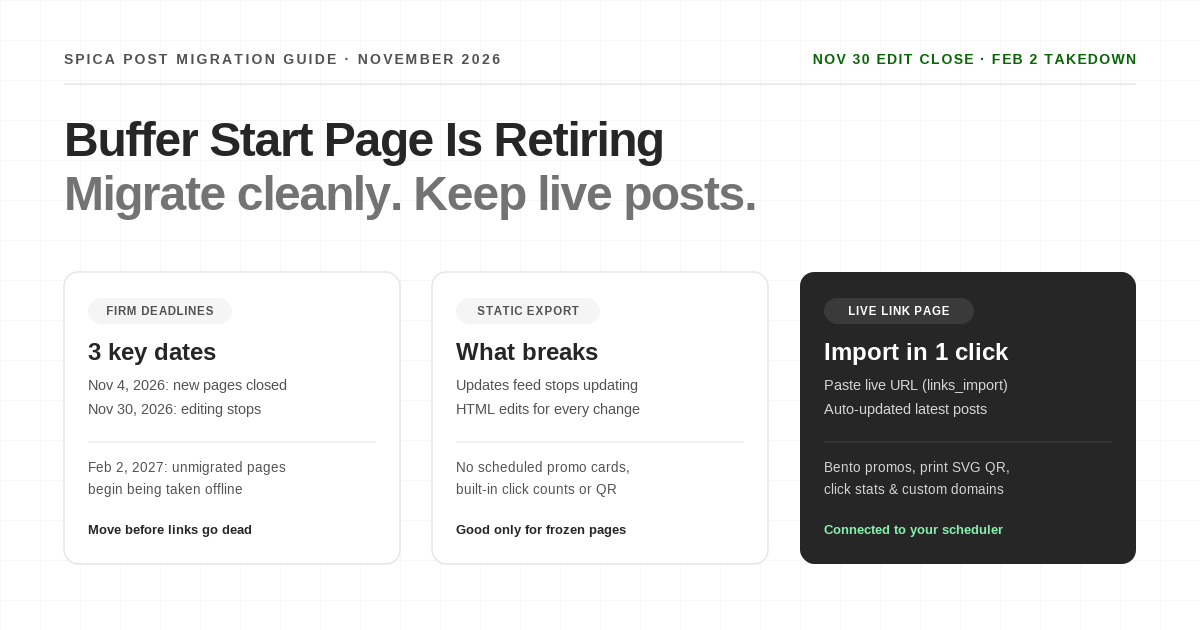
Buffer announced on November 4, 2026 that it is permanently retiring Start Page, its link-in-bio builder launched in 2021. If your Instagram, TikTok, LinkedIn, X, Bluesky, or printed menu QR code still points to a start.page link, you have two firm deadlines: editing closes on November 30, 2026, and Buffer begins taking down unmigrated Start Pages on February 2, 2027.
For small businesses, creators, and multi-brand teams, the tricky part is not moving five URLs; it is deciding whether you want a frozen static HTML page, another standalone link-in-bio subscription sitting on a separate credit card bill, or a live link page tied directly to your publishing calendar so your latest posts, seasonal offers, business hours, and QR codes stay current without touching code.
This guide lays out Buffer’s exact shutdown schedule, what breaks in Buffer’s built-in export, an honest side-by-side comparison of the five real replacement paths, and a step-by-step 5-minute migration checklist you should run before links start returning 404 errors.
Snapshot verified November 2026. Dates and export behavior come directly from Buffer’s November 4, 2026 retirement notice, and competitor pricing reflects published rates verified in November 2026.
Buffer Start Page retirement timeline (and the billing trap to catch)
Buffer’s official notice sets three hard milestones. Mark all three on your calendar so neither a broken bio link nor a phantom monthly charge slips past you.
| Date | What happens inside Buffer | Action to take |
|---|---|---|
| November 4, 2026 | Creating new Start Pages is disabled permanently. | Stop launching new campaigns, flyers, or QR codes pointing at start.page. |
| November 30, 2026 | Editing locks permanently, Buffer’s export & redirect tool opens, and Start Page stops counting toward your Buffer channel limit. | Export/import your links, publish your replacement page, set Buffer’s redirect, and trim your paid Buffer channel count. |
| February 2, 2027 | Buffer begins removing unmigrated Start Pages from the web. | Verify every social bio, email signature, Google Business Profile link, and printed QR code points to your permanent URL. |
Do not forget to lower your paid Buffer channel count after November 30
Because Buffer bills per connected channel (for example, $6/month per channel on Essentials or $12/month per channel on Team on monthly billing), Start Page previously occupied a paid channel slot for many teams. Starting November 30, 2026, Buffer stops counting Start Page against your channel allowance, freeing up that slot. If you do not manually adjust your channel count in Buffer billing, you will keep paying every month for an empty channel you are no longer using.
Migrate your links while your Start Page is still live and readable (ideally right around November 30, well ahead of February 2, 2027). Automated URL importers can pull your title, bio, and buttons in seconds only while the source page is still online.
What Buffer’s static export keeps (and the four things it breaks)
Buffer’s November 30 migration tool lets you download your Start Page as static HTML, CSS, and image files to host on Netlify, Vercel, or Cloudflare Pages, plus configure a redirect from your old Start Page address.
That is genuinely generous of Buffer for simple personal pages, and if you are comfortable editing HTML and pushing to Git, hosting a frozen list of five links on Cloudflare Pages for $0/month is a great option. However, four capabilities stop working the instant you export to static files:
1. Your live social updates feed disappears
Buffer explicitly cautions in its retirement post that not every block transfers and that the live updates feed exists only inside Buffer. Once exported, a static HTML page freezes in time: every new Instagram carousel, seasonal special, or product drop stays invisible on your link page unless you edit HTML and redeploy manually.
2. Every business-hour change or seasonal promo becomes a code edit
Restaurants updating weekend brunch specials, salons opening holiday booking slots, or creators running a 72-hour launch promo need to toggle a highlight card on Tuesday and have it vanish automatically on Friday night. A static export cannot schedule promo cards (startsAt / endsAt), show live “Open now” hours, or let a non-technical teammate swap a button from their phone.
3. Click tracking vanishes unless you wire external analytics
Knowing whether visitors actually tapped “Book a table”, “Order online”, or “Download the menu” requires wiring your own analytics or redirect service into a static export, while respecting mobile in-app browsers (Instagram and TikTok WebViews aggressively strip client-side JavaScript trackers).
4. Printed QR codes pointing at start.page become liabilities
Many cafés, trade booths, real estate signs, and service vans printed QR codes encoding their https://*.start.page link directly. Once Buffer shuts down redirects down the road, printed signage breaks permanently unless you move to a URL you control (ideally a custom domain or stable branded /@handle page).
Comparing the 5 main Buffer Start Page alternatives (2026)
Choose your replacement based on how often your links change and whether you want one integrated publishing + link-in-bio workspace or a standalone page.
| Option | Best for | Auto-updated latest posts | One-click URL import | Click tracking & custom domain | Pricing & billing model (Nov 2026) |
|---|---|---|---|---|---|
| Static export (Cloudflare Pages / Netlify) | Developers with a simple, rarely edited link list | No (frozen HTML) | Export ZIP from Buffer | DIY analytics & custom DNS | $0 hosting; manual code edits |
| Linktree | Solo creators wanting a standalone bio page only | Partial (paid integrations) | Manual rebuild | Paid tiers (custom domains limited; branding removal paid) | Free tier (with branding); paid tiers ~$5 to $24+/mo per page |
| Carrd | Minimal one-page microsites for freelancers | No | Manual rebuild | Pro plans add custom domains & embeds | Low annual fee (~$19/yr for Pro Standard); separate from scheduler |
| Beacons | Creators selling digital downloads or tip jars | Limited | Manual rebuild | Paid tiers unlock custom domains & zero transaction fees | Free tier (with fees/branding); paid tiers separate from scheduler |
Spica Post (/@handle Link Pages) |
Small businesses, creators & agencies tying links directly to their brand and posting workflow | Yes, syncs latest posts & open-now hours automatically | Yes, built-in URL importer (links_import) |
Human-only 302 click tracking (Studio/Pro); white-label custom domains (Pro) | Bundled into flat workspace plans (one-time Starter, Studio, Pro; see pricing) |
1. Static export on Cloudflare Pages or Netlify
If you have zero interest in social scheduling, run a tiny personal site, and know how to drop a folder into Cloudflare Pages or Netlify, take Buffer’s static export and enjoy $0/month hosting. Just update your social bios directly to your own domain once deployed so you are never trapped by a temporary redirect.
2. Linktree
Linktree is the household name for creator bio pages and has a generous library of button styles and commerce embeds. The catch is fragmentation: you end up managing one bill and one dashboard for Linktree, another bill for your scheduler, and another tool for QR codes and short links. For agencies managing 5 to 20 client brands, paying per-page Linktree fees adds up quickly.
3. Carrd
Carrd is phenomenal for crisp $19/year static landing pages and custom domains. Like Buffer’s static export, however, it has no connection to your social publishing calendar, no automatic latest-posts feed, and no built-in print QR code generator or per-post short-link attribution.
4. Beacons
Beacons makes sense if your main priority is selling digital products, media kits, and creator storefronts from one bio URL. If you run a local business, service firm, or multi-brand studio that mostly needs hours, booking links, promo cards, QR codes, and a unified social scheduler, Beacons adds storefront complexity you will never use.
5. Spica Post Link Pages (/@handle and custom domains)
Spica Post builds public Link Pages directly into the same workspace where you draft, approve, and schedule posts, so your bio page is never a stale orphan site.
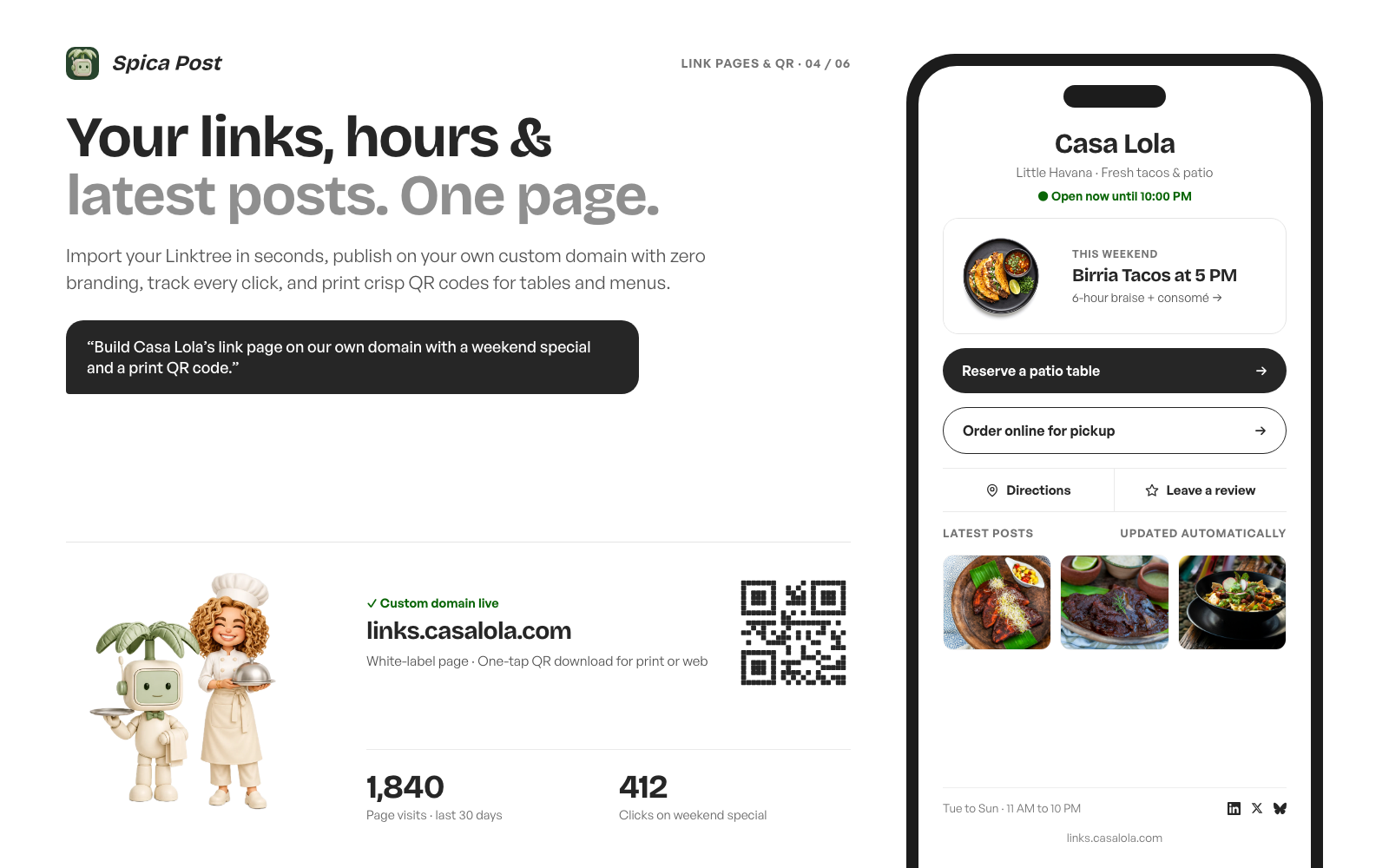
What comes bundled out of the box when you move a Start Page to Spica Post:
- One-click URL import (
links_import): Paste your live Buffer Start Page (or Linktree) URL in the/linksvisual editor or ask your connected Claude, ChatGPT, Codex, or Cursor assistant to runlinks_import. Spica pulls your title, bio, and link buttons automatically. - 3-tab visual editor (
Content,Design,Settings) with drag-and-drop ordering: Combine ordered link buttons, section headings (kind: "heading"), Bento promo boxes (stack,compact, orhalfwidths with optional images, CTA buttons, and automaticstartsAt/endsAtscheduling), and 17 manual social/contact icons alongside your connected accounts. - Live latest posts + Open-now hours: Your
/@handlepage displays your latest published posts and current business hours automatically, with zero HTML edits. - Brand styling & print-ready QR codes: Pick from 4 canvas themes (
Brand,Tinted,Dark,Clean), 5 curated font pairings,Pill/Rounded/Squarebuttons, custom avatar and cover banner (which also upgrades your social previewog:image), and one-click brand-styled or black-and-white print SVG/PNG QR codes (links_qr). - Human-only 302 click tracking (Studio, Pro and Agency): Every link button and clickable box routes through
/@handle/go/<key>(or/go/<key>on custom domains), filtering out bots, crawlers, and prefetchers while counting real taps reliably even inside Instagram and TikTok WebViews. Plus tracked/l/<code>short links for per-post click attribution across X, LinkedIn, Bluesky, and Mastodon. - White-label custom domains, hosted blog & live sponsor media kit (Pro): Connect your own verified domain (for example
links.yourbrand.com), turn off"Made with Spica Post", and optionally serve a hosted bilingual blog (/@handle/blog) and live Results-backed sponsor media kit (/@handle/media-kit) from the exact same brand hub.
Honest trade-offs to weigh before choosing Spica Post
Every migration involves trade-offs. Here is what to verify before moving your Start Page to Spica Post:
- No forever-$0 tier: If all you want is a free, rarely edited list of four links and you do not need social publishing, hosting Buffer’s static HTML export on Cloudflare Pages for $0 is cheaper. Spica Post bundles Link Pages into paid flat workspace plans (including a one-time Starter plan with zero monthly subscription; see current plans on
/pricing/). - Network rollout status (verified November 2026): Today Spica Post publishes live to X, LinkedIn (personal profiles), Bluesky, and Mastodon (any public server), while Instagram, Facebook Pages, Threads, Google Business Profile, YouTube, TikTok, Pinterest, and LinkedIn Company Pages are built in code and opening for all customers as platform reviews complete. Your public
/@handlelink page itself is 100 percent live immediately on every paid plan and supports manual links and icons for all 17 social and contact platforms right away. - LinkedIn profile icon note: LinkedIn OAuth does not expose an automatic public profile handle URL, so add your LinkedIn profile URL once inside the manual social icons bar in
/links.
How to migrate your Buffer Start Page cleanly in 5 minutes
Run these five steps while your Buffer Start Page is still online (before February 2, 2027) so nothing gets lost in transit.
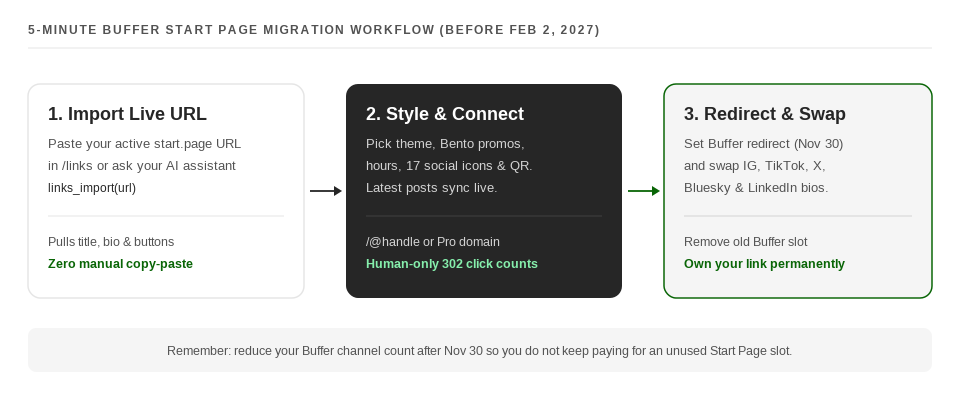
Step 1: Import your live Start Page URL
Open /links inside Spica Post (or tell your connected AI assistant: “Import my Buffer Start Page at https://yourname.start.page using links_import”). Confirm your page title, short bio, and link buttons imported cleanly, and double-check that every destination URL still loads with zero broken redirects.
Step 2: Upgrade flat buttons with Bento promos, hours, and your logo
Do not merely clone a boring 2021 button stack. While you are migrating:
- Add your business hours or “Open now” block if you serve local customers.
- Turn your #1 current promotion or booking CTA into a Bento promo box with a start and end date so it expires automatically when the offer ends.
- Add a crisp cover banner and verify your wide wordmark logo renders cleanly at the top.
- Check all 17 social and contact icons (phone, email, WhatsApp, Instagram, TikTok, Bluesky, Mastodon, LinkedIn, Google Maps, YouTube).
Step 3: Publish at /@yourhandle (or bind your Pro custom domain)
Publish your page at /@yourhandle (Spica Post even holds a previously published handle for 30 days if you rename it). On Pro, connect your custom domain (like go.yourbrand.com), verify DNS TXT and CNAME records, and toggle white-label mode to remove Spica Post branding.
Step 4: Replace printed QR codes where possible and enable Buffer’s redirect
Download your new brand-styled or print-ready SVG QR code from /links for upcoming menus, packaging, or storefront posters. Starting November 30, 2026, open Buffer’s migration tool and point your old start.page redirect straight to your new /@yourhandle or custom domain URL so legacy flyers keep working smoothly.
Step 5: Update every social bio directly (and adjust Buffer billing)
Do not rely on Buffer’s redirect forever. Spend two minutes updating the website/bio URL directly across:
- Instagram & Threads bio
- TikTok bio
- LinkedIn profile Featured / Website link
- X (Twitter), Bluesky, and Mastodon bio (remember to add
rel="me"verification on Mastodon!) - Google Business Profile website/appointment link and email signature
Finally, log into Buffer Billing after November 30 and verify your channel count no longer bills you for the retired Start Page slot.
Treat Buffer’s redirect as a 90-day safety net, not a permanent foundation. Update your live social bios directly to your own domain or /@handle URL this week so a future policy change never breaks your traffic again.
If you are also comparing Buffer’s per-channel subscription against flat multi-brand pricing while you migrate, read our complete Spica Post vs. Buffer comparison or our 2026 Buffer Alternatives guide.
Questions people ask
- When does Buffer Start Page shut down completely?
- Buffer disabled creating new Start Pages on November 4, 2026, closes editing and opens its migration and redirect tools on November 30, 2026, and begins taking down unmigrated Start Pages on February 2, 2027.
- Will my old Buffer Start Page link keep working after February 2, 2027?
- Only if you configure a redirect through Buffer's migration tool before your page is removed. Even with a redirect active, you should update every Instagram, TikTok, LinkedIn, X, Bluesky and print QR link directly so your traffic never depends permanently on a retired third-party URL.
- Does Buffer's static export keep the live social updates feed?
- No. Buffer's official retirement notice explains that the updates feed only lives inside Buffer and does not transfer to static HTML exports. If you want your link-in-bio page to display your latest published posts automatically, move to a link page connected directly to your publishing engine.
- How do I move my Buffer Start Page links into Spica Post?
- Open the Link Page editor at /links in Spica Post (or ask your connected AI assistant to run links_import) and paste your live Start Page URL before February 2, 2027. Spica reads your title, bio and buttons automatically, then pairs them with your brand colors, logo, business hours, live latest posts and printable QR code.
- Does Spica Post have a forever-free link page tier like Buffer Start Page did?
- No. Spica Post has no forever-free plan: link pages are bundled into our flat workspace plans (including a one-time Starter option with no monthly bill, plus Studio, Pro and Agency tiers with multi-page quotas, click tracking and Pro white-label custom domains). Check /pricing/ for current options.
Sources
- Buffer: We are Retiring Start Page: Why and What to Expect (Nov 4, 2026)
- Buffer Pricing (checked Nov 2026)
- Cloudflare Pages Documentation: Free static site hosting
- Spica Post vs. Buffer: Full pricing and feature comparison
- Spica Post Studio: Link pages, Bento promos, QR codes and tracked short links
- Spica Post Pricing: Flat workspace plans with bundled link pages