Customer trust
How to Post About a Mistake or a Bad Day Without Losing Customers
Learn when to fix a mistake privately vs. publicly, use the 4-step apology framework, pause scheduled promos, and copy 5 calm customer scripts.
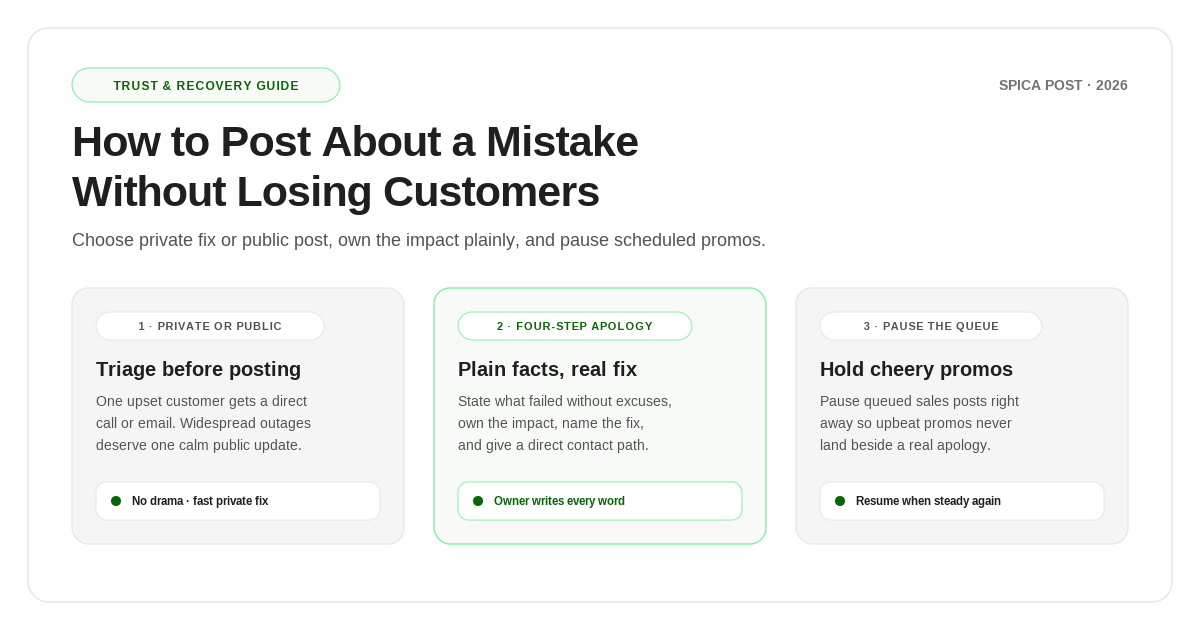
To apologize to customers on social media without losing their trust, decide first whether the problem belongs in a private direct message (for one customer) or a public update (for an outage, closure, delay, or error affecting dozens of people), pause every scheduled promotional post immediately, and publish a short human-written note using four plain steps: state what happened, own the impact, name the concrete fix with a timeline, and give a direct human contact path. Most neighbors forgive an honest slip faster than owners expect; what actually costs repeat business is silence, excuses, or a cheerful automated sale graphic landing ten minutes after a broken morning.
Every real small business and creator hits a rough day sooner or later. A point-of-sale terminal drops offline during the Saturday rush. An air conditioning unit fails in July and forces an early close. A supplier delays twenty custom orders by a week. Someone accidentally publishes a promo code with the wrong discount or wrong Saturday date. In those moments, the worst instinct is either hiding behind radio silence or writing a stressed four-paragraph essay trying to defend yourself.
Customers judge small businesses far more by how calmly you handle a bad day than by whether you maintain an impossible spotless streak. A steady, specific public note proves there is a dependable person standing behind the counter, the truck, or the inbox. This guide walks through the private-versus-public triage gate, the four-step apology framework, why pausing your queue matters before anything else, why a human owner must always hold the pen, five copy-ready templates you can adapt in two minutes, and the common mistakes that escalate minor hiccups into lasting damage.
First decide: private fix or public post?
Before typing a single word on Instagram, Facebook, Google Business Profile, X, or Bluesky, ask one grounding question: How many customers are actively affected right now, and would a public post save people a wasted trip or confusion? Posting publicly when only one order went sideways creates unnecessary spectacle, while staying quiet during a shop-wide disruption forces dozens of regulars to discover the bad news in your parking lot.
| Real-world situation | Private fix or public post? | Why this path protects trust | First action to take within 30 minutes |
|---|---|---|---|
| One unhappy customer (wrong order, late arrival, rough interaction) | Private fix | Airing one person’s complaint invites strangers to speculate and embarrasses both sides | Call, email, or DM the customer directly, apologize plainly, and offer a clear make-good |
| One billing or invoice mistake | Private fix | Financial mix-ups involve personal details that never belong on public timelines | Reverse the charge immediately, send the receipt privately, and confirm by phone or email |
| One angry public comment or 1-star review | Brief public reply + private resolution | Future buyers read your tone; they want to see calm ownership, not a courtroom debate | Leave a 3-sentence public reply acknowledging the issue and naming a direct phone or email |
| POS or card-reader outage | Public post | Saves walk-ins from arriving without cash or standing in a stalled checkout line | Post cash-only or temporary pause notice, pin it, and update once payments work again |
| Sudden AC, power, plumbing, or kitchen closure | Public post | Prevents neighbors from driving across town to a dark storefront or locked gate | Update Google Business Profile hours if needed, publish a short notice, and name next reopen time |
| Severe weather closure or route cancellation | Public post | Safety comes first and locals check social feeds before leaving home in storms | Post clear closing time, note whether appointments reschedule automatically, and check in next morning |
| Supplier or shipping delay affecting 10+ orders | Direct email first + public post | Paying buyers deserve direct notice first, while followers appreciate honest lead times | Email affected buyers with real dates, then post a brief turnaround update for new orders |
| Wrong published promo, price, or broken booking link | Public post (or edited caption + pinned comment) | People screenshot offers; quiet edits without explanation feel sneaky | Fix the link or caption, state the correction plainly, and clarify how early orders are honored |
Why airing a one-customer dispute publicly almost always backfires
When a business owner feels stung by an unfair complaint or an honest one-off mistake, it is tempting to publish a vague “Just to clear the air…” post explaining your side to your whole audience. Resist that impulse every time. Ninety-five percent of your followers had no idea anything went wrong until your post announced it. Worse, vague public venting looks defensive to prospective buyers who have never met you and cannot tell who was right.
If an unhappy buyer leaves a public comment on one of your posts or writes a negative Google review, keep your public response calm, brief, and factual. Acknowledge the frustration, avoid arguing over every timestamp in public, and offer a direct phone number or email address so you can finish solving the problem privately. Google’s own review response guidance notes that courteous, helpful replies show future shoppers that you take feedback seriously, and annual consumer research such as the BrightLocal Local Consumer Review Survey consistently shows that shoppers pay close attention to how owners answer criticism. For detailed review reply scripts, see our guide on how to respond to Google reviews without sounding scripted.
Protecting customer privacy and asking explicit permission
Even when a mistake resolves into a heartwarming comeback story, never share screenshots of private customer DMs, emails, invoices, phone numbers, home addresses, or order numbers on social media. If a customer later praises how well you fixed an issue and you want to share their kind words or a photo of their replacement project, ask that customer for explicit permission before quoting their name or posting any identifiable image of their face, home, or custom order. Respecting privacy during a tense moment builds quiet confidence across your entire neighborhood.
The four-step honest apology framework
When a disruption genuinely affects a group of customers, speed and clarity beat theatrical emotion. People checking your page on their phone in a parking lot want four answers in fifteen seconds: what broke, whether you understand the hassle, what you are doing about it, and who they can reach right now.
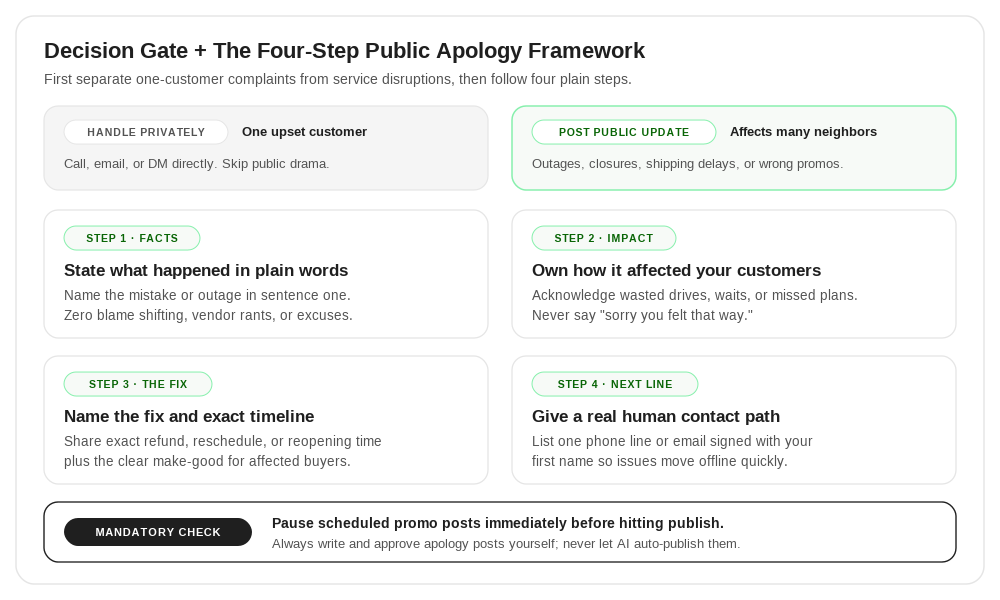
Step 1: State what happened in plain words with zero excuses
Open your first sentence with the concrete fact. Do not bury the real news beneath three sentences about how hard your team works or how unpredictable the economy has been. If the bakery oven failed at 5:00 AM, say that the main deck oven failed at 5:00 AM and sourdough loaves are delayed until tomorrow morning. If your booking calendar double-booked Saturday appointments, say that your booking calendar double-booked Saturday appointments.
Avoid pointing fingers at staff members, unnamed delivery drivers, or software vendors. Even when a third-party supplier genuinely dropped the ball, customers hired your business and paid your name. Mentioning a supplier delay briefly as context (“our fabric shipment from our distributor arrived four days late”) is fine when stated neutrally; ranting about how incompetent your vendor is makes customers wonder whether your operation is steady enough to trust again.
Step 2: Own the impact without defensive phrasing
Good apologies name the specific inconvenience customers experienced rather than hiding behind passive corporate language. A short sentence such as “We know several of you drove over on your lunch break for nothing, and we are genuinely sorry we wasted your time” earns immediate respect because it proves you see the problem from the customer’s side of the counter.
| Defensive phrasing to cut | Why customers distrust it | Plain human replacement |
|---|---|---|
| “We apologize if anyone was inconvenienced.” | Sounds conditional, as if the customer is being overly sensitive | “We are sorry we had to close early and cost you a wasted drive.” |
| “Sorry you felt that way about our service.” | Blames the buyer’s reaction instead of owning the slip | “We missed the quality mark on your appointment today, and that is on us.” |
| “Due to unforeseen circumstances beyond our control…” | Reads like a generic airline press release | “Our card reader network went down at 11:15 AM, so we cannot process cards right now.” |
| “We always strive for 100% excellence and this is not who we are.” | Self-focused fluff that delays telling people what happens next | “We mixed up today’s pickup times. Here is how we are fixing every order before 5:00 PM.” |
| “Please be patient with our small team!” | Turns a business mistake into guilt placed on paying customers | “Thank you for bearing with us while we get every delayed box out by Thursday.” |
Notice how much shorter the right column is. Removing defensive padding cuts word count in half and keeps your brand voice warm, direct, and grounded in reality.
Step 3: Name the concrete fix, exact timeline, and make-good
An apology without a clear next step leaves customers hanging. Spell out exactly what happens next, by what time, and whether affected customers receive a refund, priority rescheduling, a replacement item, or a small make-good gesture.
Be strictly realistic with timelines. If the plumber repairing your shop line cannot guarantee water service before 2:00 PM, do not promise “reopening at noon!” and force yourself to post a second apology two hours later. Promise only what you know you can beat: “We are closed for the rest of today, Tuesday, and will post a status confirmation here by 7:30 AM Wednesday before normal opening.” When you beat a conservative timeline and reopen early, customers feel relieved rather than strung along.
Also keep your make-good proportional to the slip. You do not need to give away a month of free services because an order ran twenty minutes behind. Offering a waived rush fee, a complimentary pastry on their next visit, priority morning rescheduling, or an immediate hassle-free refund for anyone who cannot wait shows fairness without wrecking your margins.
Step 4: Offer one direct human contact path and sign your name
Close every public apology with one fast way for affected customers to reach a real person: a phone number someone answers, a monitored text line, or a direct email address checked throughout the day. Asking people to “fill out our contact form on the website” during an outage feels cold and slow.
Sign the note with your real first name and role (for example, “Elena, owner of Cedar Street Florist”). People treat a named neighbor very differently from an anonymous logo. A first-name signature signals accountability and quietly cools down the comment section before anyone types in all caps.
Pause scheduled posts immediately before writing a single word
Before you draft or publish a public update about a bad day, open your calendar and pause every scheduled promotional post across your social accounts for the next 24 to 72 hours. This single five-second check prevents the most embarrassing mistake in small business marketing.
Why cheery queued promos destroy an apology
Imagine posting a sincere 10:00 AM note explaining that a kitchen pipe burst and you had to cancel Friday lunch orders, and then at 12:15 PM your scheduler cheerfully fires off “WHO’S HUNGRY?! Swing by for our Friday Melt Special before they’re gone!!” That clash happens constantly when owners batch their week ahead of time and forget their queue is still armed. Customers do not blame the software; they assume nobody is paying attention, or worse, that you reopened when your doors are still locked.
Make pausing the queue Step Zero of every rough day. Cancel or reschedule upbeat sales posts, weekend countdowns, automated cross-posts, and promo banners until operations are genuinely steady again.
Where else to mirror the update so locals do not miss it
Social media feeds are not chronological for most followers. A customer driving to your storefront or checking your schedule on their phone often looks at Google Maps or your profile link before scrolling Instagram or Facebook. Mirror your short status note in three quick places when a real disruption hits:
- Pin the update on your primary social profiles (Instagram, Facebook Page, X, or Bluesky) so anyone opening your profile sees today’s status at the top.
- Update your Google Business Profile if hours changed for the day or week, and publish a brief Google Business Profile update (Google Business Profile post help) so searchers typing your business name see the exact reopening time immediately.
- Update the top announcement box on your Link Page if you use one in your bios or storefront QR codes, so nobody places an online pickup order while your doors are shut.
Closing the loop once service is back to normal
Many small businesses post an apology when things break and then forget to post the resolution. Two weeks later, a brand-new customer lands on your profile, sees “CLOSED TODAY DUE TO WATER LEAK” still pinned at the top, and calls your competitor instead. The moment the issue is resolved, unpin the closure notice and publish one crisp, upbeat confirmation noting that you are open, caught up, and grateful for everyone’s patience.
Why a human owner must always write and approve apology posts
AI writing tools and MCP assistants are wonderful for brainstorming seasonal topics, adapting captions to each network’s character limits, and keeping routine weeks on schedule. An apology or crisis update is the hard line where automation must stop completely.
What goes wrong when AI auto-publishes apologies
Even well-prompted AI models default to hollow corporate patterns under stress: bloated empathy phrases, dramatic transitions, vague promises (“we are working around the clock”), and stiff sign-offs that sound nothing like the person who actually runs your shop. Customers who know your normal voice spot robotic apologies within two seconds, and nothing feels colder during a real mistake than realizing a business could not spare three minutes to speak to them directly.
Even more importantly, an assistant cannot verify live operational facts on your shop floor. It does not know whether the electrician actually arrived, which ten customers already got refunded, whether an insurance claim limits what you should say about an accident, or whether your tone needs extra care because a local storm hurt nearby homes. Never enable auto-publishing for crisis notes, comment complaints, or apology replies. Read more about keeping authentic human judgment in our guide on how to make AI social media posts sound human.
Where an assistant actually helps during a hard day
Keeping the owner firmly in charge of the final words does not mean you have to manage every mechanical task manually while your hands are full. During a hectic day, your workspace or connected assistant can safely help with behind-the-scenes triage:
- Pulling up your upcoming scheduled queue in seconds so you can pause or reschedule every cheery promo post without missing a network.
- Surfacing recent comments and Google reviews in one calm view so you do not miss an upset customer asking a question on a post from last Tuesday.
- Checking character limits before you post your own written message across tighter networks like X, Bluesky, or Mastodon so your phone number and reopening time never get cut off mid-sentence.
- Holding your draft for review if you run a team with role-based approvals, ensuring no junior staff member publishes an unapproved public statement while you are dealing with the repair.
Setting team approval guardrails before a bad day arrives
If more than one person helps with your social accounts, write down a simple two-line house policy today while everything is calm: no teammate posts about an outage, pricing error, or public complaint without owner sign-off, and anyone who spots a live disruption pauses scheduled promos first and calls the owner immediately. Using role-based approval queues prevents panicked late-night replies from making a minor glitch ten times louder.
Five copy-ready public update and comment-reply scripts
Keep these five templates saved in a note on your phone so you never have to invent calm wording while your blood pressure is high. Replace every bracketed detail with your own plain facts and sign your real first name.
1. Sudden outage or early closure (POS down, AC failure, storm)
Quick heads-up for anyone planning to stop by [Business Name] today: our [specific issue, e.g., main AC unit / payment network / water line] went down at [Time], so we are closing early for the rest of [Day] to get it repaired safely.
We are really sorry if you were about to head over or had an afternoon errand planned around us. Anyone with a [Day] appointment or pickup order is being called directly right now to reschedule first on our list (or issue a full refund right away if that works better for you).
Our technician is scheduled for [Day/Time], and we will post a clear status update here by [Time] before opening. Need help with an order today? Call or text me directly at [Phone] or email [Email]. Thank you for bearing with us.
[Your First Name], [Business Name]
2. Shipping, supplier, or turnaround delay affecting multiple orders
Honest update for everyone waiting on [Product / Service Batch] orders placed between [Date] and [Date]: our [supplier delivery / equipment part] arrived [Number] days behind schedule, which pushed our turnaround back by [Exact Days].
We promised delivery by [Original Date], and we are sorry to throw off your plans. Every affected customer should already have a personal email from us with your updated ship or pickup date. If you need your order sooner and prefer to cancel for a full refund right away, reply to that email and we will process it today with zero hassle.
Everyone waiting with us gets [clear small make-good, e.g., free expedited shipping / a $10 credit toward your next order] automatically. Reach me directly at [Email] or [Phone] with your order number if you did not see our note.
[Your First Name], [Business Name]
3. Wrong published promo, price typo, or broken link
Correction on the [Offer / Post] we shared earlier today: we accidentally listed [wrong detail, e.g., 40% off instead of 20% off / Saturday’s date instead of Sunday / a broken booking link]. That was our typo, plain and simple.
Here is how we are handling it cleanly: anyone who already booked or placed an order using that post before [Time] will have the original listed deal honored in full. Moving forward, the correct offer is [accurate offer details] through [End Date], and the fixed link is live in our bio now.
Sorry for the confusion. Email [Email] or message us with your confirmation number if you have any questions.
[Your First Name], [Business Name]
4. Calm public comment reply moving an upset buyer offline
Hi [First Name], I am really sorry we missed the mark on your [order / visit / appointment] today. That is not the experience we want you to have with us, and I want to fix it properly right away. Could you please call or text me directly at [Phone] or email [Email] with your [order number / best time to reach you] so I can take care of this personally today? [Your First Name]
5. Follow-up “Back open and caught up” closing update
Good news from [Business Name]: our [issue, e.g., payment terminal / oven / AC system] is fully repaired, tested, and running smoothly, and our doors are back open today from [Start Time] to [End Time].
Every [delayed order / rescheduled appointment] from [Day] has been contacted and prioritized. Thank you genuinely to every neighbor who checked in, rescheduled kindly, or gave us grace while we sorted things out. We are glad to be back at full speed and look forward to seeing you this week.
[Your First Name], [Business Name]
Five mistakes that turn a small slip into a lasting reputation hit
Most local businesses do not lose loyal customers over the original mistake. They lose customers during the four hours afterward by making one of five avoidable errors:
- Deleting honest, respectful criticism. Removing a frustrated buyer’s real comment rarely hides the issue; it convinces that customer you have something to hide and motivates them to share screenshots in neighborhood Facebook groups or leave a harsher review on Google. Reserve deletion or reporting strictly for spam, slurs, harassment, or policy-violating fake reviews (Google Maps User Contributed Content Policy).
- Blaming an employee by name or role in public. Writing “Our new cashier forgot to lock in your booking” makes customers uncomfortable and wrecks team morale. Inside the shop you coach and improve your checklist; outside the shop, the business owns the mistake as one team.
- Oversharing personal exhaustion or venting at customers. A brief human sentence works; a five-paragraph rant about rising rent, flaky suppliers, and how ungrateful people are makes loyal customers feel awkward walking back through your door. Save venting for a trusted friend or business peer off social media.
- Making big promises you cannot keep under pressure. Promising “Everyone gets half off all month!” or “Fixed in two hours!” while panicked creates a second disappointment when math or repairs catch up. Commit only to fixes you can fulfill cleanly before sunset.
- Arguing back and forth in public comments. Give one calm, respectful reply offering direct offline resolution. If someone keeps trying to start a public fight after you have offered a fair fix and direct contact path, stop trading replies in public. Calm restraint tells every silent reader everything they need to know.
A 20-minute bad-day recovery checklist and honest Spica Post trade-offs
When something breaks mid-shift, follow this calm sequence in order instead of improvising under stress:
- Minutes 1 to 3 (Stabilize and pause): Confirm the exact operational facts, pause all scheduled promotional posts across your social accounts, and tell your team not to improvise public replies.
- Minutes 4 to 7 (Triage private vs. public): If one customer is affected, pick up the phone or send a direct personal message right now. If dozens of people could waste a trip or wait on orders, draft one short public update using the four-step framework.
- Minutes 8 to 13 (Write and verify as the owner): Draft the post yourself in plain speech, cut every excuse or defensive line, double-check the exact phone number, email, and reopening or update time, and read it aloud once before publishing.
- Minutes 14 to 17 (Publish and mirror): Post on your primary active social profiles, pin the update to the top, adjust Google Business Profile hours or post a brief update if storefront visits are affected, and update your Link Page announcement box.
- Minutes 18 to 20 (Monitor calmly and close the loop later): Watch replies for the next few hours through one inbox, move individual order issues offline with your direct contact line, and unpin the old note once you publish your “Back open” confirmation.
Honest trade-offs if you use Spica Post
If you manage your social calendar and customer replies through Spica Post’s Unified Inbox and workspace tools, here is the exact November 2026 picture for small businesses and creators so you know what works live today and what is still completing network approvals:
- What works live today: You can pause or cancel queued scheduled posts cleanly from your calendar or batch tools, enforce role-based team approvals so editors cannot publish sensitive posts without owner sign-off, update your branded Link Page announcement box in seconds, publish direct status updates across X, LinkedIn personal profiles, Bluesky, and Mastodon, and read plus reply to Bluesky comments live inside the Unified Inbox (with saved reply skeletons you always personalize and approve yourself). For wider planning habits, see our 15-minute daily social media routine.
- What is built and completing network review: Spica Post’s Unified Inbox and direct publishing adapters for Instagram, Facebook Pages, Threads, and Google Business Profile (Google Business Profile API is approved and enabled in production, awaiting first live service-area profile verification; Meta networks are completing Meta App Review) plus TikTok and YouTube (OAuth approved, completing compliance audit) are built and finishing live platform approvals. Until Meta and Google live inbox replies open across every workspace, pause your Spica Post queue and update your Link Page first, then post and reply natively on Instagram, Facebook, and Google Business Profile directly so no customer waits on an approval queue. You can review flat workspace plans anytime on our pricing page.
Nobody runs a flawless small business forever. When a bad day hits, pause the promos first, skip the excuses, state the plain fix in your own voice, and follow through on what you promised. Neighbors remember who stayed calm and honest far longer than they remember a broken card reader.
Questions people ask
- Should I post a public social media apology when one customer had a bad experience?
- No. One upset customer deserves a fast, direct phone call, email, or private message so you can make things right personally. Posting a public apology for an isolated mistake turns a private service hiccup into neighborhood gossip and draws hundreds of people into an issue that affected only one order.
- How fast should a small business post about a sudden outage, closure, or shipping delay?
- Aim to post your first plain update within 30 to 60 minutes of confirming the disruption, before customers drive across town to a locked door or check their inbox wondering where an order is. Even if you do not yet know the exact repair time, state what is closed right now and promise a clear time for your next update.
- Should I delete negative comments underneath my public apology post?
- Keep fair, frustrated comments from real customers visible and answer them calmly with your direct contact line. Deleting honest criticism usually pushes an upset buyer to post screenshots elsewhere. Only hide or remove comments that contain hate speech, slurs, spam links, or personal threats.
- Can I let an AI assistant write and publish an apology post automatically?
- Never let any AI tool or scheduler auto-publish an apology or crisis update. Customers recognize hollow, over-polished language immediately, and an assistant cannot know your real repair timeline, refund budget, or legal limits. Always write, verify, and publish every apology yourself as the business owner.
- Should I leave a closure or outage apology post up forever once the issue is fixed?
- Keep your public record honest, then publish a short follow-up update once service returns to normal and unpin the old closure notice. That way someone discovering your profile three weeks later sees that you are open and reliable rather than assuming your card reader or kitchen is still broken.
Sources
- Google Business Profile Help: Read and reply to reviews
- Google Business Profile Help: Create posts on your Business Profile
- Google Maps User Contributed Content Policy: Prohibited and restricted content
- BrightLocal Local Consumer Review Survey: How consumers evaluate owner replies
- Spica Post Unified Inbox and Weekly Executive Digest