Small business
The 15-Minute Daily Social Media Routine for Busy Owners
Follow a 5-5-5 daily social routine (inbox, one real capture, queue check) plus one short weekly batch so marketing never eats your workday.
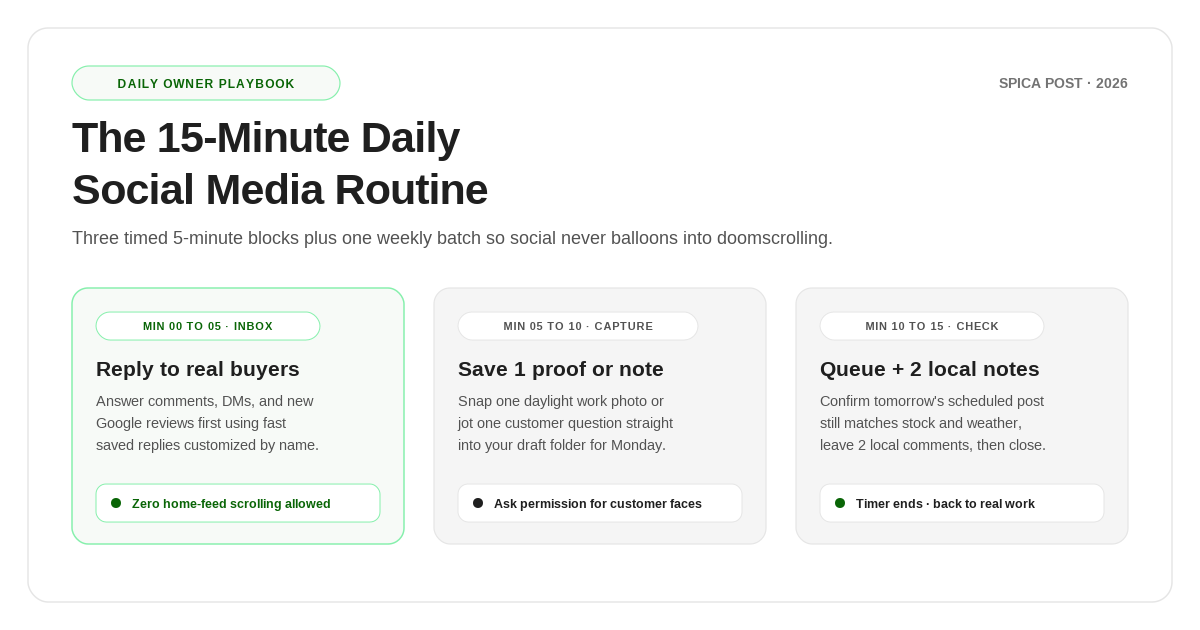
A 15-minute daily social media routine for a small business works when you stop trying to invent, design, and publish a brand-new post from scratch every single day and split your quarter-hour into three strict 5-minute blocks instead: 5 minutes answering buyer comments, DMs, and Google reviews; 5 minutes capturing one real photo or two-sentence note straight into your draft library; and 5 minutes checking your scheduled queue and leaving two genuine local comments. Pair that daily 5-5-5 habit with one 25-minute weekly batching block on Monday morning, and your business stays visible, responsive, and human in under two hours a week total.
Most small business owners do not fail at social media because they lack discipline. They fail because social apps are engineered to turn a quick “let me post a quick update” visit into a 70-minute detour through unrelated videos, trend audio, and competitor anxiety. Once marketing feels unpredictable and exhausting, busy owners understandably shove it to the bottom of the list behind payroll, suppliers, and customers standing in front of them.
Time-boxing fixes the problem by giving every minute one clear job and a hard finish line. Below is the exact minute-by-minute daily 5-5-5 routine, how it connects to a short weekly batching anchor, the five time-wasting habits to drop immediately, realistic weekly posting cadences by profession, copy-ready reply snippets, and an honest look at how Spica Post supports this workflow.
Snapshot verified November 2026. Google Business Profile review and post guidance plus Spica Post Unified Inbox and scheduling capabilities reflect documentation verified in November 2026. Check Spica Post’s pricing page for current plan options.
Why daily posting from scratch fails busy owners
Trying to wake up every morning and think “What should I post today?” combines the hardest cognitive task (ideation) with the highest operational distraction (running a business). Writing under pressure creates three predictable breakdowns:
- Decision fatigue: When you have ten minutes between jobs, staring at a blank caption box feels harder than answering three supplier emails, so you skip posting entirely.
- Silent buyer questions: Owners spend twenty minutes agonizing over a cute graphic while a warm prospect’s comment asking “Do you have openings Thursday afternoon?” sits unanswered for three days.
- Weekend catch-up burnout: After going quiet all week, you lose two hours on Sunday night rushing out stiff posts nobody interacts with.
The daily 5-5-5 routine flips the order completely. You protect warm customer conversations first, collect raw daily proof passively while you are already doing real work, and push actual caption writing and scheduling into one calm weekly block.
The minute-by-minute 5-5-5 daily social media routine
Set an actual 15-minute timer on your phone or desk clock for your first two weeks until the rhythm feels automatic. Anchor it to an existing daily trigger, such as right after unlocking the shop with morning coffee or right after the lunch rush clears.
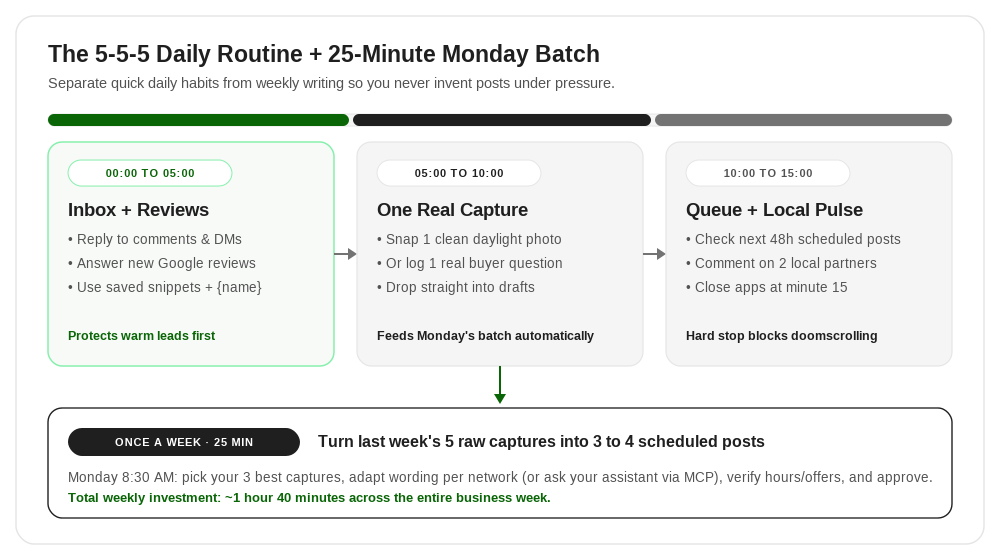
Minutes 0 to 5: Clear your inbox, comments, and Google reviews first
Start where money and trust actually sit: people who already raised their hand. Open your unified inbox or direct notifications screen (never the algorithmic home feed) and handle messages in strict priority order:
- Direct buyer inquiries and DMs: Price questions, availability checks, hours, and booking links come first. Give a clear answer and one direct next step (call, booking link, or visit window).
- Post comments: Answer questions publicly so silent readers see the answer too, and reply warmly to regulars who complimented your work.
- New Google Business Profile reviews: According to Google Business Profile review guidance, replying promptly and respectfully to both glowing and critical reviews builds visible customer trust right inside Search and Maps. Keep three to five short saved replies ready (customized with the customer’s first name and one real detail from their visit) so five replies take under three minutes. See our Google review response guide for nuance on tough reviews.
If a customer left an upset 1-star review or complex billing question, do not burn your whole 15 minutes crafting an emotional essay on the spot. Acknowledge politely in two calm sentences, offer a direct email or phone line to resolve it privately, and move on to minute five.
Minutes 5 to 10: Capture one real photo or two-sentence note into drafts
Your only job during minutes five through ten is collecting raw material, not writing a finished post. While you are already in your workspace, kitchen, clinic, studio, or truck, capture just one of these four fast ingredients:
- One crisp daylight photo: Wipe your phone lens, step near a window or open shade, clear background clutter, and shoot one horizontal or vertical JPEG of a finished job, freshly stocked shelf, tool setup, or daily special.
- One short 10-to-15-second raw clip: A quick pour, finished paint trim, unboxing new inventory, or packing an order. Do not edit it or add music right now; just save the clean unwatermarked file.
- One real buyer question: Jot two sentences into your notes or draft box recording a question a customer asked yesterday (“People keep asking whether our synthetic oil service includes tire rotation; answer: yes, takes 35 minutes, walk-ins welcome Tue to Fri.”).
- One operational update: Upcoming holiday hours, seasonal opening dates, or a newly opened appointment slot.
Drop that single photo or two-sentence note straight into your scheduler’s asset library or draft folder and stop. By Friday afternoon, five tiny five-minute captures hand you five authentic post ingredients without ever staring at a blank screen.
Customer permission check: Whenever your daily five-minute capture might include a customer’s face, child, home exterior, custom order name, or license plate, ask for explicit verbal or written permission before taking or saving the shot for social media. If someone prefers privacy (or is not around to ask), frame clean details of the craft, finished materials, storefront, or tools instead.
Minutes 10 to 15: Sanity-check your queue and leave two genuine local comments
Use the final five minutes to protect accuracy and stay connected to your real community:
- Check the next 48 hours of scheduled posts (2 minutes): Glance at your calendar view to confirm tomorrow’s scheduled post still matches reality. If rain just rolled in, a featured dish sold out, or a crew schedule shifted, pause or swap the post in thirty seconds before it goes live awkwardly.
- Leave two genuine local comments (3 minutes): Visit two specific local accounts you intentionally follow (a neighboring café, a real estate partner, a supplier, a local chamber page, or a happy vendor) and leave a real, human two-sentence comment that adds warmth or helpfulness. Skip single-emoji drive-bys.
- Close every social app the second the timer rings. At minute fifteen, your social media shift is officially finished for the day.
Pairing your daily 15 minutes with one 25-minute weekly batch
The secret that keeps the daily routine down to 15 minutes is moving writing and scheduling into one short, calm weekly anchor (25 to 30 minutes every Monday morning or Sunday evening).
Because you captured four or five raw photos and customer notes during the previous week’s middle 5-minute block, your Monday session requires zero brainstorming:
- Pick your 3 strongest captures (5 minutes): Choose one proof-of-work photo, one answered customer question, and one timely operational or offer post.
- Draft and adapt cleanly per network (12 minutes): Turn each short note into versions matched to each platform’s limits (short scannable hook for Instagram or Bluesky, plain local details with zero hashtags for Google Business Profile updates, clear takeaway for LinkedIn or Facebook). If you use an AI assistant connected over MCP, hand it your three raw captures once, let it draft adapted versions in your brand voice, and spend two minutes editing out any stiff phrasing.
- Verify media, alt text, links, and schedule (8 minutes): Check every date, hour, and booking link, add short alt text to photos, and approve the slots across Tuesday, Thursday, and Saturday (leaving flexible room for any live midweek news). For deeper monthly batching, see our step-by-step batching guide.
Add the whole week together: five 15-minute daily blocks (75 minutes) plus one 25-minute Monday batch equals 1 hour and 40 minutes per week for a consistent, authentic social presence across your core channels.
Realistic weekly cadence by small-business profession
You do not need to post twice a day to earn local calls, foot traffic, or inquiries. Match your weekly posting rhythm to how quickly your inventory or availability changes.
| Business profession type | Realistic weekly post rhythm | Google Business Profile cadence | Best daily 5-minute capture habit |
|---|---|---|---|
| Local service professions (plumbers, HVAC, cleaners, salons, auto shops, clinics) | 2 to 3 posts/week (1 finished job proof, 1 answered question, 1 availability/tip) | 1 update + 1 real photo/week + prompt review replies | Snap 1 clean daylight finished-work shot (with customer permission) right after wrap-up |
| Food, retail, and hospitality (cafés, bakeries, boutiques, gyms, florists) | 3 to 4 posts/week (new arrivals/specials, behind-the-scenes prep, hours/events) | 1 weekly special or hours update + review replies | Snap 1 window-lit dish, shelf restock, or fresh arrangement 60 minutes before rush |
| Solo creators, consultants, and B2B owners (designers, accountants, coaches, makers) | 3 posts/week (1 craft breakdown, 1 practical teaching tip, 1 clear invite/offer) | Optional (required if serving a local metro area) | Jot 1 recurring client question or snap 1 workbench/screen progress detail |
Pick the lowest column pace you can keep during your busiest week of the year, not your quietest week. Two grounded posts every single week for fifty weeks outperform frantic daily sprints every time.
Five habits to stop immediately so 15 minutes never becomes 90
Adding a good routine fails unless you remove the triggers that hijack your attention. Cut these five habits starting tomorrow morning:
- Stop opening social apps through the home feed or Explore tab. Bookmark your direct inbox, calendar, or business profile URLs on desktop, and move entertainment feeds off your phone’s first home screen so muscle memory stops dumping you into infinite short-form reels.
- Stop leaving non-message notifications turned on. Turn off push alerts for likes, suggested reels, “someone you may know posted,” and follower counts. Keep notifications on strictly for direct messages, review alerts, or scheduled-post failure notices.
- Stop designing elaborate multi-font graphics for routine posts. A clean, bright phone photo of your real work paired with three blunt sentences beats a 45-minute templated flyer almost every time on local feeds.
- Stop checking analytics every day. Daily likes and views bounce randomly and pull owners into anxious over-tweaking. Check real outcomes (link clicks, booking inquiries, calls, and follower trend) once a week via a short executive summary or once a month in ten minutes.
- Stop maintaining dead secondary channels out of guilt. If nobody in your buyer base interacts on a fourth or fifth platform, stop typing manual updates there. Either mirror cleanly where appropriate or pause the channel until your core two or three accounts feel effortless.
Copy-ready templates for your daily 5-minute blocks
Save these four short templates inside your inbox saved replies or phone notes so you never burn minutes phrasing routine responses from scratch.
1. Warm 5-star Google review or praise comment reply
Thank you so much, [Customer First Name]! We loved helping with your [specific item or service] and appreciate you taking a minute to share your note. Always glad to see you back whenever you need us next.
2. Hours, pricing, or availability DM reply
Hi [First Name], thanks for reaching out! We are open [Days and Hours] at [Neighborhood / Address]. For [Service or Item], our next open slots are [Day/Time Window], and you can check details or book directly here: [Clean Short Link]. Happy to answer any other questions right here.
3. Calm response to a critical 1-star review or complaint
Hi [First Name], thank you for letting us know about your experience on [Day]. That is not the standard we aim for, and I would like to look into this personally and make it right. Please email me directly at [Owner Email] or call [Direct Number] so we can follow up today.
4. Two-sentence daily capture note (for Monday’s 25-minute batch)
Capture [Date]: [1 sentence describing the photo or real customer question, e.g., “Just finished refinishing an oak dining table before Thanksgiving; client asked how long oil finish takes to cure.”] Operational detail + permission: [e.g., “Answer: safe for light use in 24 hours, full cure in 7 days. Customer gave verbal permission to share table photo without family items shown. Next open booking window: first week of December.”]
Honest Spica Post trade-offs for a 15-minute routine (November 2026)
If you are checking whether Spica Post’s Unified Inbox and assistant-driven scheduling workflow fit this daily routine, here is the clear November 2026 breakdown:
- What works live today: Spica Post lets you keep your Monday batch fast by connecting your own AI assistant (Claude, ChatGPT, Gemini, Grok, or another MCP client) to draft tailored posts checked against each network’s limits while holding every draft for your explicit approval. Direct publishing and scheduling are live today across X, Bluesky, Mastodon (any public server), and LinkedIn personal profiles, alongside a branded Link Page, click-tracked
/l/short links, an optional Weekly Executive Digest email (so you stop checking analytics daily), and Unified Inbox triage with reusable{name}saved replies live for Bluesky today. - Honest boundaries and networks in review: Spica Post’s connectors for Google Business Profile (approved and enabled in production, awaiting first live service-area profile verification), Instagram (including real-time comment webhooks), Facebook Pages, Threads, TikTok, YouTube, and Pinterest are built and finishing official platform review or compliance audits. For Unified Inbox specifically, Bluesky replies are live right now while Google Business Profile review replies, Instagram comments, and Facebook Page comments activate as each network approval completes (X remains post-only, so X replies stay native on X). Review flat workspace tiers anytime on our pricing page.
Pick your daily 15-minute anchor window tonight, silence non-message social notifications, set a real timer tomorrow morning for 5 minutes of replies, 5 minutes of one real capture, and 5 minutes of queue and local check, and watch how quickly consistent social media stops feeling heavy.
Questions people ask
- Can a small business really stay active on social media in 15 minutes a day?
- Yes, as long as you separate daily maintenance from weekly writing. Use your daily 15 minutes strictly for three 5-minute tasks (answering inbox messages and reviews, capturing one raw photo or buyer question, and checking your upcoming queue plus two local comments), and pair it with one 25-minute weekly batching block to schedule your core posts.
- What time of day is best for a busy owner to run a 15-minute social routine?
- Pick a fixed transition anchor rather than waiting for 'free time' that never arrives. Most owners hold the habit best either 15 minutes before doors open with morning coffee, or right after the lunch rush before afternoon appointments start, with a literal 15-minute phone timer running.
- How do I stop a 15-minute social media check from turning into 90 minutes of doomscrolling?
- Open directly to your inbox, scheduling dashboard, or review notifications instead of any algorithm home feed, switch off non-message push alerts, keep saved replies ready so you never stall on wording, and close the app the second your 15-minute timer rings.
- How many times per week should a busy small business owner actually post?
- Two to four steady posts per week plus one Google Business Profile update is enough for almost every local business. Consistency across twelve months beats posting twice a day for ten days and then going silent for six weeks.
- Do I need permission before taking my daily 5-minute capture photo if customers are nearby?
- Yes. Always ask explicit verbal or written permission before photographing or posting identifiable customers, children, private homes, or vehicle license plates. When customers are busy or prefer privacy, frame clean daylight shots of finished work, stocked displays, tools, or dishes.