How to Write an Instagram Bio That Tells People What You Do and Where
Fit your service, city, proof, and booking pointer inside Instagram's 150-character bio limit and 64-character Name field, with 10 copy-ready examples.
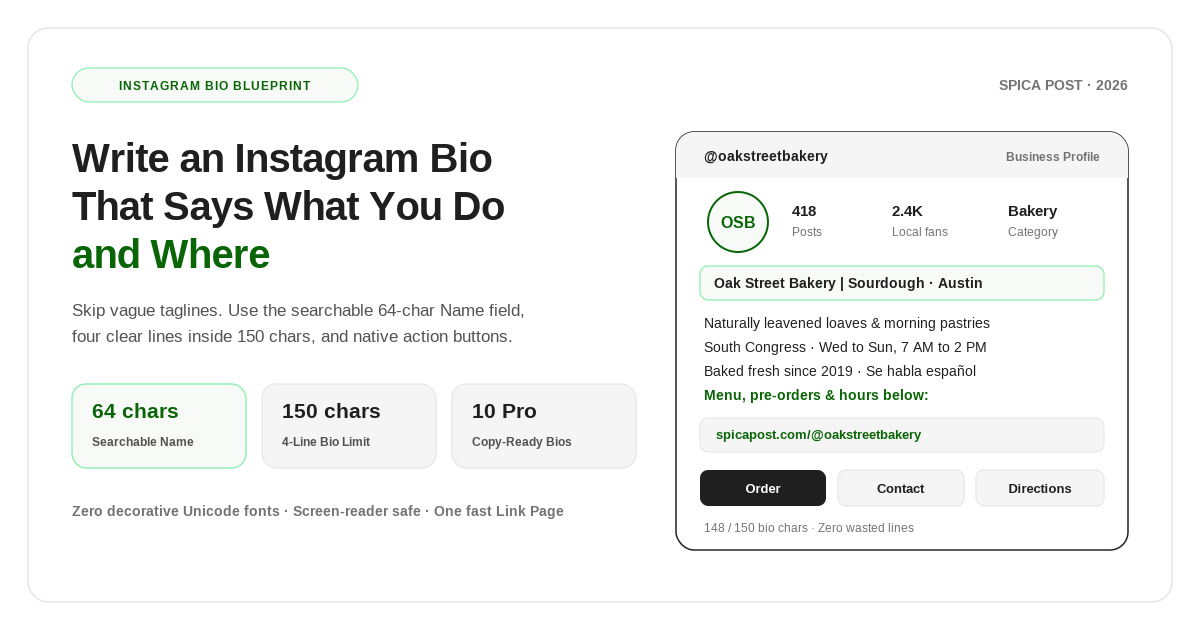
To write an Instagram bio for business that converts local visitors in under three seconds, put your Business Name, Primary Service, and City inside Instagram’s searchable 64-character Name field, then use the strict 150-character bio for four crisp lines: Line 1 states your exact service or specialty, Line 2 names your neighborhood or service area plus hours (or “Se habla español”), Line 3 adds one concrete credibility anchor, and Line 4 points straight to one fast Link Page, while moving your phone, email, address, and booking tap onto Instagram’s native action buttons.
Most small businesses and creators waste their most valuable mobile storefront on poetic fog. A neighbor taps over from a Reel or local tag, reads “Creating unforgettable moments since 2019 | Dream big | DM for collabs”, has zero clue whether you are a bakery in Denver or a wedding florist in Madrid, and taps Back within two seconds. Your Instagram bio is not a magazine ad; it is the storefront sign over your door.
Below is the exact character-budget table for every Instagram profile field in 2026, a visual breakdown of the 4-line formula, how to offload phone and address clutter into native action buttons, why decorative Unicode fonts quietly break search and accessibility, and 10 copy-ready business bios written inside the 150-character limit across ten distinct professions.
Snapshot verified November 2026. Instagram professional account fields, 150-character bio limits, 64-character Name limits, and native action button options reflect live Meta specifications verified in November 2026. Measure any draft instantly with our free Social Media Character Counter.
Why vague taglines waste the 3 seconds a local visitor gives you
When someone lands on your Instagram profile from a friend’s Story mention, a neighborhood search, or a comment reply, their brain runs a three-question filter almost automatically: What do you actually sell or do? Are you anywhere near me (or do you ship to me)? How do I see prices, hours, or book?
If your 150 characters spend 60 spaces on a motivational quote and another 40 spaces on three hashtags that link visitors away to competitors’ feeds, you make interested buyers work too hard. Clear beats clever every single day on local social media. A baker who writes “Sourdough loaves & morning pastries · South Congress · Wed to Sun 7a-2p” earns ten times more walk-ins than one who writes “Baked with love and sunshine.”
Instagram profile fields and exact 2026 limits
Before drafting a single line, separate what belongs inside your 150-character bio from what belongs in Instagram’s dedicated profile fields so nothing wastes character space twice.
| Profile field | Exact 2026 limit | Searchable in IG? | Best job for small businesses and creators |
|---|---|---|---|
Username (@handle) |
30 characters | Yes (high priority) | Clean, memorable brand handle with zero random strings of digits if available |
| Name field (bold line) | 64 characters (2 edits per 14 days) | Yes (high priority) | Business Name | Primary Service · City so local searchers find you directly |
| Category label | Preset list (free Professional account) | Supports discovery | Displays Bakery, Plumber, Dentist, or Photographer in gray for zero bio chars |
| Bio text | 150 characters (spaces, line breaks, emojis count) | Limited | Strict 4-line blueprint: exact specialty, area + hours, 1 proof anchor, link pointer |
| External links | Up to 5 links (separate from bio) | No | Keep 1 clean branded Link Page URL so visitors see menu, hours, and booking at once |
| Action buttons | Native Business/Creator buttons | No | Offload Call, Email, Text, Directions, Book Now, or Order Food outside your bio |
Note two practical platform limits. First, Instagram counts line breaks, spaces, punctuation, and emojis toward the 150-character bio cap (emojis often count as 2 or more code units depending on skin tone or compound sequences, which is why testing your final copy in our Character Counter saves awkward truncation). Second, Instagram restricts changes to your Name field to twice within a 14-day window, so finalize your Business Name | Primary Service · City phrasing carefully before tapping Save. See every network’s full profile and caption cap in our 2026 social media character limits cheat sheet.
The 4-line Instagram bio structure (plus the searchable Name field)
Think of your profile header as five tight building blocks where no two lines repeat the same fact.
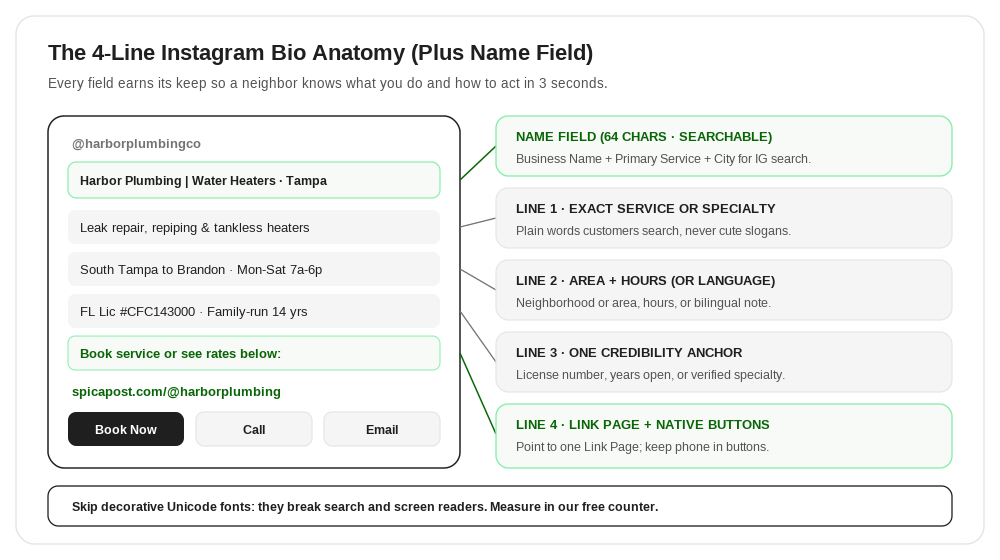
Searchable Name field (64 characters): Business Name + Service + City
Do not repeat your exact @handle word-for-word in the bold Name field unless your brand name already states your exact profession and city. Someone searching Instagram for “tampa plumber” or “austin sourdough” rarely knows your shop’s name yet.
Use clean separators (| or ·) inside 64 characters:
Harbor Plumbing | Water Heaters · Tampa(39 chars)Oak Street Bakery | Sourdough · Austin(38 chars)Bright Smile Dental | Family Dentist · Miami(44 chars)
Keep your Category label switched on under Edit Profile -> Profile Display -> Display category label (available on free Instagram Professional accounts), which frees even more space in your bio.
Line 1: exact service or specialty in customer words
Skip industry jargon and write what a real buyer types into a search bar. Instead of “Holistic aesthetic transformations”, write “Curly cuts, balayage & keratin treatments”. Instead of “Residential thermal comfort solutions”, write “AC repair, tune-ups & heat pump installs”.
Line 2: neighborhood or service area, hours, or bilingual note
Tell local visitors immediately whether they can reach you today. Storefronts name their neighborhood and days open (“South Congress · Wed to Sun, 7a to 2p”). Mobile service providers name their realistic service area (“Serving North Dallas, Plano & Frisco”). If your team serves Spanish-speaking or bilingual clients fluently, adding “Se habla español” on Line 2 or Line 3 is one of the highest-trust signals in local business.
Line 3: one concrete credibility anchor
Pick one factual trust marker instead of vague superlatives like “#1 in town” or “Best quality”. Strong one-line anchors include:
- Years serving the neighborhood (“Family-run since 2012”)
- State license or credential (“FL Lic #CFC143000 · Insured”)
- Clear patient, buyer, or turnaround promise (“Same-day estimates · 2-year warranty” or “Accepting new patients · Most PPO plans”)
- Specific verified milestone (“Over 400 Austin roofs inspected” or “Daily routes across East Portland”)
Line 4: one clear pointer to your Link Page
Your final line tells visitors exactly what happens when they tap the link directly beneath your bio. Skip vague arrows pointing at nothing and name the specific payoff: “Menu, pre-orders & hours below:”, “Book a free estimate below:”, or “See today’s stop & catering form:”. For more phrasing ideas, browse our social media call-to-action examples.
Offload clutter to native action buttons and one fast Link Page
Every time you paste Call (555) 234-5678 | 1420 Main St Suite B, Austin TX into your bio text, you burn 56 of your 150 characters on unclickable text that visitors cannot even dial without memorizing digits.
Turn on Instagram’s native Contact, Directions, and Book buttons
With a free Business account (Instagram action button help), go to Edit Profile -> Contact Options and enter your business phone number, email address, and street address (only for brick-and-mortar storefronts; mobile service businesses can leave the street address blank and stick to Call/Email/Text). Under Action Buttons, connect a supported scheduling or ordering partner if you use one. Instagram renders clean, tappable Call, Email, Directions, and Book Now buttons right below your link, costing zero characters of your bio.
Why one fast Link Page beats Instagram’s 5-link dropdown
Instagram allows up to five links in your profile, yet visually displays only the first URL plus “and 4 more”. Clicking it opens a stark system list with zero context, zero hours, and no visual hierarchy.
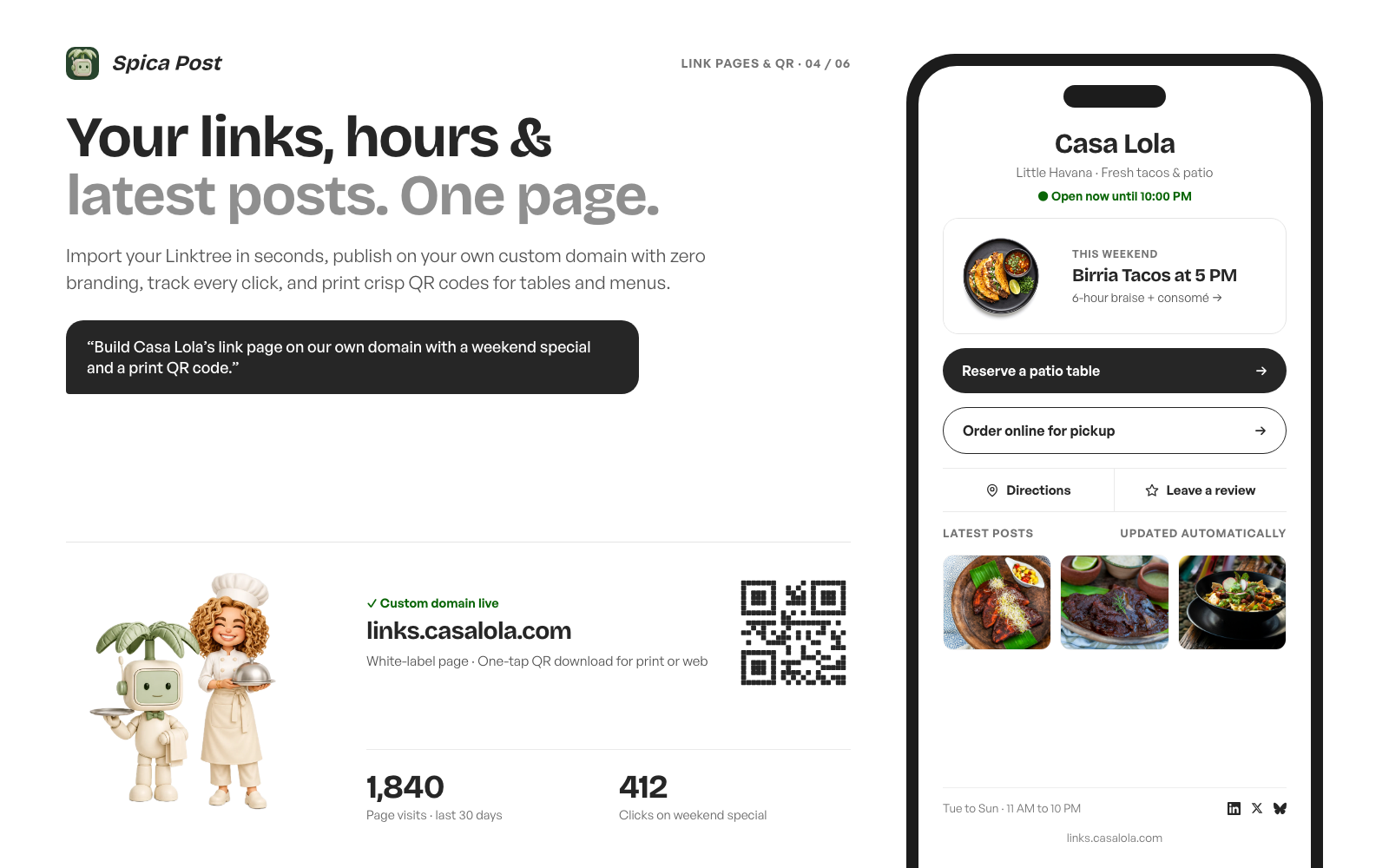
Pointing that single visible link slot to one fast branded Link Page gives every mobile visitor an instant mini-storefront: your open-now hours, a top announcement box (for seasonal menus, open appointments, or today’s location), your primary booking or order button, and quick links to Google Maps reviews and contact options. Pair that bio setup with three pinned posts at the top of your grid (Instagram pinned post help) covering who you are, proof of your best work, and how to visit or book (see our 30-day Instagram plan for local businesses).
Accessibility and search traps to skip in your bio
Small formatting habits can quietly sabotage an otherwise clear bio. Avoid these four traps:
- Fancy Unicode font generators. Typing your bio into a “cool Instagram fonts” website replaces plain English letters with mathematical Unicode symbols (
𝐁𝐚𝐤𝐞𝐫𝐲or𝒞𝑜𝒻𝒻𝑒𝑒). Those symbols break Instagram keyword search, display as empty tofu boxes on older Android phones, and cause screen readers used by blind and low-vision visitors (guided by W3C WCAG 2.2) to read aloud gibberish like “mathematical bold capital B, mathematical bold small a”. Plain system text always looks cleaner and works for everyone. - Clickable
#hashtagsand@mentionsthat leak traffic. Adding#austinfoodieor#hairstylistinside your bio creates blue exit links that send warm visitors away from your profile to browse competing accounts. Only tag a sister location or your own secondary brand handle if you genuinely want visitors clicking over. - Dense walls of emojis. One clean separator (
·or|) or at most one relevant emoji at the start of a line aids scanning; pasting twelve emojis burns 24+ characters and makes your business look cluttered. - Stale seasonal lines. Leaving “Holiday pre-orders open!” in your bio in March signals an abandoned account. Review your bio on the first Monday of every month or move time-sensitive promos onto scheduled Link Page boxes instead.
10 copy-ready Instagram bio examples across professions
Every single example below fits strictly inside Instagram’s 64-character Name field and 150-character Bio limit (including line breaks and spaces). Swap in your city, hours, license, and Link Page URL, then verify your exact count in our free Character Counter.
1. Plumber
Name field (39 chars): Harbor Plumbing | Water Heaters · Tampa
Leak repair, repiping & tankless heaters South Tampa to Brandon · Mon-Sat 7a-6p FL Lic #CFC143000 · Family-run 14 yrs Book service or see rates below:
(Bio length: 150 characters)
2. Bakery
Name field (38 chars): Oak Street Bakery | Sourdough · Austin
Naturally leavened loaves & pastries South Congress · Wed to Sun, 7a to 2p Baked fresh since 2019 · Se habla español Menu, pre-orders & hours below:
(Bio length: 148 characters)
3. Hair salon
Name field (41 chars): Loom Hair Studio | Balayage & Cuts · Mesa
Lived-in color, curly cuts & glosses Downtown Mesa · Tue to Sat by appt 12 yrs specializing in healthy color Book your chair & see pricing below:
(Bio length: 145 characters)
4. Dentist
Name field (44 chars): Bright Smile Dental | Family Dentist · Miami
Cleanings, implants & gentle kids care Coral Gables · Mon-Fri + Sat mornings Accepting new patients · Se habla español Book your visit online below:
(Bio length: 148 characters)
5. Real estate agent
Name field (43 chars): Elena Ruiz | Homes & Relocation · Charlotte
Helping buyers & sellers across Charlotte South End, Myers Park & Lake Norman NC Lic #318940 · 11 yrs local market Free home valuation & listings:
(Bio length: 146 characters)
6. Auto repair shop
Name field (44 chars): Cedar Auto Care | Brakes & Diagnostics · SLC
Honest diagnostics, brakes & oil service Sugar House · Mon to Fri, 7:30a to 5:30p ASE Certified · 24-mo / 24k-mi warranty Book drop-off & estimates:
(Bio length: 148 characters)
7. Photographer
Name field (46 chars): Maya Lin Photo | Weddings & Portraits · Denver
Documentary weddings & family portraits Denver, Boulder & Front Range travel 180+ couples shot · Full galleries fast Check 2026-2027 dates below:
(Bio length: 145 characters)
8. Landscaper
Name field (44 chars): Greenline Lawn | Landscape Design · Raleigh
Weekly mowing, mulch & patio installs Raleigh, Cary & Apex · Free quotes Licensed & insured · Local crew since 2016 Request your yard estimate below:
(Bio length: 149 characters)
9. Food truck
Name field (44 chars): Fuego Street Tacos | Food Truck · San Diego
Slow-braised birria & handmade tortillas San Diego breweries & weekend markets Private catering for 40 to 300 guests Today’s stop, menu & catering:
(Bio length: 147 characters)
10. Independent creator
Name field (45 chars): Sam Rivera | Woodwork Plans & Shop Tips · OR
Small-shop woodwork & honest tool tests Portland maker · New build video Fridays Practical plans for real garage shops Free cut lists & plans below:
(Bio length: 148 characters)
A 5-minute bio rewrite checklist and honest Spica Post trade-offs
Compare your current profile against this quick before-and-after test before saving changes:
| Weak bio habit | Stronger replacement | Why it converts better |
|---|---|---|
Name field repeats @oakstreetbakery |
Oak Street Bakery | Sourdough · Austin |
Captures local Instagram searches for sourdough and Austin |
| Line 1: “Baking memories since 2019” | “Naturally leavened loaves & pastries” | Tells strangers in one second what you actually sell |
| Phone and street address typed in bio | Native Call and Directions buttons | Saves 45+ bio characters and opens dialer or Maps in one tap |
| Cursive Unicode generator font | Clean native plain text | Indexed by Instagram search and readable on screen readers |
| Five raw links in bio dropdown | One branded Link Page URL | Shows hours, top promo, menu, and booking on one fast screen |
Before hitting Save inside Instagram:
- Paste your drafted 4-line bio into our free Social Media Character Counter to verify it sits at 150 characters or fewer including line breaks and emojis.
- Confirm your Category label and Contact / Directions / Book action buttons are turned on under your Professional account settings.
- Open your profile from a friend’s phone and tap your bio link once to verify your Link Page loads cleanly on cellular data with zero broken buttons.
Honest trade-offs if you consider Spica Post alongside Instagram
If you are checking how Spica Post supports small businesses and creators on Instagram in November 2026, here is the exact current picture:
- Live today: You get our free no-login Social Media Character Counter (
/tools/character-counter/) to verify bios, Instagram’s 125-character caption fold, and cross-network limits, plus Spica Post’s fast branded Link Pages (with open-now hours, scheduled announcement boxes, click counts on Studio, Pro and Agency, custom domains on Pro, and printable SVG QR codes),/l/tracked short links, and live direct publishing to X, LinkedIn personal profiles, Bluesky, and Mastodon. - Built and finishing Meta review: Direct Instagram publishing (single JPEG photos, up to 20-item carousels, Reels, collaborator tags, and comment-to-DM auto-replies) is built and tested in Spica Post while completing Meta App Review. Until Meta approves public access across all workspaces, you can use Spica Post for your Instagram bio Link Page, Character Counter checks, drafting workspace, and live networks while posting natively to Instagram in two minutes. See current flat plans anytime on our pricing page.
Strip out the slogans, claim your 64-character searchable Name field, fit four plain facts inside 150 characters, and point to one fast Link Page. Every visitor will know what you do, where you are, and how to hire you before their thumb moves on.
Questions people ask
- What is the character limit for an Instagram bio and Name field in 2026?
- An Instagram bio holds a strict maximum of 150 characters, counting letters, spaces, punctuation, line breaks, and emojis. Separately, your bold Name field holds up to 64 characters and is directly indexed by Instagram's search bar, while your @username holds up to 30 characters.
- Why should a local business put its primary service and city in the Instagram Name field?
- Instagram's search bar indexes both your @username and your bold Name field far more reliably than your bio text. Putting your business name alongside your main service and city (such as 'Oak Street Bakery | Sourdough · Austin') helps nearby customers discover you when searching for your profession directly inside Instagram.
- Should I put my phone number and street address inside my 150-character Instagram bio?
- No. Switch to a free Instagram Professional account (Business or Creator) and place your phone number, email, street address, and booking partner inside Instagram's native Contact, Directions, and Book action buttons instead. That frees up precious bio characters for your exact specialty, hours, and credibility.
- Do fancy Unicode fonts hurt an Instagram business bio?
- Yes. Decorative bold, script, or cursive font generators swap ordinary letters for mathematical Unicode symbols. Instagram's search index often fails to match those symbols to normal words, screen readers for blind or low-vision visitors pronounce them as confusing math characters, and older phones frequently render them as empty boxes.
- Should I add five separate links to Instagram or use one Link Page?
- Although Instagram lets profiles attach up to five external links, displaying multiple URLs hides links two through five behind an extra tap inside a plain text popup. Linking to one fast branded Link Page puts your hours, menu or services, booking button, and latest announcement on a single readable mobile screen.
Sources
- Instagram Help Center: About professional accounts (Business vs. Creator)
- Instagram Help Center: Add an action button (Contact) to your profile
- Instagram Help Center: Pin a post to the top of your profile
- W3C Web Content Accessibility Guidelines (WCAG) 2.2
- Spica Post Free Social Media Character Counter and Post Checker