Instagram Hashtags in 2026: How Many, Which Ones, and Where They Go
Stop stuffing 30 generic tags on Instagram: use 3 to 5 specific local and service hashtags at the caption end alongside plain search keywords.
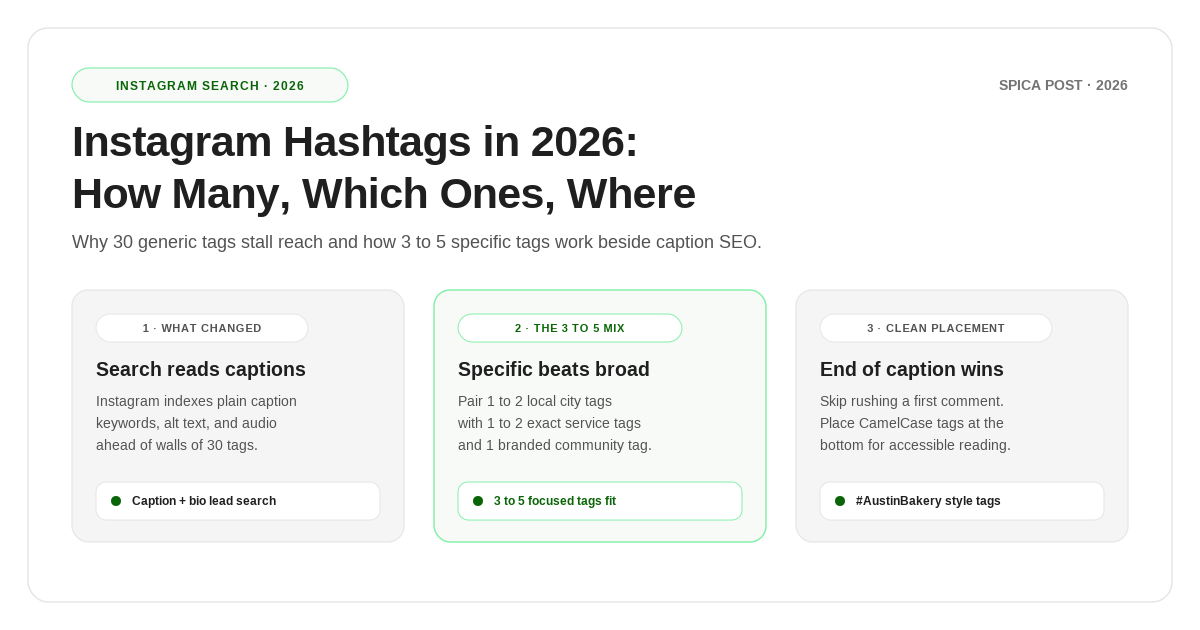
In 2026, small businesses and creators should use 3 to 5 specific Instagram hashtags placed cleanly at the bottom of the caption, treating them as supporting labels rather than a reach shortcut. Instagram’s search and recommendation systems now read plain caption keywords, spoken and on-screen video text, custom alt text, location pins, and bio name fields first, which means a wall of 30 generic tags adds visual noise without bringing local buyers to your door.
Snapshot verified November 2026. Every platform limit below reflects Instagram’s current Help Center and Meta’s Instagram Platform publishing specifications.
If you still keep a saved note filled with #smallbusiness #entrepreneur #love #instagood #explorepage #localbusiness and paste it under every photo hoping for a reach spike, you can retire that habit today. It belonged to an era when Instagram Search only matched usernames and hashtags. That era ended years ago, yet old checklists keep circulating and costing owners ten minutes per post.
This guide lays out what changed inside Instagram discovery, which signals actually place your posts in front of nearby buyers, the exact 3 to 5 hashtag formula across six real professions, why caption-end placement with CamelCase beats the old first-comment scramble, and how to check whether hashtags earn their keep on your own account.
Why walls of 30 generic hashtags stopped working
Instagram’s technical caption limit still allows up to 2,200 characters and up to 30 hashtags per post (per Meta’s Instagram Platform publishing documentation and Instagram Help Center). The mistake many owners make is confusing a technical ceiling with a growth target. Just because the field accepts 30 tags does not mean the recommendation engine rewards using all 30.
What Instagram actually indexes first in 2026
In Instagram’s own explanation of how Instagram Search works, the platform explains that when a user types a query like “gluten free bakery Austin” or “emergency plumber near me”, Instagram matches that query against text across usernames, bio names, bios, captions, locations, and hashtags, then ranks results by user activity and relevance. Notice the shift: buyers no longer tap #austinglutenfreebakery to browse a chronological grid of recent posts. They type normal everyday phrases into the search bar, just as they do on Google or TikTok.
When you write “Fresh rosemary sea-salt sourdough and gluten-free almond tarts out of the oven this morning in East Austin” in plain prose, Instagram already knows your city, your neighborhood, and your exact products. Tacking on 28 loose hashtags afterward gives the classifier conflicting signals instead of sharper focus.
Why mega-tags like #smallbusiness hurt clarity
Broad tags with tens of millions of posts suffer from two practical problems for local businesses and independent creators:
- Zero buyer intent: People browsing
#smallbusinessor#instagoodare overwhelmingly other business owners, freelancers, or spam bots promoting growth services, not neighbors looking to book a haircut or order pastries. - Topic dilution: Mixing
#coffee,#morningvibes,#entrepreneurlife,#supportlocal,#foodie, and#motivationon a single photo of a custom birthday cake blurs what the post is actually showing. Instagram’s recommendation model works best when every signal on the post points to one unambiguous topic and audience.
Technical limits versus practical reach
Keeping the old playbook side by side with how Instagram operates today makes the cleanup obvious:
| Dimension | Old 2019 playbook | Current 2026 reality | Practical move for your business |
|---|---|---|---|
| Hashtag count | 25 to 30 tags on every post | 3 to 5 specific tags; technical limit remains 30 | Cut broad filler tags and keep only accurate labels |
| Primary search text | Hashtags carried almost all keyword discovery | Bio name, plain caption keywords, audio, and alt text lead | Write natural city and service phrases in sentence one |
| Broad vanity tags | #love #smallbusiness #explore #fyp |
Virtually zero local discovery; attracts spam comments | Delete from saved notes permanently |
| Tag placement | Rushed first comment right after posting | Clean line at the bottom of the caption | Publish everything in one pass; stop racing the clock |
| Formatting | All lowercase (#austinflowershop) |
CamelCase (#AustinFlowerShop) |
Capitalize each word for screen readers and mobile legibility |
| Performance check | Guessing from recycled viral lists | Account-level comparison in Insights and Results | Audit top posts monthly to see whether tags correlate with reach |
Cutting back from 30 tags to 4 takes seconds and immediately makes your captions look calmer, more confident, and easier to read on a phone screen.
The 2026 Instagram discovery stack: captions, audio, alt text, and location
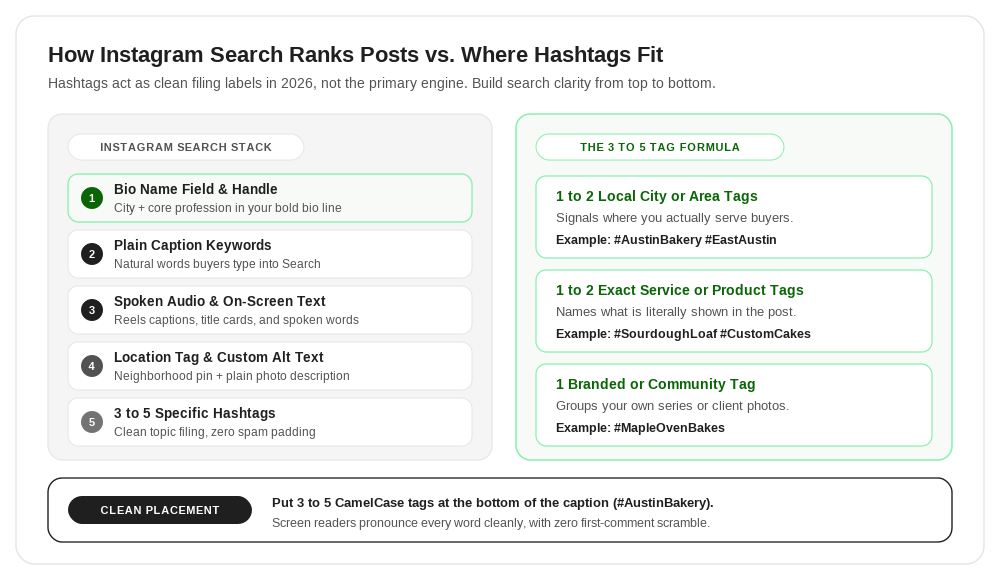
Before you pick a single hashtag, build the four discovery signals that carry far more weight in Instagram Search and Explore. Hashtags sit at the base of the stack as a tidy filing label, not at the top as a magic lever.
Bio name field and handle keywords
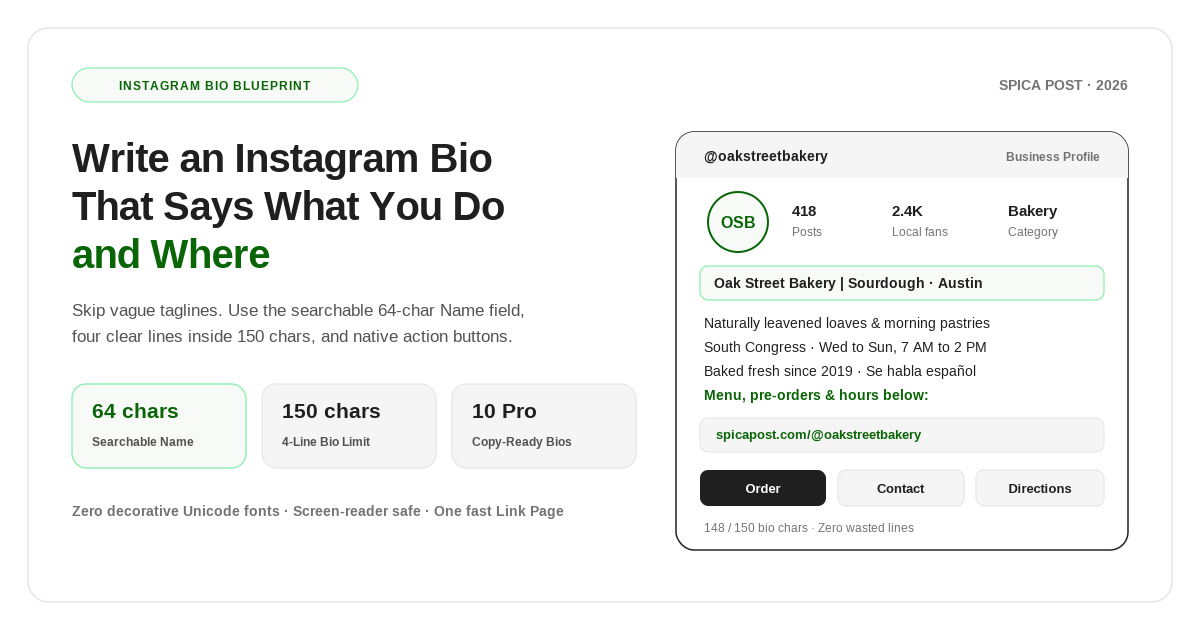
Your Instagram Name field (the bold line directly beneath your profile photo, separate from your @handle) is heavily indexed in Search. If your bakery is called Maple Oven and your bold Name line only reads “Maple Oven”, someone searching “Austin Bakery” may never see your profile. Changing the Name line to “Maple Oven | Austin Bakery” immediately puts your profession and city into the strongest searchable field on your account. Keep it clean and human, with one city and one clear category rather than a stuffed string of commas.
Plain-English caption keywords
The first two sentences of your caption do double duty: they hook human readers before the “more” fold and tell Instagram Search exactly what problem you solve. Instead of opening with “So excited to share this beauty!”, open with what the post genuinely shows: “Finished a full cedar fence replacement in South Tampa this afternoon using 6-foot pressure-treated posts set in concrete.” That single sentence naturally includes the exact service, material, and area without reading like a search-engine script. For more caption structure habits, read our guide to writing social media captions.
Spoken audio, on-screen text, and Reels covers
On Reels, Instagram transcribes your spoken narration and reads native on-screen text overlays. Saying “Here is how we troubleshoot a leaking kitchen sink trap in Phoenix” in the first three seconds, and placing a crisp 5-word title card across the upper-middle safe zone of the cover, feeds Instagram’s topic classifier far better than twenty hidden hashtags ever could. Keep auto-captions switched on and proofread proper nouns (neighborhood names, product models, and service names) before publishing so transcription typos do not garble your keywords.
Custom alt text and neighborhood location pins
Instagram automatically generates machine alt text for photos, which often guesses vague phrases like “Image may contain: indoor, table”. Writing one clear sentence of custom alt text in the Advanced Settings screen (per Instagram’s alt text guide) serves visually impaired followers using screen readers and gives Instagram an accurate description of the photo. Describe what is literally visible (“Close-up of a freshly glazed strawberry rhubarb danish on white parchment at Maple Oven Bakery in Austin”), never a list of hashtags.
Always pair that photo with a real Location tag whenever your business serves a physical storefront or local service area. Tag your neighborhood, your city, or a host venue if you work pop-ups and events. Location pins connect your post to Instagram’s interactive map search, where hungry diners and weekend shoppers still browse nearby spots by photo.
The 3 to 5 specific hashtag formula for small businesses and creators
Once your bio name, plain caption, alt text, and location pin are clear, add 3 to 5 specific hashtags using a simple three-slot structure. Every tag must earn its place by describing something literally true about that exact post.
Slot 1: 1 to 2 local city and neighborhood tags
If you serve a geographic area, local tags anchor your post in regional browsing and local creator communities. Pick one city-plus-profession tag and, when helpful, one neighborhood or metro tag:
- Examples:
#AustinBakery+#EastAustin,#DenverPlumber+#HighlandsDenver,#MiamiHairStylist+#CoralGablesSalon - For online creators or nationwide shops: Replace the city slot with 1 to 2 audience-context tags that name who the post helps (for example,
#BookkeeperTipsor#HandmadeCeramics).
Slot 2: 1 to 2 exact service or product tags
Name the exact work, dish, product, or technique visible in the photo or Reel. If the post shows balayage hair color, use #BrunetteBalayage, not #HairGoals. If the post shows a tankless water heater install, use #TanklessWaterHeater, not #HomeImprovement. Specific tags connect your post to smaller, tighter topic clusters where interested buyers actually linger.
Slot 3: 1 branded or community tag
Reserve your final slot for your own business tag (#MapleOvenBakes) or a recurring content series tag (#MapleOvenWeekendSpecials). Branded tags will not bring cold strangers on day one, yet they build a clean archive over twelve months: customers who tap your branded tag see dozens of your real projects, menus, or client stories (always shared with explicit customer permission) in one uninterrupted gallery without competitor posts mixed in.
Real examples across six professions
Notice how each strong example pairs one plain-English caption opening with 3 to 5 focused CamelCase tags instead of a cluttered 30-tag paste:
| Profession | What to stop pasting | Plain caption opening (SEO workhorse) | Clean 3 to 5 hashtag set |
|---|---|---|---|
| Bakery | #bakery #food #yummy #instafood #smallbusiness #love #bakedwithlove (x30) |
“Pulling hot cardamom buns and country sourdough loaves off the rack in Portland’s Hawthorne district until 3 PM.” | #PortlandBakery #HawthornePDX #CardamomBuns #SourdoughBread #SunbeamBakehouse |
| Hair salon | #hair #hairstyles #beauty #salonlife #explorepage #fyp #glam (x30) |
“Lived-in copper gloss and soft face-framing layers done in one two-hour appointment at our Brookline studio.” | #BrooklineHairSalon #BostonColorist #CopperHairColor #LivedInColor #LoomHairStudio |
| Plumbing | #plumber #plumbing #contractor #workhard #hustle #diy #home (x30) |
“Replaced a 14-year-old leaking main shut-off valve with a quarter-turn ball valve for a homeowner in Mesa today.” | #MesaPlumber #PhoenixPlumbing #MainShutOffValve #CopperRepipe #DesertLinePlumbing |
| Landscaping | #garden #nature #green #outdoorliving #yard #business #summer (x30) |
“Swapped a patchy front lawn in San Diego for decomposed granite paths, lavender, and drip-irrigated native sages.” | #SanDiegoLandscaping #DroughtTolerantYard #NativePlantsCA #FrontYardDesign #CoastlineTurfCo |
| Photographer | #photography #photooftheday #camera #art #portrait #instagood (x30) |
“Golden-hour outdoor family portraits at Piedmont Park in Atlanta, delivered in a full print-ready gallery within seven days.” | #AtlantaFamilyPhotographer #PiedmontPark #OutdoorPortraits #AtlantaPortraits #KiraVancePhoto |
| Online boutique / creator | #shopsmall #fashion #style #ootd #shopping #entrepreneur #trending (x30) |
“Restocked our heavyweight 100% organic cotton chore jackets in olive and charcoal, sewn in small runs of 40 pieces.” | #OrganicCottonJacket #SmallBatchClothing #ChoreCoat #SlowFashionMaker #NorthLoomGoods |
If a tag does not describe the location, the exact subject in frame, or your brand, drop it. Three accurate tags outperform twenty vague ones every single week.
Caption bottom vs. first comment, and why CamelCase matters
For years, social media tips insisted that putting hashtags in the first comment kept captions tidy while delivering identical reach. In 2026, the first-comment habit creates unnecessary work with zero upside.
Why putting tags at the end of the caption wins
Instagram explicitly confirmed in its Search guidance that keywords and hashtags belong directly inside the caption for search indexing. Leaving tags in the caption brings three immediate advantages for busy owners:
- Instant indexing at publish time: You do not lose the first sixty seconds scrambling to paste a comment while standing behind a counter or driving between job sites.
- Reliable scheduling: Whether you publish natively or through a scheduler, the entire post goes live atomically in one step with zero broken follow-up comments.
- Zero clutter when you use only 3 to 5 tags: The whole reason people hid hashtags in the first comment was embarrassment over pasting 30 messy lines. Four tidy tags sitting quietly on one short line at the bottom of your caption look clean and intentional.
Screen-reader accessibility with CamelCase
Always capitalize the first letter of every word inside a multi-word hashtag (often called CamelCase or PascalCase). Compare how an assistive screen reader reads these two tags aloud:
- Lowercase:
#chicagocustomframingoften gets read as a garbled single syllable string. - CamelCase:
#ChicagoCustomFramingis pronounced cleanly as “Chicago Custom Framing”.
CamelCase also helps sighted customers scrolling quickly on bright outdoor screens recognize your city and service in half a second. Instagram treats #ChicagoCustomFraming and #chicagocustomframing as the exact same tag in search, so there is zero downside and real accessibility value.
Spacing, punctuation, and copy-paste traps to avoid
Skip the old five-rows-of-periods trick (., ., ., ., .) before your tags. Those dot stacks look dated, push screen readers into announcing “period, period, period”, and are unnecessary when your tag line is only 4 tags wide. Leave one clean blank line after your call to action, place all 3 to 5 hashtags on a single line separated by spaces, and never embed #tags mid-sentence where they interrupt reading flow.
Also check every new tag by tapping it in Instagram Search once before adopting it. Avoid banned or spam-flooded tags (for example, overly generic words hijacked by spam networks) and skip punctuation, apostrophes, or spaces inside a tag, since Instagram breaks the link at the first special character.
Three copy-ready Instagram caption layouts with 3 to 5 tags
Use these layouts as blueprints and swap in your own city, real work details, and booking step.
1. Local storefront or bakery daily post
Fresh blueberry cornmeal scones and rosemary olive oil focaccia just came out of the deck oven here in East Austin. We bake one morning run Tuesday through Sunday, and the focaccia usually sells out around 1:30 PM.
Stop by the counter on Manor Road or check today’s full pastry list through our Link Page in bio.
#AustinBakery #EastAustin #SourdoughFocaccia #MapleOvenBakes
2. Local home-service project post (with customer permission)
Cleared a slow main kitchen drain and replaced corroded galvanized pipe under the sink for a homeowner in Mesa this morning (shared with the homeowner’s permission). The whole swap took just under two hours, with clean PVC fittings and a fresh shut-off check so there are zero surprise drips later.
Dealing with a sluggish sink or older pipes in the East Valley? Tap our bio link to request a straight estimate for next week.
#MesaPlumber #EastValleyAZ #KitchenPlumbing #DesertLinePlumbing
3. Independent creator or small-batch product drop
We just finished glazing 36 speckled stoneware coffee mugs for Friday’s 10 AM shop restock. Each mug holds 12 ounces, fits cleanly under espresso spouts, and goes straight into the dishwasher without losing its matte rim.
Tap the Link Page in bio to preview all three glaze colors and set a restock reminder before Friday morning.
#HandmadeCeramics #StonewareMug #SmallBatchPottery #CedarClayStudio
How to audit and maintain your hashtag library in 15 minutes a month
Guessing which tags help your business is optional when your own posting history already holds the evidence. Once a month, spend fifteen quiet minutes reviewing real numbers instead of following generic advice threads.
Checking whether hashtags actually move reach on your account
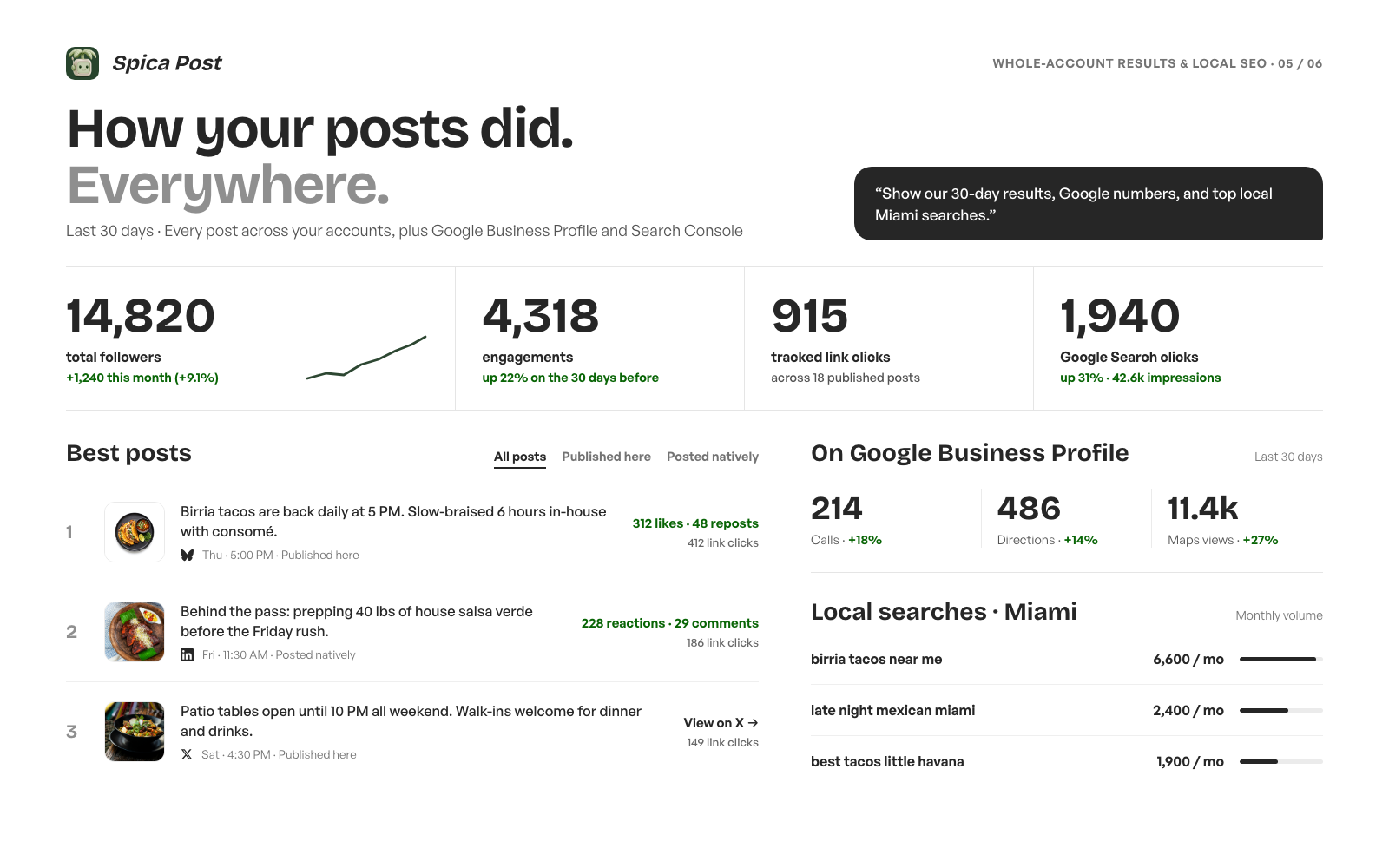
Open Instagram Insights on your last ten posts (or review your Results dashboard inside Spica Post) and look at two things together:
- Non-follower reach and impressions from Search / Other: Remember that Instagram groups hashtag impressions alongside search and profile discovery in newer Insights layouts, so look at whether posts with sharp plain-text keywords and 4 specific tags outperform older 25-tag posts on non-follower reach, saves, profile visits, and website taps. For help reading those figures accurately, read our breakdown of reach versus impressions versus views.
- Hashtag performance comparisons: In Spica Post’s Results page, the built-in hashtag report groups your published posts by the hashtags used on them and shows average engagement side by side. If posts tagged
#CustomBirthdayCakesconsistently earn three times more saves and link clicks than posts tagged#BakingLife, you have real account-specific proof of which topic and tag pair resonates with buyers.
Rotating three clean topic sets instead of repeating one block
Rather than building a giant spreadsheet of 120 tags, save three tiny, clean sets in a note or brand template matched to your three main post types:
- Core offer set (4 tags): Your main city + flagship product or service + brand tag.
- Behind-the-scenes / process set (4 tags): Your neighborhood + craft/process term + local community + brand tag.
- Seasonal or promo set (4 tags): Your city + exact seasonal offer (for example,
#HolidayCateringor#SpringTuneUp) + brand tag.
Whenever you draft a post, start with the closest set and swap at least one tag so it names the exact detail in that photo. The whole process takes under fifteen seconds.
Four hashtag myths still wasting business owners’ time
Clearing out outdated folklore keeps your weekly workflow fast:
- Myth: “You must hide 30 hashtags under white text on Instagram Stories.” Shrinking 20 tags behind a sticker looks messy, fails accessibility checks, and rarely moves Story views. On Stories, one visible location sticker and one clear question or link sticker outperform hidden hashtag piles.
- Myth: “Using exact 10k-to-100k post-count tiers guarantees Explore page placement.” The old “10 small + 10 medium + 10 large staircase” formula was designed for chronological hashtag feeds that Instagram retired. Relevance to what is actually in the photo matters far more than hitting an arbitrary tag volume bracket.
- Myth: “Editing a caption to fix a hashtag typo kills your post’s reach.” Fixing a misspelled tag or broken word within the first few minutes will not tank a good post; clear text beats leaving
#AustnBakerybroken forever. - Myth: “Adding #fyp or #explore forces Instagram to push your Reel.” Recommendation models rank Reels by watch time, replays, likes per reach, and DM sends, not by asking the algorithm for favors inside a tag.
Step-by-step pre-publish checklist for Instagram discovery
Before you publish or schedule your next Instagram post, run this 60-second check:
- Verify your bio Name line still names your city (if local) and primary profession plainly.
- Read sentence one of your caption out loud to confirm it names your exact product, service, or neighborhood naturally.
- Check on-screen text and spoken audio (if posting a Reel) so your core topic appears within the first three seconds.
- Write one plain sentence of custom alt text describing what is visible in the photo.
- Attach the exact neighborhood, storefront, or venue location pin when serving local customers.
- Add 3 to 5 specific CamelCase hashtags at the bottom of the caption after one blank line (1 to 2 local + 1 to 2 exact service/product + 1 branded).
- Confirm explicit customer permission if any client, customer face, home exterior, or private project appears in the post.
Tracking hashtag performance and honest Spica Post trade-offs
Checking what works across your social accounts should never require exporting five spreadsheets a week. Here is the transparent November 2026 picture of what Spica Post gives small businesses and creators today, and what is still completing platform review.
What is live today vs. completing review in November 2026
- Live today in Spica Post: You can draft captions in your own brand voice, validate drafts against Instagram’s 2,200-character and 30-hashtag limits before publishing, organize reusable media with alt text in the Asset Library, run a fast branded Link Page with
/l/click-tracked short links to measure which Instagram bio visits actually convert, and publish or auto-crosspost directly to X, LinkedIn personal profiles, Bluesky (with live whole-account Results sync, hashtag report, and Unified Inbox), and Mastodon. - Built and completing Meta review: Instagram, Facebook Pages, and Threads adapters, including carousels of up to 20 items, Reels covers and trial options, collaborators, user tags, comment-to-DM auto-replies, and Instagram whole-account Results sync (with reach and hashtag performance reports), are fully built in Spica Post and completing Meta App Review. Until Meta clears public approval across workspaces, you can draft, check limits, shorten tracked links, and prep your 3 to 5 tags inside Spica Post, then paste your finished caption and photo into Instagram natively in under a minute. Check current flat workspace plans anytime on our pricing page or explore full Instagram capabilities on our Instagram platform guide.
The relief of Instagram hashtags in 2026 is how much simpler they have become. Stop chasing 30-tag formulas, spend that saved time writing a clear first sentence that sounds like a real human in your city, add 3 to 5 sharp CamelCase tags at the bottom, and get back to running your business.
Questions people ask
- How many hashtags should a small business use on Instagram in 2026?
- Use 3 to 5 specific, directly relevant hashtags per post. Even though Instagram's technical limit still permits up to 30 hashtags in a caption, Instagram's own discovery guidance emphasizes a small set of accurate topic and location tags paired with natural keywords in the caption text.
- Should Instagram hashtags go in the caption or the first comment?
- Place your 3 to 5 hashtags cleanly at the bottom of the caption, separated by one blank line. Instagram Search indexes caption text immediately at publish time, and putting tags in the caption saves you from rushing to paste a first comment while keeping the post neat.
- Do hashtags still increase reach on Instagram in 2026?
- Hashtags act as supporting filing labels rather than a primary reach multiplier. Most non-follower discovery in 2026 comes from plain caption keywords, spoken audio, on-screen text, location pins, and engagement signals such as shares and saves, with 3 to 5 focused hashtags helping categorize the post.
- Why should small businesses capitalize each word in multi-word hashtags?
- Writing hashtags in CamelCase, such as #AustinBakery instead of #austinbakery, lets screen readers pronounce each word separately for visually impaired readers and makes tags faster for every customer to scan on a phone screen.
- Will pasting the same block of 30 hashtags on every post hurt my account?
- Repeating an identical wall of broad, loosely related tags like #smallbusiness, #love, and #instagood adds clutter without helping Instagram understand what each individual post is about. Swapping in 3 to 5 tags that accurately describe that specific photo or service gives cleaner context.