Facebook Groups
Facebook Groups for Local Businesses: Show Up Without Spamming
Win local referrals in neighborhood Facebook Groups without getting banned: check group rules, answer real threads, and keep promos clean.
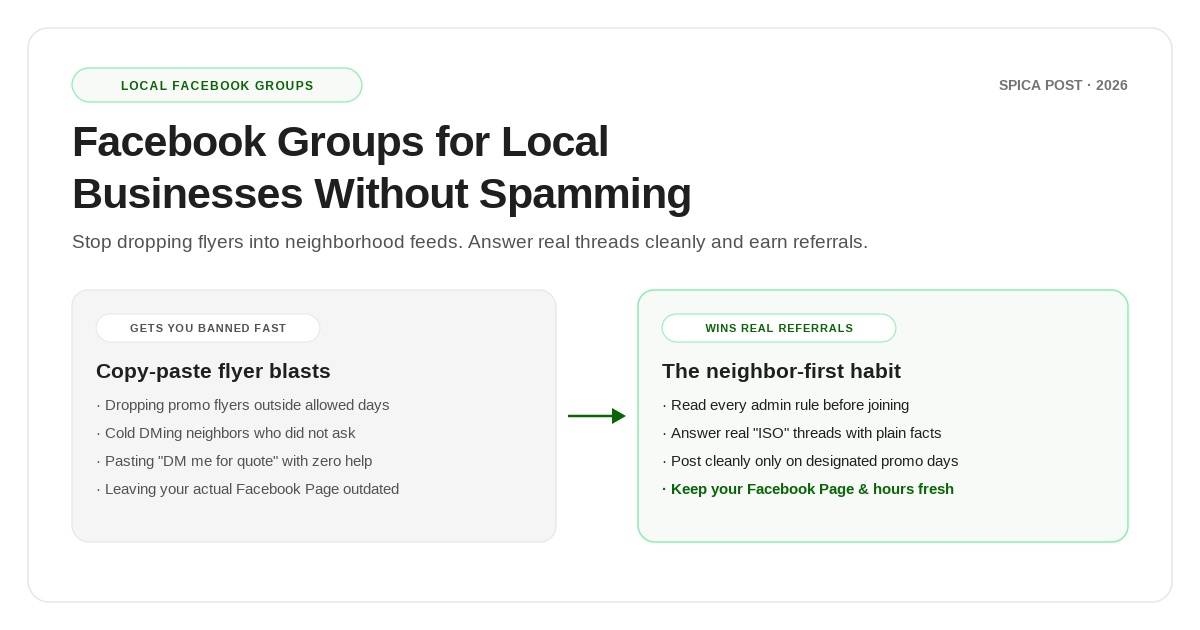
Local neighborhood Facebook Groups bring real, ready-to-buy referrals when you read every group’s self-promotion rules first, answer genuine resident questions with plain help before mentioning your business, and save direct promos strictly for admin-approved business days. Dropping unsolicited flyers across ten town feeds is the fastest way to get muted, mocked, or permanently banned within forty-eight hours.
While organic reach on cold Facebook Pages can feel unpredictable, local Groups remain packed with high-intent buying conversations every single morning: “ISO an honest mechanic near Oak Ridge”, “Looking for a bakery that makes nut-free birthday cakes”, or “Who does quick drywall patches before a move-out?”. Showing up as a real, calm, helpful neighbor turns those exact threads into booked work for years.
This guide shows you how to audit your local groups before typing a single word, a 15-minute weekly neighbor-first routine, four copy-ready reply and promo-day templates, the five mistakes that trigger instant admin bans, and how to connect group curiosity to a crisp Facebook Page without falling for banned automation tricks.
Why neighborhood Facebook Groups still outperform cold local ads
Paid local ads interrupt people who were scrolling family vacation photos. Neighborhood Facebook Groups capture residents who have already pulled out their phone specifically to hire someone nearby.
Even better, recommendations inside Groups compound over time. When you give a neighbor two honest minutes of practical advice on a leaking outdoor spigot or a tricky lawn fungus with zero sales push, three things happen naturally: the original poster clicks your profile to see what you do, twenty silent neighbors bookmark your name for later, and past customers who recognize your name jump in to vouch for you. A single neighbor tagging your Page carries ten times the trust of any self-written ad.
Audit five local groups before posting a single word
Not every local group welcomes business posts, and volunteer group admins guard their feeds closely. Pick three to five active groups serving your exact zip codes and check the About -> Group Rules panel (per Facebook Group participation guidelines) before commenting anywhere.
| Local group type | Typical self-promo rule | Best way to show up | What gets you removed fast |
|---|---|---|---|
| Neighborhood / HOA / Township chat | Strict no-ads policy except maybe one pinned weekly business thread | Answer practical questions as a resident; disclose your profession calmly only when directly asked | Posting promotional flyers, price lists, or “DM me” replies on non-promo threads |
| Local “Recommendations / ISO” groups | Business replies often allowed ONLY when a member explicitly asks for your service | Reply transparently with one helpful tip + clear contact info or Page tag | Starting unsolicited promo posts or cold-messaging people who asked for public comments |
| Parent, pet, homeowner, or hobby groups | Zero cold selling; helpful expertise welcomed | Share plain safety, care, or seasonal tips without a sales pitch; let your profile bio do the work | Turning every community chat into a pitch for your service |
| Local Chamber / “Shop Small” promo groups | Open promos allowed on set days (e.g., Small Business Saturday or Promo Friday) | Share 1 clean real photo + specific local offer or update (never recycled spam banners) | Posting the exact same flyer every single day |
Keep a tiny note in your phone listing each group name and its exact rule (for example: “Westside Neighbors: NO promos ever, replies OK only on ISO threads · Metro Small Biz: Fridays only”). That two-minute habit prevents awkward admin warnings completely.
The 15-minute-a-week neighbor-first routine
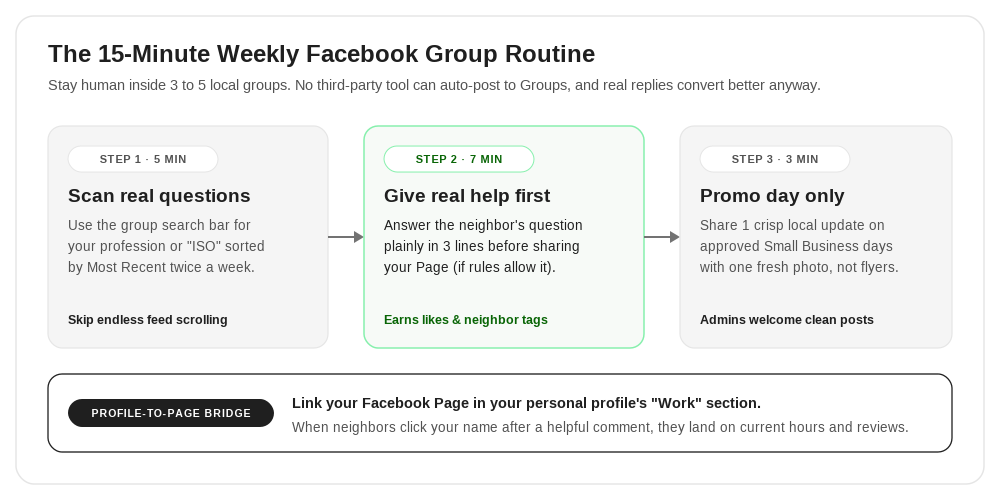
You do not need to live inside Facebook all day watching notifications pop up. Two quick seven-minute check-ins per week capture almost every relevant conversation without pulling you away from paid work.
Personal profile vs. Facebook Page inside groups
Most well-run neighborhood groups restrict membership to personal profiles rather than business Pages to keep spammers out. That works in your favor when you set up one tiny bridge:
- Open your personal Facebook profile and list your business cleanly under Work (linked directly to your official business Facebook Page, e.g., “Owner at Oak Creek Plumbing”).
- Make sure your Facebook Page itself has current hours, accurate service area, a working phone number, recent job/shop photos, and a link to your website or Link Page. (See our Facebook Page reach guide for keeping your Page tidy.)
- Never create a fake secondary personal account to promote your company. Real neighbors want to see a real local owner standing behind their work.
Use the group search bar instead of doom-scrolling
Instead of scrolling through 80 posts about lost dogs and traffic detours, open each of your 3 to 5 target groups twice a week, tap the magnifying glass, search two keywords tied to your work (plus “ISO” or “recommend”), and sort by Most Recent. In five minutes you find every live neighbor question from the past 72 hours.
Four copy-ready Facebook Group reply and promo templates
Adapt these to your real voice so you sound like a helpful local business owner rather than a copy-pasted ad script.
1. Helpful non-sales answer (works even in strict no-promo groups)
Quick tip before you spend money replacing the whole unit: check [the simple 60-second cause / reset / common issue] first, because we see that exact thing constantly in older [Neighborhood] houses.
If it still acts up after checking that, look for someone who gives an upfront written quote before opening the wall. Happy to answer any follow-up questions right here in the thread!
2. Transparent reply on a recommendation (“ISO”) thread (when group rules allow)
Full disclosure, I own [Business Name] right over off [Street/Area], so feel free to look at our Google reviews too!
For [the specific job or request they mentioned], we normally [1 sentence explaining how you handle it cleanly, e.g., inspect first and send a clear written price / bake nut-free in a dedicated morning batch]. We have openings [this Thursday afternoon / next week] if you still need someone. Here is our Page @[BusinessPage] or you can call [Phone].
3. Clean post on an approved “Small Business / Promo Day”
Happy [Promo Friday / Small Business Saturday], [Neighborhood] neighbors!
I am [First Name], owner of [Business Name] over on [Street / serving Area]. Thought I would share one real photo from this week ([brief plain caption of the job, dish, or new arrival]).
If anyone is planning [timely seasonal need] over the next few weeks, we have [2 midweek slots open / weekend pre-orders open until Thursday]. Full hours and direct info sit on our Page @[BusinessPage]. Hope everyone has a great weekend!
4. Warm thank-you when a past customer recommends you
Thank you so much for the kind mention, [First Name]! It was genuinely great working with you on [general project type without revealing private details].
[OP First Name], happy to help anytime if you still need quotes or just want a quick second opinion. Feel free to call [Phone] or peek at our Page @[BusinessPage].
Five mistakes that get local businesses banned fast
- Blasting the same flyer into twelve groups in five minutes. Facebook’s automated spam filters throttle identical repeated posts immediately, and local admins across neighboring towns often moderate multiple groups together. One ban can lock you out of half the county.
- Cold-messaging neighbors via DM when they asked in public. Writing “Sent you a PM!” and sliding into someone’s Messenger inbox uninvited feels pushy and makes residents suspicious about why you will not state basic info openly. Answer plainly in the comments unless the poster specifically asks for DMs.
- Writing “DM me” with zero helpful context. Twenty lazy accounts reply “Check inbox” on every lead post. One calm owner who answers the actual question publicly wins the call almost every time.
- Using fake accounts or friends to stage fake recommendations. Group admins spot brand-new accounts praising the exact same company every Tuesday within minutes, and getting called out publicly in a neighborhood group damages local reputation far worse than staying quiet.
- Forgetting your landing pad. When a neighbor clicks your tagged Page from a group thread and finds broken website links, holiday hours from two years ago, and zero recent photos, all your goodwill evaporates on the spot.
Should you start your own local Facebook Group?
Many small business owners ask whether they should build their own branded Facebook Group instead of joining existing neighborhood groups. For almost every local service business, joining three established neighborhood groups beats starting your own group by a mile.
Running your own group means recruiting members from scratch, approving join requests daily, removing spam bots, mediating neighbor arguments, and creating enough non-promotional conversation every week to keep the group alive. If you run a plumbing company, dental clinic, bakery, or hair salon, very few busy residents want to join a group dedicated strictly to a single company when they already belong to an active 10,000-member town group.
When starting your own group actually makes sense
Building your own local group pays off only when your business naturally anchors a genuine shared hobby, recurring community, or local interest:
- A running shoe shop hosting a neighborhood 5K and weekend trail group.
- A plant nursery or garden center running a regional gardening Q&A group for local soil and frost dates.
- A dog trainer or pet groomer hosting a friendly neighborhood dog-owners group sharing park tips and lost-pet alerts.
- A craft studio, yarn shop, or fitness studio keeping paying class members connected between sessions.
If your business does not fit one of those community-hobby patterns, skip the moderation headache and invest your 15 minutes a week inside the neighborhood groups your customers already open every morning.
Turning group curiosity into calls (and honest Spica Post trade-offs)
One essential technical fact to understand in 2026: Meta permanently deprecated the third-party Facebook Groups publishing API in April 2024 (announced in Meta’s Graph API v19.0 release). That means no legitimate social media scheduler can auto-post into Facebook Groups today. Any tool claiming automated Facebook Group blasting relies on risky browser scripts that violate Meta’s terms and endanger your personal account.
The clean division of labor is simple:
- Inside Facebook Groups (15 minutes a week, 100% human): Read rules, search recent local inquiries, answer helpfully in your real voice, and show up cleanly on approved promo days.
- On your Facebook Page, Google Business Profile, and Link Page (scheduled calmly): Keep your hours, latest work photos, reviews, and booking or contact links consistently fresh so every neighbor who clicks your name from a group thread immediately trusts you and calls.
Honest Spica Post status note for Facebook
As of November 2026, Spica Post never automates Facebook Group posting (respecting Meta’s official API deprecation and keeping your account safe). For your storefront landing pad, Spica Post’s branded Link Page (holding your hours, phone, services, and booking links in one fast mobile page) plus direct publishing and Auto-crosspost across X, LinkedIn personal profiles, Bluesky, and Mastodon are live today, while our official Facebook Pages, Instagram, Threads, Google Business Profile, TikTok, Pinterest, and YouTube connectors are built and completing platform review or live verification. See current availability and flat workspace plans on our pricing page.
Open your three most active neighborhood groups today, check each group’s exact promo rule, link your Facebook Page cleanly in your personal profile’s Work line, and leave one genuinely helpful, zero-pitch answer for a neighbor who needs advice this week.
Questions people ask
- Can a small business still get customers from local Facebook Groups in 2026?
- Yes. Neighborhood recommendation groups remain one of the highest-intent local referral channels because residents actively post asking for trustworthy plumbers, bakeries, salons, mechanics, tutors, and cleaners in their exact zip code.
- Should I join local Facebook Groups with my personal profile or my Facebook Page?
- Most neighborhood groups only admit personal profiles so admins can verify real residents and stop automated spam. Join with your real personal profile, link your business Facebook Page cleanly in your personal Work section, and follow any group rule that allows Page tagging.
- Why do third-party schedulers not auto-post into Facebook Groups anymore?
- Meta officially deprecated the Facebook Groups API in April 2024, ending third-party scheduling and auto-posting to Groups. Any genuine participation inside Facebook Groups today happens natively by a real human, which also keeps neighborhood threads far more trustworthy.
- How do I respond when someone in a local group asks for a service I provide?
- First check whether group rules allow self-recommendation on inquiry threads. If allowed, answer their actual question helpfully in two or three sentences, disclose plainly that you own the business, share your city or neighborhood, and avoid cold-messaging them unless they ask.
- What gets a small business banned fastest from a neighborhood Facebook Group?
- Dropping promotional flyers outside designated business days, blasting identical ads across ten groups at once, cold DMing residents who did not ask for a message, arguing in comments, or using fake accounts to recommend your own shop.