Multi-brand
How to Manage Multiple Social Media Accounts Without Mixing Brands (2026)
How agencies and multi-brand teams manage 10 to 150 social accounts safely with workspace isolation, role gates, review links and flat pricing.
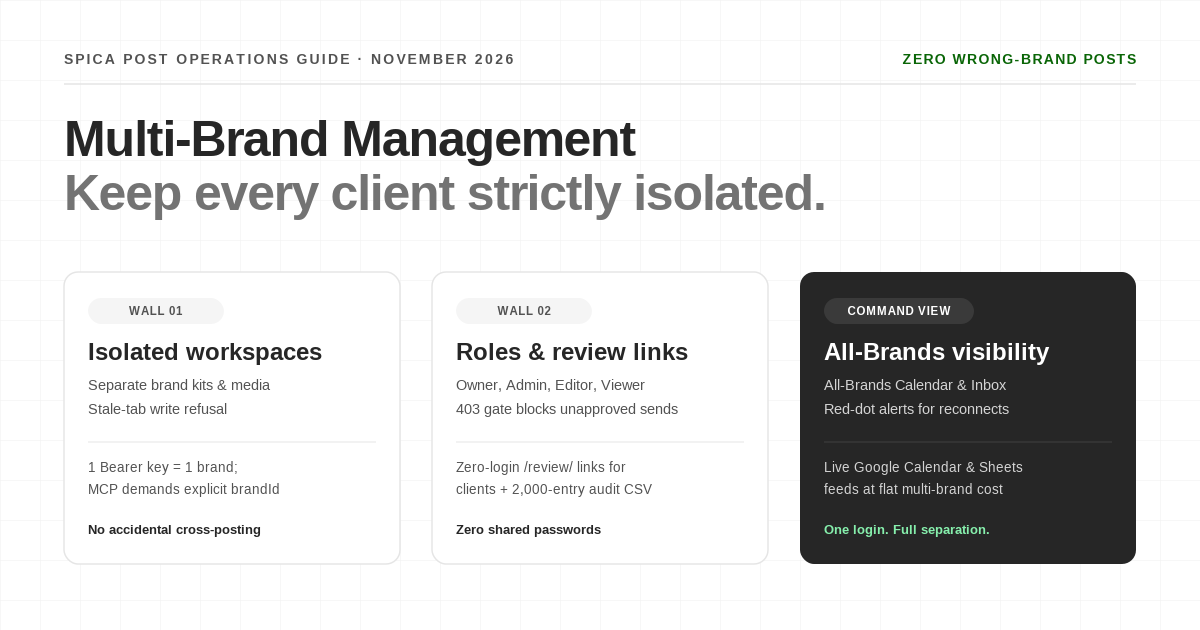
To manage multiple social media accounts and client brands in 2026 without posting to the wrong profile or leaking client assets, stop relying on shared native app logins and “being careful”: move each brand into a server-isolated workspace with its own brand kit, photo library and OAuth connections, enforce role-based approval gates (403 approval_required for editors), lock every REST key to one brand and every MCP call to an explicit brandId, collect external sign-off via zero-login client review links, and monitor everything from one All-Brands Calendar and All-Brands Inbox.
Managing one business across three networks is a writing problem. Managing five to twenty brands across thirty to one hundred fifty accounts is an operational risk problem. Every agency owner, franchise marketer or multi-store operator knows the cold sweat of opening X or LinkedIn and realizing a roofing promo just went live on a bakery’s account, or that a former contractor still has a client’s Instagram password on their personal phone.
Human checklists catch nine mistakes out of ten. The tenth mistake happens at 4:55 PM on a Friday when three browser tabs are open, an editor rushes a holiday edit, or an AI assistant guesses the wrong workspace. Real multi-brand safety comes from structural guardrails that make cross-brand mistakes impossible even when your team is moving fast.
Snapshot verified November 2026. Competitor billing figures reflect published USD pricing as of November 23, 2026. Check Spica Post’s pricing page for current Starter, Studio, Pro and Agency brand, account and seat allowances.
Why “just be careful” fails past 5 connected accounts
Three accounts live easily in your head. Once you cross 10 accounts across 2 or more brands, five predictable failure modes show up in almost every team.
1. Flat account dropdowns invite click errors
Many older schedulers dump all connected social profiles into one flat sidebar checklist. When you have four LinkedIn profiles, six X accounts and five Bluesky handles sitting side by side, selecting one wrong checkbox takes half a second and blasts Client A’s campaign to Client B’s audience.
2. Stale browser tabs overwrite the wrong workspace
Suppose you open Brand A in Tab 1, switch to Brand B in Tab 2 to answer a client question, then return to Tab 1 and click Schedule. Without server-checked brand context, Tab 1 silently writes Brand A’s draft into Brand B’s session cookie.
3. Shared native logins create offboarding nightmares
Sharing a spreadsheet of passwords or passing SMS two-factor codes over Slack breaks the moment a freelancer leaves or a client changes an account password. Worse, when something goes wrong, native apps leave zero audit trail showing which team member published or deleted a post.
4. Unscoped AI assistants and scripts hallucinate across clients
In 2026, agencies increasingly connect Claude, ChatGPT, Cursor or automated scripts to their social tools. If an API key can see every client account in one flat list, or if an MCP server silently defaults to “whichever brand was opened last,” one vague prompt (“schedule Friday’s post”) can cross client boundaries instantly.
5. Per-channel and per-workspace billing punishes growth
Every time you land a new client with 4 or 5 social accounts, per-channel schedulers raise your invoice immediately, and per-workspace tools charge an entire second subscription per brand. Teams respond by cramming multiple brands into one shared workspace to save money, which destroys brand isolation completely.
Never cram two separate brands into one shared workspace to save on software seats. Fix the billing unit instead, so every single brand gets its own hard wall from day one.
Five structural safeguards that prevent brand mix-ups
Safe multi-brand operations rely on five concrete mechanisms enforced by the software itself, not sticky notes on a monitor.
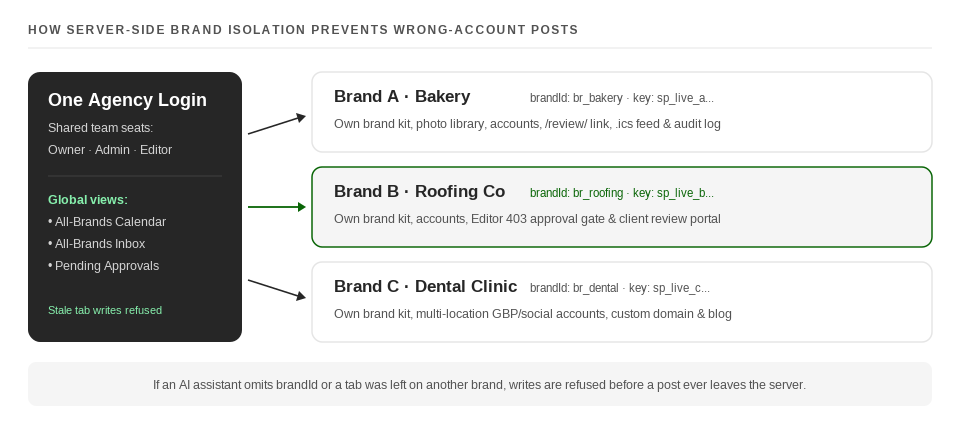
1. Separate workspaces under one login (plus stale-tab refusal)
Every brand should be its own isolated workspace holding its own brand kit (colors, fonts, logo, voice, hours, offers), its own photo library, its own connected social accounts, its own link pages and its own audit log, switched cleanly from one top switcher without signing out and back in.
On Spica Post, every browser tab displays <Brand> · <Page> in the tab title, remembers your last active brand, shows a red attention dot beside any brand with a failed post or disconnected account, and refuses writes from a stale tab left open on another brand until you reload. You can even move a connected account from one brand to another on the account page without reconnecting OAuth (cancelling its queued jobs cleanly and sealing credentials server-side).
2. Role-based seats and server-enforced approval queues
Separate who writes from who approves:
- Owner & Admin: Full brand control, account connections, team invitations, and final publish/approve authority.
- Editor: Drafts posts, uploads photos, renders templates and writes blog articles, but is blocked at the server (
403 approval_required) from publishing or scheduling directly across Web, REST and MCP. Every draft routes cleanly to the internal approval queue (approvals_submit). - Viewer: Read-only visibility for executives, analysts or stakeholders.
Turning on the workspace requireApproval toggle extends that same approval queue to every contributor when strict review policies apply. Invitations go out as role-bound 7-day /invite/<token> links with zero shared passwords, and removing a teammate revokes web and MCP access immediately.
3. Single-brand API keys and explicit brandId MCP walls
When code or AI assistants touch multiple brands, credentials must respect the exact same walls as humans:
- REST
/v1API: Everysp_live_Bearer key is locked to one specific brand at creation time. A Zapier webhook or CMS publish hook for Brand A can never inspect or publish to Brand B. - Remote MCP server: One OAuth sign-in lets Claude, ChatGPT, Cursor or Codex operate across your shared brands, showing your exact role per brand in
brands_list, while requiring an explicitbrandIdon every single tool call whenever a login holds multiple brands. OmitbrandIdand the server refuses the call outright instead of guessing.
4. Global visibility without losing isolation (All-Brands Calendar & Inbox)
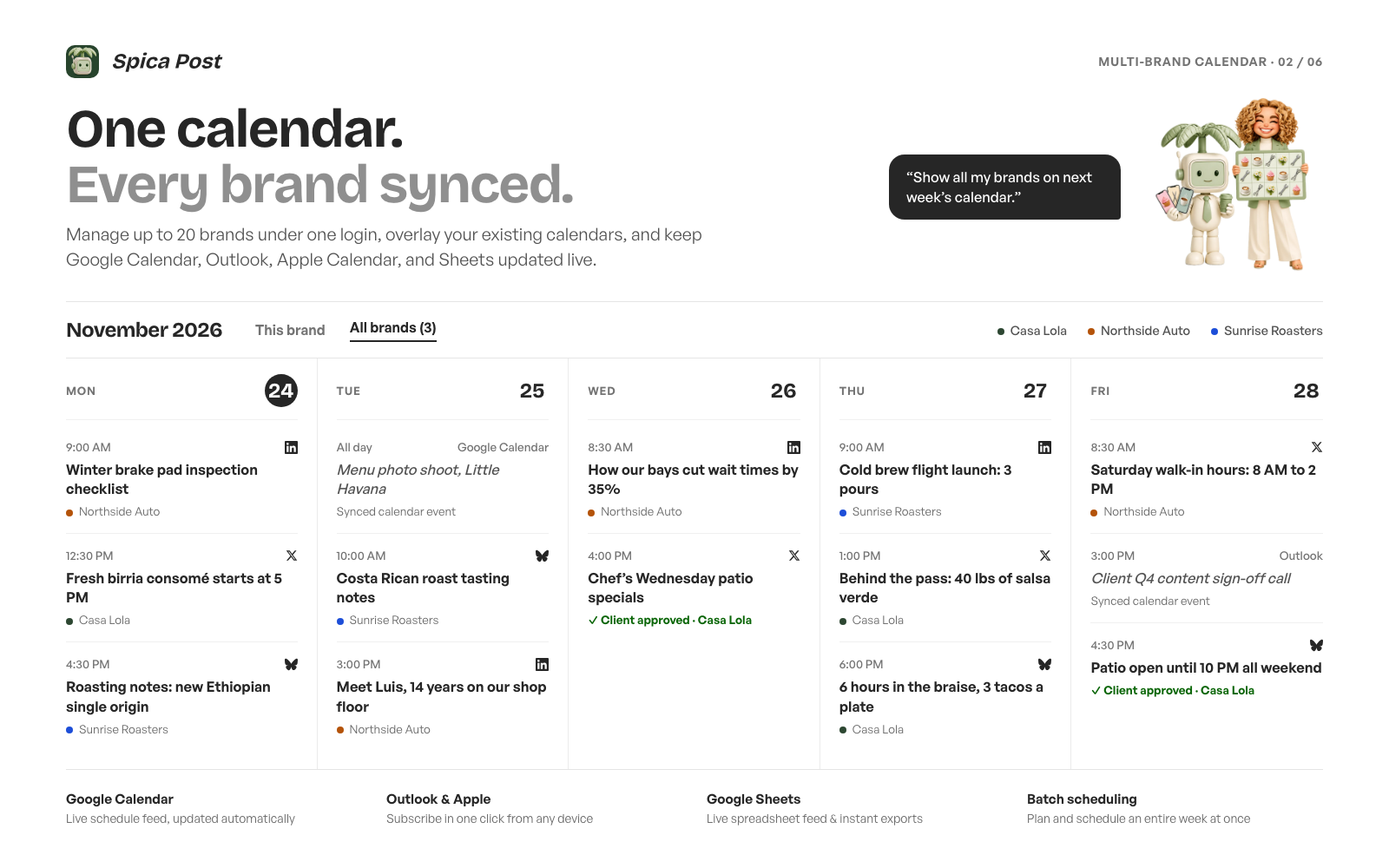
Strict workspace isolation does not have to mean clicking through fifteen tabs every morning just to see what is going live today. Pair isolated write boundaries with unified read views:
- All-Brands Calendar: Toggle between This brand and All brands to inspect every upcoming post across every client on one screen, filter by brand, spot scheduling gaps, and click straight into a brand workspace when you need to edit.
- All-Brands Unified Inbox & Approvals: Review open comments, Google Business Profile reviews (as platform approvals clear; Bluesky live today) and pending editor approvals across all brands in one triage list (
brands_inbox_list,brands_approvals_list). - Live calendar subscriptions: Subscribe each brand (or specific location) to rotatable
.icsfeeds for Google Calendar, Outlook and Apple Calendar, or live Google Sheets.csvfeeds (=IMPORTDATA) so account managers never manually copy schedules into spreadsheets.
5. Zero-login client review portals and searchable audit logs
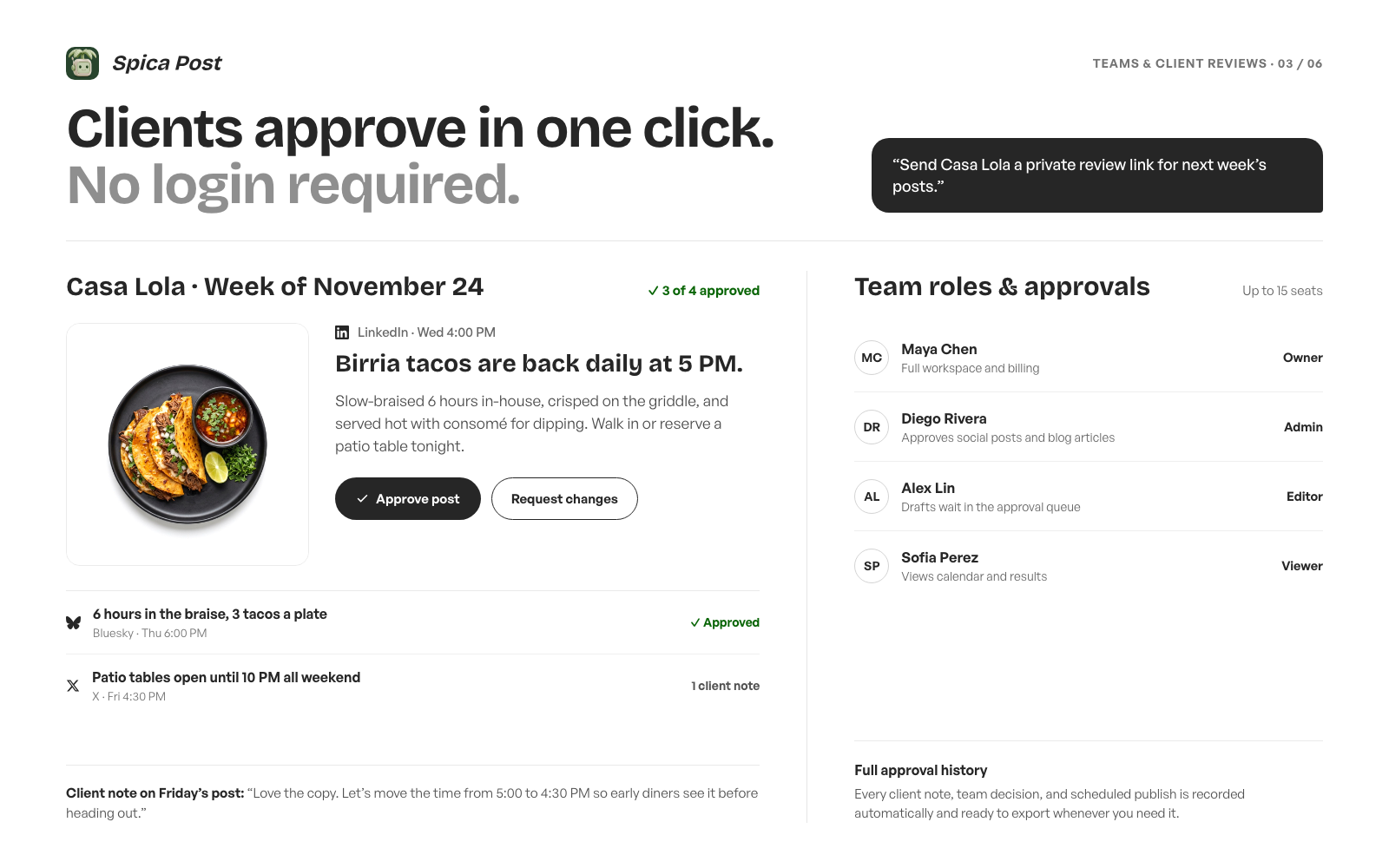
Forcing busy small-business clients to remember yet another SaaS username and password guarantees slow approvals and endless email chains. Generate a shareable zero-login client review link (/review/<token>, optionally scoped to one location and an expiry date) so clients preview upcoming posts in a clean calendar and click Approve or Request changes with written notes. Their decision appears immediately on your calendar and fires a signed review.submitted webhook into Slack or your project board.
Behind the scenes, keep a searchable workspace audit log (up to 2,000 entries per brand with one-click formula-safe CSV export) attributing every web, REST and MCP action to the real user who made it.
Before onboarding a new client brand, test two negative cases on purpose: try publishing as an Editor (confirm the server blocks it with 403 approval_required) and try opening two brands in adjacent tabs (confirm a stale tab cannot write into the wrong brand).
Multi-brand pricing math: how billing units diverge at 5 and 20 brands
Software costs scale wildly depending on whether a vendor bills per channel, per workspace, per user seat, or on a flat multi-brand tier. Comparing published November 2026 USD rates across two realistic agency sizes shows why billing units matter as much as features:
| Billing model & example tool | Pricing unit (Nov 2026) | 5 brands / 15–30 accounts (3 teammates, approvals) | 15–20 brands / 60–150 accounts (scaling agency) | Operational watch-out |
|---|---|---|---|---|
| Flat multi-brand studio (Spica Post) | Flat plan bundling brands, accounts & seats | Studio flat monthly rate (check pricing for current brand/account caps) | Pro flat monthly rate (check pricing for current caps) | Live today on X, Bluesky, Mastodon & LinkedIn; 7 visual/local networks unlocking via review |
| Per-channel (Buffer Team) | Stepped $12/ch (1–10), $4 (11–25), $3 (26–50), $2 (51+) | $140/mo (15 ch) to $195/mo (30 ch) monthly | $455/mo at 150 ch monthly ($379.17/mo yr) | Start Page retiring Feb 2027; no zero-login client portal or CSV audit log |
| Per-workspace (Planable Pro) | $59/mo per workspace ($49/mo yearly; 10 pages, 150 posts/mo) | 5 Pro workspaces = $295/mo monthly ($245/mo yr) | 20 Pro workspaces = $1,180/mo monthly ($980/mo yr) | Visual mockups are top-notch, but monthly post caps apply per workspace |
| Per-seat enterprise (Hootsuite) | Per user seat starting $99+/seat/mo | $297+/mo for 3 seats before Enterprise add-ons | Custom Enterprise pricing | Best only when full social listening & large customer-care desk justify seat spend |
| Per-account (Publer Business) | $10/account/mo ($8 yr) + extra user fees | ~$120–$140+/mo for 15 accounts + seats | $210–$270+/mo at 30 accounts + seats | API, MCP, analytics & approvals require Business on every account |
Check each vendor’s live pricing page before purchasing, and compare exact side-by-side numbers on our Spica Post vs Planable and Spica Post vs Buffer breakdowns.
Connecting multiple accounts per network cleanly (OAuth tip)
One practical detail trips up every team connecting Client A’s and Client B’s accounts on the same afternoon: browser session cookies on social platforms.
- Networks with built-in account pickers: Google Business Profile, YouTube, Instagram and TikTok prompt you to choose which account or page to link during every OAuth sign-in.
- Networks that bind silently to your current browser login: X, LinkedIn, Facebook, Threads and Pinterest frequently authorize whichever account is currently logged into that browser session. Always sign out of the social network (or open a clean private/incognito browser profile) between connecting Brand A and Brand B so you never accidentally attach Brand A’s X handle inside Brand B’s workspace.
- Bluesky and Mastodon: Use a dedicated Bluesky App Password per brand and connect each public Mastodon instance URL individually via OAuth 2.0 dynamic registration, naming each handle clearly.
A calm 20-minute daily operating routine for multi-brand teams
With clean isolation and global views in place, managing 5 to 20 brands does not require tab-hopping chaos:
- Minutes 1 to 5 (Health scan): Open the top brand switcher and glance for red attention dots (any disconnected OAuth token or failed job in the last 7 days). Reconnect or trigger an idempotent retry before morning posts fire.
- Minutes 5 to 10 (Approvals & client feedback): Open pending approvals (
brands_approvals_listor/team) and check new client review link responses (/review/<token>). Approve clean posts and return change-requested drafts to editors with clear notes. - Minutes 10 to 15 (Unified Inbox sweep): Open the All-Brands Inbox to answer open customer comments and reviews using saved brand-voice replies with
{name}personalization. - Minutes 15 to 20 (All-Brands Calendar spot check): Switch
/calendarto All brands and verify tomorrow’s slots across every client so no brand has an accidental holiday gap or overlapping promo.
Run daily triage from global All-Brands views, then step inside one isolated brand workspace whenever you draft, upload photos or configure rules. Read globally; write locally.
Honest trade-offs to weigh on Spica Post for multi-brand teams
Before migrating an entire agency roster onto Spica Post, check four current boundaries honestly:
- Live networks today vs. in review: X, Bluesky, Mastodon (any public server via OAuth dynamic registration) and LinkedIn (personal destination) require no waiting on central platform approval. Instagram, Facebook Pages, Threads, Google Business Profile, YouTube, TikTok and Pinterest adapters are built in the product and unlock as each network’s official app review completes. If an agency client needs live Instagram Reels, TikTok or LinkedIn Company Pages published this week, pair Spica Post with an approved publisher until reviews clear.
- Brand lifecycle limits: Brands share your login’s total plan allowances cleanly, and you can move connected accounts between brands without reconnecting, but transferring ownership of a brand to a completely different billing login is not yet built.
- Enterprise SSO and pixel feed mockups: SAML/SSO and custom per-network permission matrices are not built yet, and if your agency’s main selling point is pixel-exact Instagram grid mockups with inline threaded sticky notes, Planable still leads on visual mockup presentation.
- Where Spica Post wins right now: Flat multi-brand pricing, strict brand walls across Web + REST (
161routes) + MCP (170tools with explicitbrandId), enforced403 approval_requiredqueues, zero-login client review links, 2,000-entry audit CSVs, live.ics/ Google Sheets feeds, branded link pages, tracked/l/<code>short links, hosted bilingual blogs and full English + Spanish (usted) support.
5-step multi-brand safety audit for your current setup
Run this quick audit across your existing accounts this week:
- Eliminate every shared password. Replace shared native logins with OAuth connections inside role-gated workspaces and revoke access for any inactive contractors.
- Verify hard workspace walls. Confirm each client has its own photo library, brand colors, link page and account list rather than sharing one flat dropdown.
- Enforce an approval gate for editors and AI agents. Make sure neither junior teammates nor connected AI assistants can publish directly without an Admin or Owner sign-off (or explicit confirmation).
- Set up zero-login client review links and live calendar feeds. Replace emailed PDFs and manual spreadsheets with a live
/review/<token>link and a read-only.icsor Google Sheets feed. - Turn on failure and reconnect alerts. Subscribe to
post.failed,account.needs_reconnectandreview.submittedwebhooks (or email alerts that name the exact brand) so you catch expired OAuth tokens before a client ever notices.
Questions people ask
- What is the biggest cause of posting to the wrong brand account?
- Shared native logins, stale browser tabs left open on an earlier brand, and flat account lists that put every client's profiles into one composer dropdown. Real safety requires server-side brand isolation, stale-tab write refusal, role-based approval queues and scoped credentials.
- How should agencies give teammates and contractors access without sharing social passwords?
- Connect each client's social accounts once via OAuth inside a brand-isolated workspace, then invite teammates by email with role-bound links (Admin, Editor or Viewer). Editors can draft and submit for approval without ever seeing OAuth tokens or publishing directly, and removing a teammate revokes access instantly across web and MCP.
- How do you stop an AI assistant from mixing up two client brands?
- Never rely on prompt instructions alone. Use an MCP server that enforces explicit brand separation at the tool layer: Spica Post requires an explicit brandId parameter on every multi-brand MCP call (refusing calls that omit it), and every REST /v1 API key is locked to one single brand.
- How can clients approve scheduled posts without creating another software login?
- Use shareable zero-login client review links (/review/<token>). Clients open a clean calendar scoped to their brand or location, preview upcoming posts with images and copy, and click Approve or Request changes with notes that flow straight back to your team and webhooks.
- Why do per-channel and per-workspace schedulers get expensive fast for multi-brand teams?
- Per-channel tools like Buffer Team multiply every connected profile ($140/mo for 15 channels, $195/mo for 30 channels monthly), while per-workspace tools like Planable Pro multiply every client brand ($295/mo monthly for 5 workspaces). Flat multi-brand plans bundle multiple brands, dozens of accounts and seats under one predictable subscription.
Sources
- Spica Post multi-brand isolation, team seats, approvals and client review architecture
- Spica Post live pricing, brand and account plans
- Spica Post REST API and brand-scoped key documentation
- Buffer stepped per-channel pricing for teams (verified Nov 23, 2026)
- Planable per-workspace agency pricing (verified Nov 23, 2026)
- Hootsuite per-seat plans and agency tiers (verified Nov 23, 2026)