Schedulers
How to Choose a Social Media Scheduler: 10 Questions to Ask
Avoid per-channel pricing traps and half-working integrations. Use these 10 plain questions to pick a scheduler that fits your real week.
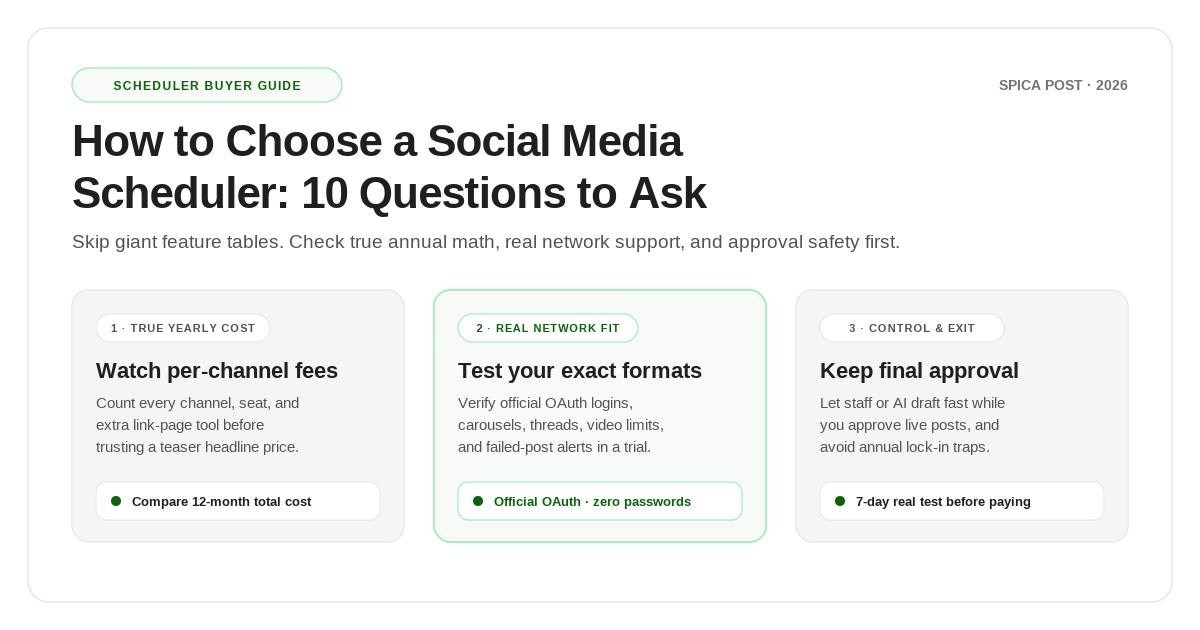
Choosing a social media scheduler gets much easier once you stop reading 80-row feature comparison grids and ask ten plain questions about price, real network publishing, approval safety, and weekly speed. Most small business owners and creators end up switching tools inside six months for the exact same three reasons: per-channel pricing quietly tripled their bill, a key network only offered clunky phone reminders instead of direct publishing, or the composer took more clicks than posting natively.
Snapshot verified November 2026. Pricing models and official API publishing rules evolve steadily across social networks, so verify every vendor’s live checkout total and supported post formats during a short trial before committing to an annual contract.
This guide gives you the exact 10 questions to run through before entering a credit card, a visual scorecard to compare contenders fairly, a decision matrix by business type, a 7-day trial checklist, and an honest audit of where Spica Post fits and where another tool fits better today.
Why most small businesses pick the wrong scheduler on day one
Comparison websites usually rank schedulers by how many checkboxes they fill: AI caption generators, hashtag clouds, 45-page PDF exports, social listening streams, and “best time to post” heatmaps. Almost none of those extras save a busy owner time on a Sunday evening.
In real life, a small business or creator repeats three actions every single week: upload two or three photos or a short clip from a phone, adapt the caption cleanly so it fits each platform’s character and image limits, and schedule those posts knowing they will actually publish without breaking. Any tool that makes those three routine jobs slow, expensive, or unreliable fails regardless of how many analytics widgets sit in the sidebar.
The 10 questions to ask before paying for a scheduler
Group your evaluation into four clear blocks: true yearly cost, real network and format support, daily workflow and approval control, and reliability when something breaks.
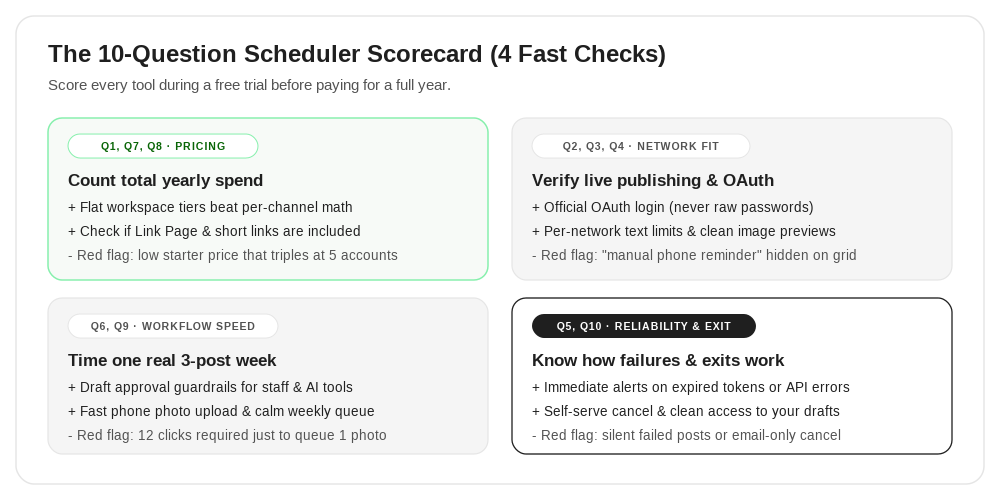
Questions on pricing and bundled tools (Q1, Q7, Q8)
1. Does the price multiply per social channel or per team seat?
This is the single biggest surprise in social media software. Many well-known schedulers (such as Buffer’s per-channel model) advertise an attractive starting monthly figure for one connected social channel. Connect Instagram, Facebook, Google Business Profile, LinkedIn, and Bluesky, and that headline price multiplies by five overnight. Add a second brand or a co-owner seat, and the bill jumps again.
Before judging any price page, calculate your exact 12-month cost for every profile you run today plus two profiles you might add next year. You can test that math side by side in thirty seconds with our free scheduler savings calculator.
7. Does it replace extra subscriptions you already pay for?
A scheduler that costs a little more up front can still save real money if it cleanly replaces separate tools you pay for every month: a bio Link Page, click-tracked short links, a basic reply inbox, or a shared media library. Conversely, a “cheap” scheduler that still forces you to pay separately for a link-in-bio page, a URL shortener, and extra team seats often ends up costing more overall.
8. Are you paying for enterprise features you will never open?
Enterprise social suites are built for 20-person marketing departments monitoring brand sentiment across 50 regions, routing support tickets across shifts, and exporting executive decks every Monday. If you are a solo owner, creator, or small team posting three to five times a week, paying high monthly per-seat prices for enterprise listening tools is pure waste. Look for calm, focused tools built around publishing, clean links, and simple results.
Questions on real network fit and security (Q2, Q3, Q4)
2. Which exact networks and formats actually publish live today?
Every platform’s official API enforces different rules (for example, Meta’s Instagram Content Publishing API requires an Instagram Professional account linked to a Facebook Page and imposes specific media format limits). Some schedulers advertise a network logo on their homepage even when certain post types (carousels, Reels cover frames, chained threads, Stories, or Google Business Profile updates) actually fall back to manual mobile push reminders instead of auto-publishing.
Write down your top three real formats (for instance: 4-photo carousels, 30-second vertical videos, and text threads with links) and confirm during a trial that the scheduler publishes all three directly without manual workaround steps.
3. Does it connect via official OAuth rather than asking for your password?
Never type your raw Instagram, Facebook, LinkedIn, or Google password into a third-party social tool. Reputable tools use official OAuth 2.0 connections (defined in RFC 6749), sending you to the network’s own sign-in screen to grant scoped publishing permissions that you can revoke with one click later. Unofficial “browser automation” or password-scraping tools risk sudden account locks and security breaches.
4. Can you tailor one draft to each network without rewriting from scratch?
Blasting the exact same 900-character Instagram caption (complete with @instagram_handles and “link in bio!”) straight onto X, Bluesky, LinkedIn, and Google Business Profile looks lazy and frequently fails character-limit validation. A strong scheduler lets you write one core draft, preview exact character counts and image crops per network, and tweak the hook or link for each destination cleanly in one screen. (See our 2026 character limits guide for exact cutoffs across every major network.)
Questions on workflow speed and approval control (Q6, Q9)
6. Can a teammate, contractor, or AI assistant draft without publishing behind your back?
Even if you work solo today, you may eventually hand drafting to a front-desk manager, a freelance assistant, or an AI workflow via MCP or API. Check whether the scheduler supports a clean Draft -> Review -> Approved boundary so helpers can prepare next week’s posts while you keep final human sign-off before anything touches a live public account.
9. How fast does a real 3-post week feel from phone photos to queued?
Complexity kills consistency. During a trial, time yourself uploading three real photos from your camera roll, writing short captions, picking Tuesday/Thursday/Saturday slots, and confirming the calendar view. If simple scheduling requires twelve clicks, slow modal pop-ups, or constantly re-selecting time zones, you will stop opening the tool within a month.
Questions on reliability and clean exit (Q5, Q10)
5. What happens when a scheduled post fails or a network token expires?
Social network tokens expire periodically (especially on Meta and LinkedIn when passwords change or security prompts trigger), and APIs occasionally reject a video codec or oversized image. The worst schedulers fail silently, leaving your Friday promotion unpublished until you notice on Sunday night. Verify that your tool sends a clear, immediate email or dashboard alert telling you which post failed, why the network rejected it, and how to retry in one click.
10. What happens to your drafts, links, and brand assets if you leave?
Avoid platforms that trap you with aggressive annual-only billing, opaque cancellation forms requiring a sales phone call, or short links that break permanently the day you downgrade. Favor transparent monthly billing (or fair annual discounts after a real trial), self-serve cancellation inside account settings, and clean ownership of your copy and custom-domain links.
Quick decision matrix by business type
The “best” scheduler depends entirely on who is running the keyboard and how many brands or clients sit under one roof.
| Operator type | What matters most | What you can safely skip | Clean starting point |
|---|---|---|---|
| Solo local business (1 location) | Simple mobile upload, Google Business Profile + Instagram/Facebook clarity, zero per-channel surprise bills | Multi-step agency approval trees, social listening, 40-page client PDFs | Native Meta + Google tools if posting twice a week, or one flat-rate scheduler once running 3+ channels |
| Creator who sells | Fast crossposting, threads, built-in Link Page, real link click tracking, zero seat bloat | Enterprise CRM integrations, shift-based support routing | A scheduler combining direct publishing, threads, and a fast branded Link Page |
| Small team (2 to 5 people) | Draft approval safety, shared brand voice, predictable flat seat cost | Per-user enterprise pricing tiers | Flat workspace scheduler with clear draft vs. publish permissions |
| Multi-brand or agency operator | Hard workspace isolation per client, zero wrong-account posts, flat brand pricing, API/MCP automation | Single-profile creator tools that mix brands in one queue | Workspace-isolated platform (see our multi-account guide) |
For a deeper side-by-side breakdown of specific vendors, browse our full automation tools guide or our direct scheduler comparison hub.
Run a 7-day real trial before paying annually
Do not judge a scheduler from a 90-second demo video. Before switching to annual billing on any platform, run this five-step live check over one normal week:
- Connect at least two live accounts via official OAuth and check how clear the permission screen feels.
- Schedule one real photo post and one short video (using actual files from your phone, not tiny stock test PNGs) and confirm they land cleanly on the live feeds at the exact scheduled minute.
- Test per-network edits on one shared post: Trim the Bluesky or X version under 300/280 characters while keeping the LinkedIn or Facebook version longer, and verify links and previews render cleanly.
- Trigger a small deliberate error or inspect failure settings: Try uploading an unsupported file or oversized caption to see whether the tool warns you upfront clearly or fails vaguely later.
- Audit the exit and renewal screen: Confirm you can view invoices, change plans, or cancel inside Settings without emailing support, and verify the true 12-month price with all accounts connected.
Honest Spica Post trade-offs against these 10 questions
Applying this exact 10-question scorecard honestly to Spica Post as of November 2026 shows clearly where it excels and where you should wait or combine it with native tools today:
- Where Spica Post scores strongly today: Flat workspace pricing (no per-channel or surprise per-seat multiplication, detailed on our pricing page), official OAuth connections with strict workspace isolation, AI assistant drafting via MCP and REST API where humans keep clear approval control, built-in branded Link Page + customer blog (including custom domain support), click-tracked
/l/short links, chained threads (up to 24 follow-ups), Unified Inbox + analytics for Bluesky, and live direct publishing plus Auto-crosspost across X, LinkedIn personal profiles, Bluesky, and Mastodon. - Where Spica Post has honest limits right now (Nov 2026): Direct publishing connectors for Google Business Profile (API approved and enabled in production, awaiting first live service-area profile verification), Instagram, Facebook Pages, Threads, TikTok, Pinterest, and YouTube are built and completing platform review or compliance audit. Also, Spica Post intentionally never reads paid X API analytics (using
/l/link click tracking instead so customer bills stay flat). If direct automated publishing to Instagram, Facebook, and TikTok is your non-negotiable day-one requirement today, check live connector availability first or pair Spica Post with native Meta Business Suite until Meta and video platform reviews finish opening across all workspaces.
Take ten minutes today to run your actual channel count through the savings calculator, write down your three non-negotiable formats, and test your top two choices on one real week of posts before pulling out a credit card.
Questions people ask
- What is the biggest hidden trap when comparing social media schedulers?
- Per-channel and per-seat pricing multipliers. A tool advertised at a low starter price per channel quickly multiplies once you connect four or five networks, add a second location, or invite a teammate. Always calculate your real 12-month cost with every account and seat included.
- Should a small business ever give its social media password to a scheduler?
- No. Every trustworthy social media scheduler connects through official OAuth authorization with each network so you can inspect permissions and revoke access at any time without sharing or changing your password.
- What is the difference between direct publishing and reminder notifications in a scheduler?
- Direct publishing pushes your post live automatically through the network's official API at the scheduled time. Reminder notifications merely ping your phone so you have to open the native app and finish posting manually. Check which networks actually publish directly before paying.
- Do small businesses really need enterprise listening or deep analytics in a scheduler?
- Usually no. Most small businesses and creators check three numbers once a month: link clicks, real replies or calls, and which post formats performed best. Paying for enterprise competitor tracking or giant PDF reports you never read adds monthly cost without bringing customers.
- How should I test a social media scheduler before paying for an annual plan?
- Run a 7-day live trial using your actual routine: connect at least two real accounts, upload one phone photo and one short video, adapt one caption to each platform's character limit, check how failed posts or expired tokens alert you, and confirm self-serve cancellation works.