Automation
10 Best Social Media Automation Tools for 2026
Compare 10 social media automation tools by real workflow: MCP AI assistants, native crossposting, central schedulers, source automation and true account cost.
The right social media automation tool in 2026 depends on where your posts actually start: Spica Post for AI-assistant MCP publishing combined with native auto-crosspost and multi-brand governance, MicroPoster for solo native crossposting across text networks including Mastodon, Buffer for simple per-channel scheduling with a permanent free tier, Nuelink for turning blogs, stores and podcasts into social queues, Post Bridge for lean high-account API publishing, SocialBee for evergreen category recycling, Metricool for analytics-led reporting, Later for visual Instagram and TikTok grids, Planable for client sign-off workspaces, and Hootsuite for enterprise publishing, inbox and listening.
You write one sharp update while an idea is fresh, or your shop has a weekend special ready to announce. Then the real drag begins: adapting the length for X, reformatting for LinkedIn, resizing media, checking every brand account so nothing goes to the wrong client, and logging into four apps just to repeat yourself. That gap between writing once and showing up consistently is what social media automation is supposed to close.
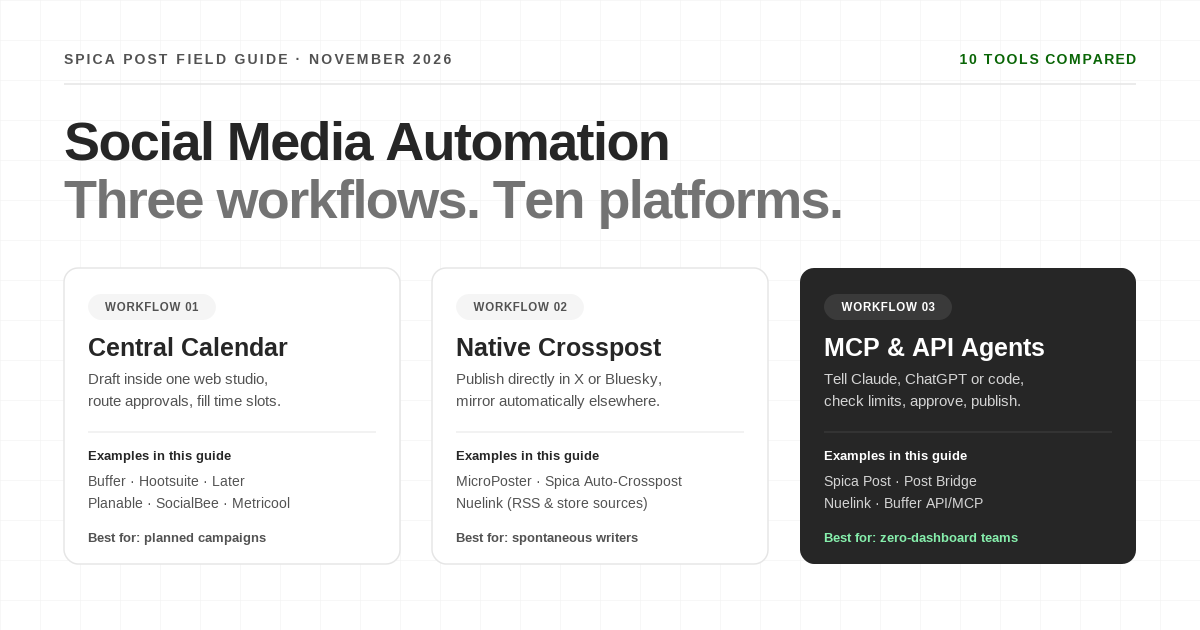
In practice, tools in this category solve three very different jobs. Choosing the wrong workflow is the single fastest way to pay for a subscription your team stops opening after week two. The ten platforms below are ordered for workflow navigation, not as a single best-to-worst ranking.
Snapshot verified November 2026. Competitor prices are in USD and reflect published billing terms at verification time; check each vendor’s pricing page before buying, and check Spica Post’s live pricing page for current Spica Post plan tiers and limits.
Choose the automation workflow before comparing features
Most buyers open a pricing page, count supported logos and pick the longest checklist. Six weeks later, drafts are still sitting in a notes app because the tool asked them to change how they work. Before comparing prices, decide which of the three publishing workflows matches how content is born in your business.
1. Central calendar scheduling
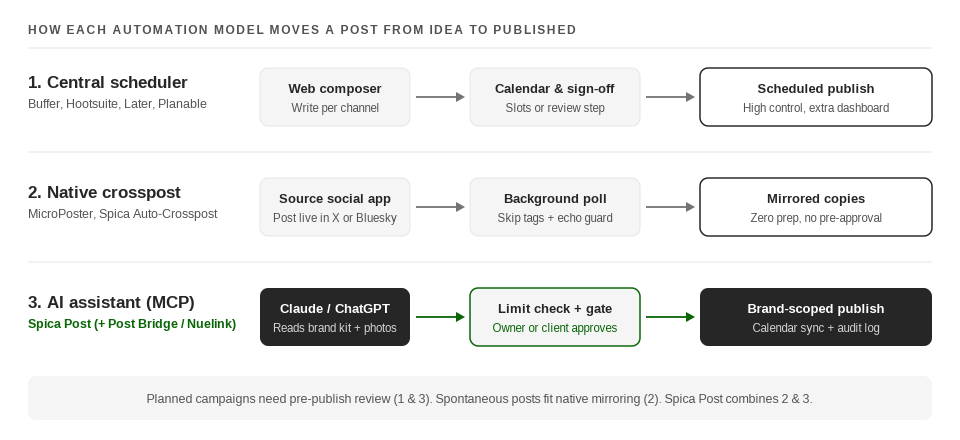
Everything begins inside the tool’s web composer. You draft a post, tailor captions and media per channel, assign it to a queue slot or fixed date, and optionally route it for internal or client sign-off. Buffer, Hootsuite, Later, Planable, SocialBee and Metricool all live primarily in this camp. It works best for planned launches, seasonal promotions, visual grids and regulated teams that need pre-publish oversight.
2. Native-first auto-crossposting and source triggers
Instead of dragging you into a new dashboard, the tool watches a source you already update. On a native crossposter like MicroPoster or Spica Post’s auto-crosspost engine, you publish normally inside X or Bluesky, and a background rule mirrors eligible updates to your other connected accounts with echo-loop guards and skip tags. On a source-driven tool like Nuelink, the trigger lives outside social altogether: a new blog RSS entry, Shopify product, YouTube upload or podcast episode automatically becomes a social post.
3. AI-assistant (MCP) and API-driven publishing
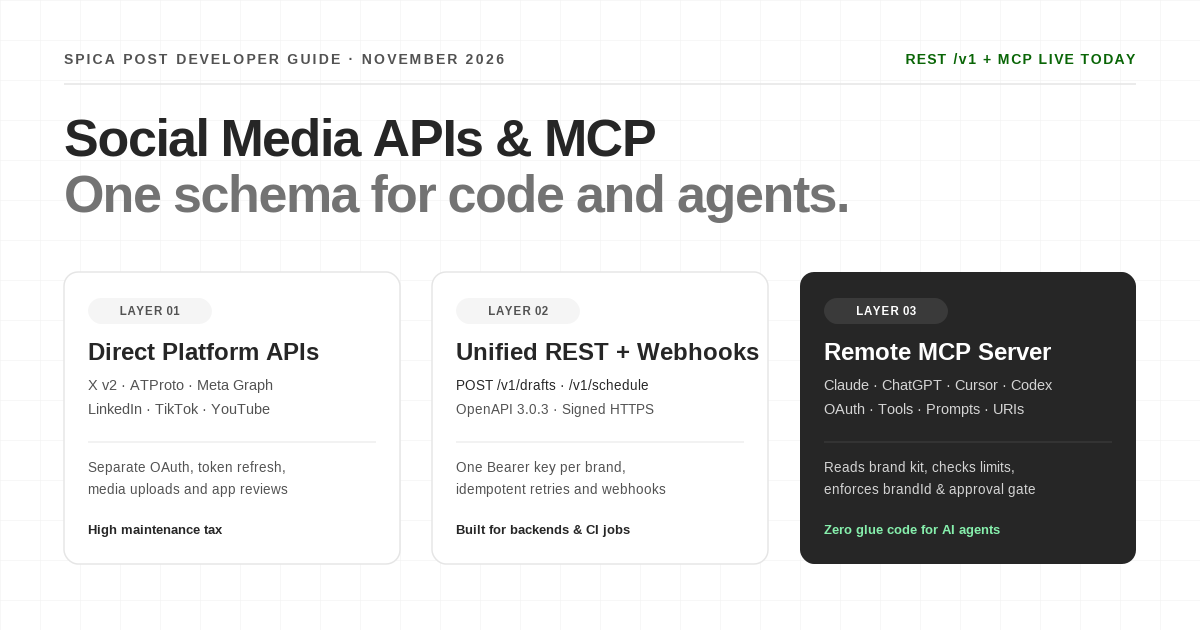
A newer third pattern removes the dashboard bottleneck without giving up review control. You connect the AI assistant you already pay for (Claude, ChatGPT, Gemini, Grok, Cursor or Codex) over the Model Context Protocol (MCP), or call a REST API from your own code. The assistant reads your saved brand kit and photos, drafts channel-specific versions checked against each network’s limits, holds them for your approval, and schedules them across isolated brands.
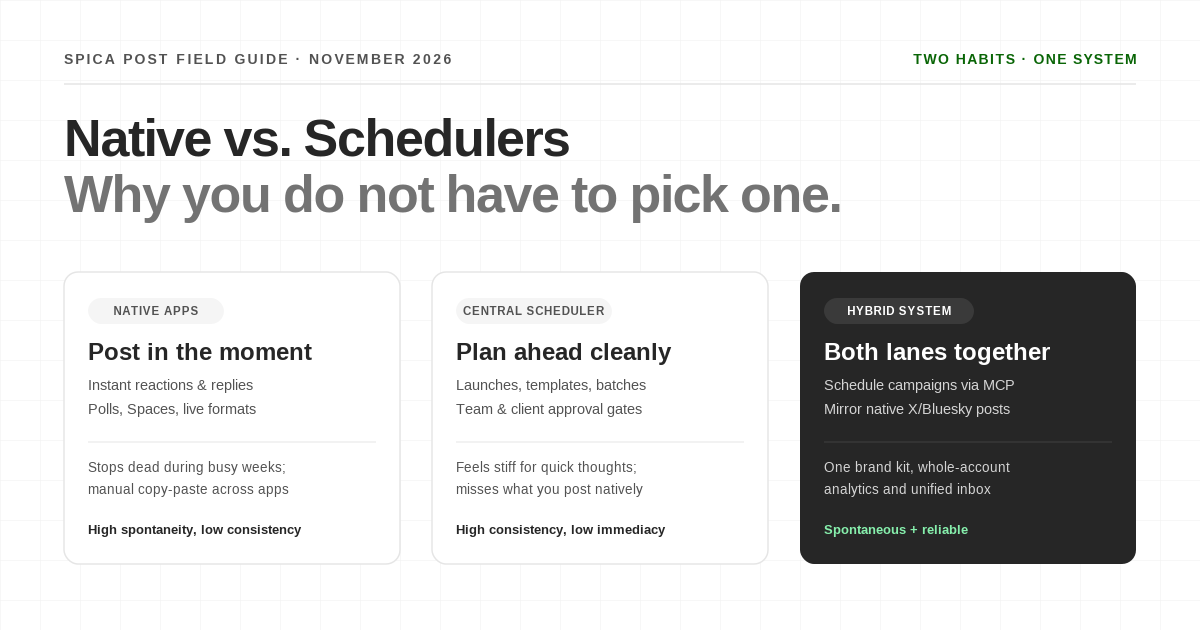
If a post needs client sign-off or brand-kit design before going live, use a central calendar or an MCP approval workflow. If a post is a spontaneous thought you already typed in X or Bluesky, use native auto-crossposting. Do not force both jobs through the wrong pipe.
1. Spica Post
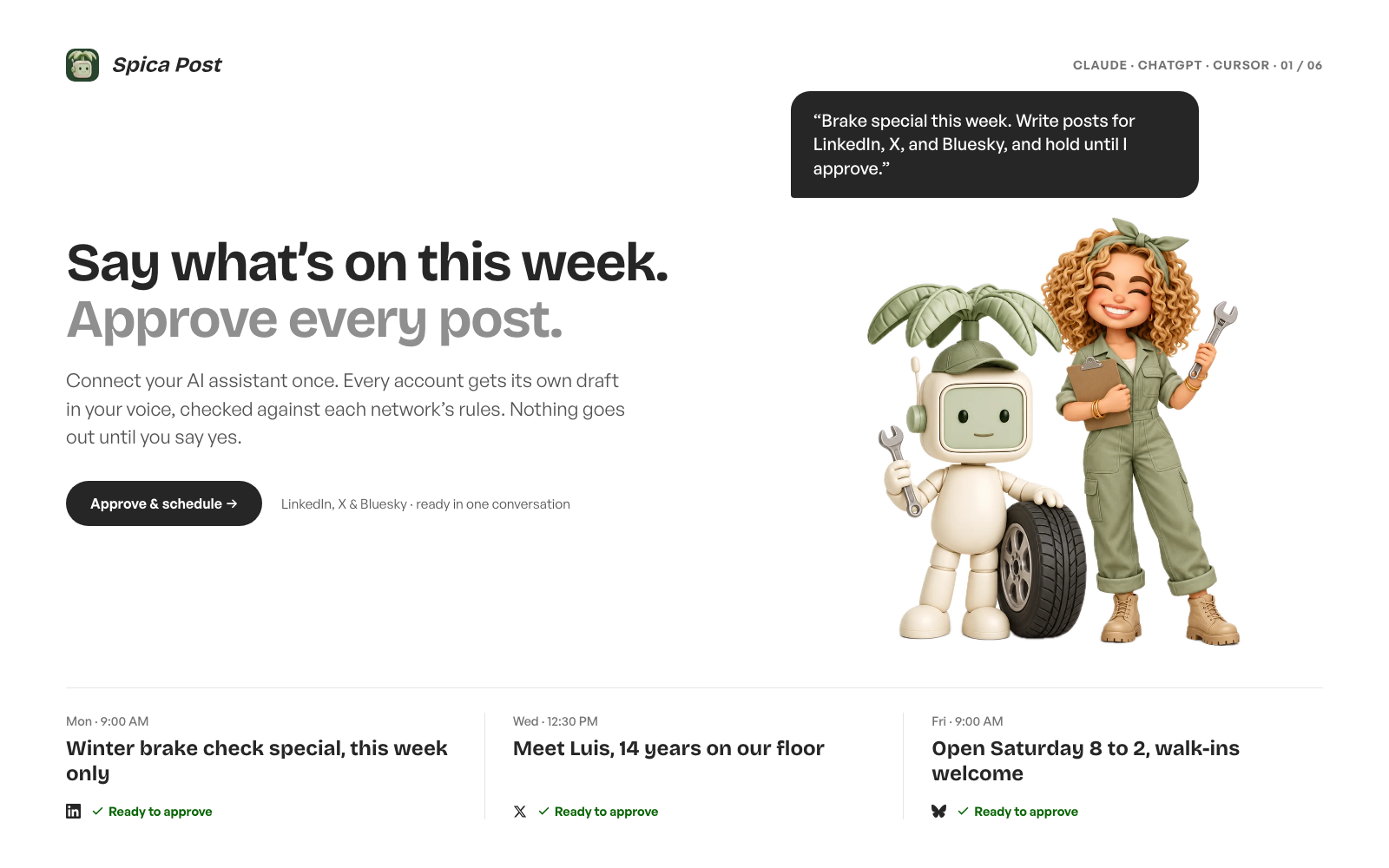
Spica Post is built around a rare combination: you get an MCP-first publishing studio driven from your own AI assistant, a live REST API with signed webhooks, and native auto-crossposting inside the same subscription, with flat multi-brand pricing instead of per-channel or per-seat fees.
Rather than bolting on a generic in-app chatbot and charging AI credit markups, Spica Post connects straight to Claude, ChatGPT, Gemini, Grok, Perplexity, Le Chat, Hermes, Cursor or Codex via one MCP link. Your assistant reads your saved brand kit (colors, fonts, logo, voice, offers, hours, photo library), writes network-specific drafts checked against each platform’s character and media limits, and stops at an approval gate so nothing publishes until an owner or admin says yes.
Where it fits best
Spica Post fits small businesses, creators, multi-location operators and agencies who want two habits under one roof: planned, approved campaigns drafted through their assistant or web studio, plus spontaneous updates mirrored automatically from native apps via Auto-crosspost.
- True brand isolation at flat cost: Manage multiple isolated brands and dozens of connected accounts under one login without per-channel price spikes (see pricing for current Studio, Pro and one-time Starter limits).
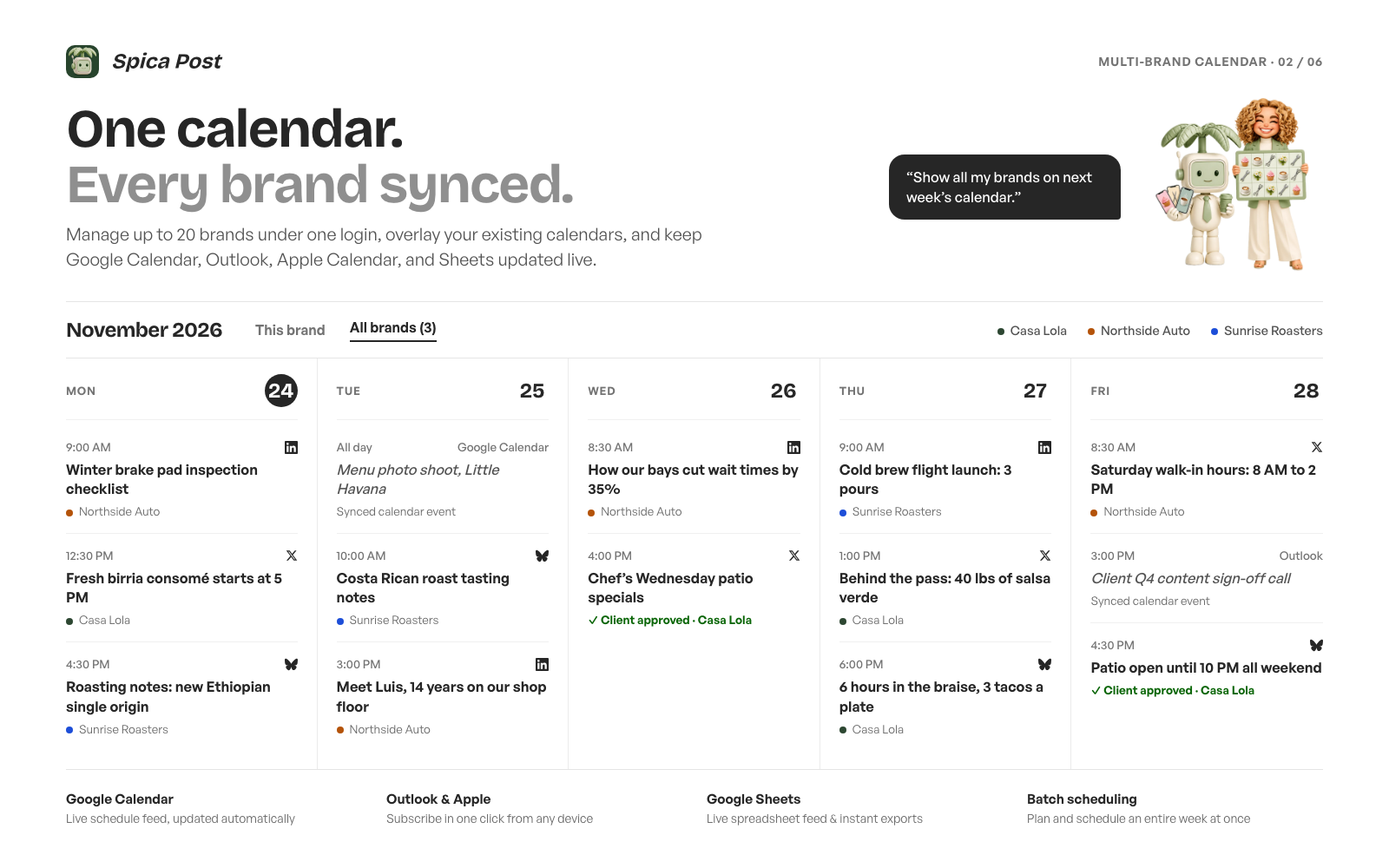
- Agency and team governance built in: Role-based seats (Owner, Admin, Editor, Viewer), an enforced internal approval queue for both social posts and hosted blog articles, a searchable 2,000-entry CSV audit log, an All-Brands Calendar, and zero-login client review links (
/review/<token>) so clients can approve or request changes without creating an account. - Calendar sync and growth stack included: Rotatable
.icsfeeds for Google Calendar, Outlook and Apple Calendar, live Google Sheets.csvfeeds (=IMPORTDATA), external.icscalendar overlays, branded link-in-bio pages, tracked short links with per-post click counts, Pro custom domains, a hosted bilingual blog, a live sponsor media kit, local keyword research, and full English plus Spanish (usted) support. - Live developer automation today: Over a hundred
/v1REST API routes with an OpenAPI 3.0.3 spec, brand-scoped keys, signed HTTPS webhooks and an extensive MCP toolset on every paid plan.
If your team manages more than five accounts across multiple brands, compare total monthly cost at 15 and 30 accounts, not the entry sticker price. Flat multi-brand plans often cut annual spend by more than half once approvals are required.
Real trade-offs
Honesty about platform review timelines matters when choosing a tool you need this week:
- Live network availability today: X, Bluesky, Mastodon (any public server via OAuth dynamic registration) and LinkedIn (personal destination) require no waiting on central platform approval. Instagram, Facebook Pages, Threads, Google Business Profile, YouTube, TikTok and Pinterest adapters are built in the product and unlock as each network’s official app review completes. If you need live Instagram Reels or TikTok publishing this afternoon, pair Spica Post with an already-approved publisher until reviews clear, or pick a mature central scheduler from this list.
- No X analytics reads or enterprise DM ticketing: Spica Post includes a Unified Inbox for comments and Google Business Profile reviews (Bluesky live today; Instagram, Facebook and Google Business Profile unlocking with platform approvals), whole-account analytics sync on supported networks, tracked short-link clicks, and Google Business Profile and Search Console stats. By policy it does not bill customers for X API read scraping, and it is not an enterprise social listening desk like Hootsuite.
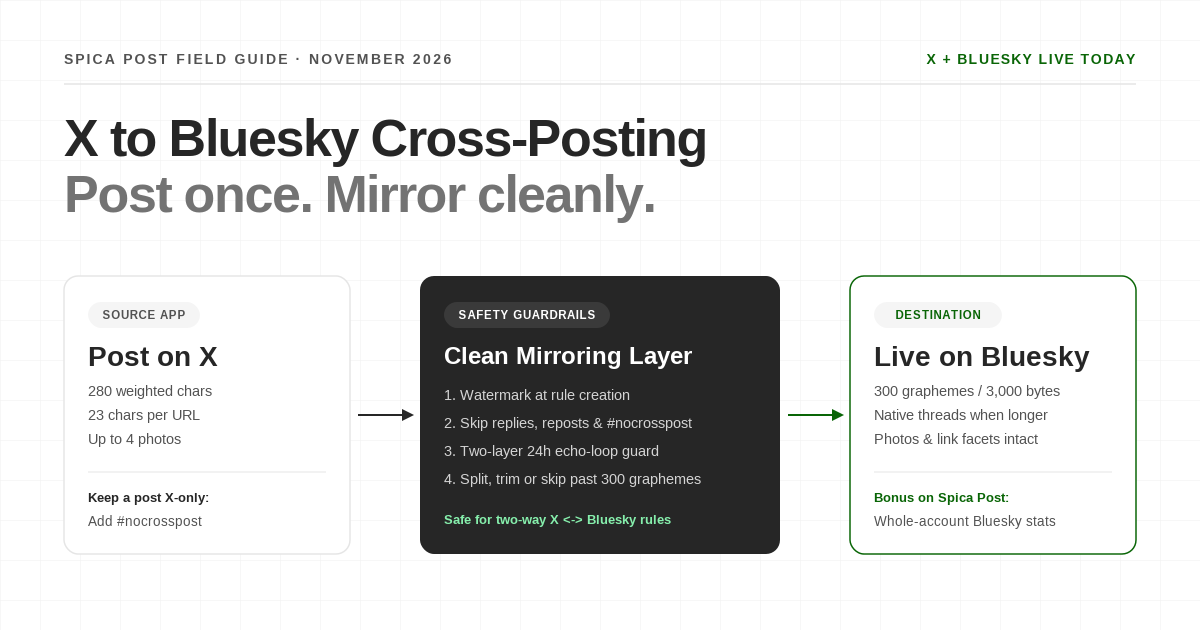
- Crosspost format scope: Auto-crosspost includes watermarked creation, two-layer echo-loop protection, up to 10 skip tags (
#nocrosspost), up to 10 appended hashtags, native thread splitting (up to 25 parts on X and Bluesky), quote-post controls, Native Auto-Repost and photo re-upload (up to 4 photos), but does not yet stitch multi-post source threads into one LinkedIn post or mirror video files automatically.
2. MicroPoster
MicroPoster is purpose-built for solo writers, founders and indie creators who live on text-first social networks and dislike opening a scheduler before posting. You keep writing directly inside X, Threads, Bluesky or Mastodon, and MicroPoster polls your source account on your plan’s interval to mirror new updates to selected destinations.
Where it fits best
MicroPoster shines when your entire social presence revolves around conversational microblogging and you want strong native crosspost mechanics right now, especially on Mastodon.
- Broad Mastodon support: Works with any Mastodon server (
hachyderm.io,fosstodon.org, self-hosted instances), automatically reading each server’s custom character and media limits so posts only thread when required. - Mature text-crosspost extras: Supports live Threads and Mastodon today, automatic multi-post thread splitting, thread-to-LinkedIn joining (up to 3,000 characters), video crossposting,
#nocrosspostor#keephereskip tags (including via reply), and native Auto Repost (1 to 7 day lookback). - Accessible solo entry: Creator starts at $12/month (or $108/year) for up to 4 accounts with a 7-day no-card trial; Pro is $29/month for 8 accounts and Power is $59/month for 12 accounts. Paid plans also include monthly logged-out shadowban monitoring for X, Threads and Bluesky.
Real trade-offs
MicroPoster’s ceiling shows up fast once you move beyond a solo creator setup (see our full Spica Post vs MicroPoster comparison).
- Hard 12-account top cap and no team governance: Even Power at $59/month caps at 12 accounts, and MicroPoster’s own agency documentation notes it does not yet include team seats, approval workflows or white-label client reporting.
- Narrow five-network scope: Covers X, Threads, Bluesky, Mastodon and LinkedIn (destination-only). It does not support Instagram, Facebook, TikTok, YouTube, Pinterest or Google Business Profile.
- No MCP server and API still on a waitlist: Builders cannot drive MicroPoster from Claude, ChatGPT or a live REST API today.
3. Buffer
Buffer has survived more than a decade of social platform churn by keeping its core experience calm and predictable. You connect channels, set a weekly posting schedule, queue content with per-network customizations, and review clean engagement metrics without wrestling an enterprise control panel.
Where it fits best
Buffer remains the safest baseline for solo creators, consultants and very small shops managing one to four accounts who want proven live integrations across every mainstream network today.
- Genuine forever-free tier: Buffer Free covers 3 channels with up to 10 queued posts per channel at a time (slots reopen as soon as posts go live), making it one of the strongest zero-dollar starting points on the market.
- Wide live network coverage: Supports 11+ networks in production today, including Instagram, Facebook, TikTok, X, LinkedIn, Pinterest, YouTube, Threads, Bluesky, Mastodon and Google Business Profile.
- Predictable solo entry: Essentials starts at $6/channel/month ($5/channel billed yearly) and Team starts at $12/channel/month ($10/channel yearly) with unlimited users and approval workflows. Buffer also exposes API and MCP access tied to monthly request allowances.
Buffer’s per-channel pricing is a bargain at 3 channels and an anchor at 25 channels. Run the math for the number of profiles you expect to manage twelve months from now, not just this week.
Real trade-offs
- Per-channel math scales steeply for agencies: Connecting 15 to 30 client accounts on Buffer Team pushes monthly spend well past $100/month even after volume discounts (see Spica Post vs Buffer).
- Dashboard-first publishing: Buffer expects posts to begin inside its composer rather than monitoring native posts you publish spontaneously in X or Bluesky.
- Lighter client-ops extras: No zero-login client review portal, no live Google Calendar/Sheets subscription feeds and no hosted white-label blog or sponsor media kit.
4. Nuelink
Most schedulers automate what happens after you type a caption. Nuelink focuses heavily on automating what happens before that: pulling new content from places you already publish outside social media and turning it into scheduled posts automatically.
Where it fits best
Nuelink is a strong match for bloggers, ecommerce store owners, YouTubers and podcasters whose social feed is downstream of a website, storefront or media feed they already maintain.
- Source-driven automations: Connect an RSS feed, WordPress or Ghost blog, Shopify or Etsy store, YouTube channel or podcast, and Nuelink automatically queues promotional posts whenever a new item ships.
- Evergreen collections plus broad channels: Organizes posts into recyclable category collections across Instagram, TikTok, LinkedIn, X, YouTube, Threads, Pinterest, Bluesky, Mastodon, Telegram and Google Business Profile.
- Flat tier pricing and agent access: Standard starts around $18/month (flat per tier rather than per seat), scaling through Premium and Business tiers with bundled channels, brands, team seats, AI caption credits, link-in-bio pages, and API plus MCP access for technical workflows.
Real trade-offs
- Not a community or listening suite: Its inbox is functional for basic checks, not a deep multi-agent customer-care desk.
- Library upkeep still matters: Automated RSS and evergreen collections can look robotic quickly if you do not prune outdated product promos, seasonal headlines or stale links.
5. Post Bridge
Post Bridge takes a deliberately stripped-back approach: it is a fast, modern publisher built for solo operators, indie hackers and technical marketers who want finished text, images or videos delivered across up to ten live networks with minimal UI ceremony.
Where it fits best
If you already generate or edit your content elsewhere (in local scripts, design tools or an AI assistant) and just need reliable multi-network delivery with live platform approvals across visual and video channels today, Post Bridge is hard to beat on simplicity.
- Ten live networks with rich format options: Covers X, Instagram, TikTok, YouTube, Facebook Pages, LinkedIn (profiles and company pages, including PDF documents), Pinterest, Bluesky, Threads and Google Business Profile, plus X threads and first comments.
- Three ways in on every plan: Dashboard, REST API (Bearer key), remote MCP server and CLI (
postbridge-cli), plus shareable client connect links so someone can authorize a social profile without creating a Post Bridge login. - High account allowance for solo operators: Marketer runs $39/month for 15 accounts and Operator runs $99/month for 99 accounts, with unlimited posts.
Real trade-offs
Our deeper Spica Post vs Post Bridge breakdown highlights where its solo-first design stops:
- No agency governance or brand kit: Post Bridge explicitly states it is built for one person doing the marketing, not an agency team. There are no internal approval queues, no client review portals, no templates and no brand voice library.
- No workspace boundary in the API: While the dashboard groups accounts into workspaces, a single API key can see every connected account across businesses unless you enforce strict roster checks in your own scripts.
- Not a native auto-crossposter: Posts must be pushed into Post Bridge rather than monitored after you publish natively in X or Bluesky.
6. SocialBee
SocialBee built its reputation around one discipline: evergreen content recycling. Instead of letting your best educational tips, FAQs and service explainers disappear after a single Tuesday post, SocialBee organizes them into color-coded categories and rotates them through a weekly schedule automatically.
Where it fits best
Service businesses, coaches, educators and lean B2B teams with a steady catalog of timeless advice get the highest return from SocialBee because one week of library setup can keep accounts active for months.
- Category queues with variations and expiry: Assign ratios (for example, 40% educational, 30% case studies, 20% tips, 10% offers), write caption variations so repeats do not look identical, and set expiration dates on seasonal promos.
- Broad direct network support: Publishes directly to X, Threads, Bluesky, Instagram, Facebook, LinkedIn, Pinterest, TikTok, YouTube and Google Business Profile (Mastodon uses mobile-assisted posting).
- Predictable solo tier: Bootstrap starts at $29/month (monthly billing) for 5 profiles, 1 workspace, 1 user and 10 content categories, backed by a 14-day no-card trial.
Evergreen recycling multiplies good educational content and amplifies bad sales spam. Put date-sensitive offers on strict expiration rules so a February promo never resurfaces in July.
Real trade-offs
- Upfront setup and maintenance tax: Building and auditing category queues takes real editorial work. If most of your posts are timely job photos, news or spontaneous founder updates, an evergreen library adds unnecessary friction.
- Approvals sit on higher tiers: Team approvals and internal review notes require upgrading from Bootstrap to Accelerate or Pro.
7. Metricool
Metricool flips the usual priority order: analytics and reporting sit at the center, with scheduling, competitor benchmarking and paid-ad tracking wrapped around the same dashboard.
Where it fits best
Data-driven creators, performance marketers and boutique agencies who deliver monthly client decks (PDF or PowerPoint) or connect organic social metrics with Google/Meta ad performance get standout value here.
- Strong ongoing free tier: Metricool Free includes 1 brand, 20 scheduled posts per month, 30 days of analytics and 5 competitor profiles, with no expiring trial clock.
- Reporting depth at mid-market pricing: Starter begins at $25/month (billed monthly) for up to 5 brands, while higher tiers unlock team roles, approvals, Looker Studio connectors, API access and white-label client exports.
- Wide channel coverage: Publishes to Instagram, Facebook, Threads, Bluesky, TikTok, Pinterest, YouTube, Google Business Profile and LinkedIn (paid plans).
Real trade-offs
- Watch the X add-on and brand definition: LinkedIn is excluded from Free, and X is excluded from Free and costs an extra $10/month per connected X account on paid plans. Remember also that one Metricool “brand” holds one profile per network, so managing two Instagram accounts for one company counts as two brands.
- Monthly post cap vs queue cap on Free: Unlike Buffer’s 10-slot reusable queue, Metricool Free’s 20-post cap is a hard monthly total that does not refill as posts publish.
8. Later
Later grew up alongside Instagram and remains built around the visual grid. Where text-centric tools give you a list of drafts, Later gives you drag-and-drop media libraries, visual feed previews, Linkin.bio pages and creator-friendly Reel and TikTok workflows.
Where it fits best
Retail shops, restaurants, salons, fashion labels and creators whose primary sales channel is Instagram or TikTok benefit immediately from seeing how nine squares look together before anything publishes.
- Visual-first calendar and media library: Upload a shoot once, crop and label assets, preview the exact Instagram grid order and schedule auto-publishing alongside Linkin.bio product links.
- Clear creator-oriented plans: Starter runs $18.75/month equivalent (billed annually) with a 14-day trial for 1 user, 1 Social Set and 30 scheduled posts per profile per month.
- Visual channel mix: Covers Instagram, Facebook, Threads, Pinterest, TikTok, LinkedIn, YouTube and Snapchat.
Real trade-offs
- No X, Bluesky or Mastodon: Text-first networks are outside Later’s core scope.
- Social Set rigidity and monthly caps: A Social Set gives you one profile per supported network, not eight interchangeable slots. Managing two Instagram pages requires an additional Social Set, and collaboration or approvals require upgrading to Growth.
9. Planable
Planable solves a different bottleneck than every solo scheduler on this list: getting busy clients and stakeholders to actually review and approve posts without messy spreadsheets or 20-email chains.
Where it fits best
Social media agencies, franchise marketers and regulated brands (clinics, finance, legal) where the hardest part of social media is not drafting, it is visual sign-off and revision history.
- Best-in-class visual feedback: Posts render as pixel-accurate network mockups where clients can leave inline comments, suggest text edits, switch between internal and external notes, and click Approve with multi-level sign-off on higher tiers.
- Unlimited users inside a workspace: Basic starts around $33/workspace/month (billed annually) for 4 pages and 60 posts/month, while Pro ($49/workspace/month annually) adds 10 pages, 150 posts/month and enforced Required approvals.
- Usage-based test drive: Lets you create 50 total posts with no time limit and no credit card to evaluate the collaboration UX before paying.
Real trade-offs
- Workspace billing adds up for multi-client agencies: Unlimited seats are generous, but every separate client brand needs its own paid workspace.
- Analytics and inbox cost extra: Reporting and engagement modules are paid add-ons on self-serve tiers, and the 50-post trial excludes X publishing while Basic caps X volume strictly.
10. Hootsuite
Hootsuite is the veteran operating system for large organizations where social publishing, paid-ad coordination, customer support replies, compliance archiving and brand-wide social listening must run inside one audited command center.
Where it fits best
Mid-market companies, multi-department teams and enterprise agencies that need unified customer care, employee advocacy, social listening streams and formal governance across ten or more stakeholders.
- Full-stack social operations: Combines multi-network scheduling (Instagram, Facebook, X, LinkedIn, TikTok, YouTube, Pinterest, Threads and Bluesky) with a shared team inbox, assignment routing, bulk CSV uploads, ad management and executive reporting.
- Mature compliance and permissions: Granular role hierarchies and multi-step approval workflows (on Advanced and Enterprise) satisfy strict corporate IT and legal teams.
Real trade-offs
- Per-seat enterprise pricing: Standard starts at $99/user/month billed annually (10 accounts), Professional jumps to $199/user/month, and required content approvals start on Advanced at $399/user/month.
- Operational overhead for lean teams: If your main pain is simply keeping three to twenty accounts consistently updated, Hootsuite adds both cost and daily dashboard complexity you will never earn back.
Side-by-side comparison of all 10 tools
Use the table below to compare workflow model, live MCP/API automation, billing unit and primary constraint at a glance. Every tool name jumps straight back to its full breakdown above.
| Tool | Primary workflow | MCP / REST API | Pricing unit & entry (Nov 2026) | Best fit | Main constraint |
|---|---|---|---|---|---|
| Spica Post | AI assistant (MCP) + native auto-crosspost + studio | Both live on every paid plan | Flat multi-brand plans + one-time Starter (pricing) | SMBs, creators & agencies wanting MCP + flat multi-brand scale | Visual/local networks in platform review; no video crossposting yet |
| MicroPoster | Native-first auto-crosspost & Auto Repost | No MCP; /api waitlist |
Flat solo tiers; Creator $12/mo (4 accounts) | Solo writers on X, Threads, Bluesky & Mastodon | 12-account cap; no team seats, approvals or IG/FB/TikTok |
| Buffer | Central calendar & reusable queue | API/MCP with monthly req caps | Per channel; Free (3 ch) or $6/ch/mo Essentials | Solo & micro-teams with 1 to 4 channels | Per-channel bills climb fast past 10 accounts with approvals |
| Nuelink | Source triggers (RSS/store/YT) + evergreen queues | API & MCP included | Flat tiers; Standard from ~$18/mo | Bloggers, ecommerce, YouTubers & podcasters | Shallow inbox; evergreen libraries need periodic pruning |
| Post Bridge | Lean multi-network API/MCP publisher | Live REST API, MCP & CLI | Flat solo tiers; Marketer $39/mo (15 accts) | Technical solo marketers & indie founders | No team approvals, no brand kit, no API workspace guard |
| SocialBee | Evergreen category queues & recycling | Integrations; no native MCP | Flat tiers; Bootstrap $29/mo (5 profiles) | Coaches, B2B & educators with reusable libraries | Library maintenance work; approvals require higher tier |
| Metricool | Analytics-led scheduler & client decks | API on higher tiers | Per brand; Free (1 brand, 20 posts/mo) or $25/mo | Reporting-heavy marketers & agencies | X costs +$10/mo per account; LinkedIn paid only |
| Later | Visual feed grid & Linkin.bio planner | Limited; no MCP | Per Social Set; Starter $18.75/mo (yearly) | Instagram & TikTok visual brands | Rigid 1-per-network Social Sets; no X or Bluesky |
| Planable | Visual client feedback & approval portal | Limited; no MCP | Per workspace; Basic $33/ws/mo (yearly) | Agencies bottlenecked on client sign-off | Costs multiply per brand; analytics & inbox are add-ons |
| Hootsuite | Enterprise publishing, inbox & listening | Enterprise APIs | Per seat; Standard $99/user/mo (yearly) | Large multi-department organizations | High per-user cost; approvals require $399/user Advanced |
Your shortlist: pick the right tool for your situation
Rather than trialing five overlapping dashboards, match your exact bottleneck to one primary candidate and one backup:
- You want Claude, ChatGPT or Cursor to draft on-brand posts, enforce approvals and mirror native X/Bluesky updates across multiple brands: Start with Spica Post (flat multi-brand plans, MCP, REST API, client review links, calendar sync and bilingual EN/ES support).
- You are a solo writer living in X, Bluesky, Threads and Mastodon who wants native mirroring plus Auto Repost today: Start with MicroPoster (and check our Spica Post vs MicroPoster comparison once you outgrow 8 to 12 accounts or need an API).
- You manage 1 to 3 accounts on a zero-dollar budget and need Instagram, TikTok and Google Business live today: Start with Buffer Free (or Metricool Free if reporting matters more than X/LinkedIn).
- Your content starts as blog articles, Shopify launches, YouTube videos or podcast episodes: Start with Nuelink to turn external feeds directly into queues.
- You are a developer or solo marketer pushing finished media to 10 live visual and video networks via scripts: Start with Post Bridge (or Spica Post if you need strict brand isolation, team approvals and a brand kit).
- Your single biggest headache is client sign-off and pixel-accurate visual comments: Start with Planable (or Spica Post if you want zero-login client review links bundled without per-workspace add-on fees).
- You run a large customer-care and brand-listening operation with dedicated social agents: Look at Hootsuite or Sprout Social.
How to test any automation tool before committing
Before moving an active calendar or connecting client accounts, run a 30-minute live stress test on real material:
- Calculate your 12-month unit cost. Count every profile (including duplicate profiles on the same network), every brand workspace, every approver seat and any required add-ons like X access or client reporting.
- Verify your exact live networks and post formats. Confirm that your account type (personal profile vs company page, business vs creator) and media format (carousels, PDF documents, video lengths, links) publish automatically rather than via manual phone reminders.
- Run one real draft from idea to live destination. Test a post with a link, line breaks and an image. Inspect the live result on mobile to check link cards, cropping and character truncation.
- Test the safety rails. Try scheduling a post that breaks a network’s character limit, verify that a non-admin editor cannot bypass approval, and (for auto-crossposting) confirm that adding
#nocrosspostactually skips mirroring and never loops back. - Confirm how you leave. Check whether you can export your scheduled calendar, results and audit history in standard CSV or
.icsformats if your stack changes next year.
Never run two active auto-crossposting rules or overlapping schedulers against the same account pair during a migration. Pause the old queue first so followers never see duplicate copies back to back.
Questions people ask
- What is the difference between a social media scheduler and an automation tool?
- A scheduler holds posts you already wrote inside its web composer and publishes them at set times. An automation tool removes the repeated work around publishing: mirroring a native post to other networks, turning an RSS feed or store launch into drafts, recycling evergreen libraries, or letting an AI assistant draft and schedule through MCP or a REST API.
- Which social media automation tools support MCP for Claude, ChatGPT or Cursor?
- Spica Post, Post Bridge, Nuelink and Buffer all offer MCP connectivity in 2026, though depth varies. Spica Post was built MCP-first with brand-scoped tools, a stored brand kit, limit checks and an enforced approval workflow. Post Bridge and Nuelink offer lean publishing endpoints, while Buffer ties API and MCP usage to monthly request caps.
- Should I pick native auto-crossposting or a central content calendar?
- Pick a central calendar or an MCP approval workflow when campaigns, promotions or client accounts must be reviewed before anything goes live. Pick native auto-crossposting when you write spontaneous updates in X or Bluesky and want copies mirrored to other accounts without opening another dashboard. Tools like Spica Post support both in one subscription.
- Why do headline prices on social media tools often mislead multi-brand teams?
- Each vendor bills on a different unit. Per-channel tools like Buffer multiply monthly cost by every connected profile, per-seat suites like Hootsuite multiply by every team member, and per-workspace tools like Planable multiply by each client brand. Count your total profiles, brands, seats and paid add-ons such as X access before comparing.
- Can I test a social media automation tool without blasting old posts to my followers?
- Yes. Check that any native crossposter uses watermarked creation so it only watches posts published after you turn the rule on, and always test with one low-stakes account pair first. For central schedulers and AI assistants, start in draft mode with approvals turned on and inspect how links, images and line breaks land on each network.
Sources
- Spica Post pricing, plans and live platform limits
- MicroPoster pricing, plans and llms.txt scope (verified Nov 2026)
- Buffer pricing and free plan limits (verified Nov 2026)
- Nuelink pricing and source automations (verified Nov 2026)
- Post Bridge pricing and API documentation (verified Nov 2026)
- SocialBee pricing and evergreen category queues (verified Nov 2026)
- Metricool pricing, free limits and X add-on (verified Nov 2026)
- Later pricing and Social Sets structure (verified Nov 2026)
- Planable pricing and approval tiers (verified Nov 2026)
- Hootsuite plans and seat pricing (verified Nov 2026)