How to Turn Facebook Comments and Messages Into Booked Jobs
Answer Facebook comments publicly first to build proof, qualify inquiries in one DM with three questions, and hand off smoothly to a real booking.
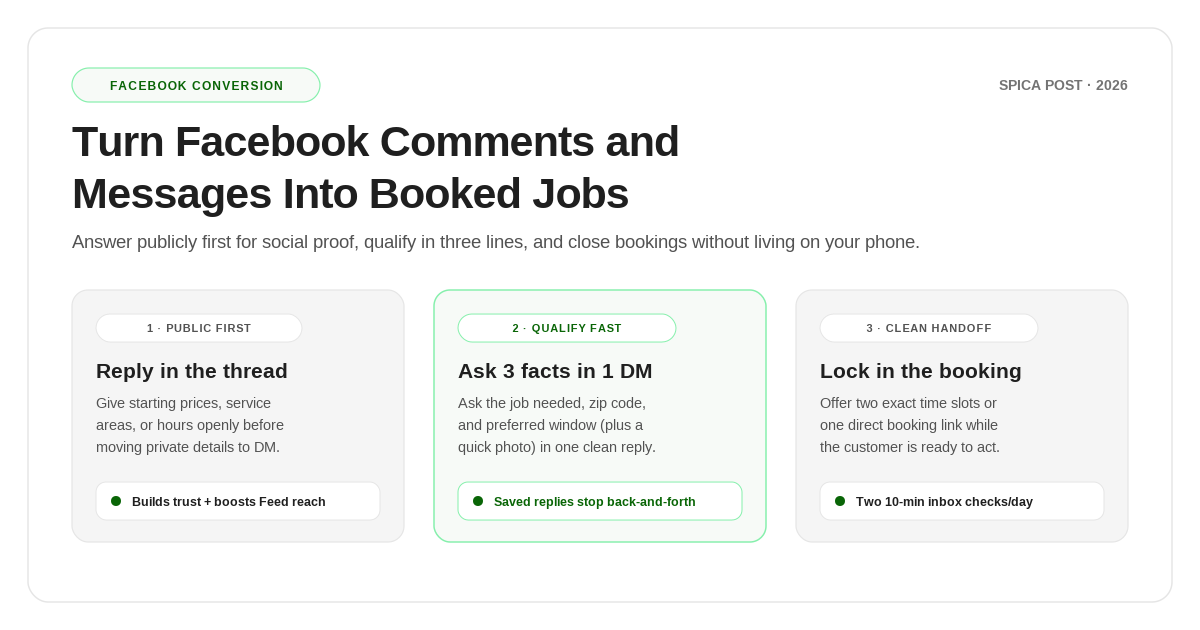
Turning Facebook comments and messages into booked jobs comes down to one four-step rhythm: answer every public comment openly in the thread first with real baseline facts (starting price range, service area, or hours), move only private address or scheduling details into Messenger, qualify the job in a single three-question message using a saved reply, and hand the buyer two concrete appointment windows or one direct booking link before they close the app and forget.
Most small businesses and creators do not have a Facebook lead problem; they have a follow-through leak. A homeowner comments “How much for a patio wash?” at 10:15 AM, gets a vague “PM sent!” three hours later, receives four choppy follow-up messages asking one detail at a time over two days, and ends up calling whoever answered the phone first. Fixing those exact handoffs turns everyday Page comments and Messenger pings into steady paid bookings without spending a dollar more on ads or living glued to notifications.
This playbook walks through why answering publicly beats “DM sent!”, the complete four-step comment-to-booking workflow, sustainable response-speed habits around hands-on work, six copy-ready saved reply scripts, customer privacy hygiene, and honest November 2026 notes on managing comments inside Meta Business Suite versus Spica Post’s Unified Inbox.
Snapshot verified November 2026. Facebook Feed public-interaction ranking signals, Meta Business Suite Inbox features (Saved Replies, Instant Replies, and Away Messages), and engagement-bait guidelines reflect Meta’s published documentation verified in November 2026.
Why answering publicly first converts more buyers than “DM sent!”
Every time someone leaves a public question under your Facebook Page post (“How much?”, “Do you come out to Westside?”, “Are you open Saturday?”), assume ten quiet neighbors with the exact same question are reading the comments without typing a word.
When those ten lurkers see “DM sent!” repeated five times under your post, two bad things happen immediately. First, they assume your prices are hidden or arbitrary, so they scroll away instead of risking an awkward sales pitch. Second, you force yourself to repeat the exact same basic answer privately ten separate times.
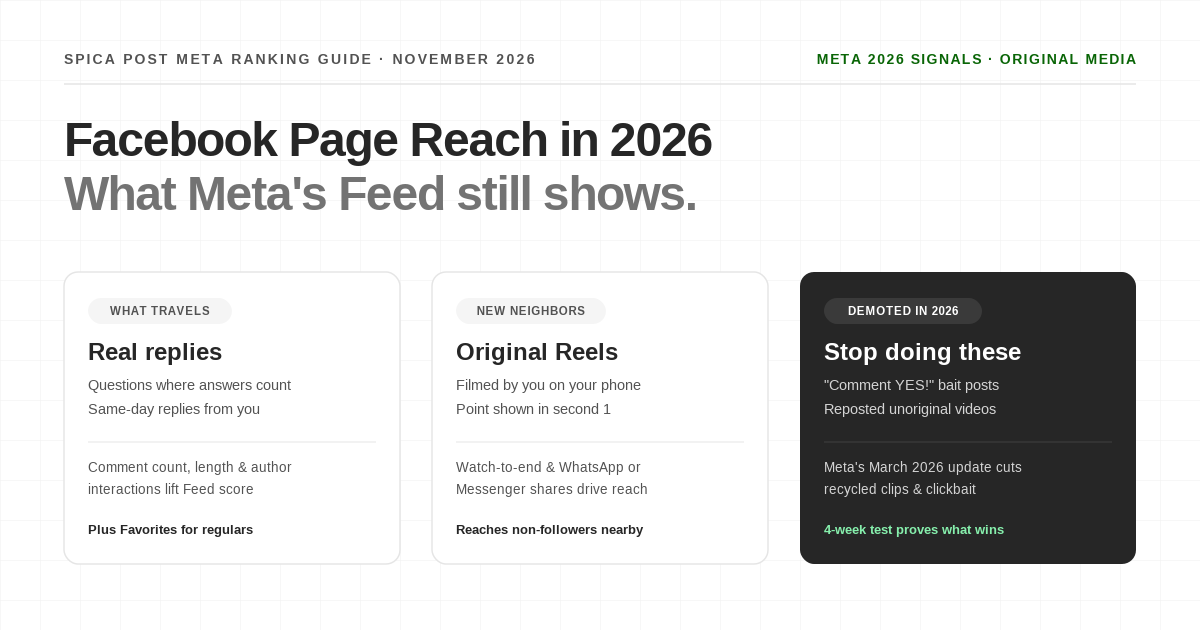
Answering helpfully right in the public thread fixes both leaks and carries an extra distribution bonus. Meta’s Facebook Feed ranking system card explicitly documents total comment count, average comment length, and public interactions between a viewer and the Page author as active ranking signals. Giving a warm, two-sentence public answer using the commenter’s first name shows professionalism to every silent prospect while signaling to Facebook that real neighborhood conversation is happening on your post. (For the full breakdown of how genuine replies outperform engagement bait, see our 2026 Facebook Page reach guide.)
What belongs in public vs. what belongs in Messenger
Draw a clean boundary so customers feel informed publicly while their private details stay protected:
| Detail | Share publicly in comments? | Move to Messenger, phone, or booking form? |
|---|---|---|
| Starting price or typical range | Yes (“Standard patio washes start at $175 depending on square footage”) | Only exact custom line-item quotes tied to their home or photos |
| Service area and business hours | Yes (“We cover Oakridge and nearby suburbs Tue to Sat, 8 AM to 5 PM”) | Exact street address, gate code, or parking instructions |
| Availability window | Yes (“We have two morning slots left this Thursday”) | Confirming exact appointment slot, email receipt, and phone number |
| How to get an exact quote | Yes (point cleanly to DM, phone, or booking page) | Job-site photos, measurements, or special personal notes |
The four-step comment-to-booking workflow
Move every inquiry cleanly down the same four stages so no hot buyer stalls between “Looks great!” and a confirmed calendar spot.
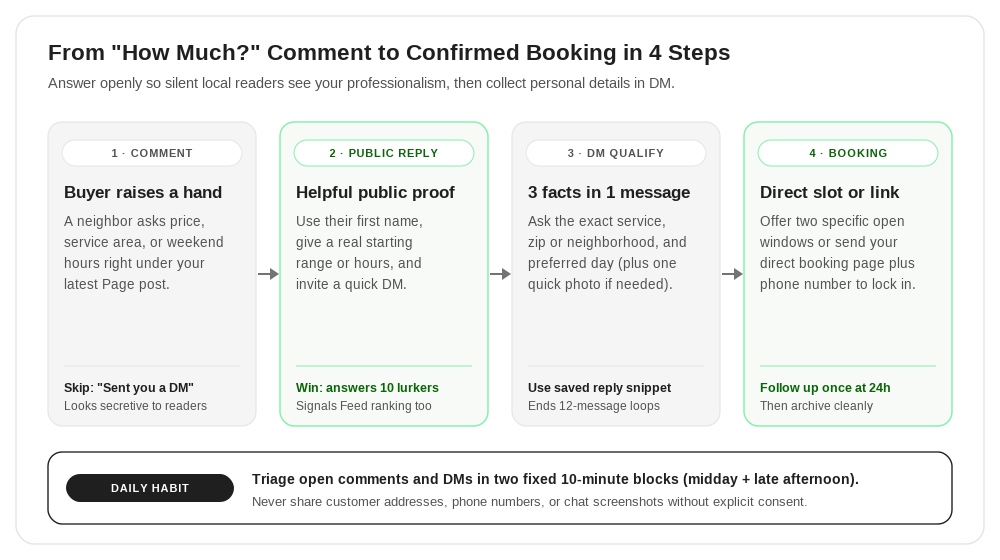
Step 1: Spot buying-intent comments fast
Not every comment is casual applause. Train yourself and your team to flag five high-intent phrases immediately:
- Price checks: “How much?”, “Price?”, “What does something like this run?”
- Coverage checks: “Do you travel to [Town]?”, “Where are you located?”
- Timing checks: “Are you open Saturday?”, “How far out are you booked?”
- Fit checks: “Do you work on [brand/material/hair type/dietary need]?”
- Friend tags: “Hey @Maria look at this!” (Even a warm one-line reply like “Thanks for tagging Maria! Happy to answer any questions if you two are planning something soon” opens doors naturally without feeling pushy.)
Step 2: Reply publicly with baseline truth plus a warm DM bridge
In two plain sentences, address the person by first name, answer the substance of their question cleanly, and tell them exactly how to get a tailored quote or slot. Never argue with price comments publicly and never beg for comments with “Comment INFO for a link!”, which Meta explicitly classifies as demoted engagement bait.
Step 3: Qualify in one single Messenger reply (four details max)
The number-one reason Messenger leads go cold is ten-message ping-pong (“What do you need?” -> “Where are you?” -> “What day works?” -> “Can you send a picture?”). Every extra round-trip loses half your prospects to dinner, kids, or work calls.
Instead, ask for all three or four required facts in one breezy, scannable message:
- Exact service or product needed
- Neighborhood or zip code (for mobile professions) or guest count / size (for food, salons, or custom makers)
- Preferred day or timeframe
- One optional quick phone photo (when seeing a leak, yard, haircut goal, or room lets you give a real number faster)
Step 4: Hand off to a concrete booking slot or direct link
Never end a qualified chat with “Let me know whenever you want to set something up!” Open-ended endings stall indefinitely. Offer two exact available windows (“I can fit you in Thursday at 9:30 AM or Friday at 1:00 PM”) alongside one clean booking or Link Page URL and your direct phone number for people who prefer a 60-second call. If they go silent after receiving a quote, send exactly one polite 24-hour check-in, then archive the thread cleanly so your inbox stays focused on active buyers.
Response-speed habits without being glued to your phone
Owners who climb ladders, bake sourdough, cut hair, or see patients cannot answer Messenger alerts in 90 seconds all day without ruining the work right in front of them. Luckily, local customers do not expect instant robot typing; they expect reliable, same-day clarity.
Run two fixed 10-minute inbox blocks per day
Turn off noisy Messenger and Facebook comment pop-ups during focus work, and lock two short triage blocks into your daily routine:
- Midday block (12:15 PM to 12:25 PM): Clear every morning comment publicly, answer overnight Messenger threads, and send qualifying prompts while people check phones on lunch break.
- Late-afternoon block (4:45 PM to 4:55 PM): Confirm next-day bookings, send quotes to everyone who replied at lunch, and clear open comments before closing shop.
Configure honest Instant Replies and Away Messages in Meta Business Suite
Meta Business Suite Inbox (Meta Business Help Center and Instant Replies guide) lets you set a lightweight Instant Reply and scheduled Away Message for evenings and closed days. Keep automated messages genuinely useful rather than robotic: state your real reply hours, provide your direct Link Page or booking URL, and list the three facts they can drop right now so you can quote them first thing in the morning.
Six copy-ready reply scripts for Facebook comments and Messenger
Save these six templates directly inside Meta Business Suite Saved Replies (and keep your public comment templates mirrored in Spica Post Saved Replies) so you personalize {name} and reply in twenty seconds instead of typing from scratch.
1. Public reply to a “How much?” comment
Hi [Name]! Most [service/project] jobs like this run between $[Low] and $[High] depending on [main factor, e.g., square footage / materials / hair length]. If you want an exact number for yours, send us a quick message with your zip code and a photo, or check our starter menu on our page link anytime.
2. Public reply to “Do you come to [Neighborhood]?” or hours check
Hi [Name], yes! We cover [Neighborhood] and surrounding areas every [Days, e.g., Tuesday through Saturday, 8 AM to 5 PM]. We currently have openings starting [Next Open Day]. Feel free to message us here or call [Phone] and we will get you on the schedule.
3. First Messenger DM: qualify all four facts in one clean note
Hi [Name], thanks for reaching out! To give you an accurate quote and check our closest opening, could you share:
As soon as you reply, I will send over a clear estimate and two open times.
4. Quote plus clean booking handoff (two concrete slots + direct link)
Thanks for those details, [Name]! Based on what you shared, that [service/project] comes to $[Price or Exact Range] (includes [1 concrete inclusion, e.g., prep and cleanup]).
Right now I can hold either [Day 1 at Time 1] or [Day 2 at Time 2]. Reply with whichever works best and your best phone number for confirmation, or lock your spot directly here: [Direct Booking or Link Page URL].
5. Polite 24-hour check-in (zero pressure)
Hi [Name], just checking in softly to see if you had any questions on the [service] estimate I sent yesterday. No rush at all; our [Day] spot is still open if you would like me to hold it for you.
6. Calm public reply to a price-skeptical or frustrated comment
Hi [Name], appreciate you asking honestly. Our pricing covers [2 real quality facts, e.g., licensed insured crew, commercial materials, and our workmanship warranty] so there are no surprise add-ons later. If you would ever like a breakdown for a specific project, we are always happy to walk through options by phone or message.
When customers also reach you inside neighborhood Facebook Groups rather than your Page, pair these scripts with the local etiquette in our Facebook Groups marketing guide. And for Google Business Profile feedback sitting alongside Facebook, keep your tone consistent with our Google review response guide.
Privacy hygiene and explicit customer permission
Messenger conversations routinely include sensitive personal details: home addresses, gate codes, alarm instructions, children’s birthday party dates, and phone numbers. Follow three strict privacy habits across your team:
- Never copy private details back into public comments. Even if a customer accidentally writes their phone number or home address under a public post, hide that comment promptly for their safety and reply in Messenger letting them know you tucked their number out of public view.
- Ask explicit customer permission before posting any message screenshot or job photo. Turning a warm “You guys saved our weekend!” DM into a testimonial post works wonderfully, yet you must always ask that customer explicitly before sharing their words, crop out full names and profile pictures unless they approve showing them, and obtain explicit permission before posting photos showing identifiable customers or private property.
- Use one clean mobile Link Page for fast booking handoffs. Instead of pasting clunky 120-character calendar URLs into Messenger chats, keep one tidy branded Link Page holding your Book Now button, service menu, hours, and phone number in one memorable address.
Organizing Facebook comments cleanly and honest Spica Post trade-offs
Once your Page publishes three times a week, replies get scattered fast: comments under last month’s Reel, a question under Tuesday’s before-and-after photo, three Messenger threads, and two new Google reviews all competing for attention.
What works well inside Meta Business Suite Inbox today
For private Facebook Messenger DMs, Meta Business Suite Inbox remains the native home base. Use three built-in features cleanly:
- Labels (
Needs Quote,Quoted,Booked,Follow Up) so no hot lead disappears beneath random thumbs-up messages. - Saved Replies loaded with the six scripts above so replies take seconds on mobile or desktop.
- Move to Done after booking or sending a final follow-up, keeping your main inbox view uncluttered.
Honest trade-offs if you evaluate Spica Post’s Unified Inbox
Small businesses and creators managing multiple channels or client brands often ask what Spica Post’s Unified Inbox handles versus what stays inside Meta Business Suite. Here is the exact November 2026 picture:
- What Spica Post’s Unified Inbox is built to do: Bring public social comments and 1-to-5-star Google Business Profile reviews into one calm triage queue (with a
This brand/All brandstoggle for multi-brand workspaces, up to 50 workspace saved replies with{name}personalization, an optional Weekly Executive Digest email, and assistant triage via MCP or REST API). - Exact November 2026 live vs. in-review status: Public Bluesky comments and replies are live today inside Spica Post’s Unified Inbox. Public Facebook Page comments (via
pages_read_engagementandpages_manage_posts), Instagram comments, and Google Business Profile reviews are built and tested, waiting on Meta App Review approvals and Google Business Profile verification before live replies switch on across all workspaces. - What stays outside Spica Post’s Unified Inbox: Private Facebook Messenger DMs are intentionally not pulled into Spica Post’s Unified Inbox. Keep handling private Messenger chats inside Meta Business Suite or the Messenger app, while using Spica Post for your public comments, Google reviews, branded Link Page booking hub, and scheduled posts (with X, LinkedIn personal profiles, Bluesky, and Mastodon publishing live today, and Facebook Pages publishing completing Meta App Review). Review flat workspace plans anytime on our pricing page.
Set up two 10-minute inbox blocks on your calendar today, load the six saved reply scripts above into Meta Business Suite, and commit to answering every public “How much?” openly before moving to DM. Within two weeks, you will spend less time staring at notifications and book far more jobs from the Facebook audience already watching your Page.
Questions people ask
- Should I answer 'How much?' comments publicly on Facebook or reply 'DM sent'?
- Always answer publicly first with helpful baseline facts, such as your typical starting range, what drives final pricing, or your exact service hours, and then invite the customer to send private details by message or phone. Replying only 'DM sent' looks secretive to the ten silent neighbors reading the same thread and misses a positive public-interaction signal in Facebook's Feed.
- How fast do small businesses need to answer Facebook comments and Messenger DMs?
- Aim for same-day replies within a few business hours rather than interrupting active work every five minutes. Two fixed 10-minute inbox check windows (around midday and late afternoon), paired with an honest Instant Reply or Away Message outside business hours, convert far more leads than sporadic midnight replies.
- What questions should I ask in Messenger to quote a job without endless back-and-forth?
- Ask for four concrete details in one short message: the exact service or item needed, the customer's neighborhood or zip code, their preferred day or timeframe, and one optional phone photo if seeing the space or job helps price accurately. Asking everything together cuts twelve-message loops down to two.
- Can I share screenshots of happy Facebook messages or comments on my Page?
- Only after asking that customer for explicit spoken or written permission, and always crop out full last names, street addresses, phone numbers, and personal profile photos unless they specifically agree to show them. Protecting customer privacy builds far more trust than unconsented screenshots.
- Does Spica Post's Unified Inbox handle private Facebook Messenger DMs?
- No. Spica Post's Unified Inbox is built for public social comments (Bluesky live today; Facebook Page comments, Instagram comments, and 1-to-5-star Google Business Profile reviews as each network approval completes) alongside reusable saved replies. Private Facebook Messenger chats stay inside Meta Business Suite or Messenger.
Sources
- Meta Transparency Center: Facebook Feed ranking explained (public interactions and comments)
- Meta Business Help Center: Manage messages and comments in Meta Business Suite Inbox
- Meta Business Help Center: About Saved Replies in Meta Business Suite
- Meta Business Help Center: About Instant Replies and Away Messages
- Meta Transparency Center: Content distribution guidelines on engagement bait