YouTube
YouTube SEO for Local Businesses: Titles and Descriptions
Get local customers from YouTube Search and Google with plain titles, city-tagged descriptions, chapter timestamps, and pinned local links.
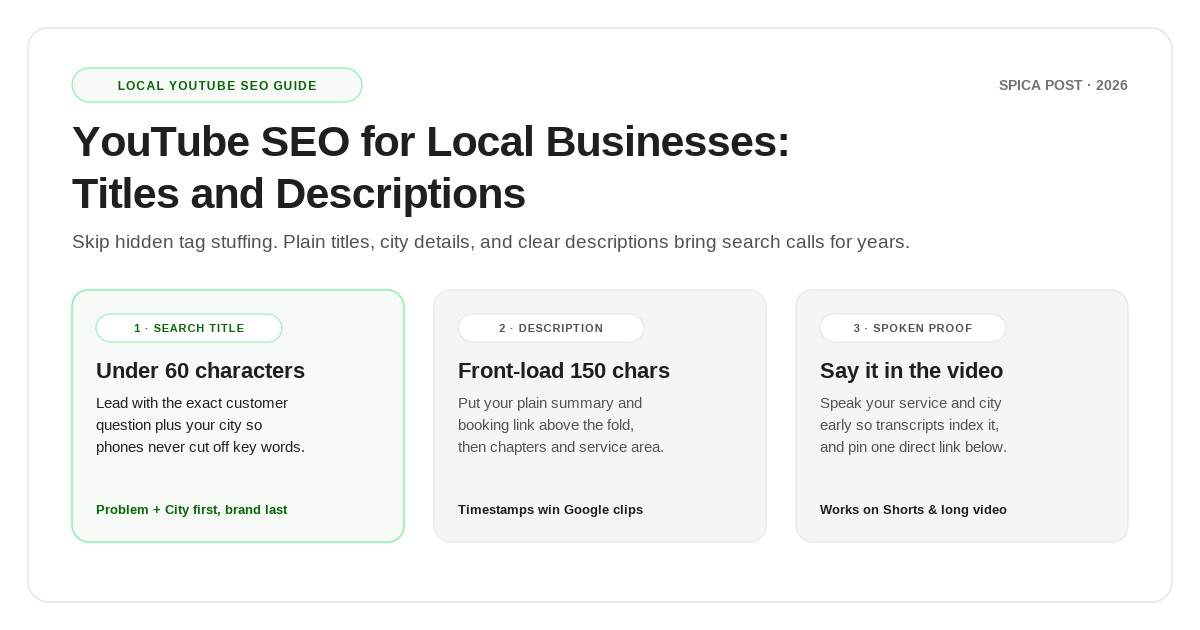
Local businesses get found on YouTube (and inside Google Search video results) by pairing plain titles under 60 characters naming the exact customer problem plus your city, front-loaded descriptions putting your answer and direct contact link inside the first 150 characters, spoken keywords that appear in accurate captions, and clean chapter timestamps rather than stuffing forty hidden tags at the bottom of the upload screen.
An Instagram Reel or Facebook post fades off most neighborhood feeds within two days. A clear 90-second YouTube clip titled “How to shut off your main water valve in Austin” or “What a curly dry cut looks like in Asheville” stays searchable on YouTube and Google for years, bringing warm local calls long after you forgot you filmed it.
This guide shows you exact local title rewrites across five professions, a 4-block YouTube description blueprint you can save as an upload default, how spoken audio and thumbnails feed local search, three copy-ready title and description templates, five common YouTube SEO myths to skip, and an honest Spica Post status note for YouTube.
Why YouTube search beats fast feeds for evergreen local leads
Most social networks act like a busy street corner where people walk past once. YouTube acts like a local library combined with Google Search.
When a homeowner notices a weird noise from their heat pump, a parent searches for a gentle pediatric dentist, or a relocating couple looks up two neighborhoods by name, they type plain questions straight into Google and YouTube. Because YouTube belongs to Google, a well-titled 2-minute phone walkthrough from a real neighborhood business frequently shows up right beside (or even above) national blogs that know nothing about your town.
You do not need ten thousand subscribers to win those searches. A channel with 45 subscribers can easily win “how to prep your patio for Florida rain” or “Pasadena pre-purchase used car inspection checklist” when the title, opening script, and description match what a real neighbor typed.
Writing local YouTube titles people actually search
Keep your core searchable phrase and city inside the first 55 to 60 characters (even though YouTube allows up to 100 characters) so mobile screens never chop off the city name with an ellipsis. Put the problem or topic first, not your business name or vague cleverness.
| Profession | Weak title (nobody searches this) | Searchable local title (under 60 chars) |
|---|---|---|
| Plumber | “Oak Creek Vlog #14: Busy Tuesday Call!” | “Water Heater Leaking in Austin? 2 Fast Shutoff Steps” (52c) |
| Dentist | “Welcome to Cedar Grove Family Dental!” | “What Happens at a Tooth Crown Visit (Raleigh Dentist)” (53c) |
| Bakery | “Fresh Out of the Oven Today!” | “How to Order a Custom Birthday Cake in Portland” (47c) |
| Auto shop | “Checking Brakes on a 2019 SUV” | “Squeaking Brakes? When Pads Can Wait (Pasadena Shop)” (52c) |
| Real estate | “Just Listed! Beautiful 3BR Home!” | “Coral Gables vs. Coconut Grove: Honest Street Guide” (51c) |
Three quick title rules that beat clickbait
- Skip episode numbers and “Welcome to our channel” intros. New searchers do not care that this is “Weekly Tip #27.” Lead immediately with the concrete noun or question they typed.
- Use real neighborhood or city names naturally. Including your city or metro name filters out viewers across the globe and instantly tells a local resident “this business actually serves my street.”
- Match what the viewer sees in the first five seconds. If your title promises “3 Checks Before Buying a Used Car in Pasadena”, start directly on check #1 with a clean shot of the hood or brake rotor. Fast drop-offs tell YouTube the title misled people.
The 4-block YouTube description blueprint
YouTube gives you up to 5,000 characters in the description box, yet almost every viewer sees only the first two lines (roughly 125 to 150 characters) before tapping ...more. Following YouTube’s smart description guidelines, structure every upload into four clean blocks and save blocks 3 and 4 inside YouTube Studio -> Settings -> Upload defaults so you never retype your address or phone number again.
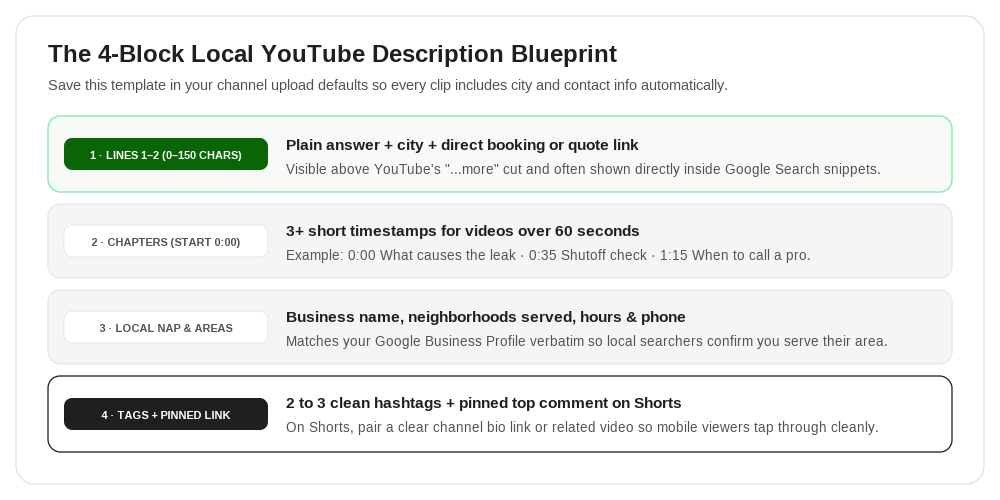
Block 1 (Lines 1 and 2 · Characters 1 to 150): Plain summary plus direct link
Restate the exact problem, name your city, and place your single best clickable link (booking page, quote form, or branded Link Page with https://) right on line two so it is visible before ...more.
Block 2 (For videos over 60 seconds): Chapter timestamps starting at 0:00
Per YouTube’s video chapters documentation, adding at least three ascending timestamps starting with 0:00 (each at least 10 seconds long) automatically creates clickable chapters on YouTube and enables Google Search “Key Moments.” Write plain chapter labels that mirror real sub-questions (for example, 0:00 Main shutoff valve, 0:35 Checking the pressure tank, 1:15 When to call a licensed plumber).
Block 3: Matching local business info (NAP)
Include your exact business name, street address (if you welcome walk-ins) or cities served (if you are a service-area business), phone number, and clear hours matching your Google Business Profile.
Block 4: Two to three clean hashtags plus Shorts link handling
Add 2 or 3 plain local hashtags at the very bottom (such as #AustinPlumber #WaterHeaterTips). Note one key difference for YouTube Shorts: mobile Shorts viewers rarely tap into the description box, so link a related long-form video using YouTube’s built-in Related Video field and keep your branded Link Page clearly visible in your channel header bio.
Spoken words, captions, thumbnails, and channel basics
Titles and descriptions get you indexed; three simple habits turn impressions into local calls.
Say your service and city clearly in the opening ten seconds
YouTube generates automatic transcripts for nearly every upload. Saying “Hi, I am Sam with Oak Creek Plumbing in North Austin, and today I am showing you how to shut off a leaking water heater in thirty seconds” feeds the exact words straight into YouTube’s captions. Spend thirty seconds inside YouTube Studio -> Subtitles fixing any misspelled neighborhood or street names in the auto-captions.
Simple phone thumbnails with three big words max
For standard horizontal videos, snap one crisp horizontal photo right beside the work before you put tools away. Skip cluttered collages and tiny 14-word paragraphs. Use one clean focal object plus 2 to 4 bold words (such as “2-Min Shutoff” or “Skip This Fix”) that stay legible at postage-stamp size on a phone screen.
Fill in your channel About page and country once
Open YouTube Studio -> Customization -> Basic info and write a clear 2-paragraph local description naming your city, core services, hours, and Link Page URL. Set your channel country accurately under Settings -> Channel -> Basic info.
Three copy-ready local YouTube title and description templates
Copy these straight into YouTube Studio, replacing the bracketed placeholders with your exact city and details.
1. Local service how-to (horizontal 90-second to 3-minute explainer)
Title: How to [Solve Simple Problem] in [City] (Before Calling a Pro)
Description: Dealing with [problem] in [City]? Here is the quick 2-minute check we show [Area] homeowners before booking a repair. Book an upfront estimate: https://yoursite.com/book
Chapters: 0:00 Why [problem] happens in [City] homes 0:30 Step 1: Safe check you can do in 60 seconds 1:10 Step 2: Signs it needs a licensed repair 1:50 How our local estimates work
[Business Name] Serving [City], [Neighborhood 1], and [Neighborhood 2] Phone: [Phone] · Hours: [Days and Times]
#[City][Profession] #[ServiceKeyword]
2. Local “first visit” or neighborhood walkthrough
Title: First Visit to [Business Name] in [Neighborhood]: What to Expect
Description: Visiting [Business Name] in [Neighborhood] for the first time? See parking, check-in, and how [core service] works step by step. Book online: https://yoursite.com/book
Chapters: 0:00 Where to park and find our entrance 0:25 Check-in and consultation 1:05 What to bring or wear for your visit
[Business Name] · [Exact Address] Open [Days and Hours] · Call [Phone]
#[Neighborhood] #[City][BusinessType]
3. Local YouTube Short (25-second repurposed vertical clip)
Title: [City] [Service] Tip: Check This Before [Season/Purchase] #shorts
Description: One quick 20-second check that saves [City] [homeowners/diners/clients] money before [season or common mistake].
Full hours, services, and direct booking sit in our channel profile link. [Business Name] · Serving [City] and nearby areas · [Phone]
#[City] #[Profession] #shorts
Five YouTube SEO mistakes local businesses still make
- Spending twenty minutes stuffing 35 hidden video tags. According to YouTube’s official tag documentation, tags play a minimal role in search discovery compared to your title, thumbnail, description, and viewer retention. Add 3 to 5 accurate tags (including common misspellings of your name or town) and move on.
- Uploading with default camera filenames like
IMG_4821.MOVand blank descriptions. Even a 20-second Short deserves a plain 50-character title and two lines naming your city and service. - Forgetting explicit customer permission. Always obtain clear verbal or written permission before filming inside a homeowner’s property, showing client vehicles with plates, or featuring customers or minors (via parent or guardian).
- Never linking your website or Link Page. Every YouTube video should give a local viewer one obvious next step to book, call, or check directions without hunting across Google.
- Quitting after two uploads. YouTube search compounds slowly over months rather than spiking in an hour. Posting two helpful local videos or repurposed Shorts a month builds a permanent library of 24 searchable local answers in a single year (see our YouTube Shorts reuse guide).
Honest Spica Post status note for YouTube
As of November 2026, Spica Post’s YouTube OAuth integration was approved (November 23, 2026) and is completing YouTube API Services compliance audit before rolling out direct YouTube scheduling across every workspace. Today, Spica Post gives you a live branded Link Page (for your YouTube channel bio and video descriptions), click-tracked /l/ short links to measure which videos actually drive calls or bookings, and live direct publishing plus Auto-crosspost across X, LinkedIn personal profiles, Bluesky, and Mastodon so every new YouTube upload can be shared cleanly across your text channels right away. Check live connector status and flat workspace plans on our pricing page.
Pick one question your customers ask every single week, film a calm 90-second answer on your phone by a bright window, title it clearly under 60 characters with your city, and save your 4-block local description default in YouTube Studio today.
Questions people ask
- How does a local small business actually get found on YouTube Search?
- Put the exact customer problem and your city name in a plain title under 60 characters, explain the answer with a direct booking link inside the first 150 characters of the description, speak your service and city clearly inside the video so captions index them, and keep your channel About page filled with accurate local details.
- Do YouTube video tags still matter for local business SEO in 2026?
- Very little. YouTube's own documentation states that tags play a minimal role in video discovery and are mainly helpful when a keyword or business name is commonly misspelled. Spend your time on a clear title, readable thumbnail, helpful first 150 characters of description, and accurate captions instead.
- Should a local business put its company name at the start of a YouTube title?
- No. Strangers searching for help do not type your company name yet; they type their problem plus their city. Lead with the exact service question and location so phones never cut off the searchable words, and keep your brand name in the channel name or at the very end if space allows.
- How do YouTube chapters help a local business rank in Google Search?
- Adding three or more timestamps starting at 0:00 breaks longer explainer videos into clear steps that Google Search can display directly as jump-to key moments. That helps impatient local searchers skip straight to the exact answer and trust your expertise.
- Are YouTube Shorts or regular horizontal videos better for local YouTube SEO?
- Both play a clean role. Shorts (under 60 seconds, vertical 9:16) are fast to repurpose from Reels and TikTok for local discovery, while 2-to-4 minute horizontal explainer videos tend to dominate Google Search video snippets for higher-ticket questions like roof inspections, dental implants, or home buying.