Photographers
Social Media for Photographers: Turn One Gallery Into Bookings
Turn every client gallery into 4 to 6 high-trust posts across Instagram, Pinterest, and Google while honoring model releases and booking via one Link Page.
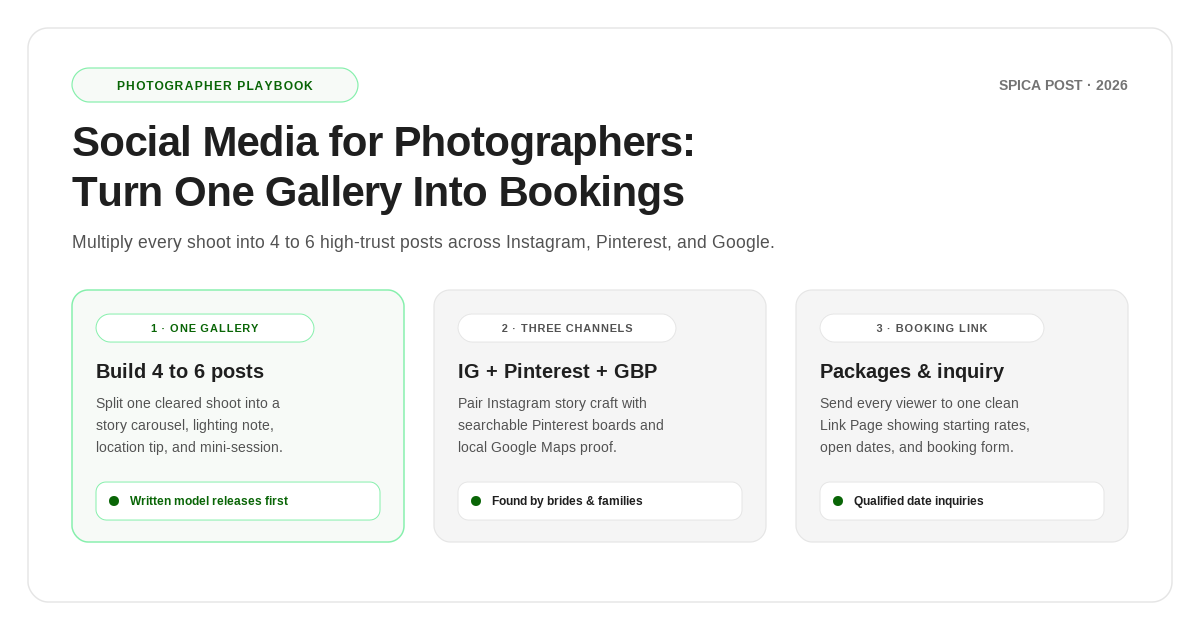
Social media for photographers becomes a dependable booking engine the day you stop posting random isolated favorites for other photographers and start turning every cleared client gallery into 4 to 6 structured booking assets distributed across Instagram, Pinterest, and Google Business Profile, all pointing straight to one fast Link Page holding your packages, starting rates, and inquiry form.
Platform specs, model-release references, and Spica Post availability snapshot verified November 2026.
Most portrait, family, wedding, and commercial photographers already sit on hard drives full of gorgeous finished images. Yet weeks pass with zero posts because culling a 600-image wedding or editing 45 family portraits leaves zero mental energy to invent clever captions from scratch. Then, when a photographer does post, they upload one single landscape shot with a heart emoji, forget to name the city or venue, hide every hint of starting investment, and wonder why likes roll in from fellow photographers while their calendar still has open weekends.
This guide shows four booking blockers to clear on your profiles first, which channels bring real local brides, families, and commercial clients in 2026, a step-by-step Gallery-to-Booking Loop, specialty tweaks across portrait, wedding, and commercial work, strict model-release and child-privacy standards, five copy-ready captions, a four-season booking calendar, and a 25-minute export routine built right into your existing gallery delivery workflow.
Fix four booking blockers before sharing your next gallery
Open your Instagram bio, Pinterest profile, and Google Business Profile on a phone as if you were an engaged couple hunting for a fall wedding photographer or a marketing director needing team headshots next month. Four small gaps quietly leak inquiries every week.
1. Poetic bio copy with no city, travel radius, or specialty
Lines like “Chasing light · Visual storyteller · Coffee lover” sound warm and fail search completely. Buyers search by geography and occasion. Put your exact specialty, primary city, travel radius, and booking status right in lines one and two (for example: “Austin Family & Wedding Photographer · Serving Central Texas · Now booking Spring & Fall 2027”).
2. Scattered links instead of one clean booking Link Page
Never send a ready-to-book bride or busy parent from your Instagram bio to a slow desktop homepage where they have to hunt through five menus just to check whether you photograph newborns or still have October open. Point every social bio and QR code on your printed pricing guide to one fast mobile Link Page holding four clear items:
- Packages & Starting Investment (transparent starting ranges by session type so clients self-qualify calmly).
- Check Date Availability / Inquiry Form (short mobile form asking only event type, target date/month, location, and contact email).
- Current Seasonal Mini-Sessions or Open Months (promoted to the top box 4 to 6 weeks before launch).
- Featured Local Venue & Location Guides (direct links to 3 signature galleries matching the bookings you want more of).
3. An empty or outdated Google Business Profile
Instagram proves your editing style and warmth; Google Search and Maps capture people typing “family photographer [City]”, “headshot photographer near me”, or “[Venue Name] wedding photos” with a real date on their calendar. Configure your listing cleanly as either a studio storefront or a service-area business if you shoot on location without a public studio (per Google Business Profile representation guidelines), upload sharp portfolio samples regularly (Google photo tips and Google photo guidelines), and reply warmly to every client review (see our Google review response guide).
4. Zero pinned “Start Here” or experience breakdown
New visitors scroll only your top six squares before deciding whether to click your link. Pin three deliberate anchors at the top of your Instagram grid: a warm self-portrait introducing who you are and how you put camera-shy people at ease, your single strongest local storytelling carousel from the exact specialty you want to book more of, and a clear “How Booking Works” slide deck covering timeline, turnaround, and starting rates.
Where local brides, families, and commercial clients actually look in 2026
Different photography specialties convert on different channels. Match your weekly posting footprint to how your real clients search instead of spreading your energy thin across seven apps.
| Channel | What the photography buyer does here | Best weekly job in this profession | Current Spica Post status (Nov 2026) |
|---|---|---|---|
| Judges editing consistency, posing warmth, local venues, and personality | 3 weekly posts: 1 hero carousel, 1 lighting/posing note, 1 open-dates or venue post | Built; completing Meta App Review | |
| Searches “[Venue] wedding photos”, “fall family outfits”, and “golden hour portraits [City]” months ahead | 3 to 5 vertical 2:3 gallery pins weekly linked directly to venue/package pages |
Built and tested against stand-ins; waiting on Pinterest Standard access | |
| Google Business Profile | Searches “photographer near me”, reads reviews, and checks recent work | Upload 2 to 3 cleared photos weekly, post seasonal openings, reply to reviews | Built and enabled in production; awaiting first live service-area profile verification |
| Branded Link Page | Reviews packages, starting rates, mini-session slots, and submits inquiries | Always live in every social bio and printed as a QR on client welcome cards | Live today in Spica Post with custom announcement boxes and printable SVG QR codes |
| Facebook Page & local groups | Parents asking “Who does fall family minis?” and local community referrals | Mirror hero carousels and seasonal mini-session launches; share politely in allowed threads | Built; completing Meta App Review |
| LinkedIn (personal profile) | Creative directors, founders, HR teams, and event planners hiring commercial shooters | 1 to 2 weekly posts for commercial photographers: brand case studies and headshot days | Live direct publishing today |
| TikTok / YouTube Shorts | Couples and families watching behind-the-scenes posing and session-day clips | Optional: 1 short 12-second BTS clip pairing the posing prompt with the finished frame | Built; TikTok in review, YouTube OAuth approved and completing compliance audit |
| X / Bluesky / Mastodon | Creative peers, editorial leads, and local small-business networking | Optional: crisp photo sets and studio updates linking to your portfolio or Link Page | Live direct publishing and Auto-crosspost today (Bluesky Unified Inbox live) |
For portrait, family, and wedding photographers, the winning trio is Instagram + Pinterest + Google Business Profile funneling cleanly into one Link Page. For commercial, headshot, and brand photographers, swap Pinterest priority for LinkedIn personal profiles + Google Business Profile + Instagram so marketing directors and local founders see real business outcomes.
The Gallery-to-Booking Loop: turning 1 delivered gallery into 4 to 6 posts
You do not need a fresh photoshoot every Tuesday to stay consistent online. Every single cleared client gallery already contains two full weeks of calm, high-trust booking proof when you divide it deliberately by buyer question instead of dumping ten random frames in one afternoon.
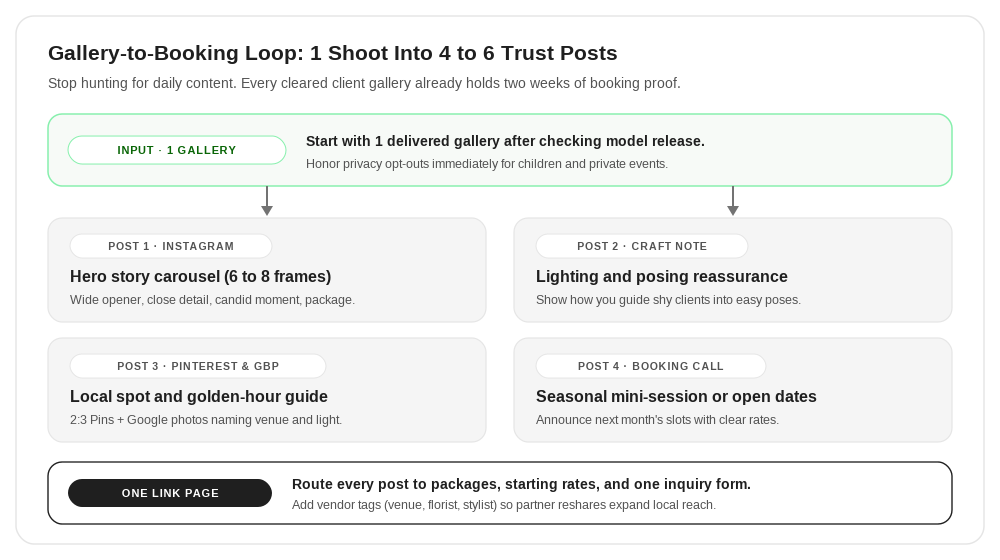
| Asset from 1 gallery | Primary channel | What buyer hesitation it resolves | What to include in the caption |
|---|---|---|---|
| 1. Hero story carousel (6 to 8 frames) | Instagram + Facebook | “Will my whole gallery look cohesive, or just one lucky shot?” | Vertical 4:5 mix of wide scene, candid emotion, tight detail, and portraits; name city, season, and exact session package |
| 2. Posing and lighting craft note | Instagram + Threads/Bluesky | “My partner and kids feel awkward in front of a camera.” | 2 to 3 frames showing relaxed movement plus one plain sentence describing the prompt you gave (e.g., walking hand-in-hand instead of stiff smiles) |
| 3. Local spot and golden-hour guide | Pinterest (2:3) + Google Business Profile |
“Where should we shoot, and what time gives soft light?” | Exact park, studio, or venue name, city, time of day, parking note, and direct link to your packages or venue post |
| 4. Open dates or mini-session call | Instagram + Facebook + Link Page | “Do you even have openings when we need them?” | 1 standout vertical frame announcing exact open months or mini-session dates, session length, starting rate, and inquiry button |
| 5. Vendor & venue collaboration spotlight | Instagram (collab/tags) + Pinterest | “Does this photographer work smoothly with local venues and teams?” | Detail shots crediting venue, florist, planner, or stylist cleanly so local partners reshare to engaged buyers |
| 6. Commercial outcome or testimonial frame | LinkedIn + Google Business Profile | “Will these photos actually help our brand or team look sharp?” | Short client quote (with permission) or before-and-after website/team-headshot use case with booking CTA |
Building a 6-to-8-frame hero carousel that earns saves
Single horizontal photos shrink awkwardly on phone screens and scroll past in half a second. Crop your hero carousel to 4:5 vertical (1080 x 1350) and sequence it like a short film: slide 1 is your strongest emotional stopper, slide 2 sets the wide venue or landscape context, slides 3 to 5 alternate intimate candid moments with crisp texture details (bouquet, tiny shoes, product packaging), slide 6 shows relaxed interaction, and the final slide offers a calm invitation naming the exact package and your Link Page (learn slide pacing tricks in our Instagram carousel guide).
Pairing Instagram craft with Pinterest and Google local search
Instagram posts fade from feeds within 48 hours, whereas Pinterest pins and Google Business Profile photos generate local inquiries six to eighteen months later. Whenever you finish a cleared venue shoot, export three vertical 2:3 (1000 x 1500) frames per Pinterest creative best practices using search-ready titles that name the real location and occasion (for example: “Autumn Golden-Hour Family Portraits at Zilker Park in Austin” or “Garden Courtyard Wedding Portraits at [Venue Name]”) and link straight to your packages or Link Page (see our Pinterest guide for small businesses). Upload two of those exact frames to your Google Business Profile the same afternoon.
Tailoring the loop by photography specialty
- Portrait and family photographers: Lead heavily with posing reassurance for fidgety toddlers and camera-shy dads, simple wardrobe color tips, exact park light windows, and 4-to-6-week lead times on seasonal mini-sessions.
- Wedding and elopement photographers (see our wedding workflow): Lead with full-day lighting reliability (bright midday ceremony, golden-hour portraits, crisp flash reception shots), specific local venue names in captions and Pinterest titles, and thoughtful vendor tags that build planner referrals.
- Commercial, headshot, and brand photographers (see our commercial workflow): Lead on LinkedIn and Google Business Profile with business clarity: fast turnaround times, usage licensing explained plainly, on-location office headshot logistics, and how consistent brand imagery upgrades websites and press kits.
Model releases, privacy opt-outs, and client consent
Photography is an intimate profession. Treating client privacy with quiet rigor is not just smart legal hygiene; it is one of the strongest trust signals you can offer families, schools, weddings, and corporate clients.
Practical studio workflow note (not legal advice): confirm your exact contract and model-release wording with a qualified attorney or established industry-association templates such as ASMP property and model release guidance.
- Check written model releases before moving a single file into your social folder. Never assume paying for a shoot grants automatic social media permission. Build a clean, readable Model Release section into every client contract with an explicit checkbox so clients choose freely without awkward pressure.
- Offer and respect child-privacy opt-outs warmly. Many parents love your photography and prefer keeping their children’s faces completely off public social feeds. Make a “Keep our gallery private (no online sharing)” option effortless and fee-free. When families opt out, honor it 100 percent without exception, and feel free to ask whether anonymous detail frames (hands holding tiny shoes, sunlit back-of-head silhouettes, or empty location scenery) are also excluded.
- Never post private event addresses, children’s full names, or schools. Keep captions warm and protective using first names only (when cleared) or simply “this sweet Austin family”, and omit school names, home addresses, or private residence landmarks.
- Respect corporate NDAs and commercial embargoes. Before sharing behind-the-scenes clips from a product shoot, restaurant menu launch, or executive portrait day, verify in writing when the brand’s public launch date passes and whether raw setup frames are cleared for your portfolio.
- Check venue and bystander context. Tag wedding venues and commercial spaces accurately, avoid zooming in on identifiable uninvolved bystanders in public parks, and honor every client request to remove a published photo promptly.
Five copy-ready captions for photographers
Keep these five templates in your editing checklist and fill in your city, venue, lighting notes, package name, and Link Page address.
1. Hero gallery storytelling carousel
Golden hour at [Park / Venue Name] in [City] rarely disappoints, especially when a [family / couple] shows up ready to laugh instead of staring stiffly at the lens.
Swipe through a few favorites from this [60-minute Family Session / Full-Day Wedding]: soft late-afternoon light along the [trail / courtyard], real candid moments between posed portraits, and warm true-to-life tones that still look timeless ten years from now.
Session details: [Package Name], delivered in [Turnaround, e.g., 2 weeks] via private online gallery. Now booking [Upcoming Months] in [City / Region]. Tap our Link Page in bio to view packages, starting rates, and open dates.
2. Behind-the-scenes posing reassurance for camera-shy clients
The sentence I hear from nine out of ten clients before we start: “Just a heads-up, we are super awkward in front of a camera!”
You never have to know what to do with your hands. During every [portrait / engagement] session, I give simple movement prompts (walking slowly, whispering something ridiculous, leaning in toward the light) so real laughter takes over within five minutes. Swipe to slide 2 to see the exact candid frame we got ten seconds after everyone said they felt nervous.
Want relaxed portraits in [City] without stiff posing? Tap Packages & Availability at the link in our bio.
3. Local venue and golden-hour guide (Instagram, Pinterest, and Google)
Planning [family / engagement / wedding] photos around [City]? Here is why [Location / Venue Name] is one of our favorite spots for [Season] light:
- Best light window: 75 minutes before sunset along the [west lawn / stone steps] for soft, even skin tones with zero harsh squinting
- What wears well here: Warm neutrals, sage, soft denim, and textured layers that complement the natural backdrop
- Easy logistics: [Short walk from parking / restroom access / permit note if applicable]
Save this guide for your planning board, or tap the link in our bio to check our [Month] openings at [Location] and around [City].
4. Seasonal mini-session launch post (publish 4 to 6 weeks early)
[Season, e.g., Fall Golden-Hour / Spring Blossom] Mini-Sessions in [City] are officially open!
Perfect for updated family portraits, holiday cards, or milestone snaps without a full-hour schedule:
- Dates: [Saturday, Date] and [Sunday, Date] at [Location Area]
- What is included: [20-minute] guided session, style guide, and [15+] hand-edited high-resolution images delivered within [10 days]
- Investment: $[Amount] total ([Deposit Amount] holds your time slot)
Only [Number] spots available across both evenings. Tap the top button on our Link Page in bio to pick your time before slots fill.
5. Commercial, headshot, and brand-shoot post (for LinkedIn)
When was the last time your company’s team page and proposal deck matched the actual caliber of your work today?
Last week we spent half a day on site with [Client Industry or Cleared Company Name] in [City] capturing clean natural-light team headshots, workspace candids, and press-ready portraits with minimal interruption to their workday. Every employee stepped in for five relaxed minutes, reviewed their favorites on the spot, and received retouched files in [5 business days] ready for LinkedIn, press releases, and recruiting pages.
Booking [Next Month] half-day and full-day brand and team-headshot sessions across [Metro Area]. View corporate packages and request a fast quote via the link in my profile.
Four-season photography calendar and five mistakes to skip
Booking windows vary sharply by photography niche: weddings book 9 to 18 months ahead, families book 4 to 8 weeks ahead, and commercial retainers often book at the start of fiscal quarters. Map your calendar early so quiet winter weeks stay planned instead of stressful.
| Season | What buyers are booking right now | High-booking weekly post themes |
|---|---|---|
| Winter (Jan to Mar) | Newly engaged wedding couples (post-holiday proposals), corporate team headshots, indoor studio portraits, spring bookings | “Just engaged in [City]?” wedding guides; Q1 LinkedIn headshot updates; early announcement of spring blossom minis |
| Spring (Apr to Jun) | High school & college senior portraits, Mother’s Day minis, spring family sessions, peak engagement shoots | Senior portrait outfit and location guides; graduation announcements; venue spotlights tagging local wedding teams |
| Summer (Jul to Sep) | Peak weddings, golden-hour beach/park families, early autumn mini-session waitlists, small-business brand refreshes | Launch autumn holiday-card mini-session waitlist in late July; real wedding gallery carousels; BTS posing tips |
| Fall and Holidays (Oct to Dec) | Fall family minis, holiday card shoots, autumn weddings, digital session gift certificates, next-year wedding dates | Last-call fall slots; print and heirloom album reminders; “Gift a 2027 family session” holiday gift cards; year-end LinkedIn brand refresh |
Drop these five habits to turn profile views into signed retainers:
- Writing captions only about camera gear. Buyers rarely care whether you shot at
f/1.4on a 50mm prime; they care how relaxed they will feel, where you shoot, and how fast galleries arrive. - Hiding every clue about location and starting investment. Missing city names block local search, and hidden starting rates attract mismatched inquiries. State both cleanly.
- Posting one horizontal image with zero carousel context. Vertical
4:5Instagram carousels and2:3Pinterest pins own mobile screen space and show range across an entire session. - Skipping vendor and venue credits. On wedding and commercial work, crediting cleared venues, florists, hair stylists, and planners builds free referral networks all year.
- Neglecting Google Business Profile between busy seasons. Uploading two cleared images and answering one review each week keeps you showing up when locals search “photographer near me”.
A 25-minute gallery-delivery routine and honest Spica Post trade-offs
The easiest way to stay visible during peak shooting season is attaching social media directly to the moment you already export a cleared gallery:
- Right after exporting a cleared gallery (10 minutes): Confirm the client’s signed model release allows public sharing. Export a tiny “Social 6” subfolder right beside the full gallery: 6 to 8 vertical
4:5frames for an Instagram carousel, 3 vertical2:3frames for Pinterest, and 2 crisp frames for Google Business Profile. - Once a week on Monday or Sunday (12 minutes): Turn that single subfolder into two weeks of scheduled posts using the Gallery-to-Booking templates above, and verify your Link Page’s open-months banner matches your real calendar.
- Weekly check (3 minutes): Answer any new Google review warmly and check which posts drove the most taps to your Packages & Inquiry button.
Honest trade-offs if you consider Spica Post
If you are evaluating Spica Post for photographers (or our tailored workflows for wedding photographers and commercial photographers), here is the exact November 2026 platform picture for small businesses and creators:
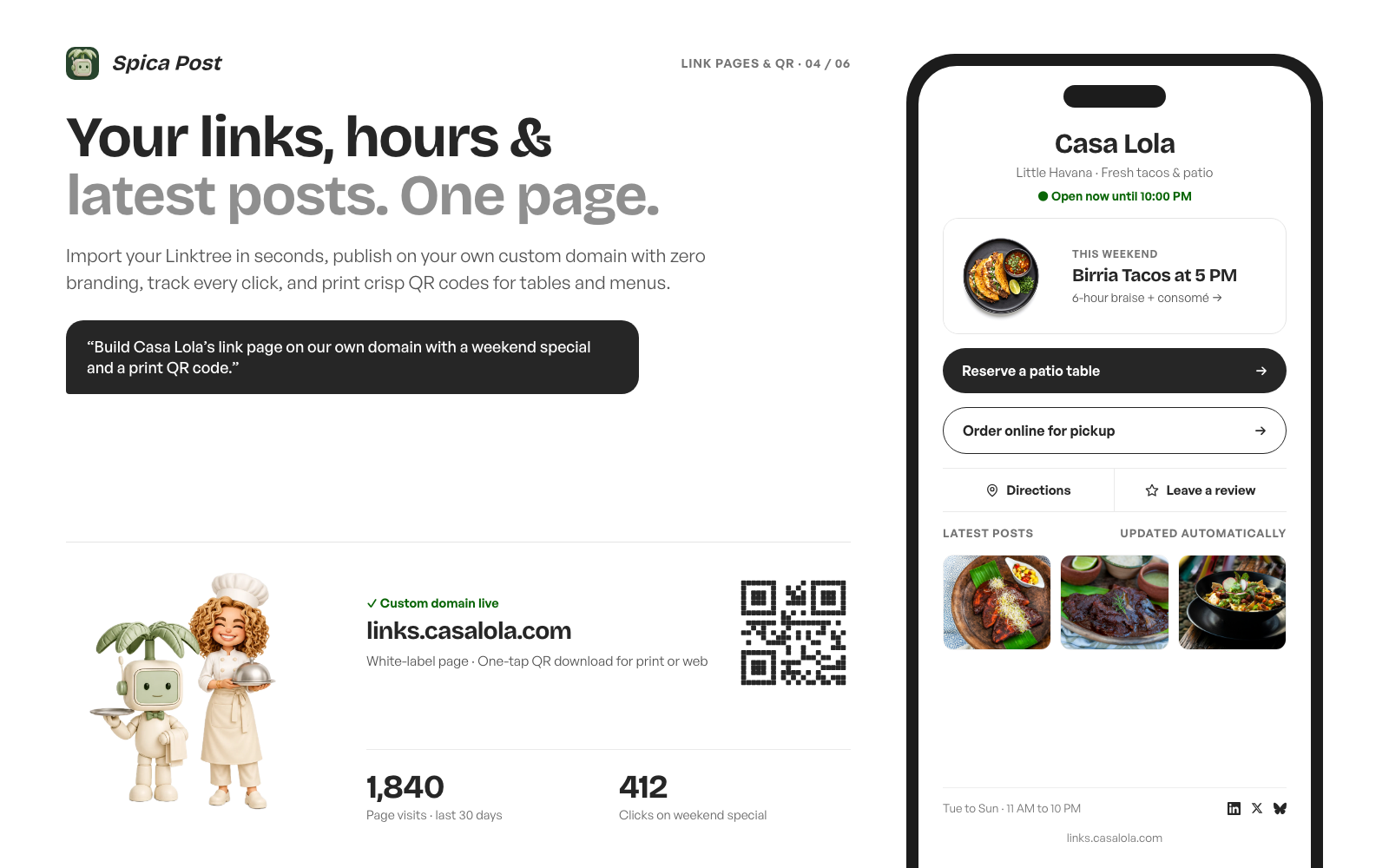
- Live today: Spica Post provides a fast branded Link Page (built to hold your session packages, starting investment notes, seasonal mini-session countdown box, featured galleries, and inquiry link plus printable SVG QR codes for bridal shows and client welcome packets),
/l/click-tracked short links showing which galleries send visitors to your booking form, drafting in your studio’s own voice, and direct scheduling plus Auto-crosspost across LinkedIn personal profiles (ideal for commercial and headshot photographers), X, Bluesky (with live Unified Inbox replies), and Mastodon. - Built and completing network review: Because Instagram, Pinterest, Facebook Pages, and Google Business Profile carry heavy discovery weight for portrait and wedding photographers, note plainly that Spica Post’s connectors for Google Business Profile (approved and enabled in production, awaiting first live service-area profile verification), Instagram, Facebook Pages, Threads, TikTok, Pinterest (built and tested against stand-ins, awaiting Standard access), and YouTube (OAuth approved, completing compliance audit) are built and finishing platform review and verification. Until Meta, Google, and Pinterest direct publishing open across all workspaces, run your booking Link Page, inquiry click tracking, drafted gallery captions, and LinkedIn commercial posts in Spica Post while pasting your 3 weekly gallery posts natively to Instagram, Pinterest, and Google in ten minutes. Review flat workspace plans anytime on our pricing page.
Start with the very next cleared gallery you deliver this week: export one six-photo vertical subfolder before closing Lightroom, publish a 6-frame storytelling carousel naming your city and package, pin three 2:3 location shots to Pinterest, upload two to Google, and link every single one straight to your booking Link Page. One shoot will work for your calendar all month long.
Questions people ask
- How many social media posts can a photographer create from one delivered client gallery?
- One cleared client gallery easily produces 4 to 6 high-trust posts without feeling repetitive: a 6-to-8-frame hero storytelling carousel, a behind-the-scenes lighting or posing-reassurance note, a local location and golden-hour guide for Instagram and Pinterest, fresh Google Business Profile photos, and a booking call for upcoming open dates or seasonal mini-sessions.
- Which social media platforms bring the most local bookings for photographers in 2026?
- Pairing Instagram, Pinterest, and Google Business Profile covers all three stages of how clients hire a photographer. Instagram builds emotional style trust, Pinterest captures brides and families searching venues and outfits months early, and Google Business Profile converts high-intent local searches such as family photographer or wedding photographer near me.
- Do photographers need a written model release before posting client photos on social media?
- Yes. Always verify a signed written model release in your client contract before selecting any photo for social media, website portfolios, or Pinterest boards, and honor privacy opt-outs immediately, especially for children, schools, and private family events. Check your release language with a legal advisor so scope and exceptions stay crystal clear.
- Should photographers publish starting prices on their Link Page or website?
- Showing clear starting investment ranges (for example, Portrait Sessions starting at $450 or Full-Day Weddings starting at $3,600) filters inquiries cleanly before you spend 30 minutes writing custom proposals. Serious clients feel respected, and your inbox shifts toward buyers who already fit your pricing tier.
- How early should portrait and family photographers launch seasonal mini-sessions?
- Announce seasonal mini-sessions 4 to 6 weeks before shoot day, especially for autumn holiday-card slots and spring blossoms. Give past clients and your waitlist 24 hours of early access, then publish one clear carousel naming exact dates, location vibe, session length, image count, starting fee, and your direct Link Page booking link.
Sources
- Google Business Profile Help: Manage photos and videos for your Business Profile
- Google Business Profile Help: Guidelines for representing your business (service-area profiles)
- Pinterest Business Help: Creative best practices and 2:3 Pin specifications
- American Society of Media Photographers (ASMP): Property and model releases
- Spica Post for Photographers: weekly posting examples and setup