Mother's Day
Mother's Day Social Media Ideas That Don't Feel Like an Ad
Skip pink clipart and loud sales yells: run a calm 3-week Mother's Day plan with early pre-orders, real gift picks, bilingual dates, and warm notes.
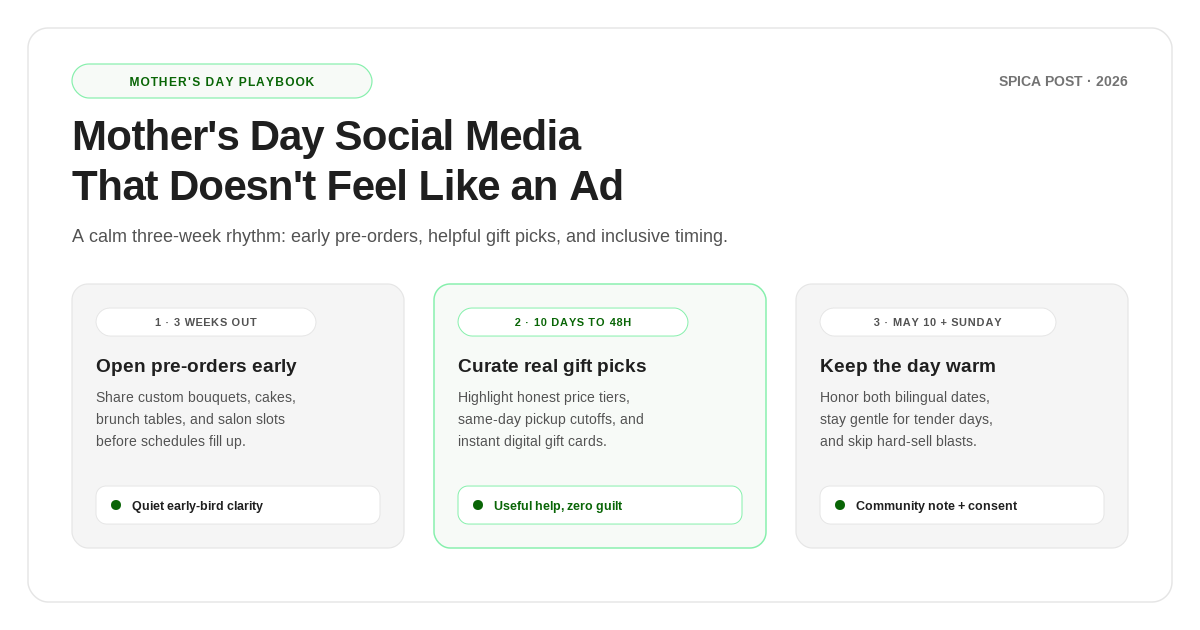
The best Mother’s Day social media ideas for a business solve real planning headaches calmly instead of shouting “Treat Mom! 20% OFF!” over pastel stock clipart. When you open pre-orders three weeks ahead, curate honest gift picks by budget ten days out, confirm walk-in stock and digital gift cards in the final 48 hours, and close with one warm community note, your posts read like helpful neighborhood service rather than another generic ad.
Every May, local feeds turn into an identical wall of script fonts, pink starbursts, and frantic countdowns. Customers scroll right past them because every caption says the exact same thing and answers none of the practical questions that actually trigger a booking or purchase: When is your order cutoff? Can I pick this up Saturday afternoon? Do you serve a vegetarian brunch? Can I send a digital gift card in two minutes if my mom lives three states away?
This guide gives small businesses and creators a grounded three-week Mother’s Day posting schedule, guidance on serving bilingual communities across both May 10 and the second Sunday of May, thoughtful tone habits for customers who find the holiday tender, eight profession-specific post ideas, five copy-ready captions, Google Business Profile prep, and an honest look at where Spica Post fits in November 2026.
Why loud Mother’s Day ads get scrolled past
Most seasonal social posts fail because they treat a personal family milestone like a mattress clearance event. Recognizing the three traps that make Mother’s Day posts feel synthetic lets you stand apart immediately in your city’s feed.
Generic clipart hides what you actually sell
Stock graphics covered in clip-art carnations and generic “Happy Mother’s Day from our team!” banners strip away the exact reason people buy locally: your actual craft. A crisp daylight photo of real peonies on your workbench, a freshly glazed lemon cake boxed with twine, or a handwritten salon gift envelope sitting beside a ceramic mug tells a customer in half a second why your shop beats a last-minute supermarket errand.
Guilt-tripping copy alienates busy shoppers
Lines like “Don’t show up empty-handed!” or “She did everything for you, the least you can do is buy her this!” land poorly. Shoppers already feel time pressure in May amid graduations, school concerts, and end-of-quarter work. Practical clarity converts far better than manufactured guilt: tell buyers the exact item, the price range, the order cutoff date, and how smoothly pickup works.
Starting four days before Sunday overwhelms your crew
Waiting until Wednesday before Mother’s Day to mention special menus or custom bouquets guarantees chaotic DMs, disappointed regulars, and sold-out frustration. According to the National Retail Federation’s Mother’s Day trend hub, gift buyers across flowers, dining, personal services, greeting cards, and gift cards split naturally into early planners who lock in reservations weeks ahead and convenience buyers who purchase in the final days. A calm three-week rhythm serves both groups cleanly without stressing your calendar.
The calm three-week Mother’s Day posting rhythm
You do not need to post every day in May to run a strong Mother’s Day season. Eight to ten focused posts spread across three weeks cover every decision point from early reservations to Sunday morning thank-you notes.
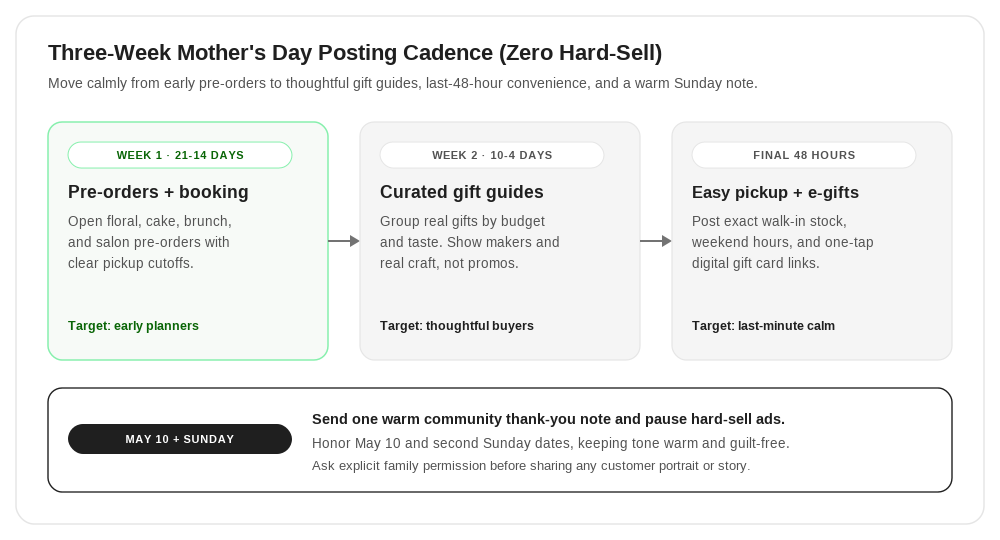
| Window | Primary job of your posts | Best formats and details to include |
|---|---|---|
| Week 1 (21 to 14 days out) | Open pre-orders and bookings | Custom bouquets, cake flavors, brunch seatings, salon packages, or family portrait mini-sessions with exact cutoff dates and deposit terms |
| Week 2 (10 to 4 days out) | Curate real gift and experience picks | Three budget tiers, behind-the-scenes prep, maker stories, shipping cutoffs, and early digital gift-card mentions |
| Final 48 hours (Fri and Sat) | Remove last-minute friction | Exact walk-in inventory, Saturday and Sunday special hours, parking cues, and a one-tap digital gift card link pinned to your Link Page |
| Holiday (May 10 and Sunday) | Share one warm community note | Short, sincere thank-you post honoring mothers and caregivers; pause loud promotional blasts and let people enjoy the day |
Week 1: Open pre-orders and bookings calmly (mid-April)
Early planners love certainty. Roughly three weeks before the second Sunday of May, publish one clean overview post and pin it to the top of your primary social profile plus the top box of your Link Page. List the exact items open for pre-order, the pickup windows, and the cutoff day.
For example, a bakery lists three cake sizes, two brunch pastry boxes, and a Tuesday 5:00 PM pre-order cutoff. A restaurant posts its exact Mother’s Day seating windows (say, 10:00 AM, 12:15 PM, and 2:30 PM), whether children’s plates are available, and a direct booking link. Plain operational facts feel helpful rather than pushy, and they save your staff hours of answering identical phone questions.
Week 2: Share thoughtful picks and real craft (10 to 4 days out)
Once early bookings are rolling, shift from logistics to helping undecided buyers picture the right gift. Skip blanket “Shop our Mother’s Day collection!” captions and instead organize real recommendations by personality or budget:
- Three clean price tiers: One under-$35 thoughtful pick, one $50 to $85 centerpiece gift, and one shared experience or bundle.
- Behind-the-scenes craft: A short carousel or 20-second vertical clip showing your florist conditioning stems in buckets, your baker folding berry filling, or your team handwriting gift cards. People buy from local businesses because real humans made the item with care.
- Experience and distance options: Explicitly remind followers whose mothers live out of town about mail-order cutoffs or instant digital gift cards that arrive by email at a scheduled morning hour.
Final 48 hours: Make walk-in pickup and digital gifts effortless
On Friday morning and Saturday afternoon, stop pitching custom work that is already closed. Instead, become the calmest helper in a stressed shopper’s feed. Share one clean shelf or counter photo showing what is physically ready for grab-and-go pickup right now, along with your weekend hours and exact cross streets.
Pair that with one dedicated mention of your digital gift card or printable voucher. Tell shoppers plainly: “Need a thoughtful gift in two minutes? Order a digital voucher on our Link Page and schedule delivery for Sunday morning with your own note.” Practical relief beats flashy urgency every time.
Holiday Sunday: One warm note, zero sales noise
On Mother’s Day itself, pause any lingering discount reminders or automated promotional posts. Publish one simple, genuine community note thanking your regulars and acknowledging the mothers, grandmothers, aunts, and caretakers who keep families and neighborhoods steady. If you are open for walk-in brunch or flower pickup, state your hours briefly at the bottom without turning the greeting into a hard pitch.
Serving bilingual communities: May 10 and the second Sunday of May
If your business serves neighborhoods across Florida, Texas, California, Arizona, Illinois, New York, or any bilingual community, remembering only one Mother’s Day date leaves half your regulars guessing. Across the Americas, two major May dates sit right next to each other every single year:
- May 10 (fixed calendar date): Mexico, Guatemala, and El Salvador celebrate Día de las Madres on May 10 every year, whether it falls on a Tuesday, a Friday, or a Saturday.
- Second Sunday of May: The United States, Canada, Colombia, Venezuela, Peru, Ecuador, Chile, Honduras, Cuba, Puerto Rico, and Brazil celebrate on the second Sunday of May.
- First Sunday of May: Spain celebrates Día de la Madre one week earlier, on the first Sunday of May, which matters if your customers ship gifts abroad or have family overseas.
Plan your pre-order cutoff around whichever date comes first on that year’s calendar. In some years May 10 lands on Wednesday or Thursday right before Sunday, turning the entire week from May 9 through May 14 into one sustained celebration window for florists, bakeries, Mexican and Latin American restaurants, gift shops, and portrait studios.
Mention both dates naturally in your Week 1 pre-order announcement and on your Link Page banner: “Pre-orders are now open for both May 10 (Día de las Madres) and Sunday, May [Date]. Choose your preferred pickup day on the order form.” That single sentence tells bilingual families you genuinely know your community and saves frantic DMs asking whether you will have roses or tres leches cakes ready on the tenth. For broader year-round seasonal timing, compare our holiday social media calendar for small businesses and our 2027 small business calendar guide.
Keeping your tone inclusive, gentle, and respectful
Mother’s Day is joyful for many households and quietly painful for many others. People scrolling your feed may have lost a mother recently, grown up in a strained home, experienced pregnancy loss, or be navigating infertility. A thoughtful small business can still promote its flowers, brunch, or gift boxes cleanly without turning the week into an emotional ambush.
Practical tone habits that keep customers feeling respected
- Drop the guilt completely: Never frame buying a product as proof of love (“Show her she actually matters!”). Frame your offer around ease, warmth, and craftsmanship.
- Widen the language naturally: Referring occasionally to “the mothers, grandmothers, aunts, mentors, and caretakers in your life” feels grounded and authentic without sounding corporate.
- Include an opt-out on email lists: If you pair social posts with an email newsletter, send one brief, considerate note in mid-April allowing subscribers to mute Mother’s Day emails with one click while staying subscribed to regular shop news. Even customers who keep receiving your emails remember that kindness.
- Keep your feed balanced: Interleave normal everyday posts (your regular lunch special, a routine behind-the-scenes update, or a helpful non-holiday tip) alongside your Mother’s Day posts so your profile never feels one-note for three straight weeks.
Always ask explicit customer and family permission before posting portraits
Mother’s Day invites emotional photos: families laughing at brunch tables, kids carrying bouquets, or multi-generation portrait sessions. Never photograph or publish identifiable customers, mothers, or children without asking explicit verbal or written permission first. When posting a family portrait from a photography studio or salon visit, get clear written consent from the parent or guardian and avoid tagging personal accounts or naming children publicly. When you do not have direct consent, tight frames of wrapped bouquets, pastry boxes, hands pouring latte art, or neatly staged gift bundles communicate just as much warmth while protecting every guest’s privacy.
Eight Mother’s Day post ideas by profession
The strongest posts match what your customer actually wants to solve in your specific profession. Use this overview table to pick two or three angles that fit your real operations, then adapt the specifics below.
| Profession | High-trust post angle | Best timing window | Core friction it removes |
|---|---|---|---|
| Florist | Vase-ready stems and exact delivery zones | 21 to 10 days out, plus Fri stock | Stops guesswork on bouquet size, freshness, and cutoff times |
| Bakery and cafe | Cake flavors, pickup windows, and care card | 21 to 7 days out | Prevents day-of sellout disappointment and box-storage mistakes |
| Restaurant | Fixed seating times, kids menu, and dietary notes | 21 to 10 days out | Answers group-table questions before people phone during rush |
| Hair, nail salon, spa | Gift envelope preview and flexible booking | 14 to 2 days out | Lets givers buy relaxation without guessing Mom’s exact calendar |
| Gift shop and boutique | Three honest budget tiers (under $35 / $75 / bundle) | 10 to 3 days out | Replaces decision fatigue with clear, gift-wrapped picks |
| Photographer | Mini-session lighting preview and wardrobe tips | 28 to 14 days out | Shows relaxed natural expressions instead of stiff poses |
| Home services and cleaning | “Give her a free Saturday” one-time refresh voucher | 14 to 3 days out | Turns practical help into a clear, redeemable gift certificate |
| Creators and makers | Studio workbench story and shipping deadline | 14 to 5 days out | Explains handmade lead times honestly and builds appreciation |
1. Florists: Show real stem recipes instead of catalog grids
Post a daylight workbench photo of three actual bouquet sizes standing side by side next to a coffee mug so customers immediately judge real scale. Explain how to keep blooms crisp if picked up Saturday afternoon for Sunday morning (cool room, fresh trim, clean water away from fruit bowls). State your delivery zip codes and exact pre-order deadline clearly for both May 10 and Sunday.
2. Bakeries and cafes: Pair flavor previews with box-care tips
Show a clean slice cross-section of your Mother’s Day cake or an overhead shot of a morning pastry box, naming allergens and refrigeration notes right in the caption. Mention whether you hold a small batch of counter cakes for walk-ins on Saturday and Sunday morning. For year-round case photography habits, see our bakery social media guide.
3. Restaurants and brunch spots: Publish the calm seating guide
Rather than posting a crowded menu graphic nobody can zoom on a phone, share one clean carousel or Link Page summary covering seating times, parking instructions, high-chair availability, gluten-free or vegetarian highlights, and patio backup plans if it rains. Compare how dining rooms time weekly promos in our restaurant social media guide.
4. Hair salons, nail studios, and day spas: Sell flexibility, not fixed slots
Many shoppers hesitate to book a hair or massage appointment because they do not know their mother’s work schedule. Spotlight nicely packaged physical gift envelopes ready at your front desk alongside instant digital vouchers redeemable for any service (blowout, manicure, facial, or color refresh) over the next twelve months. Check our hair salon social media guide for calm service framing.
5. Local gift shops and boutiques: Curate three honest budget tiers
Film a relaxed 25-second handheld table pan showing three grouped sets: a cozy under-$35 pairing (hand cream plus loose-leaf tea), a mid-tier $65 gift (linen apron plus ceramic bowl), and a splurge bundle. Mention complimentary gift wrapping and handwritten card enclosure at checkout so shoppers know they can walk straight from your counter to Sunday lunch.
6. Family photographers: Preview the experience, not just a price tag
Parents often avoid photos because they worry kids will fidget or outfits will clash. Share three consented client frames (with explicit written family permission) or a quick clip of your outdoor park location at golden hour, explaining that a 20-minute mini-session focuses on candid laughs rather than stiff smiles, plus when edited galleries arrive. Read more portfolio ideas in our photographer social media guide.
7. Home cleaning, landscaping, and local service professions: Offer “time back”
Not every mother wants candles or perfume; plenty want a spotless kitchen, freshly mulched garden beds, or a detailed car interior. Offer a clean printable or digital gift certificate for a single deep clean, spring patio wash, or interior auto detail, stating plainly what is included, your service radius, and how easily the recipient picks her own date later in May or June.
8. Makers, artisans, and creators: Share the studio timeline transparently
Small-batch ceramicists, jewelers, illustrators, and food makers win on human connection. Share a candid studio photo explaining the exact kiln, drying, or shipping cutoff date so buyers understand why ordering ten days early matters. Once your mailing deadline passes, pivot cleanly to local pickup slots or printable “coming soon from the studio” gift notes.
Five copy-ready Mother’s Day captions
Adapt these five templates to your real details, pickup windows, and city. For broader voice habits, read our guide on how to write social media captions.
1. Week 1 calm pre-order and reservation opener
Pre-orders for Mother’s Day are officially open at [Business Name] in [City].
This year we are preparing [2 to 3 specific items, e.g., seasonal hand-tied bouquets, lemon-berry cake boxes, and morning brunch tables] with pickup available for both May 10 (Día de las Madres) and Sunday, May [Date].
Order cutoff is [Day, Date] at [Time] so our team can prep every order fresh without rushing. See full options, prices, and pickup windows at the link in our bio.
2. Week 2 budget-tiered local gift guide
Still deciding on a thoughtful Mother’s Day gift? Here are three real customer favorites ready on our shelves in [Neighborhood] this week:
- Under $[Price 1]: [Specific item + 1 concrete sensory detail]
- Around $[Price 2]: [Specific item or duo + complimentary gift wrap note]
- Shared experience ($[Price 3]): [Workshop, tasting, spa package, or flexible voucher]
Stop by [Street / Cross Streets] through Saturday at [Closing Time], or tap our Link Page in bio to reserve yours for easy counter pickup.
3. Bilingual community schedule reminder (May 10 and Sunday)
Celebrating on May 10, on Sunday, May [Date], or both? We have fresh batches and pickup windows scheduled across the whole week at [Business Name].
¿Celebra el 10 de mayo, el domingo [Fecha] o ambos días? En [Nombre del Negocio] tenemos horarios de entrega y retiro listos para las dos fechas. Reserve su pedido o vea horarios especiales en el enlace de nuestra biografía.
4. Final 48 hours: walk-in stock and instant digital gift cards
Heading into Mother’s Day weekend in [City]: here is what is ready right now for easy walk-in pickup at [Address / Landmark] today until [Closing Time] and tomorrow from [Open] to [Close]:
- [Available grab-and-go item 1]
- [Available grab-and-go item 2]
- Physical gift envelopes wrapped and ready at the counter
Celebrating from afar or short on time? Digital gift cards take two minutes on our Link Page in bio and can be scheduled to arrive right on Sunday morning with your personal message.
5. Warm Sunday community note (zero sales pitch)
Wishing a calm, warm Sunday to the mothers, grandmothers, aunts, mentors, and caretakers across [City] who keep families and neighborhoods going every day.
We also hold space today for anyone for whom this weekend feels quiet or tender. Thank you for welcoming [Business Name] into your kitchen tables and milestones all year long.
(Optional if open: Our doors are open today from [Open] to [Close] for pickups and walk-ins.)
Visuals, Google Business Profile hours, and a pre-launch checklist
Even the warmest caption loses orders if your photos look cluttered or Google shows the wrong Sunday closing time. Spend fifteen minutes cleaning up three practical touchpoints before Week 1 begins.
Natural daylight photos beat heavy graphic templates
Skip crowded text-heavy flyers where twelve fonts compete for attention. Place your gift box, bouquet, pastry tray, or printed gift envelope beside a bright window in indirect daylight, wipe your phone lens clean, and leave simple breathing room around the subject. For framing and natural lighting basics, see our phone product photography guide.
Update Google Business Profile special hours and add a seasonal post
Many weekend shoppers never open Instagram at all; they search “florist open Sunday near me” or “Mother’s Day brunch [City]” directly on Google Maps. Follow Google Business Profile’s special hours guidance at least two weeks early so Maps displays exact Saturday and Sunday hours without an “Hours might differ” warning banner. Pair that with one clean seasonal Update post (per Google Business Profile post help) linking straight to your pre-order page or Link Page.
Pre-launch checklist before mid-April
- Confirm both calendar dates: Verify the exact weekday of May 10 and the date of the second Sunday of May so staff schedules, ingredient orders, and pickup cutoffs align cleanly.
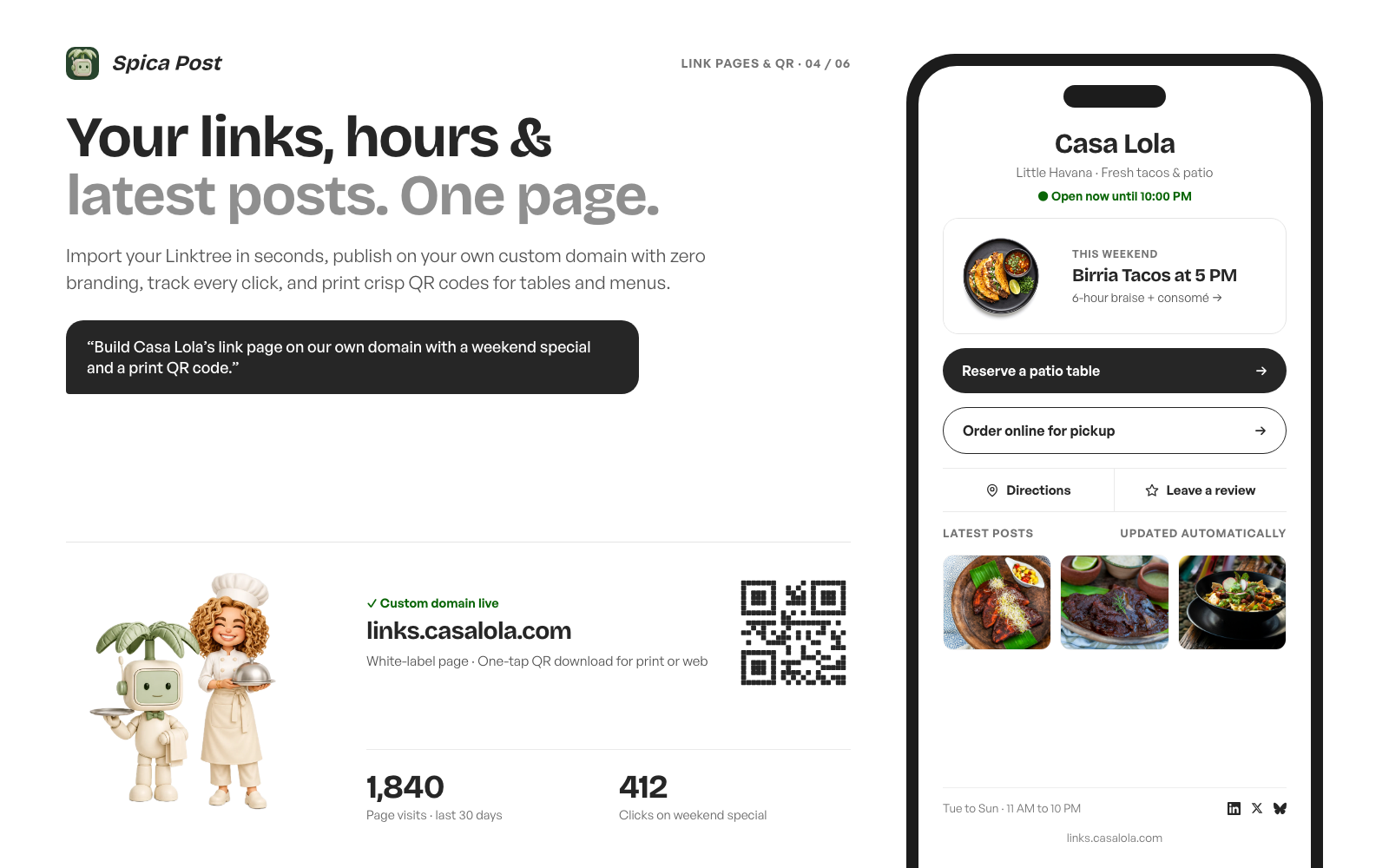
- Pin one Link Page top box: Place your Mother’s Day pre-order form, pickup hours, and digital gift card button at the very top of your Link Page so every bio and counter QR code lands in the right spot.
- Update Google Business Profile special hours: Enter exact May 10 and Sunday hours two weeks ahead.
- Prepare two plain walk-in backup notes: Draft a quick Friday stock update and a sold-out note in advance so you never scramble during Saturday rush.
- Check scheduled automations: Review any evergreen promo queue and pause unrelated hard-sell posts for Mother’s Day Sunday.
- Confirm photo consent: Double-check that any customer or family portrait you plan to publish has explicit permission on file.
A 20-minute April setup routine and honest Spica Post trade-offs
You can prepare your entire three-week Mother’s Day calendar in one focused 20-minute sitting in mid-April:
- Draft three anchor posts (10 minutes): Write your Week 1 pre-order opener, Week 2 budget-tiered guide, and Sunday community thank-you note in your shop’s natural voice.
- Shoot four clean daylight photos (5 minutes): Capture one hero item photo, one multi-item budget tier shot, one behind-the-scenes prep frame, and one gift envelope or voucher photo.
- Sync your Link Page and Google hours (5 minutes): Add your seasonal Link Page box, generate a fresh counter QR code if needed, and save your special holiday hours on Google.
Honest trade-offs if you consider Spica Post
If you are checking how Spica Post helps small businesses and creators run calm seasonal calendars, here is the verified November 2026 platform picture:
- What is live today: You get a fast branded Link Page (with schedulable promotional announcement boxes that appear and expire cleanly after Mother’s Day, plus printable SVG QR codes for counters and gift tags),
/l/click-tracked short links to see which gift guide actually drives orders, voice-consistent drafting across your connected AI assistant or web composer, calendar scheduling, and direct publishing plus Auto-crosspost to X, LinkedIn personal profiles, Bluesky (including live Unified Inbox comment replies), and Mastodon. - What is built and completing network review: Because florists, bakeries, restaurants, salons, and local shops rely heavily on Instagram, Facebook Pages, and Google Business Profile during holiday peaks, note transparently that Spica Post’s connectors for Google Business Profile (approved and enabled in production, awaiting first live profile verification), Instagram, Facebook Pages, Threads, TikTok, Pinterest, and YouTube are built and completing platform review or verification. While Meta and Google direct publishing finish opening across all workspaces, you can draft your whole Mother’s Day campaign, run your seasonal Link Page and QR code, track gift-guide links, and publish to X, LinkedIn, Bluesky, and Mastodon from Spica Post while pasting your Week 1 to Sunday posts directly into Instagram, Facebook, and Google in minutes. Check flat workspace plans anytime on our pricing page or browse more seasonal ideas on our post ideas hub.
Start three weeks out with clear pickup cutoffs, real daylight photos, and honest help for both May 10 and Sunday. Your regulars will appreciate the calm, and your team will enjoy a far smoother holiday weekend.
Questions people ask
- When should a small business start posting for Mother's Day?
- Start three weeks before the holiday, around mid-April, if you take custom pre-orders, brunch reservations, floral deliveries, or salon appointments. Shift to curated gift ideas ten days out, share walk-in stock and digital gift cards in the final 48 hours, and publish one warm community note on the day itself.
- How do businesses promote Mother's Day without sounding pushy or guilt-tripping?
- Replace urgency yells like 'Don't let Mom down!' with practical help: exact pickup cutoffs, honest price tiers, what stays fresh overnight, and clear gift-card delivery steps. Showing real preparation behind the counter earns more orders than neon discount graphics.
- Why should local businesses plan for both May 10 and the second Sunday of May?
- Many neighborhoods celebrate both dates. Families with roots in Mexico, Guatemala, and El Salvador honor Día de las Madres on May 10 every year regardless of the weekday, while the United States, Colombia, Venezuela, Peru, and several other countries celebrate on the second Sunday of May. Publishing pre-order cutoffs that explicitly cover both dates prevents missed bouquets, cakes, and family dinners.
- How should a business handle sensitivity around Mother's Day?
- Keep your tone warm, grounded, and low-pressure because Mother's Day can be tender for customers navigating grief, loss, or complicated family ties. Avoid heavy guilt copy, welcome people celebrating aunts, grandmothers, mentors, or chosen family, and offer a clear opt-out option in any Mother's Day email campaigns.
- Can I share photos of mothers and children visiting my shop or studio?
- Only when you ask for explicit verbal or written permission from the parents or guardians before photographing or posting identifiable faces. When you do not have direct consent, photograph freshly wrapped bouquets, plated pastries, gift boxes, hands tying ribbons, or your own team preparing orders.