Local SEO
How to Show Up in 'Near Me' Searches (Without Keyword Stuffing)
Google turns 'near me' into live location data. Nail your Business Profile, service areas, reviews, and mobile speed to win nearby calls.
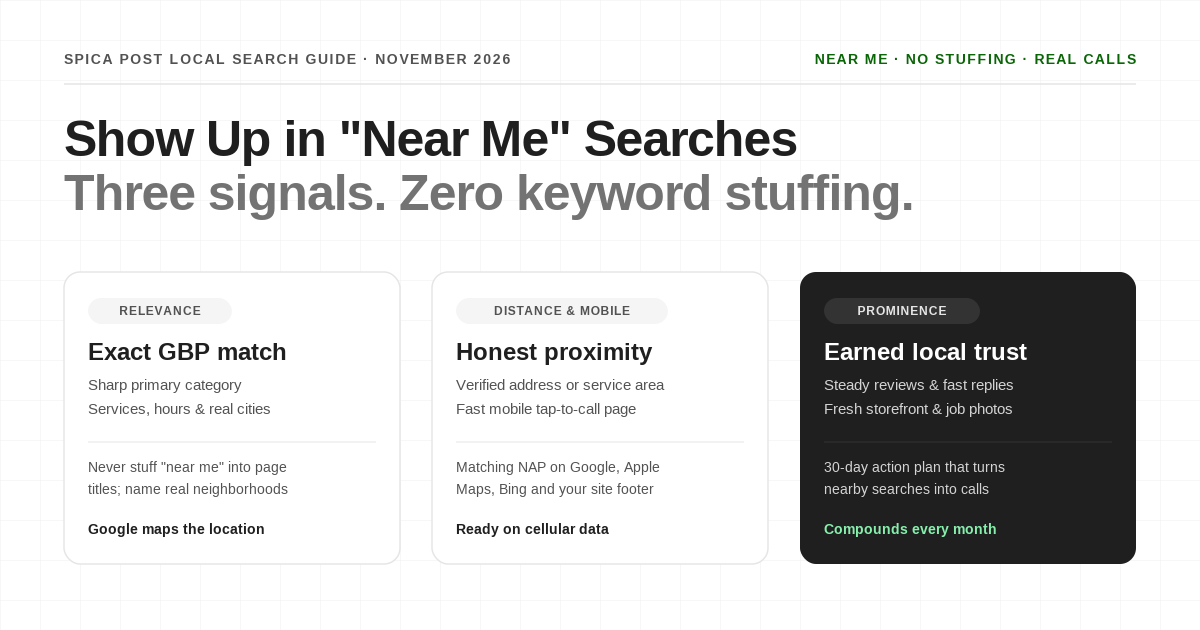
To show up in “near me” searches, you never write the words “near me” on your website or inside your Google Business Profile title. Instead, you verify your real address or honest service areas, choose the sharpest Google Business Profile category, keep your hours and Name-Address-Phone details identical across the web, earn steady customer reviews, and run a fast mobile page with a clear tap-to-call button.
When someone stands in a parking lot and types “oil change near me”, “gluten-free bakery near me”, or “emergency locksmith near me”, Google does not hunt for web pages that literally repeat the words “near me”. Google reads the phone’s live location and returns nearby businesses it is confident are relevant, open, legitimate, and trusted by neighbors.
Snapshot verified November 2026 against Google Business Profile Help and Google Search Central documentation. This guide explains how Google’s three local ranking pillars actually work on “near me” queries, why literal phrase stuffing backfires, the exact Google Business Profile and mobile website checklist to tighten this week, and a calm 30-day action plan any owner can run without an agency.
Why you should never stuff the phrase “near me” on your site
Writing “Best AC Repair Near Me in Phoenix” in your page title or Google Business Profile name actively hurts trust and can put your listing at risk. Understanding how Google interprets proximity queries stops you from wasting hours on awkward copy that makes real buyers hesitate.
How Google translates “near me” behind the scenes
Google treats modifiers like “near me”, “nearby”, “closest”, and “open now” as intent signals, not literal text-matching requests. The moment a phone sends that query, Google combines GPS, Wi-Fi, or IP coordinates with its local map database. Even when a searcher skips “near me” and types “pediatric dentist” or “thai food”, Google triggers the Map Pack using the exact same geographic logic.
What happens when you force “near me” into titles and business names
Forcing “near me” into your digital footprint creates three avoidable problems:
- Profile suspension risk: Per Google’s representation guidelines, your profile title must match your real-world signage and invoices. Adding “Near Me”, “24/7”, or extra suburbs invites edits or suspension.
- Lower click-through trust: Neighbors scanning three results spot spammy headlines immediately. “Rivera Tire & Alignment · Tempe, AZ” reads like a real shop; “Cheap Tires Near Me Best Tire Shop Near Me” reads like a trap.
- Diluted geographic clarity: Every character spent repeating “near me” in a 60-character
<title>tag steals room from your actual city, county, or neighborhood.
Write natural geographic language everywhere instead: your real city, neighborhood, cross-streets for walk-in shops, and exact service towns.
Google’s three official local ranking pillars for “near me” queries
Google publishes its local ranking framework openly in Google Business Profile Help. Every “near me” result on Google Search and Google Maps is ordered by a blend of Relevance, Distance, and Prominence.
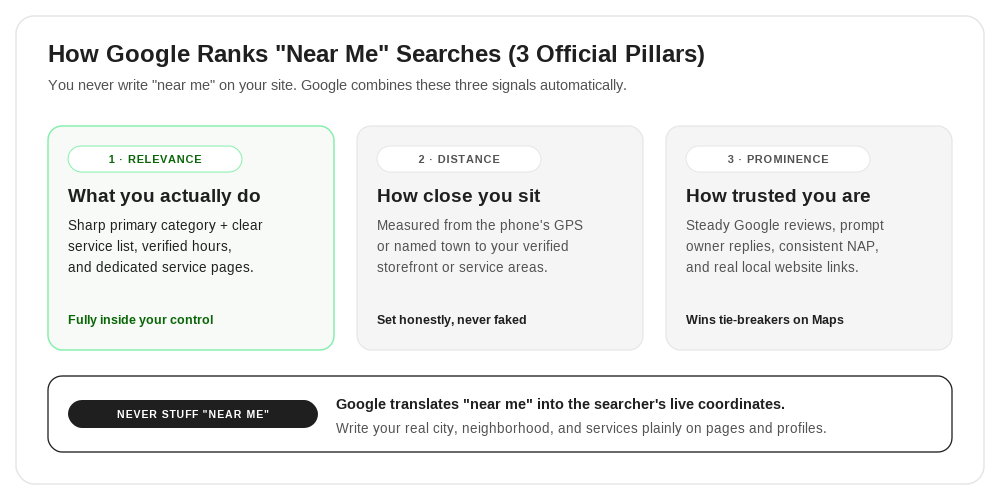
| Ranking pillar | What Google is checking | Can you control it? | Highest-leverage fix this month |
|---|---|---|---|
| Relevance | Whether your categories, services, products, and website match the exact search | Fully inside your control | Pick the sharpest primary category, populate Services/Products, and build dedicated service pages naming your city |
| Distance | Physical proximity from the searcher’s live coordinates to your verified location or service area | Fixed by geography | Verify your real storefront or configure up to 20 honest service areas cleanly (never use P.O. boxes or virtual offices) |
| Prominence | Offline reputation plus online proof (reviews, replies, web accuracy, local links, organic authority) | Compounds steadily over time | Build a repeatable review habit, reply to every review, align NAP on top map apps, and earn local community links |
1. Relevance: remove ambiguity about what you sell
Relevance is where most small businesses quietly lose easy calls. If a homeowner searches “water heater replacement near me” and your profile says only “Contractor” with zero services listed, Google shows a competitor categorized accurately as “Plumber” whose Services tab and website clearly explain water heater swaps in that city.
2. Distance: understand why rankings shift block by block
Two neighbors two miles apart see different top-three businesses for “coffee shop near me”. You cannot override a searcher standing outside a competitor’s door, so daily rank-checking wastes energy. Verify your exact storefront pin or honest driving footprint, then let strong relevance and prominence push your radius outward.
3. Prominence: earn the tie-breaker in crowded neighborhoods
When six barber shops or ten accountants sit within three miles, prominence breaks the tie. Google weighs review volume, ratings, recency, owner replies, cross-map consistency, local press or chamber mentions, and organic website strength.
The exact Google Business Profile checklist for “near me” visibility
Because the Google Map Pack sits above standard blue website links on almost every local phone screen, your Google Business Profile carries the heaviest weight. Audit these seven items inside your dashboard before spending a dollar on ads (for initial setup steps, see our Google Business Profile setup guide).
1. Lock in the single sharpest primary category (plus honest secondary categories)
Your primary category is one of the strongest relevance signals Google reads. Choose the narrowest accurate category for your main revenue driver rather than a broad umbrella. A business focused on heating and cooling should choose “HVAC contractor” rather than “Contractor”; a shop specializing in bridal tailoring should pick “Bridal shop” or “Clothing alteration service” rather than “Store”. Add secondary categories only for services you genuinely deliver year-round so you do not dilute focus.
2. Configure storefront vs. service-area settings cleanly
Per Google’s service-area business guidelines, set your location mode strictly according to how customers actually meet you:
- Storefront businesses (restaurants, salons, clinics, retail shops) display their verified street address and welcome walk-in visits during staffed hours.
- Pure service-area businesses (mobile mechanics, plumbers, house cleaners, mobile groomers working from home) clear the residential street address from public display and declare up to 20 service areas (cities, postal codes, or counties) within roughly two hours of driving time from their base.
- Hybrid businesses (a showroom or office with staffed walk-in hours that also dispatches crews to customer homes) list both their verified physical address and their realistic service areas.
Never rent a P.O. box, UPS mailbox, or unstaffed virtual office address to fake proximity in a wealthier town. Google flags those addresses routinely and recovering a suspended listing can silence your phone for weeks.
3. Keep regular hours, special hours, and “open now” accuracy spotless
Many “near me” queries happen in the moment, especially during evenings, weekends, and holidays. Set your exact opening and closing hours for every day of the week, and enter Special Hours ahead of every federal or local holiday. Even if you stay open your normal hours on a holiday, confirming those hours explicitly inside Google Business Profile removes Google’s warning that hours might differ.
4. Fill out Services, Products, Attributes, and your 750-character description
Treat the rest of your profile like a structured menu Google can read effortlessly:
- Services and Products: List every core service or top-selling product with plain descriptions and realistic pricing ranges where appropriate.
- Attributes: Toggle factual attributes customers filter by on Maps (wheelchair accessibility, outdoor seating, bilingual staff, free parking, veteran-owned, on-site estimates).
- Business description: Put your profession, top three services, and real city or neighborhood in the opening 250 characters before the fold (for ready-to-adapt formulas, read our Google Business Profile description examples).
5. Upload real photos and publish steady weekly Google Updates
Fresh, authentic photos of your exterior sign, clean interior, stocked work van, finished craft, and real team members prove your business is alive today. Always ask customers for explicit permission before photographing them, their vehicles, or the inside of their homes, and keep house numbers and personal details out of frame. Pair fresh photos with one concise weekly Google Update or Offer post, keeping phone numbers out of the description text so Google’s automated filters do not reject the post. You can verify the crop and character limits ahead of time with our free Google Business Profile post preview tool.
6. Build a steady review and reply rhythm
A profile with 45 recent reviews answered thoughtfully by the owner consistently outperforms an abandoned listing with 80 stale reviews from three years ago. Send your direct Google review link in your invoice email or counter QR card after a smooth job, never offer discounts strictly in exchange for five-star ratings, and reply calmly to every single review within 48 hours. When thanking a customer, mention the service naturally (“Glad we could get your brake pads swapped quickly before your road trip”) without stuffing robotic keyword strings. For fast, natural phrasing, use our guide on how to respond to Google reviews.
Mobile website speed, tap-to-call, and local page proof
Google evaluates your website using its mobile version first. Per Google Search Central’s mobile-first indexing documentation, the content, headings, structured data, and internal links visible on smartphones are what Google predominantly indexes and ranks.
Give every core service its own clean, fast mobile page
Do not force one homepage to carry ten unrelated services. Give each major service a dedicated page with a literal <title> tag combining Service + City + Business Name (for example, “Emergency Roof Leak Repair in Tacoma, WA | Cascade Roofing”). State plainly what the job includes, which neighborhoods you cover, typical timelines, and answers to the three questions callers ask before booking.
Make calling, directions, and hours effortless on a phone screen
Test your own website right now on cellular data with Wi-Fi switched off:
- Above-the-fold tap-to-call (
tel:): Your phone number must be a tappable link right near the top of the screen, never trapped inside a banner graphic or hidden in a collapsed menu. - Direct map and booking links: Storefronts need a one-tap Google Maps directions link and clear parking notes; appointment businesses need a fast booking button that works cleanly with one thumb.
- Matching crawlable NAP in the footer: Write your exact Business Name, Street Address (or listed service-area towns), Phone Number, and Hours in plain HTML text matching your Google Business Profile character for character.
- Compressed phone photos: Resize giant 6 MB smartphone uploads down to crisp web dimensions before placing them on landing pages so mobile visitors on weak signal do not bounce back to Google and call the listing below yours.
Align the handful of map directories that feed phones and AI assistants
Skip bulk directory blasts onto obscure link farms. Verify exact Name, Address, Phone, hours, and website links on the five platforms real phones and search engines rely on:
- Google Business Profile (Google Search and Google Maps).
- Apple Business Connect (Apple Maps and Siri directions on iPhones).
- Bing Places for Business (Bing Maps, Windows devices, and several AI search tools).
- Facebook Page and Instagram profile (the two social profiles locals check most often to verify you are active).
- One or two respected profession directories or your local chamber of commerce (Yelp for food and local retail, Nextdoor for home services, or your city’s chamber directory for a clean local backlink).
For a broader walk-through of local schema markup and Search Console basics, pair this checklist with our local SEO guide for small business beginners.
Your 30-day action checklist to win more “near me” calls
You do not need an overnight overhaul. Break the work into four focused 45-minute weekly blocks so every piece gets finished without pulling you away from customers.
- Week 1 (Google Business Profile accuracy): Verify your primary and secondary categories, confirm your storefront address or clean list of up to 20 service areas, enter regular and upcoming holiday special hours, and rewrite the opening 250 characters of your description with your real city and core services.
- Week 2 (Website mobile check and NAP alignment): Test your homepage and top service pages on cellular data, confirm a clickable
tel:link sits above the fold, update<title>tags to name your service plus real city (zero “near me” stuffing), match your footer NAP character for character to Google, and compress heavy hero images. - Week 3 (Map ecosystem and visual freshness): Claim or update Apple Business Connect and Bing Places so hours and phone numbers match Google exactly, upload five to eight crisp real photos of your storefront, team, or finished work (always with explicit customer permission for any client spaces or faces), and publish one clean Google Update post.
- Week 4 (Review habit and local measurement): Create a short printable QR card or text follow-up link for happy customers, reply to every unanswered Google review from the past six months, verify your domain in free Google Search Console, and record baseline monthly calls, direction requests, and website clicks from Google Business Profile Performance so you can track real growth next month.
Tracking local search and keeping profiles active with Spica Post
Improving “near me” visibility is not a one-time checkbox; it rewards businesses that stay visibly active on Google and social profiles while watching which local queries actually drive calls.
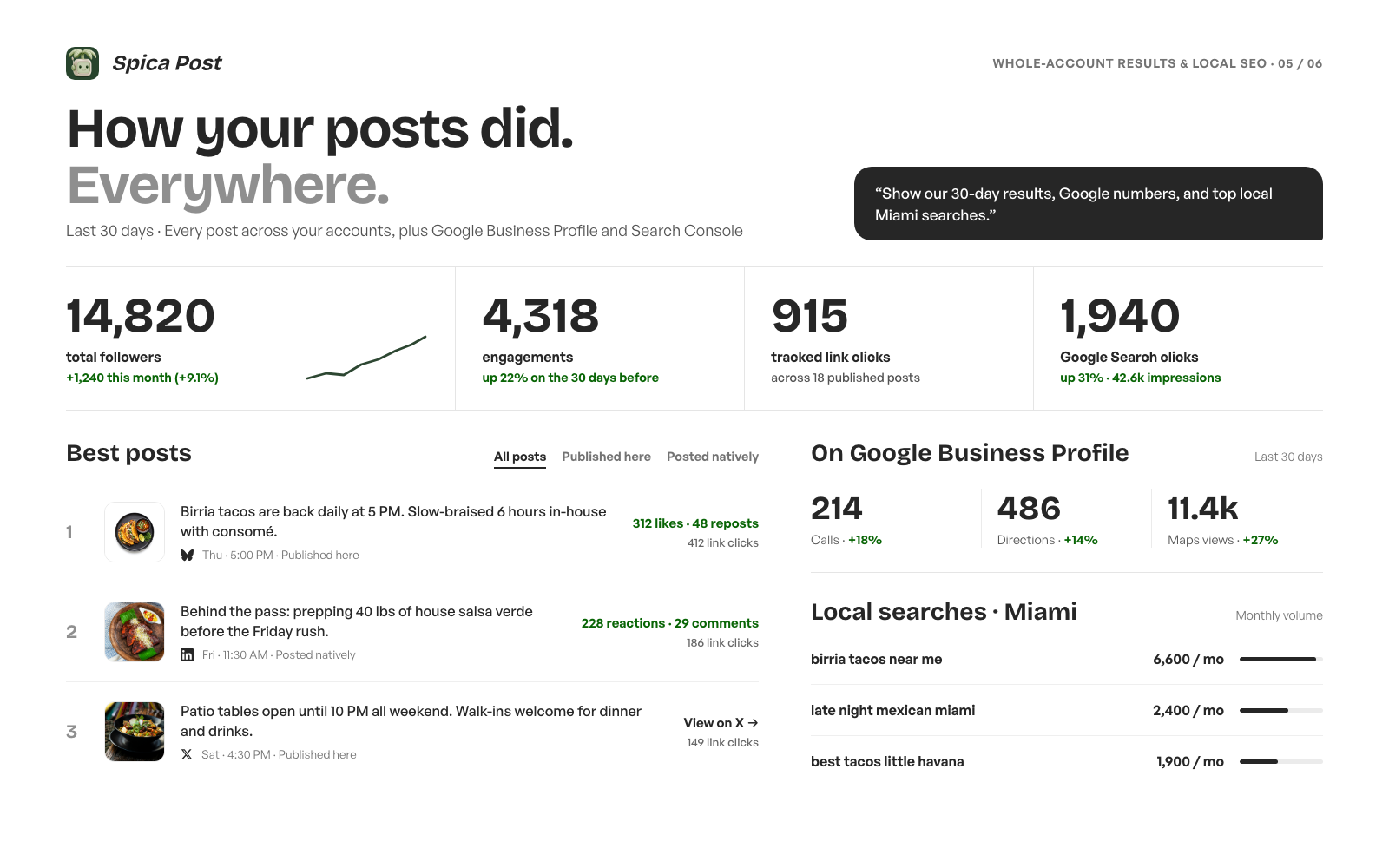
Inside Spica Post Studio, small businesses and creators get local keyword research (pulling city-level Google monthly search volumes and 12-month trends for up to 10 terms in English or Spanish), Google Business Profile Performance stats (“On Google”: calls, direction requests, website clicks, and views with period-over-period comparisons), Google Search Console top search terms and landing pages, branded Link Pages with your live open-now hours and QR codes, and a Unified Inbox built to keep reviews and comments from slipping through the cracks.
To be completely upfront about current live rollout and real trade-offs (verified November 2026): Spica Post publishes live today to X, LinkedIn personal profiles, Bluesky, and Mastodon, with live branded Link Pages, hosted blogs, /l/ tracked short links, and Unified Inbox live on Bluesky. Our Google Business Profile integration has approved API access and is enabled in production, awaiting our first live service-area verification before general rollout; Google Search Console read-only integration awaits final OAuth verification; and Instagram, Facebook Pages, Threads, TikTok, Pinterest, YouTube, and LinkedIn Company Pages are built and completing platform review and verification. Spica Post also never buys directory blasts or automates fake reviews, because real local prominence comes from real work and accurate profiles. You can compare current plans and capabilities anytime on our pricing page.
Start with Week 1 today: verify your primary category, remove any awkward “near me” stuffing from your site titles, confirm your upcoming holiday hours, and reply to your last three Google reviews before closing up shop.
Questions people ask
- Should I write the words 'near me' on my website to rank for near me searches?
- No. Google treats 'near me' as a live location instruction tied to the searcher's GPS, Wi-Fi, or IP coordinates rather than a literal phrase to match on a web page. Stuffing 'plumber near me' or 'bakery near me' into your headlines looks spammy to real buyers and adds zero ranking value. Name your real city, neighborhood, and specific services plainly instead.
- What factors decide which businesses appear in near me results on Google?
- Google's official Business Profile documentation names three local ranking pillars: relevance (how closely your profile and website match what the searcher needs), distance (how close your verified location or service area sits to the person searching), and prominence (how well-known and trusted your business is based on reviews, replies, web accuracy, and local links).
- Can a service-area business without a walk-in storefront show up in near me searches?
- Yes. Under Google's service-area business guidelines, contractors, cleaners, mobile groomers, and home-based professionals can hide their residential street address and list up to 20 realistic cities, postal codes, or counties within roughly two hours of driving time. Google still uses your verified base location and listed service zones to match nearby searches.
- How important are Google Business Profile hours for near me searches?
- Very important, especially for urgent searches like 'open now' or evening queries. If your listing lacks holiday special hours or shows inaccurate closing times, Google may filter your business out of 'open now' results or warn searchers that hours might differ. Confirm regular and holiday hours early so nearby buyers see you as open.
- How long does it take to improve near me visibility after fixing my Google profile?
- Foundational fixes such as correcting your primary category, completing your service list, confirming hours, and replying to recent reviews often improve map impressions and calls within two to six weeks. Building stronger prominence through steady reviews, mobile site improvements, and local citations compounds over three to six months.