LinkedIn Company Page vs. Personal Profile: Where to Post
Post primarily from your personal LinkedIn profile for reach and replies, and keep a clean Company Page as your storefront and logo badge.
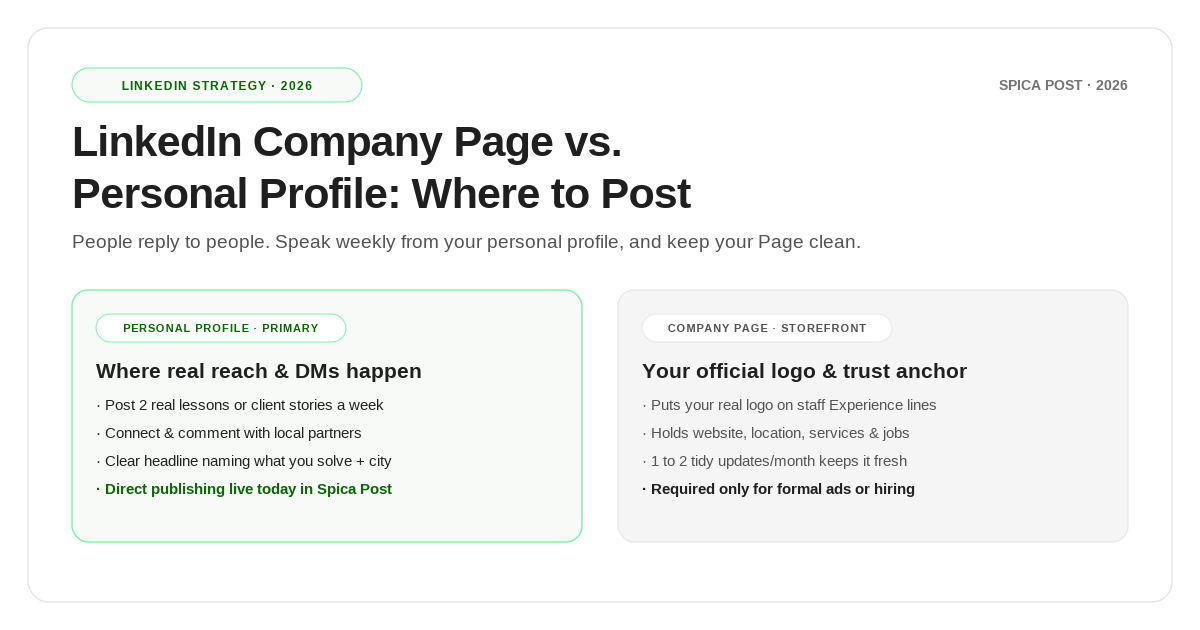
For a small business owner, solo consultant, agency founder, or local advisor, post primarily from your personal LinkedIn profile and keep your LinkedIn Company Page tidy as your official digital storefront. On LinkedIn, people trust, reply to, and send referral messages to real humans with faces and opinions, whereas unpaid Company Page updates routinely sit unseen unless backed by ad spend or an active employee team.
Countless small businesses give up on LinkedIn after three quiet months because they made one setup error: they built a shiny Company Page with 35 followers (mostly friends and relatives), posted polite corporate flyers there twice a week, received two likes from their own co-founder, and concluded “LinkedIn does not work for small businesses.” Shifting the exact same two weekly notes over to the owner’s personal profile changes the conversation almost immediately.
This guide gives you a clear side-by-side comparison of both LinkedIn surfaces, explains why you still need a clean Company Page even when posting personally, outlines a calm two-surface weekly split for solo owners and small teams, shares three copy-ready LinkedIn templates, and explains how Spica Post pairs with LinkedIn today.
Side-by-side comparison: LinkedIn Company Page vs. personal profile
LinkedIn itself treats personal Profiles and Company Pages as two different tools with distinct permissions and strengths:
| Dimension | Personal LinkedIn Profile | LinkedIn Company Page |
|---|---|---|
| Organic feed visibility | Strongest by far: LinkedIn’s feed prioritizes posts and comments from individual people | Usually modest without paid boosting or active employee resharing |
| Conversations and DMs | You can send connection notes, comment directly on partners’ posts, and receive private messages | Pages cannot initiate personal connection requests or natural 1-on-1 DMs |
| Credibility and brand anchor | Shows your individual experience, background, and local community ties | Displays your official logo on every team member’s Experience line and ranks in Google brand searches |
| Paid ads and formal hiring | Limited primarily to Thought Leader Ads sponsored through a linked Page | Required for standard Sponsored Content ads, official job postings, and formal company analytics (per LinkedIn Pages) |
| Tone that works best | First-person (“I” or “we”), plain lessons, client snags solved, honest local or industry observations | Crisp company milestones, new services, open roles, press mentions, and official contact proof |
| Best weekly effort (small biz) | Primary voice: 2 honest posts a week + 10 minutes replying and commenting | Clean storefront: 1 to 2 tidy proof updates per month so it never looks closed |
Why personal profiles win real leads for small businesses
Whether you run a bookkeeping firm, commercial cleaning company, architecture studio, IT consultancy, print shop, real estate practice, or local catering kitchen, your best LinkedIn referrals rarely come from strangers clicking a logo. They come from referral partners and former colleagues: local CPAs, attorneys, mortgage brokers, property managers, HR leads, and neighboring owners who already know your name.
When you write from your personal profile:
- Your posts land directly in the feeds of people who already trust you. Old coworkers, local business owners, and past clients recognize your face immediately, pause to read a 120-word lesson, and drop a comment that shows your post to their entire local network.
- Commenting works like a quiet networking breakfast. Leaving three thoughtful, non-sales comments a week on posts by local business leaders or industry peers puts your headline right in front of buyers who would never follow a brand logo.
- Inquiries start naturally in messages. When someone needs a reliable fractional CFO, local commercial printer, or office mover, sending a quick message to a human owner feels ten times easier than filling out a cold corporate form. (For concrete personal post prompts, read our LinkedIn guide for small business owners.)
Why you should still build and maintain a clean Company Page
Skipping a Company Page altogether creates two subtle credibility leaks:
- The empty gray icon problem. If your personal Experience entry says “Founder at Harborline Tax & Accounting” with no linked Company Page, LinkedIn displays a generic gray placeholder square beside your company name. Creating a free Company Page in ten minutes puts your crisp logo right on your personal profile and on every employee’s profile.
- The Google verification check. When a prospective B2B client Googles your company name before signing a retainer, your LinkedIn Company Page frequently appears on page one right beneath your website. Seeing a clean banner, accurate location, website link, clear service summary, and a recent update from this month reassures them you are active and established.
The calm two-surface weekly split (zero double work)
You do not need to write separate content calendars for two LinkedIn accounts. Assign each surface its exact job so LinkedIn takes 20 minutes a week total.
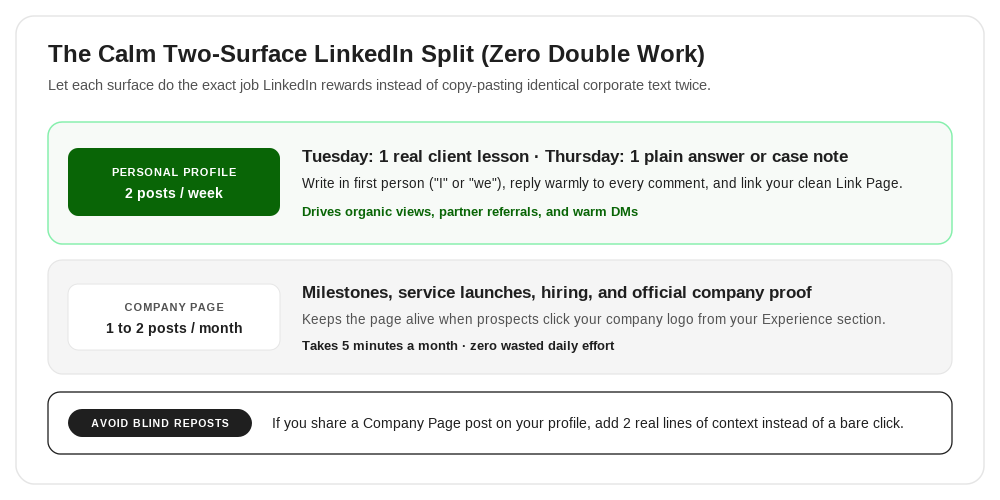
For solo owners and 1-to-5 person businesses
- Personal profile (2 posts/week): Tuesday shares one practical lesson or mistake prevented from your recent work; Thursday answers one real client question plainly or breaks down a local trend.
- Company Page (1 to 2 posts/month): Share one clean company milestone, seasonal availability notice, team welcome, or link to a helpful guide on your site so anyone clicking your logo sees a live, active business.
For growing teams of 6 or more
Do not ask every staff member to robotically click Repost on corporate announcements. Instead, invite willing leaders (owners, account managers, estimators, or technical specialists) to share one genuine observation a week from their own personal profile while your Company Page houses official case studies, open job roles, and company news.
Why blind “Reposts” fall flat
Clicking LinkedIn’s instant Repost button on your own Company Page post without adding personal commentary almost always yields quiet reach. If you want your personal network to see a Company announcement (such as a new service line or open role), either write the story natively on your personal profile first, or use “Repost with your thoughts” and add three honest sentences explaining why this matters to clients.
Three copy-ready LinkedIn templates (personal vs. Company)
Notice how the exact same expertise feels much warmer and more readable when adapted to each surface.
1. Personal profile: real client lesson (Tuesday slot)
A client called us this week ready to spend $12,000 replacing software that wasn’t actually broken.
Twenty minutes into looking at their setup, we found three duplicate exports running overnight that slowed every morning report to a crawl. Turning two off fixed the speed issue in an afternoon.
Before signing any big upgrade contract this quarter, ask for a 1-page list of what is actually causing the bottleneck today. Most small teams need a clean tune-up, not a brand-new stack.
What is the smallest fix that saved your business the biggest headache this year?
2. Personal profile: plain local or industry Q&A (Thursday slot)
Three questions every [City] small business owner should ask before signing a commercial lease renewal (from helping twelve local clients review theirs this year):
Happy to send anyone in [City] our plain 1-page review checklist if you are coming up on renewal. Drop a comment or grab my calendar link in my profile.
3. Company Page: tidy monthly storefront update
Starting this month, [Company Name] is taking on two new [monthly bookkeeping / commercial maintenance / web support] clients across [City / Region] for Q1.
What working with our team looks like: clear flat monthly scope, one dedicated local point of contact, and plain-English monthly check-ins with zero surprise add-ons.
See current services, sample timelines, and direct booking at our website link in the About section.
Five common LinkedIn setup mistakes (and fast fixes)
- Treating your personal headline like a bare job title. Change “Owner at Smith Electric” to “Licensed Commercial Electrician in Denver | Helping retail shops and offices fix panel, lighting, and code headaches.” Every comment you leave becomes a quiet introduction.
- Posting exclusively on your Company Page. If you have under 1,000 Company Page followers and zero paid ad budget, putting 100% of your writing energy into the Company Page hides your best thinking from your real network.
- Leaving your personal Featured section empty. Pin your clean branded Link Page, booking link, or top helpful guide right inside your personal profile’s Featured shelf so interested readers tap straight through.
- Pitching immediately inside connection requests. Connect warmly with peers and local owners with zero pitch attached; let your twice-weekly helpful posts earn the conversation naturally.
- Forgetting client privacy. Always ask explicit permission before naming a client company or showing client team members in a post; otherwise anonymize cleanly (“a local 12-person clinic we work with”).
A 10-minute checklist to tie both LinkedIn surfaces together
Before publishing your next post, spend ten minutes connecting your personal profile and Company Page so prospects move smoothly from a helpful comment to a booked call:
- Rewrite your personal headline with clarity. State who you help, the problem you solve, and your city or region instead of only your internal title.
- Verify your clickable Company Page logo under Experience. Edit your current role on your personal profile, re-select your official Company Page from LinkedIn’s dropdown, and save so the gray placeholder disappears.
- Add one primary link in your personal Featured section. Pin your clean branded Link Page, consultation booking URL, or flagship customer guide right near the top of your profile.
- Complete your Company Page About tab once. Confirm your website URL, street address or service metro, concise 2-paragraph overview, crisp cover banner, and current specialties.
- Invite real local contacts thoughtfully. Use LinkedIn’s monthly Page invite credits only for existing clients, colleagues, and friendly referral partners rather than blasting cold strangers.
Scheduling LinkedIn cleanly (and honest Spica Post trade-offs)
Batching two personal LinkedIn posts every Sunday afternoon takes fifteen minutes and removes the guilt of opening LinkedIn during busy client days.
Honest Spica Post status note for LinkedIn
As of November 2026, Spica Post aligns directly with the exact strategy in this guide:
- Live today: Direct scheduling and publishing to LinkedIn personal profiles works live right now inside Spica Post (alongside X, Bluesky, and Mastodon plus Auto-crosspost, chained threads, and your branded Link Page for your personal LinkedIn Featured section and contact link).
- In approval for Company Pages: Spica Post’s LinkedIn Company Pages connector (“Spica Post Pages”) is built and awaiting LinkedIn Community Management API approval. Because small businesses only need 1 to 2 Company Page updates per month anyway, you can schedule your entire weekly personal profile cadence automatically in Spica Post today and drop one quick monthly milestone onto your Company Page manually in two minutes. See live platform availability and flat workspace plans on our pricing page.
Update your personal LinkedIn headline today so it names what you solve and where you work, verify your Company Page logo is linked properly under Experience, and schedule two plain, helpful personal posts for next week.
Questions people ask
- Should a small business owner post on a LinkedIn Company Page or personal profile?
- Post primarily on your personal LinkedIn profile. People engage with, reply to, and message real humans far more readily than brand logos. Keep a clean Company Page as your official storefront so your company logo shows up on your Experience line, website links stay accurate, and prospects can verify your business.
- Do I still need a LinkedIn Company Page if I post from my personal profile?
- Yes. Without a Company Page, your current job title on your personal profile shows a generic gray building icon instead of your real logo. A tidy Company Page also ranks well in Google searches for your company name and is required if you ever post formal jobs or run LinkedIn Ads.
- How often should a small business post on its LinkedIn Company Page vs personal profile?
- A realistic rhythm for solo owners and small teams is two short, honest posts per week from the owner's personal profile plus one or two crisp milestone or service updates per month on the Company Page so it never looks abandoned.
- Should I repost my Company Page updates onto my personal profile?
- Avoid tapping plain Repost with zero added words, which usually gets minimal attention. Instead, either write the main lesson natively on your personal profile first, or add two or three genuine lines of personal perspective above the shared update.
- Can Spica Post schedule posts directly to LinkedIn right now?
- Yes for LinkedIn personal profiles: direct scheduling and publishing to LinkedIn personal profiles are live today in Spica Post. LinkedIn Company Pages support is built and awaiting LinkedIn Community Management API approval.