Claude
How to Use Claude to Write Social Media Posts in Your Own Voice
Build a 1-page voice brief with real writing samples, set up a Claude Project, and connect Spica Post over MCP to approve and queue posts.
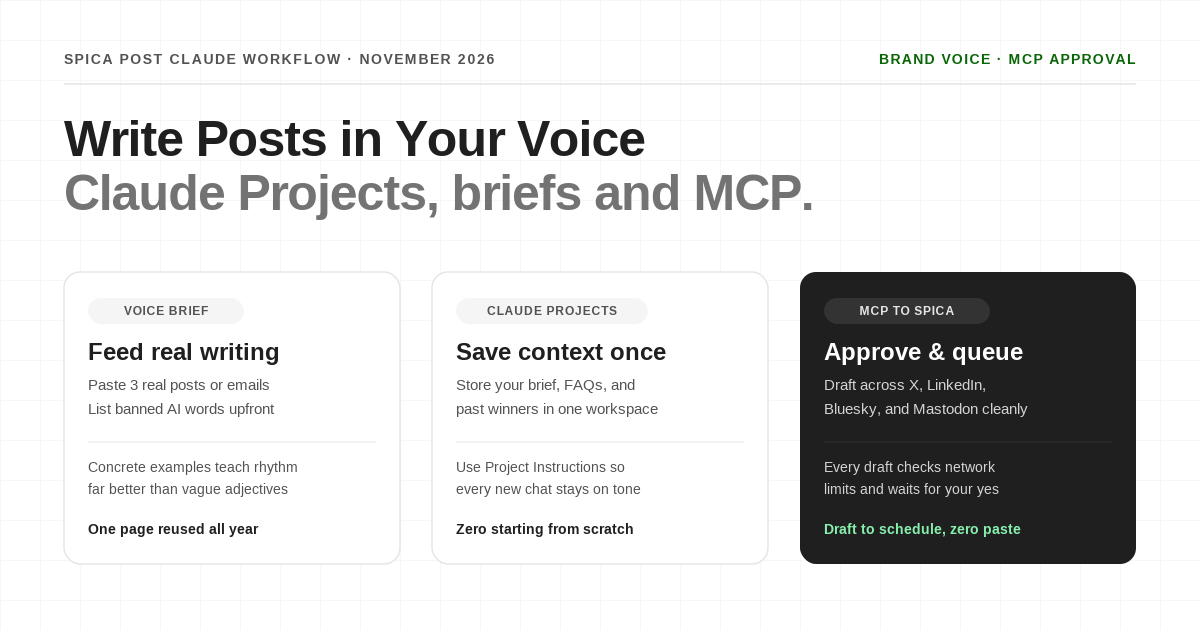
To use Claude for social media posts that genuinely sound like you, stop describing your tone with generic adjectives and feed Claude a one-page voice brief containing three real writing samples and a short list of banned cliches, save that brief inside a dedicated Claude Project, and connect Spica Post over MCP so approved drafts check network limits and queue without copy-pasting. Snapshot verified November 2026.
Most small businesses and creators test Claude once, ask “Write five LinkedIn and Instagram posts for my coffee roastery,” and receive polite, neatly structured drafts filled with phrases they would never say aloud at their own counter (“elevate your morning ritual,” “craftsmanship meets community,” “let’s dive in”). The fault is rarely Claude’s writing ability; Claude actually mirrors natural human sentence cadence unusually well compared with older models. The problem is that without real examples of how you speak to a customer, Claude has no choice except to sound like an average marketing agency brochure.
This guide walks through the full repeatable pipeline: building a reusable 1-page voice brief in ten minutes, setting up Claude Projects and custom instructions cleanly, four copy-ready Claude prompts (from voice extraction to multi-channel adaptation and cliche cleanup), connecting Claude straight to Spica Post via MCP for draft-to-approval publishing, and honest trade-offs to weigh before automating a single post.
Why examples beat tone adjectives when prompting Claude
Telling Claude to write in a “warm, authentic, authoritative, yet approachable tone” gives it almost zero usable signal. Every company on earth claims those exact four words, so Claude averages millions of bland corporate posts together and gives you polite wallpaper.
Showing Claude three short things you actually wrote (an email reply to a customer, a caption that earned genuine replies, or even a 60-second voice memo transcribed to text) hands it concrete patterns it can copy reliably:
- Sentence length and rhythm: Whether you write crisp 10-word lines or calm two-sentence explanations.
- Vocabulary you actually use: Do you say “folks,” “neighbors,” “clients,” or “customers”? Do you say “book a slot,” “swing by,” or “shoot us a note”?
- Punctuation and formatting habits: Zero exclamation stacks, zero em dashes, plain paragraphs instead of emoji bullet walls.
- Point of view: First-person singular (“I roasted a small Kenya lot this morning”) versus shop “we” (“We opened two Thursday repair windows”).
Once Claude has real specimens beside a strict “never write this” list, the first draft jumps from 40 percent usable to 85 percent ready before you touch a single edit.
The four-stage Claude brand-voice and MCP workflow
Keep writing and publishing inside one clean loop so you never lose context between weeks or accidentally publish an unchecked AI draft.
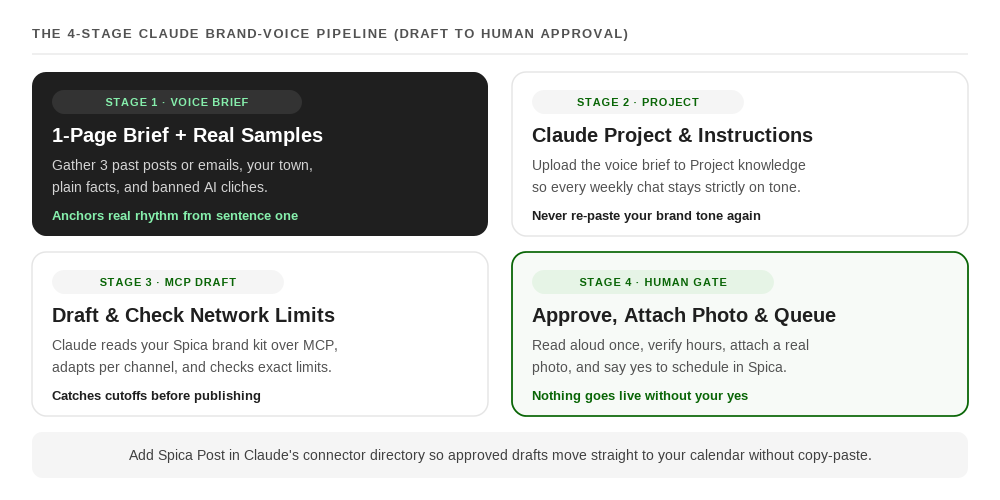
- Stage 1 (10 minutes once): Build your 1-page Voice Brief with three real past writing samples, real shop facts, and your banned-phrase list.
- Stage 2 (5 minutes once): Create a dedicated Claude Project, upload the Voice Brief as Project knowledge, and paste short Project Instructions that lock your boundaries across every chat.
- Stage 3 (10 minutes weekly): Drop raw weekly notes (a finished job, a seasonal menu change, or two real customer questions) into the Project and let Claude draft channel-tailored versions over Spica Post MCP while checking each network’s exact character and media limits.
- Stage 4 (3 minutes weekly): Read each draft aloud once, verify hours and dates, attach a real phone photo, and give Claude your explicit yes to schedule it cleanly.
Build your 1-page voice brief in ten minutes
Open a plain text or Markdown file called brand-voice-brief.md. Fill in these five blocks once and update only the seasonal facts once a quarter. Copy this exact template and swap the bracketed sections:
Brand Voice Brief: [Business or Creator Name]

## 1. Real Facts (never invent beyond these)
- What we do: [e.g., Independent bicycle repair shop and custom wheel builder]
- Location and service area: [e.g., East Austin, TX, off Manor Road, free alley parking]
- Regular hours and booking path: [e.g., Tue to Sat 9 AM to 6 PM; drop-in flat fixes, tune-ups booked via our Link Page]
- Audience: [e.g., Daily commuters, weekend trail riders, and neighborhood families]

## 2. How We Sound (and how we never sound)
- Speak like an experienced owner talking across the counter: direct, helpful, honest about wait times and maintenance reality.
- First person: Use "we" for shop updates and "I" when sharing a personal workbench lesson.
- Punctuation and style: Short paragraphs (1 to 3 sentences). Zero em dashes. At most one understated emoji, or zero by default. Zero hype adjectives.

## 3. Three Real Writing Samples (match this cadence)
Sample A (email or DM reply to a real buyer): "[Paste 3 to 5 sentences you actually wrote to a customer]"
Sample B (short update or caption that felt natural): "[Paste a real past post or newsletter blurb]"
Sample C (how you explain a common problem aloud): "[Transcribe 30 seconds of you explaining a frequent question]"

## 4. Strict Ban List (never use these words or habits)
- Never use: "elevate", "unlock", "game-changer", "delve", "seamlessly", "tapestry", "in today's fast-paced world", "thrilled to announce", "here's the thing", "let's dive in", "not just X, it's Y".
- Never open a post with "Happy Monday!", "Did you know...?", or rhetorical throat-clearing.
- Never invent prices, discounts, deadlines, statistics, or customer testimonials. If a customer story is shared, wait for my note confirming explicit customer permission.

## 5. Network Preferences
- LinkedIn personal profile: 80 to 150 words, practical lesson or honest shop observation, zero corporate buzzwords.
- Bluesky and Mastodon: Conversational, concise (stay cleanly inside Bluesky's 300-grapheme limit and Mastodon's 500-character default), plain alt text required for every photo.
- X: Punchy single update under 280 characters or a tight 2-post thread only when adding real value.
- Instagram / Facebook / Google Business Profile: Lead with the concrete local detail and end with one clear action (no phone number in Google post body text).
If you do not have three old social posts you like, pull three sent emails from your Gmail or Outlook “Sent” folder where you answered a customer question clearly. Real customer emails almost always hold your sharpest, most natural human voice.
Setting up Claude Projects vs. custom instructions vs. styles
Per Anthropic’s Claude documentation, Claude gives you three distinct customization layers. Using the wrong one causes tone bleed across unrelated work:
| Claude layer | Where it applies | Best job in a social media workflow | What to avoid putting here |
|---|---|---|---|
| Claude Project (Knowledge + Project Instructions) | Only chats inside that specific Project | Storing brand-voice-brief.md, seasonal offer sheets, FAQ docs, and brand-specific writing boundaries |
Mixing two different client brands inside one shared Project |
| Account-wide Profile Preferences | Every chat across your whole Claude account | Personal universal habits (such as “Never use em dashes” or “Keep answers concise and plainspoken”) | One shop’s hours, town name, or client-specific voice rules |
| Writing Styles | Toggled on or off per chat | Switching quickly between terse Bluesky notes and longer founder LinkedIn posts when drafting outside a Project | Storing factual hours, prices, or compliance boundaries |
Create one Project named [Your Business] Social Desk (or one Project per client if you manage several brands). Upload brand-voice-brief.md into the Project’s Files / Knowledge panel, then paste a concise 8-line instruction into Project Instructions telling Claude to read brand-voice-brief.md before every draft, enforce the ban list strictly, and insert [NEED DETAIL] instead of guessing missing dates or prices.
Four copy-ready Claude prompts that protect your voice
Once your Project holds your Voice Brief, stop writing giant essays to prompt Claude. Use these four compact prompts inside your Project whenever you sit down to draft.
Prompt 1: Extract your exact voice patterns (run once)
Read
brand-voice-brief.mdin Project knowledge, focusing closely on my three real writing samples. List 6 concrete stylistic fingerprints you notice (sentence length, opening habits, vocabulary level, how I end a thought) and 4 common AI habits that would immediately clash with my samples. Keep it to one short checklist so we can agree on it before drafting.
Review Claude’s checklist once. If it misreads one habit (for example, saying you use casual slang when you prefer crisp plain English), correct it right there and add that line back into brand-voice-brief.md.
Prompt 2: Turn messy bullet notes into channel-ready drafts
Here are three real notes from this week at the business:
Following
brand-voice-brief.mdstrictly, draft posts for [LinkedIn personal profile, Bluesky, X, and Instagram] from these three notes. Open every draft with the concrete fact or repair detail. Keep every ban-list phrase out. Show me all drafts clearly for review before scheduling anything.
Prompt 3: The anti-AI de-fluffing pass
Whenever a draft sounds 10 percent too smooth or “marketing-like,” run this single follow-up prompt instead of rewriting by hand:
Rewrite those drafts as if I were explaining the same thing in 20 seconds to a smart neighbor standing at my counter. Cut every filler opener, remove any phrase that contrasts “not just X, it’s Y,” replace vague adjectives with one physical detail from my notes, and trim total word count by 20 percent.
That single pass consistently strips away the subtle “AI gloss” that readers spot instantly in feeds.
Prompt 4: Turn one real customer FAQ into a calm weekly post
A customer asked me this exact question today: “[Paste real customer question verbatim]”. Here is my honest plainspoken answer: “[Paste 2 or 3 rough sentences]”.
Turn this into one clear teaching post for LinkedIn (under 140 words) and one tight version for Bluesky (under 270 graphemes so it leaves room for a short link). Do not add fabricated statistics or extra claims beyond what I wrote. Suggest one simple phone photo I can snap in 30 seconds to pair with it.
Connect Claude to Spica Post over MCP (draft to human approval)
Writing clean copy inside Claude still wastes twenty minutes a week if you have to copy every draft into four tabs, manually re-check Bluesky’s 300-grapheme limit, upload the same photo three times, and retype alt text by hand. Connecting Claude directly to Spica Post over the open Model Context Protocol (MCP) closes that gap while keeping you firmly in charge of the publish button.
How to connect Spica Post inside Claude in two minutes
As documented on our Claude MCP setup guide, Spica Post is listed directly in Claude’s connector directory:
- Open Spica Post in Claude’s connector directory (or add the custom connector link in Claude Settings under Connectors) and click Add.
- Sign in to Spica Post with your email link and press Allow on the device where Claude asked.
- Inside your
[Your Business] Social DeskClaude Project, make sure the Spica Post connector is toggled on in the tools menu under the message box. - Start a chat by asking: “Check my connected Spica Post accounts and brand details, then draft this week’s posts from my notes below and show them to me first.”
If you also work inside Claude Code, you can install the Spica Post plugin or add the HTTP MCP connector directly from your terminal (full commands are on /connect/claude/) and run /mcp to sign in.
What stays strictly human-approved over MCP
Connecting Claude does not hand over autopilot control of your reputation. Every Spica Post MCP workflow keeps clear human guardrails:
- Read vs. write separation: Read-only tools (checking connected accounts, reading your saved brand kit, viewing your upcoming queue, checking character and media limits) are safe to run smoothly during drafting.
- Explicit approval before scheduling or publishing: Claude presents each network’s exact draft, photo, alt text, and proposed time slot so you inspect it first. Nothing goes live or enters your scheduled queue until you explicitly say yes in chat (and on team workspaces, editors route drafts through the internal approval queue before publishing).
- Instant disconnect anytime: If you ever want to revoke Claude’s access, clicking Disconnect on your Spica Post account page under “Your data and access” terminates the grant immediately on the server side.
Real trade-offs to weigh honestly
AI-assisted drafting over MCP saves genuine hours every week, yet pretending it has zero trade-offs leads to sloppy feeds. Keep four realistic boundaries in mind:
- Voice drift across long chats: Even inside a great Claude Project, threads that run past 20 or 30 back-and-forth turns slowly drift back toward generic phrasing. Start a fresh chat inside your Project each week so
brand-voice-brief.mdsits crisp and front-of-mind. - No AI replaces your real photos or lived stories: Claude can polish a two-line job note into a clean LinkedIn update, yet it cannot stand in your shop, snap a bright window-lit photo, or hear what a customer asked at the register this morning. Your real-world inputs are the whole reason anyone pays attention.
- Fact and permission discipline remains 100 percent yours: Always verify holiday hours, service areas, prices, and explicit customer permission before saying yes to any scheduled post. Never let an assistant invent testimonials or local stats.
- Current Spica Post network status (November 2026): Live direct publishing through Spica Post and MCP works today on X, LinkedIn personal profiles, Bluesky, and Mastodon, alongside your hosted branded Link Page,
/l/tracked short links, hosted blog, and whole-account analytics + Unified Inbox for Bluesky. Integrations for Google Business Profile (API approved, completing profile verification), Instagram, Facebook Pages, Threads, TikTok, Pinterest, YouTube, and LinkedIn Company Pages are built and completing platform review and verification. You can review full MCP tool coverage on our MCP page and current workspace tiers on our pricing page.
If you have been putting off AI writing because every test sounded stiff, take fifteen minutes today: pull three sent customer emails into brand-voice-brief.md, drop that file into a fresh Claude Project with a five-line ban list, connect Spica Post from Claude’s connector directory, and test one real weekly note before changing anything else.
Questions people ask
- Why do Claude social media posts sometimes sound stiff or overly polished?
- When you ask Claude to write a post using only vague tone adjectives like 'friendly, professional, and engaging,' it falls back on safe corporate phrasing. Giving Claude three short samples of your actual writing alongside a short list of banned AI cliches fixes the rhythm immediately.
- Should I use Claude Projects or account-wide custom instructions for brand voice?
- Use a dedicated Claude Project for your business social media rather than account-wide preferences. Project Instructions and uploaded Project knowledge files stay isolated to that brand's chats, keeping your voice brief, past posts, and FAQ sheet neatly separated from personal or unrelated chats.
- Can Claude actually schedule and publish social media posts for me?
- Yes, when connected to a scheduling workspace through the Model Context Protocol (MCP). You can add Spica Post directly from Claude's connector directory so Claude reads your saved brand details, drafts channel-ready versions, checks each network's character and media limits, and schedules only after you explicitly approve.
- How do I keep Claude from inventing prices, holiday dates, or fake customer quotes?
- Add one strict factual boundary to your Project Instructions: Claude may only use prices, hours, offers, and stories present in your uploaded brief or current message, and must insert a bracketed placeholder when a detail is missing. Always confirm customer permission before turning any client story into a post.
- Which social networks can Claude publish to through Spica Post today?
- As of November 2026, Spica Post publishes live to X, LinkedIn personal profiles, Bluesky, and Mastodon over MCP and web, while integrations for Google Business Profile, Instagram, Facebook Pages, Threads, TikTok, Pinterest, YouTube, and LinkedIn Company Pages are built and finishing platform review and verification.