Scheduling
Why Scheduled Social Media Posts Fail (and How Pacing Laws Prevent Holds)
Learn the 9 exact reasons social APIs reject scheduled posts, when to pause a queue instead of retrying, and how calendar pacing laws protect every account.
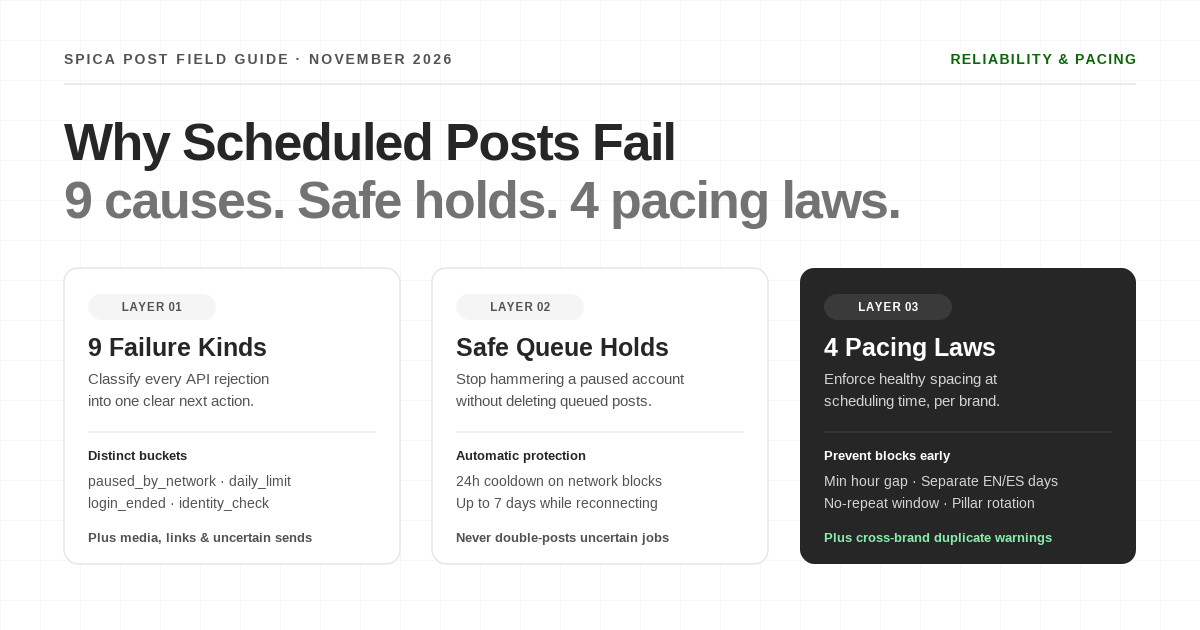
Scheduled social media posts fail for nine predictable reasons: a temporary network pause, a daily publishing ceiling, an expired login, a rejected media file, an account identity checkpoint, an unconfirmed email address, a blocked link, an uncertain timeout where the post may already be live, or a single-post content policy rejection. Stopping repeat failures requires separating account-level holds from one-draft edits, and enforcing calendar pacing laws before posts ever enter the queue.
Every small business owner, creator and agency operator eventually hits the same frustrating Monday morning. You spent two hours loading a full week of posts across X, LinkedIn, Bluesky, Instagram, Facebook or Google Business Profile. At 9:00 AM a red banner appears with an unhelpful sentence like “Delivery failed: API returned 403.” Most people react in the worst possible way: they click Retry three times in a row, watch the next four scheduled posts collide with the same block, and turn a minor 24-hour cooldown into a week-long account restriction.
That failure loop is completely avoidable once you understand what official social APIs actually enforce behind the scenes. Platforms do not reject scheduled posts at random. Every rejection belongs to a concrete operational bucket with one safe next step, and most repeat blocks trace back to three preventable queue habits: burst posting, identical captions repeated across accounts or brands, and failing to pause an account the moment a network raises a hand.
Snapshot verified November 2026. All character ceilings, file caps, accepted media types and error handling behaviors below reflect official developer documentation from each platform and Spica Post’s live adapter suite. Check our generated channel cards and failed-post guide for live adapter updates, and check pricing for current Spica Post plan details.
Why scheduled API posts fail more often than native posts
Publishing through an official scheduling API is structurally different from tapping Post inside a mobile app. When you post natively on your phone, the social app sits directly in front of you: it quietly transcodes an HEIC photo into JPEG, crops a wide video, pauses to ask for a two-factor code if you signed in from a new city, or shows a red counter before you tap send.
An unattended scheduled post has no human sitting in front of a prompt. The publishing server opens an authenticated HTTPS request on your behalf using a stored OAuth token, uploads your media payload, attaches your caption and native options, and expects a clean receipt within seconds. If anything along that chain drifts, the network refuses the call.
Four hidden gaps between native apps and API publishing
- Stricter media encoding and container validation. Instagram’s Content Publishing API expects standard JPEG images and compliant MP4 video containers without relying on an iPhone’s local re-encoder. TikTok’s Direct Post API requires compliant MP4 video and explicit creator disclosures. A file that looks fine in your camera roll can fail strict API ingestion if its codec, pixel dimensions, aspect ratio, or duration sit outside the documented envelope.
- OAuth token decay and silent permission resets. Changing a password, toggling two-factor authentication, revoking a business manager role in Meta Business Suite, or letting a 60-day token expire ends API authorization silently. Your phone stays logged in because the mobile app uses a separate native session, so the first sign of trouble is a failed scheduled post.
- Automated anti-spam and velocity heuristics. Social platforms evaluate API traffic more tightly than thumb taps. Sending five posts in fifteen minutes, pushing identical captions across three connected accounts, or firing queued items into an account that already returned a rate limit triggers automated cooldowns faster than human posting.
- Network timeouts after acceptance. Sometimes a platform writes your post to its feed, then drops the HTTPS connection before returning the receipt ID. A naive scheduler assumes the post failed and sends it a second time, leaving awkward duplicate posts on a client’s profile.
Knowing these four gaps explains why reliable publishing is not a “retry harder” problem. It is a classification, holding, and pacing problem.
The 9 canonical failure kinds (and the one safe action for each)
Raw API errors are famously noisy. One network returns HTTP 403 with a vague permissions phrase; another returns HTTP 400 with nested subcode 2207042; another drops the TCP socket mid-upload. Showing raw error payloads to a business owner or an AI assistant invites guesswork.
Instead, every failed scheduled delivery across all eleven major social networks maps cleanly onto nine canonical failure kinds. The moment you know which bucket a failure belongs to, you immediately know two things: whether the account’s remaining queue should pause automatically, and what single action fixes the problem.
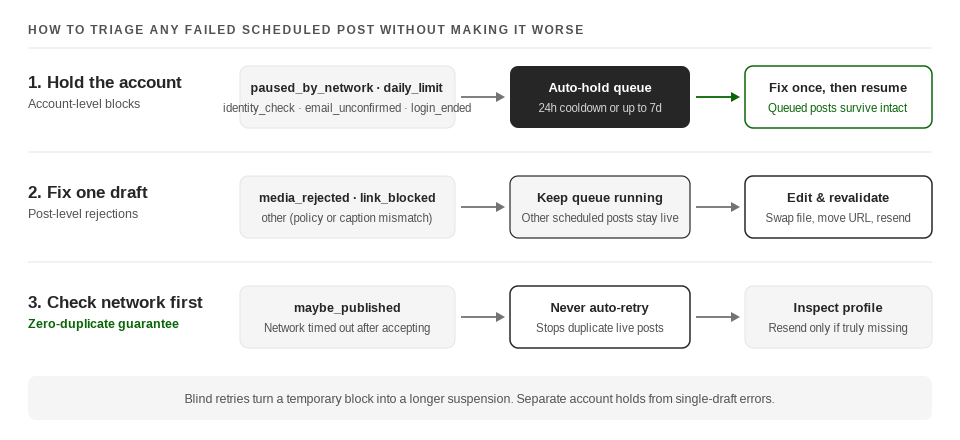
| Failure kind | What happened | Safe queue behavior | Single next action |
|---|---|---|---|
paused_by_network |
The network temporarily slowed or restricted automated posting (spam check, action block, or burst rate limit). | Auto-hold account queue for 24 hours. | Wait out the cooldown; slow your posting pace and vary captions before resuming. |
daily_limit |
The account reached the network’s rolling 24-hour publishing cap (such as Instagram’s API daily ceiling or YouTube’s daily upload quota). | Auto-hold account queue for 24 hours. | Let the 24-hour window reset; space future posts farther apart with calendar pacing laws. |
login_ended |
The OAuth session expired, permissions were revoked, or the account password changed. | Hold account queue safely up to 7 days. | Reconnect the account once; held posts resume automatically without manual re-entry. |
identity_check |
The network locked publishing behind a security checkpoint (such as Meta Graph error 190 subcodes 459 or 490, or an X verification challenge). | Hold account queue safely up to 7 days. | Open the network’s own app or website, complete the verification prompt, then resume. |
email_unconfirmed |
The account has an unverified email address or pending contact confirmation blocking API publishing. | Hold account queue safely up to 7 days. | Confirm the email address inside the network’s settings, then resume the held queue. |
media_rejected |
The attached photo or video broke that network’s format, size, codec, aspect ratio, or duration limits. | Keep queue running for other posts. | Swap or re-export the file (standard JPEG/PNG or H.264 MP4 within limits), revalidate, and resend. |
link_blocked |
The network’s spam or safety filter refused a URL or shortener in the caption. | Keep queue running for other posts. | Remove or replace the flagged URL, or move the link into a first reply where supported, then resend. |
maybe_published |
The request timed out or returned an ambiguous network error after reaching the platform. | Never auto-retry; keep queue intact. | Open the live profile to check whether the post landed; resend only if it is genuinely absent. |
other |
A single-post refusal such as duplicate caption text, disallowed policy wording, or a missing board/category. | Keep queue running for other posts. | Read the plain-language note, adjust that specific draft, validate against network limits, and resend. |
Group 1: Account-level blocks that demand an immediate queue hold
Notice the first five rows in the table: paused_by_network, daily_limit, login_ended, identity_check, and email_unconfirmed. Every single one describes the state of the account, not a flaw in a specific caption.
When any of those five occurs, letting the scheduler attempt the next queued post two hours later guarantees another failure. Worse, on X, Meta and TikTok, repeated automated write attempts against an account currently under an action pause or checkpoint signal aggressive bot behavior and can extend a brief cooldown into a permanent API restriction.
Holding the account’s queue solves both halves of the dilemma. Queued posts are neither blindly fired into the wall nor permanently failed and discarded. Timed holds (24 hours for paused_by_network and daily_limit) automatically lift once the window passes. Manual-fix holds (login_ended, identity_check, email_unconfirmed) safely hold upcoming posts for up to 7 days and release cleanly the moment the owner reconnects or completes the checkpoint.
Group 2: Single-draft rejections that leave the queue moving
The next three rows (media_rejected, link_blocked, and other) are strictly local to one draft. If your Tuesday afternoon video failed Instagram’s aspect ratio envelope, your Wednesday morning JPEG photo has no reason to stop. Pausing the entire account for a single bad attachment would create needless calendar gaps.
Instead, isolate that one failed post, inspect the exact limit it violated, swap the asset or URL, run pre-publish validation, and reschedule only that post.
Group 3: Uncertain outcomes (maybe_published) and zero-duplicate discipline
The single most embarrassing scheduling bug for an agency is double-posting a client’s launch announcement because an API timed out. Whenever a delivery reaches maybe_published, the platform may have committed the post seconds before a gateway timeout dropped the HTTP response.
Never automatically retry an uncertain delivery. Check the platform’s feed first (either manually or through receipt reconciliation where the API exposes recent posts), and resend only after confirming nothing went live.
Network-by-network limits and failure traps across 11 platforms
Every social network draws its own sharp lines around caption weighting, media containers, native options and anti-spam enforcement. The table below summarizes the exact live limits enforced across eleven major networks so you can audit drafts before scheduling.
| Network | Caption limit | Media cap & formats | Most common API failure triggers |
|---|---|---|---|
| X | 280 weighted chars (links = 23, emoji = 2) | Up to 4 photos (PNG, JPEG, WebP) or 1 MP4 | HTTP 403 automation/spam holds, duplicate text rejections, unverified email, link-heavy bursts, or videos exceeding length/size ceilings. |
| 3,000 characters | Up to 20 PNG/JPEG or 1 MP4 | Expired 60-day OAuth tokens, revoked company page admin roles, or videos shorter than 3 seconds. | |
| Bluesky | 300 graphemes (3,000 UTF-8 bytes) | Up to 4 images (PNG, JPEG, WebP) or 1 MP4 | Confusing byte length with grapheme count on accented/emoji text, or using a main password instead of a dedicated App Password. |
| Mastodon | 500 characters (standard server default) | Up to 4 images (PNG, JPEG, WebP, GIF) or 1 MP4 | Instance-specific rate throttling, custom server media limits, or missing alt text/content warnings where instance etiquette expects them. |
| Google Business Profile | 1,500 characters | Optional JPEG/PNG photo | Unverified locations, restricted phone numbers inside post body text, or revoked Google Business permissions. |
| 2,200 characters (stories: no caption) | Up to 20 JPEG/MP4 (at least 1 required; stories: 1) | Missing photo/video, non-JPEG images (such as PNG or HEIC), Meta checkpoint subcodes (190/459/490), daily publishing cap (subcode 2207042), or videos outside 3s to 15m (1m for stories). | |
| Facebook Pages | 63,206 characters (stories: no caption) | Up to 10 PNG, JPEG or MP4 (stories: 1) | Missing full Page control in Meta Business Suite, expired admin tokens, blocked domains, or story videos outside 3s to 60s. |
| Threads | 500 characters | Up to 20 PNG, JPEG or MP4 | Meta action blocks from burst replies, videos longer than 5 minutes, or expired Meta permissions. |
| TikTok | 2,200 characters | 1 MP4 required | Unaudited developer apps restricted to private drafts, missing per-post creator privacy/commercial disclosures, spam-rate pauses, or videos outside 3s to 10m. |
| YouTube | 100-char title + 5,000-byte description | 1 MP4 required | Missing visibility choice, unverified channels uploading videos longer than 15 minutes, or hitting the daily channel upload quota. |
| 100-char title + 800-char description | Up to 5 PNG, JPEG, WebP or MP4 (required) | Missing destination board, blocked destination URLs, or repetitive pin bursts pointing to one domain. |
Where multi-network teams get tripped up most often
X weighted counting and 403 buckets. Counting raw characters in a spreadsheet misses two X-specific rules: every URL counts as 23 weighted characters regardless of length, and emoji count as 2. Furthermore, X returns HTTP 403 for several totally different problems: duplicate tweet text, automated spam blocks, identity checkpoints, unconfirmed email, and blocked links. Treating every 403 as “try again later” wastes hours and risks escalating an automation hold. Placing external links in options.firstReply instead of cramming every main post with outbound URLs keeps X timelines cleaner and reduces link friction.
Meta Graph error code 190 and subcode distinctions. On Instagram, Facebook Pages and Threads, Meta frequently groups normal token expiration and security checkpoints under error code 190. Looking only at 190 makes a security lock look like a routine reconnect. Checking the subcodes (459, 490, 491, 1349126, 2207050) separates an identity_check that must be cleared inside the Meta app from a plain login_ended that only needs OAuth re-authorization, while subcode 2207042 clearly signals daily_limit.
Bluesky graphemes vs UTF-8 bytes. Spanish, French, Portuguese and emoji-heavy captions routinely pass a naive JavaScript .length check while exceeding Bluesky’s 300-grapheme limit or 3,000-byte ceiling. Validating true grapheme clusters before scheduling stops silent truncation and upload rejections.
TikTok creator disclosure requirements. TikTok’s Content Posting API enforces strict user-control compliance: a third-party scheduler cannot silently invent visibility or commercial-content toggles on behalf of the creator. A draft can be prepared and validated ahead of time, then completed through an explicit owner-choice screen before publishing.
How the 4 calendar pacing laws prevent holds before they happen
Fixing failed posts after they break is half the discipline. Preventing automated spam holds in the first place comes down to controlling spacing, language cadence, repetition and series variety inside your queue.
Most schedulers treat a queue as a dumb list of timestamps: if Tuesday at 9:00 AM is empty, the next draft drops into Tuesday at 9:00 AM, even if an identical bilingual campaign posted at 8:30 AM or the same promotion went out four days ago. That blind filling creates the exact mechanical signatures platform trust-and-safety systems dislike: clustered bursts, copy-pasted text, and monotonous streams of identical offers.
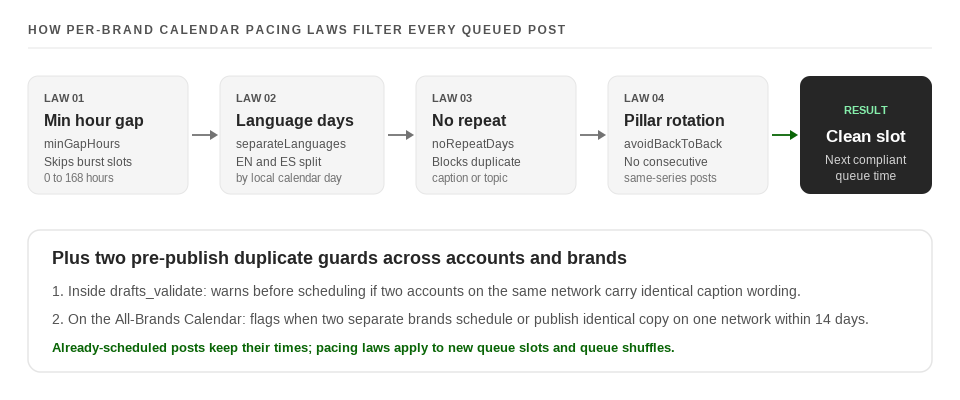
Four per-brand calendar pacing laws remove those failure patterns automatically at scheduling time.
Law 1: Minimum gap between posts (minGapHours)
Set a minimum spacing window (anywhere from 0 to 168 hours) per brand. Whenever you queue a new draft or shuffle your queue, the scheduler inspects every already-queued and recently published post on that account and skips any slot closer than your minimum gap.
For a local business posting three to five times a week, a 12-hour or 24-hour minimum gap guarantees that an emergency promo added on Wednesday morning never collides ten minutes away from a pre-scheduled tip. For higher-tempo creator or news accounts, even a 3-hour or 4-hour floor prevents accidental back-to-back bursts when a batch is imported.
Law 2: Keep languages on separate local days (separateLanguagesByDay)
Bilingual small businesses and regional brands across Miami, Texas, California, New York and Latin America face a unique scheduling trap: publishing an English post at 9:00 AM and its Spanish translation at 11:00 AM on the same account. Not only does that double-tap the same followers with duplicate visuals in one morning, it also spikes hourly posting density on quieter accounts.
Turning on separate language days inspects each post’s language metadata (from linked topics, native language fields, or lang-en / lang-es campaign tags) and ensures English and Spanish posts never land on the same local calendar day on one account. Tuesday becomes an English day; Wednesday becomes a Spanish day. Followers get cleaner spacing, and your queue stays balanced automatically across time zones.
Law 3: No-repeat window (noRepeatDays)
Evergreen tips, weekend hours and seasonal reminders are valuable, yet repeating identical wording too soon is one of the fastest triggers for duplicate-content refusals on X and reduced distribution across Meta and LinkedIn.
A configurable no-repeat window (0 to 365 days) normalizes captions (ignoring extra whitespace and capitalization) and tracks linked topic IDs. When you queue a draft whose caption or linked topic already ran inside the window on that account, the scheduler automatically pushes it to the first compliant slot after the window expires, or tells you plainly why no slot fits so you can write a fresh angle instead of recycling yesterday’s copy.
Law 4: Rotate content pillars (avoidBackToBackPillar)
Accounts that publish five promotional offers in a row lose engagement quickly and look promotional to automated filters. Tagging drafts by content pillar or series (for example, Brew Guides, Behind the Scenes, Customer Questions, Weekend Offers) and switching on pillar rotation keeps two posts from the exact same series from landing consecutively on the same account.
When combined, these four laws act as a silent editor sitting between your content backlog and live APIs. Already-scheduled posts keep their exact times so nothing shifts unexpectedly, while every new queued post and queue shuffle respects the brand’s guardrails automatically.
Preventing cross-account and multi-brand duplicate warnings
Agencies and multi-location operators face one additional failure mode that solo creators rarely encounter: cross-account duplicate blasting.
Suppose an agency manages four dental practices or three regional wholesale brands under one login. A well-meaning coordinator writes one strong holiday reminder and pastes the exact same caption into all four brands for Tuesday at 10:00 AM on X and LinkedIn. Even if every single brand obeys its own per-account pacing laws, the receiving network sees identical text arriving from the same API client across multiple accounts within minutes.
Two pre-publish guardrails eliminate that trap without slowing teams down:
- Same-network multi-account check during draft validation. Before a draft is even scheduled, validation compares normalized captions across every destination account inside the draft. If two accounts on the same network carry identical wording, the validator raises a clear non-blocking warning so you or your AI assistant can rewrite one version with distinct phrasing, local city details, or a different hook.
- Cross-brand 14-day duplicate watch on the All-Brands Calendar. Across all brands under a multi-brand login, the calendar compares upcoming and recently published posts on each network over a 14-day sliding window. Whenever two separate brands carry identical normalized copy on one network, a warning banner names both brands and dates so the team can differentiate the captions before either one fires.
Keeping one clean account per network per brand, writing distinct wording per channel, and separating client brands inside isolated workspaces protects both your client’s reputation and your publishing infrastructure.
A 10-step pre-publish and recovery checklist
Use this checklist whenever you onboard a new brand account, import a monthly batch, or recover after a failed delivery:
- Confirm account readiness natively first. Verify the account’s email address, finish any two-factor or identity prompts inside the network’s own app, and confirm admin roles on Facebook Pages, LinkedIn Company Pages, or Google Business Profiles before connecting OAuth.
- Validate every draft against live network limits before scheduling. Never wait for publish time to discover an oversized Bluesky grapheme count, an Instagram caption without media, or a missing YouTube visibility field.
- Export media in safe universal formats. Standardize photos as clean JPEG or PNG (under 10 MB for fast upload; JPEG specifically for Instagram) and videos as H.264 MP4 with AAC audio inside each network’s duration bounds.
- Tailor captions per network instead of copy-pasting. Write a concise, link-light version for X (placing URLs in
firstReplywhen needed), a scannable multi-line version for LinkedIn, and a grapheme-checked version for Bluesky. - Turn on per-brand pacing laws before queuing batches. Configure a sensible
minGapHours(such as 12 or 24 hours for local businesses), enableseparateLanguagesByDayon bilingual accounts, set anoRepeatDaysfloor (such as 14 to 30 days), and enableavoidBackToBackPillar. - Review duplicate warnings across accounts and brands. Before approving a multi-brand week, resolve every duplicate-caption warning so two accounts on one network never publish identical strings.
- Classify any failure before touching Retry. Identify whether the rejection is an account block (
paused_by_network,daily_limit,login_ended,identity_check,email_unconfirmed), a single-post issue (media_rejected,link_blocked,other), or an uncertain timeout (maybe_published). - Respect automatic account holds. If an account enters a 24-hour cooldown after a rate or spam signal, leave the hold in place instead of forcing retries through another tool.
- Verify live feeds on
maybe_publishedbefore resending. Open the profile URL directly; reschedule only when you confirm the post did not land. - Audit failure patterns every two weeks. Track which failure kinds repeat across your workspace so you fix root causes (such as a recurring video exporter setting or an expiring page token) permanently.
How Spica Post handles failures, holds and pacing (and real trade-offs)
Spica Post builds all three reliability layers directly into the publishing engine, the web studio, the REST API (/v1), and the MCP server for Claude, ChatGPT, Gemini, Grok, Cursor and Codex.
Every failed delivery records one of the nine canonical kind values alongside a single plain-language next action across the Account page, Results, alert emails, MCP jobs_query / results_get, and REST /v1/jobs. Account-level blocks trigger automatic queue holds (heldUntil) so queued posts stay safe instead of crashing one by one, and you or your assistant can also pause or resume any account manually via accounts_hold and accounts_resume. On /calendar (and via queue_rules_set or PUT /v1/queue/rules), each brand can turn on all four calendar pacing laws with zero impact on already-scheduled posts, while drafts_validate and the All-Brands Calendar surface cross-account and cross-brand duplicate warnings automatically. Check pricing for current plans and caps.
Real trade-offs to weigh honestly
No publishing tool bypasses official platform reviews or upstream network policies, and being upfront about current boundaries saves you wasted setup time:
- Live networks today vs adapters awaiting platform approval. Today you can connect and publish live on X, LinkedIn (personal profiles), Bluesky, Mastodon (any public server via OAuth dynamic registration), and Google Business Profile. Adapters for Instagram, Facebook Pages, Threads, TikTok, YouTube, and Pinterest are already built and drift-tested against their official limits (including full failure classification and story/video rules), and activate as each network finishes its official app review. If you need live Instagram or TikTok auto-publishing this week, pair Spica Post with an already-approved publisher during the transition, or hold ready drafts with
drafts_holdso they unlock automatically once connected. - Zero X analytics reads by policy. Spica Post publishes to X and enforces full X limit checks, failure classification and pacing, but it never reads X engagement metrics (likes, replies or views) to keep customer plans predictable without X API read billing. Measure X performance with Spica tracked short links (
/l/<code>) placed inoptions.firstReply, and inspect native likes directly on X. - Pacing laws guard queued slots, not manual overrides. Fixed-timestamp scheduling still obeys explicit dates you choose manually so urgent announcements are never blocked when you genuinely need a specific minute; pacing laws guard queue slot assignment, queue shuffles and validation warnings.
Reliable social media publishing is quiet by design. When drafts are validated against real limits before scheduling, queues obey calm spacing laws, and temporary blocks hold gracefully instead of retrying blind, your calendar stops breaking on Monday mornings and starts compounding week after week.
Questions people ask
- Why do scheduled social media posts fail when the same caption works inside the native app?
- Official publishing APIs enforce stricter validation and safety gates than native mobile apps. A native app silently re-encodes oversized images, prompts you through a one-tap security checkpoint, or lets you pick a thumbnail on the spot. A scheduled API job runs unattended, so an expired OAuth token, an unsupported aspect ratio, a Meta identity checkpoint, or a daily publishing ceiling rejects the delivery outright.
- Should I immediately retry a failed scheduled post?
- Only when the rejection points to a single-post problem that you have already corrected, such as swapping an unsupported photo or moving a blocked URL. If the failure came from a network pause, a daily limit, an identity checkpoint, an unconfirmed email, or an expired login, retrying blindly makes the block worse. If the outcome is uncertain after a timeout, inspect the live profile first so you never publish duplicates.
- What happens to the rest of my scheduled queue when one account hits a block or expires?
- In most basic schedulers, every remaining queued post keeps firing on schedule and fails one by one, hammering a rate-limited or checkpointed account. A safer queue places an automatic account hold for 24 hours on temporary pauses or up to 7 days while waiting for a reconnect, keeping upcoming drafts intact until the block clears or the owner reconnects.
- How do calendar pacing laws prevent spam filters and account holds?
- Calendar pacing laws enforce four spacing habits at scheduling time: a minimum gap in hours between posts on one account, separate calendar days for different languages such as English and Spanish, a no-repeat window for identical captions or topics, and content pillar rotation so two posts from the same series never run back to back. Together they eliminate burst patterns and duplicate-text signals before anything reaches a network API.
- How can an agency or multi-brand team stop two brands from posting identical copy?
- Use pre-publish duplicate detection at both the draft and portfolio levels. Validate drafts before scheduling so identical captions across two accounts on the same network raise an immediate warning, and review an all-brands calendar alert whenever two separate brands schedule the exact same wording on one network within a 14-day window.
Sources
- Spica Post live failed-post guide and 9 canonical failure kinds
- Spica Post generated channel cards and adapter limits
- Spica Post live pricing and plan details
- X API v2: Create a Post, weighted length and error responses
- Meta Instagram Graph API: Content Publishing limits and media requirements
- Meta Graph API: Error handling, OAuth code 190 and checkpoint subcodes
- TikTok Content Posting API: Direct Post, audit status and media rules
- YouTube Data API v3: videos.insert metadata limits and quota
- LinkedIn Marketing API: Posts API character and media specifications
- Bluesky AT Protocol documentation: Post length, graphemes and media blobs
- Mastodon REST API: Publish a new status and attachment limits
- Google Business Profile API: Local Posts specifications
- Pinterest API v5: Create a Pin character and media rules