Mastodon
How to Schedule and Cross-Post to Mastodon (Any Server, 2026)
Connect any public Mastodon server via OAuth, keep alt text and content warnings intact, split threads cleanly, and cross-post without spamming.
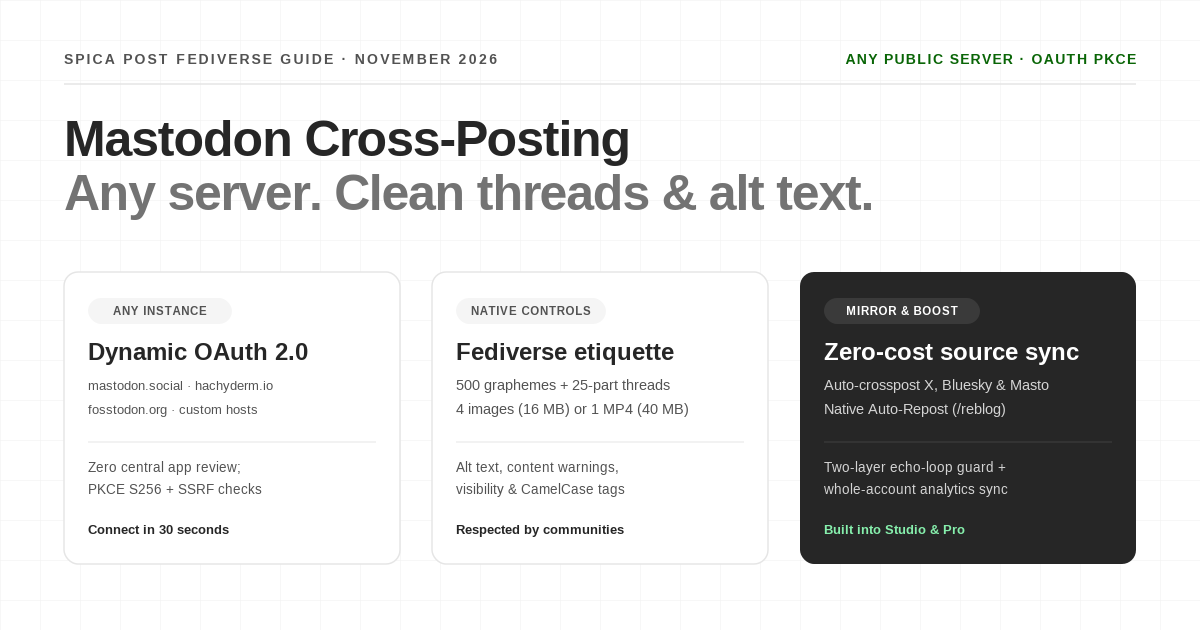
To schedule and cross-post to Mastodon cleanly in 2026, connect your specific server domain (whether mastodon.social, hachyderm.io, fosstodon.org, or your own self-hosted instance) over OAuth 2.0 dynamic app registration, write within the 500-grapheme standard limit (or split long pieces into chained threads with replies marked unlisted), attach descriptive alt text to every image, strip broken @handle mentions from other platforms, and filter out stray replies so Mastodon receives only original updates worth reading.
Mastodon is quietly one of the highest-trust corners of the open social web for independent software makers, designers, educators, journalists, publishers, local community shops, and privacy-conscious creators. Unlike algorithmic feeds that throttle outbound links or lock you behind paid API tiers, every Mastodon server speaks ActivityPub and exposes a documented, open REST API at $0 read cost.
Yet most businesses still fumble Mastodon for two opposite reasons: either they skip it because legacy schedulers only hardcode mastodon.social, or they bolt on a crude cross-poster that dumps truncated X threads, missing alt text, and dead @mentions into the local timeline until half their followers mute them.
This guide shows how Mastodon federation actually works under the hood, how modern multi-server OAuth connection works without central app approval, how to configure Mastodon as either a destination or a primary publishing source, and the etiquette rules that earn boosts instead of mutes.
Snapshot verified November 2026. API endpoints, attachment caps, and OAuth specifications reflect the Mastodon v4 API documentation and live adapter behavior verified in November 2026.
Why Mastodon is different from centralized social networks
Before plugging Mastodon into a scheduling calendar, it helps to understand the three architectural differences that separate the fediverse from centralized platforms like X, Instagram, or LinkedIn.
1. Your server is an email provider, not a walled garden
On Mastodon, handles look like @yourbrand@hachyderm.io or @shop@mastodon.social. Like email addresses, anyone on one server can follow, reply to, and boost posts from someone on any other public server over ActivityPub. You do not need an account on every instance; one well-chosen home server connects you to millions of federated accounts.
Because servers are independently run by communities, nonprofits, or businesses, there is no single central OAuth portal where a scheduling tool submits one app for all users. Instead, Mastodon was built with dynamic OAuth 2.0 client registration (POST /api/v1/apps).
2. Chronological feeds reward clarity, not engagement bait
Mastodon has no engagement-maximizing ranking algorithm. Posts appear in reverse chronological order for everyone who follows you, and discovery travels primarily through Boosts (reposts without quote-dunking friction) and Hashtags (which Mastodon users actively follow as dedicated columns).
Two practical consequences follow immediately:
- Outbound links are never penalized. Sharing a blog article, product changelog, store hours page, or newsletter issue gets the exact same visibility as a text-only status.
- Posting frequency matters more for etiquette than for algorithms. Dumping eight cross-posted status fragments in five minutes clogs your followers’ chronological home feed. Spacing scheduled updates or bundling multi-part ideas into a clean thread makes you pleasant to follow.
3. Accessibility and consent are cultural norms, not footnotes
On Mastodon, alt text on images and Content Warnings (spoiler_text) on sensitive, spoiler-heavy, or off-topic posts are deeply held community norms. Many active users literally filter out or decline to boost images that lack alt text, because screen-reader accessibility is part of how the community defines a good neighbor.
Never schedule an image to Mastodon without writing real alt text describing what is in the photo. If your cross-post tool strips alt text during transfer, fix the pipeline or turn cross-posting off for image posts until alt text carries over intact.
Connecting any public Mastodon server cleanly (without central approval)
Older scheduling tools forced you to pick from a hardcoded dropdown of five servers, or told you to hand-copy static access tokens out of Developer Settings (which never rotate cleanly and often over-grant account permissions).
Modern Mastodon integrations solve this with RFC-compliant OAuth 2.0 dynamic registration paired with PKCE (S256) and strict host validation.
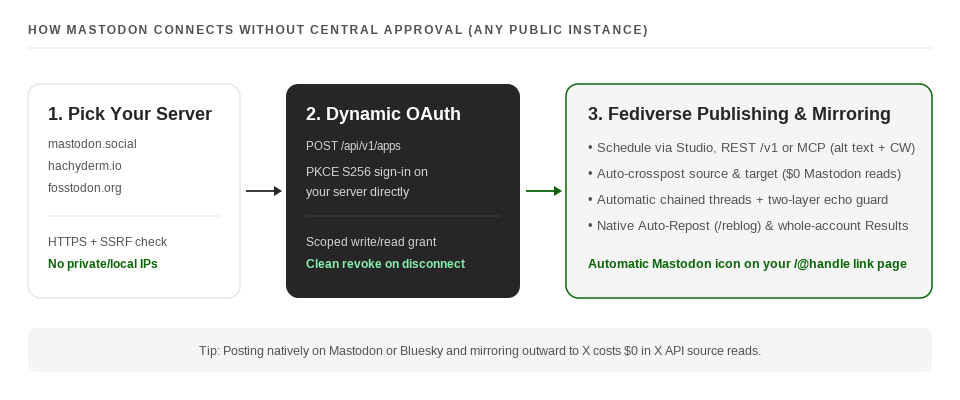
How multi-server OAuth 2.0 + PKCE works in four steps
- You enter your server hostname (for example
mastodon.social,fosstodon.org,hachyderm.io, orsocial.yourcompany.com). - The scheduler validates the host safely (SSRF protection). A trustworthy scheduler blocks raw IP addresses,
localhost,.localor private-network hosts, custom ports, plain HTTP, and blind redirects before ever touching the network. - The scheduler registers an OAuth client dynamically against
https://<your-server>/api/v1/appsrequesting only the scopes it needs (read:accounts,read:statuses,write:statuses,write:media), and caches that client ID/secret per server hostname. - You approve access on your own server via OAuth 2.0 with PKCE S256. When you later disconnect the account, the scheduler calls
POST /oauth/revokeso the token is invalidated immediately on your server too.
Choosing the right server for a small business or creator
If you have not picked a Mastodon home yet, avoid overthinking it for weeks. Three realistic choices cover almost everyone:
| Server option | Best for | Pros | Trade-offs |
|---|---|---|---|
Large general server (mastodon.social, mstdn.social) |
Solo founders, local shops, broad audiences | High uptime, familiar domain, fast moderation backups | Busy local timeline; read the server’s commercial-account rules first |
Topic community server (hachyderm.io, fosstodon.org, indieweb.social) |
Developers, designers, open-web creators, educators | Immediate peer discovery in the local timeline | Stricter etiquette against promotional or automated spam |
Self-hosted / managed brand domain (social.yourdomain.com) |
Brands, publications, agencies wanting full domain ownership | Built-in domain verification (@team@yourdomain.com), zero risk of server policy changes |
Small monthly hosting fee (or managed host like masto.host) |
Always verify your website link inside your Mastodon profile metadata by adding rel="me" on your homepage or link-in-bio page. Mastodon displays a green verification checkmark next to your domain automatically at zero cost, which signals authenticity instantly when people discover your scheduled posts.
Exact 2026 Mastodon technical limits and API features
If you draft multi-network campaigns, check your posts against Mastodon’s exact limits (or paste drafts into our free local Social Media Character & Post Checker before scheduling).
| Capability | Standard Mastodon limit (2026) | What breaks if you ignore it |
|---|---|---|
| Post text length | 500 graphemes (standard servers; custom instances may allow 1,000 to 5,000+) | Hard HTTP 422 rejection on standard servers if a long LinkedIn/Instagram caption is sent unsplit |
| URL length counting | 23 characters per http:// or https:// URL (like X, unlike Bluesky) |
Mastodon is actually generous with long links, whereas Bluesky counts the literal URL string |
| Image attachments | Up to 4 images (PNG, JPEG, WebP, or GIF; 16 MB max each) | Uploading a 5th image or exceeding 16 MB fails media attachment |
| Video attachments | 1 MP4 video (40 MB max; cannot mix with images in one post) | Mixing video and photos in one status fails; large videos need async HTTP 202 polling |
Alt text (description) |
Up to 1,500 characters per media attachment | Leaving description blank strips accessibility and suppresses community boosts |
Content warning (spoiler_text) |
Collapses post body behind an expandable summary label | Essential for spoilers, sensitive topics, or long technical announcements |
| Visibility modes | public, unlisted, private, direct |
Posting every thread reply as public clutters local/federated timelines |
| Idempotency protection | Idempotency-Key header on POST /api/v1/statuses |
Without idempotency keys, transient server timeouts can accidentally double-post |
Why async v2 media uploads matter when scheduling video or high-res photos
Mastodon’s modern media endpoint (POST /api/v2/media) accepts your image or MP4 along with its description (alt text) and returns HTTP 202 Accepted while the server transcodes or generates thumbnails in the background. If a scheduler tries to publish POST /api/v1/statuses immediately without polling GET /api/v1/media/:id until processing finishes, the post either fails with a 422 error or goes live missing its attachment.
Clean Mastodon schedulers upload via v2/media, poll until the media ID reports ready, attach the alt text directly to each media object, and send an Idempotency-Key header on the final status publish so network retries never create duplicate posts.
Cross-posting workflows: Mastodon as destination vs. Mastodon as source
In 2026, most creators and small teams land in one of two architectures depending on where they actually enjoy writing every day.
| Workflow pattern | Where you write | Where posts go automatically | Cost & friction profile | Best fit |
|---|---|---|---|---|
| Workflow A: Cross-post INTO Mastodon | Bluesky, X, or a central studio composer | Mastodon (plus LinkedIn, Threads, GBP, etc.) | Smooth if text adapts cleanly and alt text transfers | Teams already anchored on X, Bluesky, or a multi-brand calendar |
| Workflow B: Mastodon FIRST (Source) | Your Mastodon app or client (Ivory, Phanpy, Elk, web) | Bluesky, LinkedIn, Threads, X, Facebook | $0 source read cost (open Mastodon API + open Bluesky API) | Open-web makers, indie devs, writers who prefer Mastodon’s calm feed |
| Workflow C: Write once, adapt per network | Central draft studio or AI assistant via MCP | Tailored variants to Mastodon, Bluesky, LinkedIn, Instagram | Highest engagement per network; 2 extra minutes per batch | Small businesses and creators running weekly batched campaigns |
Making Workflow A work without annoying Mastodon followers
If you write primarily on X or Bluesky and auto-cross-post to Mastodon, enable four guardrails before turning automation on:
- Skip replies and reposts by default. Nobody on Mastodon wants to see out-of-context replies starting with
@somebody_on_x Yes totally agree!. Cross-post original posts and deliberate threads only. - Rewrite or strip cross-platform
@handles.@janeon X is almost never@janeon your Mastodon server (worse, it can ping an unrelated stranger named@janeonmastodon.social). Strip bare@mentionsor map them explicitly to full@user@serverhandles. - Preserve every image’s alt text. Bluesky and Mastodon both treat alt text as first-class fields. Verify your cross-poster copies
altstraight into Mastodon’s mediadescription. - Keep replies on Mastodon human. Check Mastodon notifications at least once a day (or twice a week for quiet brand accounts) so anyone who replies to a cross-posted update gets a real human response.
Why Workflow B (Mastodon as source) is a hidden superpower
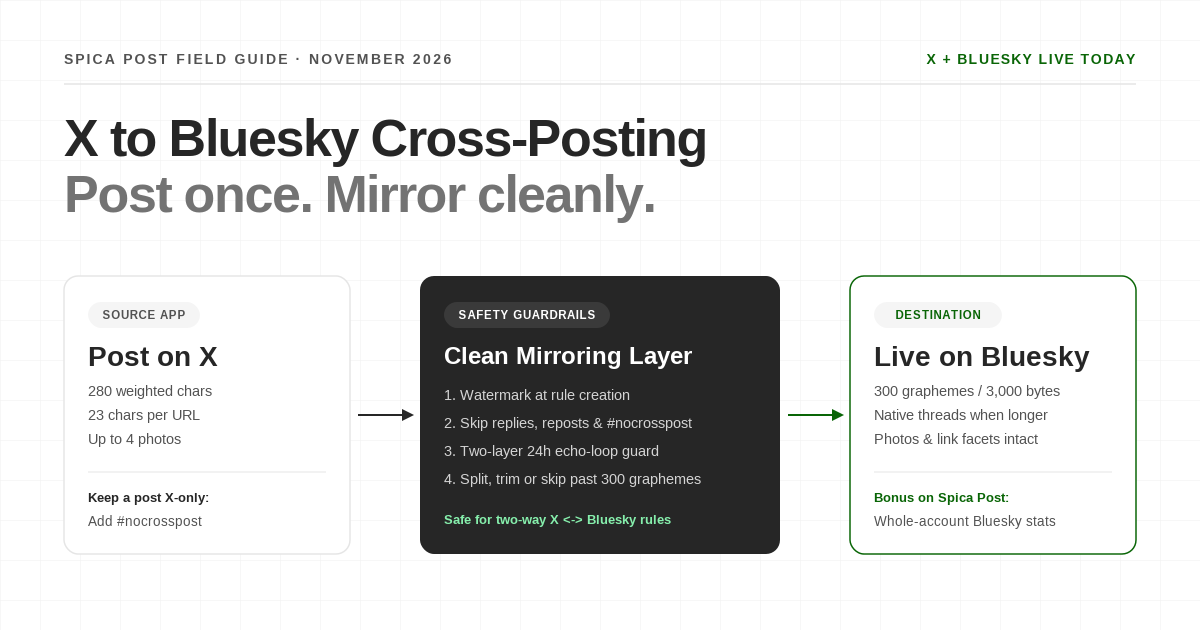
X charges pay-per-use fees to poll your timeline for outbound cross-posting, whereas both Mastodon and Bluesky offer completely open, free read APIs. If you enjoy hanging out on Mastodon via a great client like Phanpy, Elk, Ivory, or Tusky, you can write organically right there and let an Auto-crosspost rule mirror original posts to Bluesky (auto-splitting 500-grapheme posts into crisp 300-grapheme Bluesky threads when needed), LinkedIn, or X at zero source-polling cost.
Wait: pay attention to the reverse length direction! A 500-grapheme Mastodon post is longer than both Bluesky (300 graphemes) and X standard (280 weighted characters). Either keep your cross-posted Mastodon thoughts under 280 characters, or turn on automatic native thread splitting so a 450-character Mastodon update becomes a clean 2-part thread on Bluesky and X instead of getting chopped off mid-sentence.
If Mastodon is your source and Bluesky or X is your destination, put the complete takeaway inside the first 260 characters, and put extra links or secondary context in the second paragraph. Even when an automatic splitter breaks it into a 2-post thread, part 1 stands completely on its own.
Mastodon etiquette: 6 habits that earn boosts (and prevent mutes)
Because Mastodon has no hidden algorithm rescuing sloppy posts, small craft habits make an immediate visible difference in who boosts your work.
1. Use 2 to 4 CamelCase hashtags at the end
Hashtags are Mastodon’s search engine and topic directory. People subscribe directly to tags like #SmallBusiness, #WebDev, #IndieMaker, or #LocalCoffee.
Always capitalize the first letter of each word (CamelCase: #SmallBusinessTips, never #smallbusinesstips). Screen readers pronounce #SmallBusinessTips as three clear words and stumble over lowercase mashups.
2. Mark thread replies Unlisted (Post 1 Public, Posts 2+ Unlisted)
When you publish a 4-part guide on Mastodon:
- Set Post 1 visibility to
publicso it appears in your followers’ feeds, local timelines, and hashtag feeds. - Set Posts 2, 3, and 4 to
unlisted(chained viain_reply_to_id). Everyone who clicks Post 1 sees the entire thread seamlessly, and nobody’s hashtag feed gets filled with four disjointed replies.
3. Add Content Warnings (spoiler_text) generously
On Mastodon, a Content Warning is not an alarm bell; it is a polite subject line / collapsible accordion. People use spoiler_text for politics, news stress, big product launch announcements, spoilers, food photos on certain servers, or long technical rants. A clear label like Product launch: new Q4 release notes lets interested followers expand it immediately while respecting folks scrolling quietly.
4. Set the post language (language)
Mastodon users frequently filter feeds by language (en, es, etc.). If you run a bilingual business posting in both English and Spanish, passing the exact ISO language code (en on English posts, es on Spanish posts) guarantees Spanish-only followers see your Spanish updates and English-only followers see your English updates without cluttering either group.
5. Use Native Auto-Reposts sparingly instead of copy-pasting duplicates
Because Mastodon feeds are strictly chronological, followers in Europe or Asia can miss a morning post published from North America. Rather than copying and pasting the exact same post text twelve hours later (which feels robotic and duplicates links), use a single native Boost (reblog) via /api/v1/statuses/:id/reblog 8 to 12 hours later for high-value launches or cornerstone guides, and skip repeating routine updates.
6. Get permission before sharing customer photos or quotes
Whether you post a completed job, a customer testimonial, or a studio photo to Mastodon, ask the customer’s permission before publishing their name, handle, or photo, and include accurate alt text describing the finished work.
How Spica Post handles Mastodon (including honest trade-offs)
Spica Post supports Mastodon natively across any public HTTPS Mastodon server, alongside Bluesky, X, LinkedIn, Instagram, Facebook, Threads, TikTok, YouTube, Pinterest, and Google Business Profile.
What Spica Post does natively for Mastodon
- Any public server via OAuth 2.0 + PKCE: Enter your server domain (
mastodon.social,hachyderm.io,fosstodon.org, or your own domain). Spica Post dynamically registers an OAuth client with strict SSRF hostname validation and revokes the token automatically if you ever disconnect. - Full native options: Supports 500-grapheme posts, chained threads (
options.threadPosts, up to 25 parts), up to 4 images (with alt text) or 1 MP4 video via async v2 media polling,visibility(public,unlisted,private),spoilerTextcontent warnings, ISOlanguagetags, andIdempotency-Keyduplicate protection. - Source and destination Auto-crosspost at $0 read cost: Publish to Mastodon from Bluesky, X, or your studio calendar, or write natively on Mastodon and mirror original posts out to Bluesky, LinkedIn, Threads, or X with automatic thread splitting.
- Native Auto-Repost, analytics, and Link Page icon: Schedule a follow-up native Boost (reblog) for opposite time zones, pull account-level analytics into your workspace, and display your verified Mastodon icon on your branded Link Page automatically.
- MCP + REST ready: Draft, review, and schedule Mastodon posts (complete with alt text, content warnings, and visibility controls) from Claude, ChatGPT, Codex, or your own backend scripts using the exact same contract. See our pricing page for flat workspace plans rather than per-profile fees.
Honest trade-offs to weigh before choosing Spica Post for Mastodon
- Live walk still finishing on production servers: Our Mastodon adapter, OAuth 2.0 dynamic registration, SSRF guards, media polling, threading, and reblog support are built and covered by automated Node and Worker tests, and we are completing final live walkthrough verification against production Mastodon servers. Always run one test post (set to
unlisted) after connecting a custom instance to verify your server’s exact media and character limits. - Mastodon replies are not in the Unified Inbox yet: Today, Spica Post’s Unified Inbox focuses on Bluesky comments (live now) plus Instagram, Facebook, and Google Business Profile reviews as approvals complete. For Mastodon replies and mentions, keep using your preferred Mastodon web or mobile client alongside Spica Post scheduling.
- Custom server character limits above 500: Some private or specialty instances raise limits to 1,000 or 5,000 characters. Spica Post validates conservatively against the standard 500-grapheme baseline so cross-posted drafts never fail unexpectedly across federated clients.
A 15-minute setup checklist for your first week on Mastodon
If you want to add Mastodon to your 2026 publishing workflow without adding another daily chore, run this five-step checklist once:
- Polish your profile and verify your domain: Add a clear bio saying what you make or serve, add
rel="me"from your website or Link Page back to your Mastodon profile URL, and pin one introductory#Introductionpost explaining what people will get by following you. - Connect your server via OAuth PKCE: Connect your Mastodon server domain inside Spica Post’s Mastodon setup (or your scheduler of choice) and send one
unlistedtest post with a JPEG photo and alt text to verify everything renders cleanly. - Choose one primary direction for cross-posting: Either mirror original Bluesky/X posts into Mastodon (skipping replies and stripping raw
@handles), or write natively on Mastodon and cross-post outward to Bluesky and LinkedIn. Do not set up circular two-way mirroring between the same two accounts. - Schedule 2 to 3 anchor posts per week: Share one helpful tip or behind-the-scenes update, one link to a real guide or product page, and one short visual or thread (with Post 1
publicand repliesunlisted, plus 2 to 4 CamelCase hashtags and full alt text). - Spend 5 minutes twice a week answering replies and boosting peers: Mastodon rewards real conversation more than posting volume. Replying to two commenters and boosting three interesting posts from peers in your profession builds far more trust than automating twenty dry announcements.
Treat automation on Mastodon as a reliability tool, not a megaphone. Schedule the steady work ahead with proper alt text, language tags, and unlisted thread replies, then show up in person to answer anyone who talks back.
Questions people ask
- Do I have to use mastodon.social to schedule or cross-post to Mastodon?
- No. Mastodon uses standard OAuth 2.0 dynamic application registration (POST /api/v1/apps), so modern schedulers like Spica Post can connect to any public HTTPS Mastodon server (including mastodon.social, hachyderm.io, fosstodon.org, infosec.exchange or a self-hosted brand instance) without waiting for central app approval.
- Does the Mastodon community dislike automated cross-posting?
- Mastodon users do not mind scheduled or cross-posted work when it reads like a native post, carries real alt text on images, skips broken @handle tags from other networks, and gets replies when people comment. What gets muted or blocked is one-way link dumping, missing alt text, and reposting every stray reply from X.
- What is the character and media limit on Mastodon in 2026?
- Standard Mastodon servers allow 500 graphemes per post, plus up to 4 images (PNG, JPEG, WebP or GIF up to 16 MB each) or 1 MP4 video (up to 40 MB). Individual servers can configure higher character limits, though drafting for 500 graphemes guarantees clean display and cross-posting across the wider fediverse.
- Can I cross-post both to Mastodon and from Mastodon to Bluesky or LinkedIn?
- Yes. Because Mastodon provides a free, open public status API on every instance, you can publish natively on Mastodon and automatically mirror original posts out to Bluesky, LinkedIn, Threads or X at zero read-API cost, or write elsewhere and adapt into Mastodon with automatic thread splitting.
- Why should I set thread replies to Unlisted visibility on Mastodon?
- Setting post 1 of a Mastodon thread to Public and posts 2 through N to Unlisted lets your opening post appear in local and federated timelines while keeping the remaining replies from flooding strangers' feeds. Followers still see the full connected thread when they open it.
Sources
- Mastodon Official Documentation: OAuth dynamic app registration (POST /api/v1/apps)
- Mastodon Official Documentation: Publishing statuses, visibility, spoiler_text and Idempotency-Key
- Mastodon Official Documentation: Asynchronous v2 media uploads and alt text descriptions
- W3C ActivityPub Recommendation: Decentralized social networking protocol
- Spica Post Mastodon integration: Any public server via OAuth 2.0 PKCE
- Spica Post Auto-crosspost: Source and destination cross-posting